A security architecture diagram can be completely accurate and still fail to answer the question that matters to a board member. Consider a proposed enterprise AI security initiative: The engineering team presents an impressive topology of Cloud proxies, API gateways, policy engines and data stores. But the board asks a simpler question: Which critical capabilities will this investment strengthen, and how will we know?
This is where a capability oriented architecture view changes the conversation. In this hands on demonstration, we will map business concerns to security enabling capabilities, Microsoft controls, implementation evidence and technical assets. Then we will build three different views over the same model using Power BI. The approach is inspired by ArchiMate 3.2, but the dashboard is not presented as a certified ArchiMate modeling tool.
“Show me what the AI security investment enables, how far delivery has progressed, and where I can verify the evidence.”
Demo disclosure: Every organization name, maturity score, test percentage, owner and status in this article is fictional. No production Microsoft tenant was used to produce these results. The aim is to build and explain a repeatable architecture reporting pattern, not to claim measured business improvements.
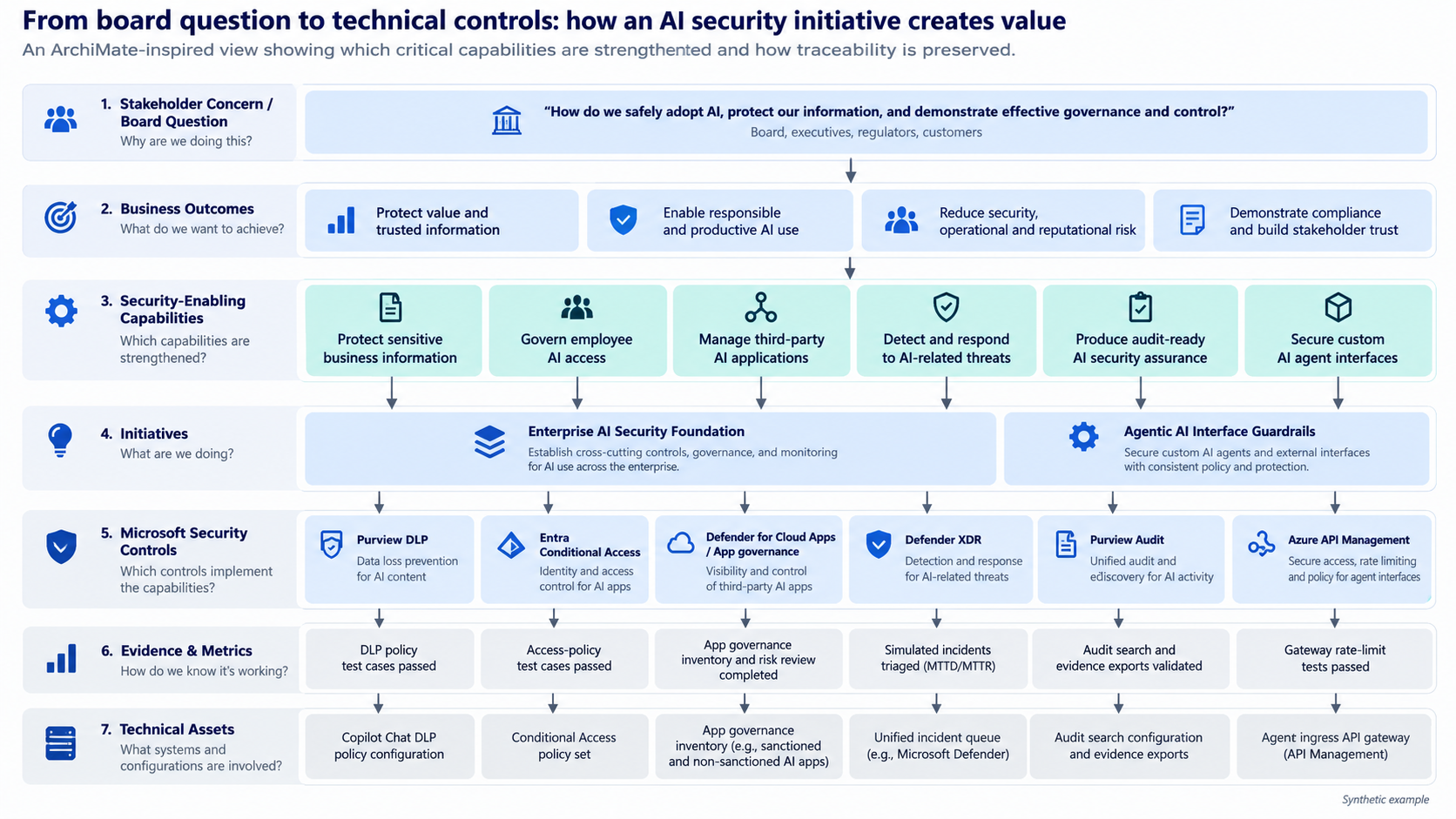
The following ArchiMate inspired architecture view shows how the board question links to security capabilities, delivery initiatives, Microsoft controls and implementation evidence. It is a conceptual traceability view rather than a formal ArchiMate model.
The architecture mistake: starting with technology instead of the stakeholder concern
An API gateway, a Copilot DLP policy or a Conditional Access rule is not the answer to a board level capability question. These are important implementation details, but they belong in the next layer of the conversation. An executive needs to see the investment’s intended outcome, the capabilities it supports, delivery confidence and proof that controls are working.
We should not throw away the engineering diagram. We should add an executive capability view and preserve the connections to implementation. The technical view remains available for architecture review and audit, without forcing every executive to interpret network components.
Our design: one initiative, three complementary views
- Board capability view: Which security enabling capabilities support safer AI adoption? What is their baseline, target, implementation coverage and evidence review status?
- Capability traceability view: Which initiatives and Microsoft controls support the selected capability, who owns them, and what evidence supports the mapping?
- Engineering detail view: Which policies, gateways, applications, interfaces and technical diagrams implement the control?
The traceability chain is easy to explain: Business objective → Capability → Initiative → Security control → Evidence → Technical asset. It is a navigational reporting chain, not a claim that these are all direct ArchiMate relationships.
Sample scenario: Enterprise AI Security Foundation
Imagine an organization planning to expand Microsoft 365 Copilot adoption and internal AI agents. The proposed security program includes sensitive data protection, governed identity access, risky OAuth app visibility, incident monitoring, audit assurance and secure custom agent interfaces.
| Capability we want to support | Microsoft control example | What we should validate |
|---|---|---|
| Protect sensitive business information | Microsoft Purview DLP for Copilot | Percentage of approved sensitive prompt test cases that behave as expected |
| Govern employee AI access | Microsoft Entra Conditional Access | Access policy test results across intended user and device scenarios |
| Manage third party AI applications | Defender for Cloud Apps app governance | Percentage of identified risky OAuth apps reviewed |
| Detect and respond to AI related threats | Microsoft Defender XDR | Percentage of agreed simulated incident scenarios detected and triaged |
| Produce audit ready assurance | Microsoft Purview Audit | Percentage of required evidence retrieval tests passed |
| Secure custom AI agent interfaces | Azure API Management | Authentication and rate limit policy test results |
These are examples of security enabling capabilities. To tie them to the wider business, record the associated outcome, such as trusted employee AI adoption, protected customer information or repeatable regulatory assurance. Do not equate the number of configured controls with business value.
A product specific caveat matters here: Microsoft Purview DLP has different actions for restricting external web searches, processing sensitive prompts and excluding labeled content. Sensitive prompt blocking is described by Microsoft as a feature subject to preview rollout, so validate availability and supported conditions in your tenant before designing tests. See Microsoft’s Copilot DLP documentation.
Step 1: prepare the data model
For an initial proof of concept, we can build the report entirely in Power BI Desktop using synthetic CSVs. No Microsoft 365 admin privileges or production telemetry are needed.
| Dataset | Purpose |
|---|---|
| 01_Capabilities.csv | Capability ID, name, outcome, owner, criticality and baseline/target maturity |
| 02_Initiatives.csv | Initiative, sponsor and delivery stage |
| 03_Controls.csv | Named controls, Microsoft product, owner and type |
| 04_Traceability.csv | Associations between an initiative, capability and control, plus status and rationale |
| 05_Evidence.csv | Test metric, observed and target values, review status and source |
| 06_TechnicalAssets.csv | Implementing component, technology layer, owner and diagram reference |
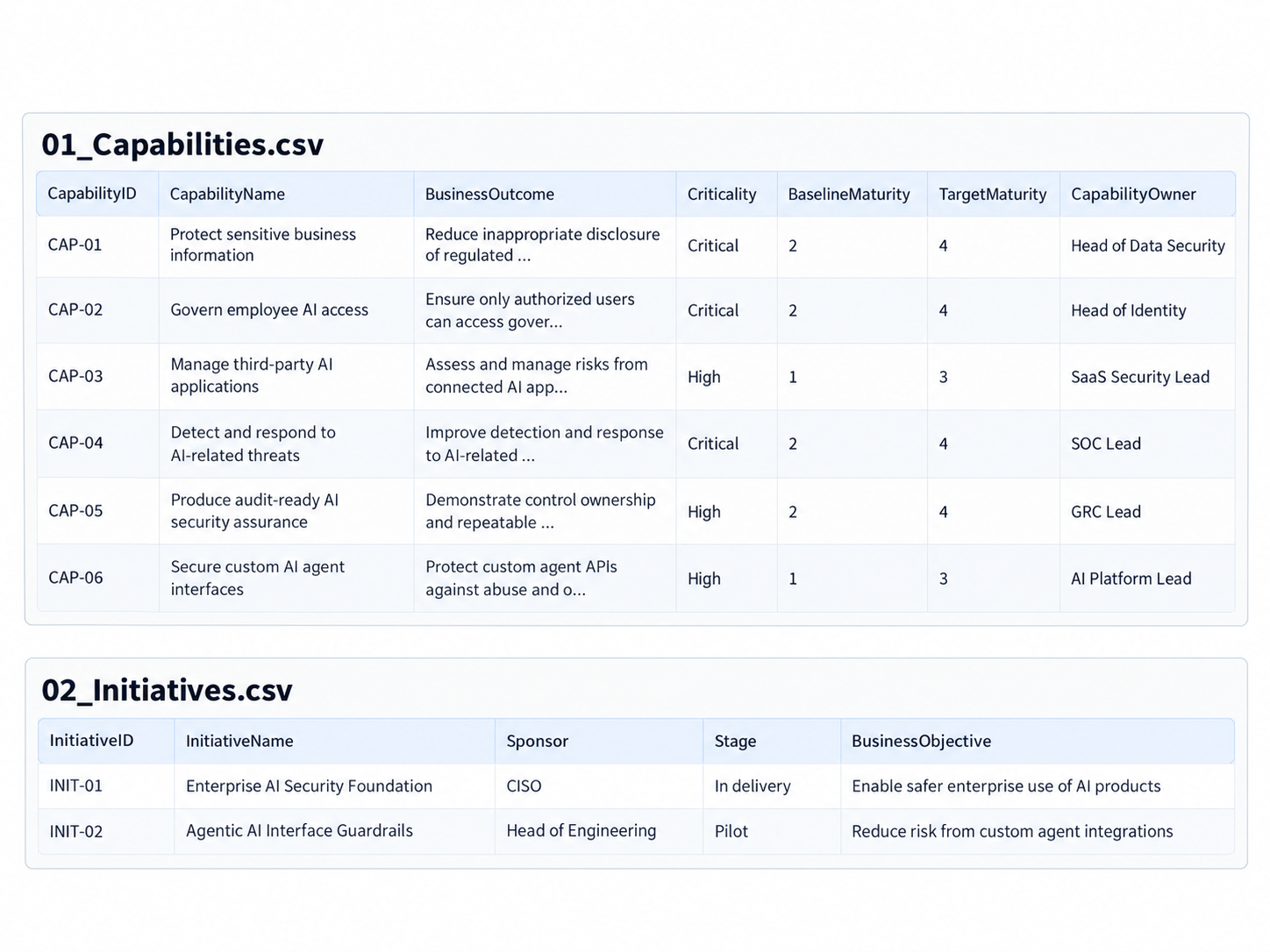
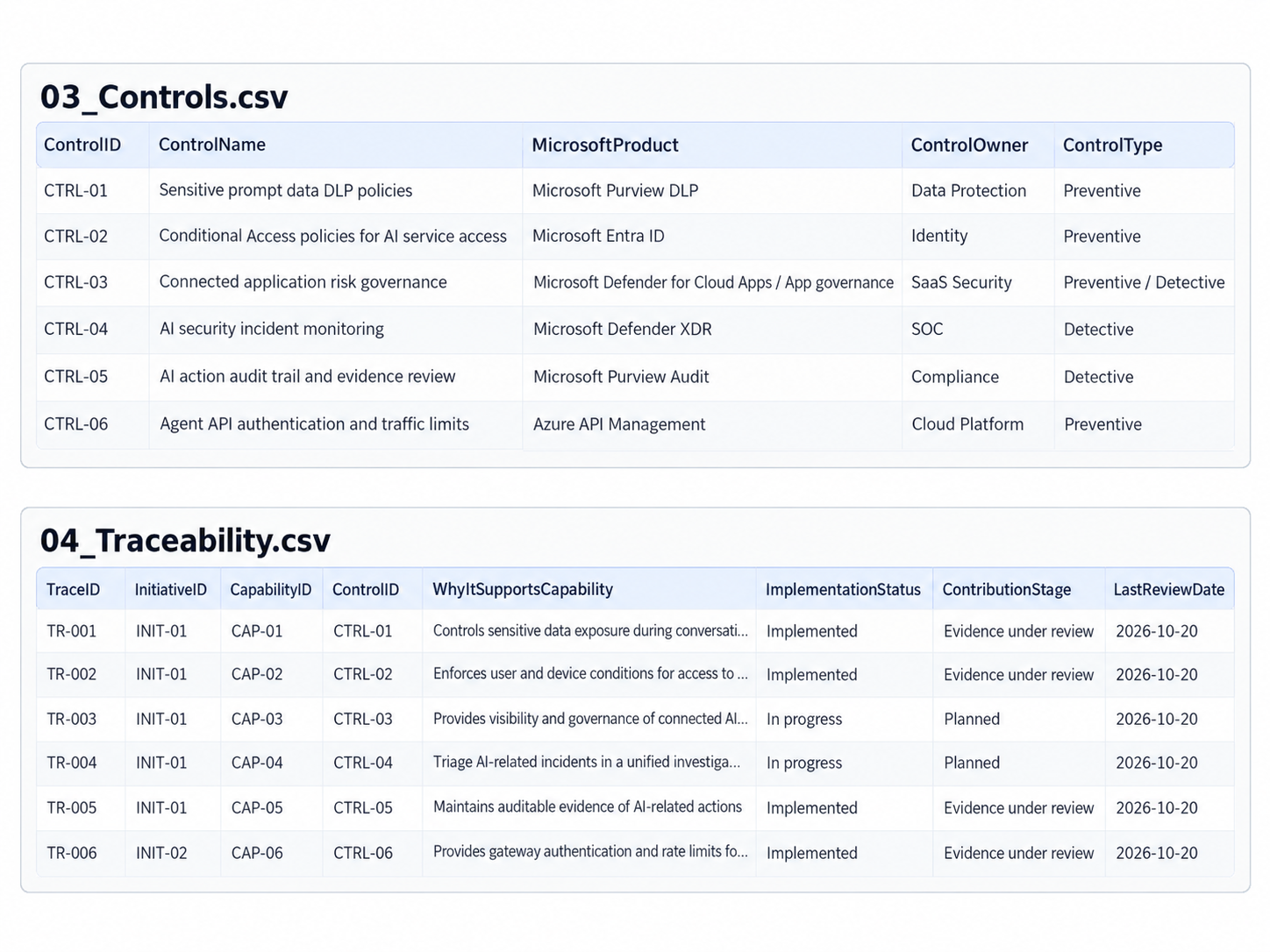
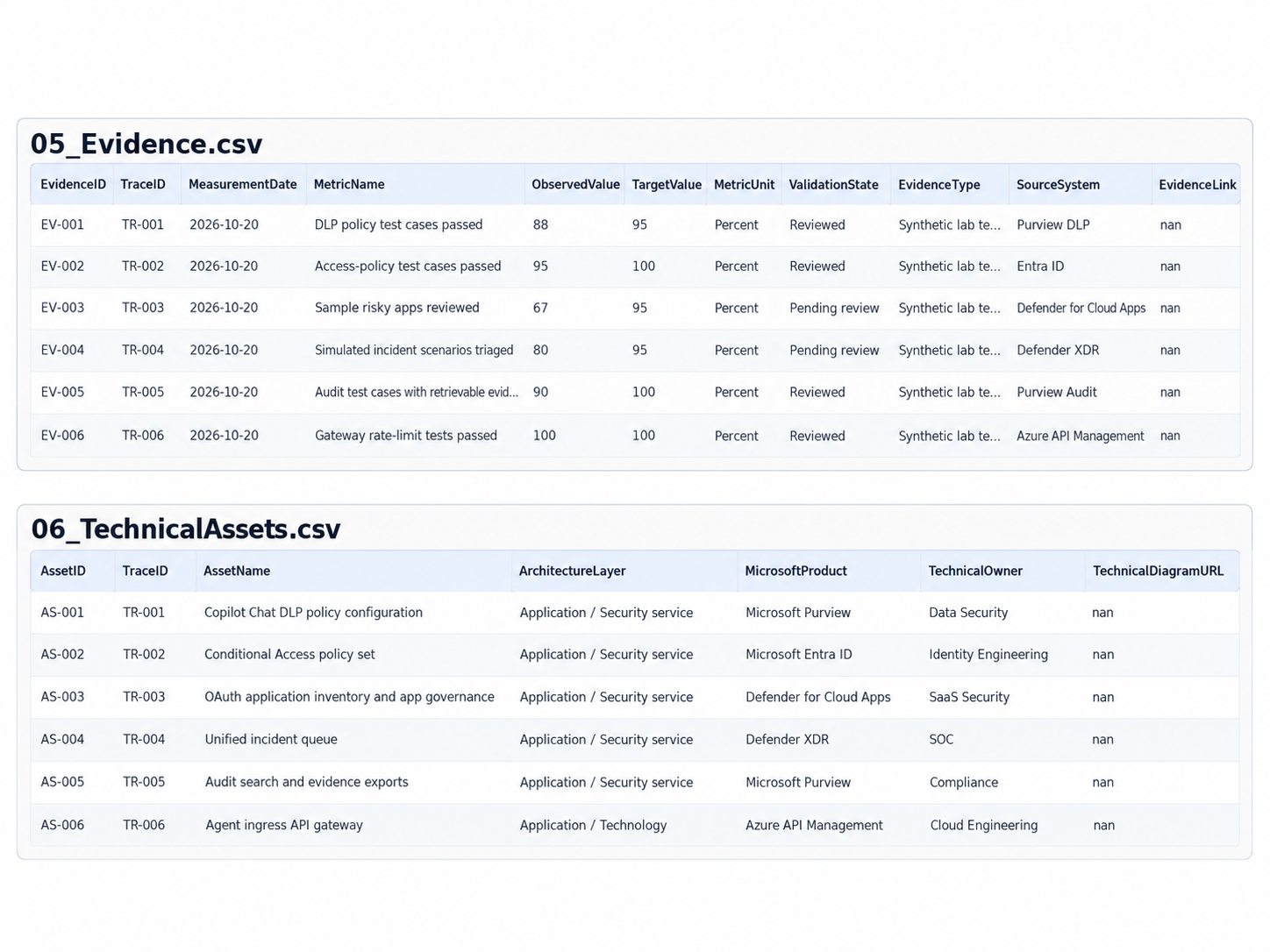
Use stable text IDs such as CAP-01, INIT-01 and CTRL-01. The TraceID key is the bridge from a control mapping to its supporting evidence and engineering artifacts. Keep what we plan, what is implemented and what has been tested as separate attributes.
Download the Power BI starter kit: AI Security Capability Map – Power BI Starter Workbook (.xlsx). This workbook includes six synthetic datasets, relationship guidance, a README and DAX measures. Alternatively, use the original CSV files with Get Data → Text/CSV as described in the steps below.
Step 2: load the datasets into Power BI Desktop
- Open Power BI Desktop and select Home → Get data → Text/CSV.
- Load the six files from the starter kit. Use Transform data to confirm key columns are text and measurement columns are numeric.
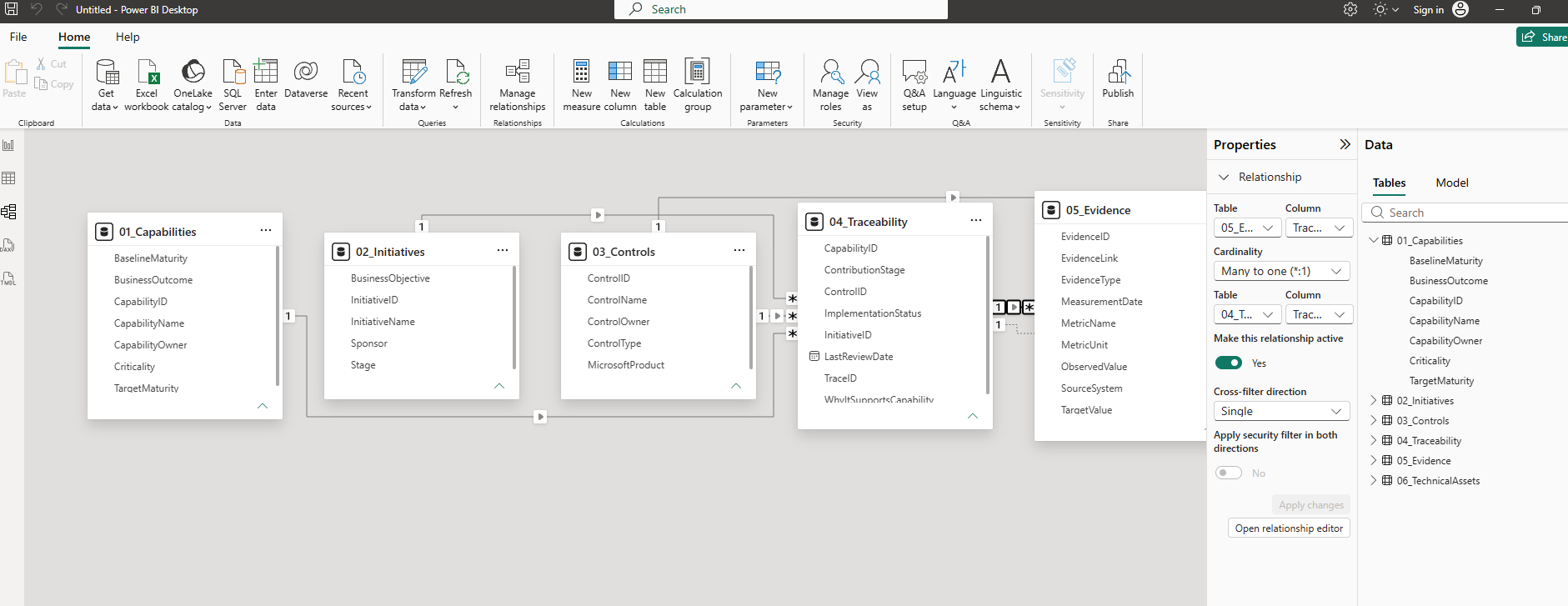
- In Model view, create the five one to many relationships shown below. Use single-direction filtering in the first version.
- Disable or review automatically inferred relationships so that additional ambiguous filter paths are not introduced.
01_Capabilities[CapabilityID] 1 → * 04_Traceability[CapabilityID]02_Initiatives[InitiativeID] 1 → * 04_Traceability[InitiativeID]03_Controls[ControlID] 1 → * 04_Traceability[ControlID]04_Traceability[TraceID] 1 → * 05_Evidence[TraceID]04_Traceability[TraceID] 1 → * 06_TechnicalAssets[TraceID]
The relationships make it possible to filter a capability down to its mapped controls and then into relevant evidence and assets. Avoid casually enabling bidirectional filtering across all the tables, which can produce misleading totals and ambiguous navigation.
Step 3: create simple DAX measures
The first report should distinguish implemented mappings from evidence reviewed mappings. Start with these measures, using the imported table names from the starter kit:
Mappings = DISTINCTCOUNT('04_Traceability'[TraceID])Implemented Mappings =CALCULATE( [Mappings], '04_Traceability'[ImplementationStatus] = "Implemented")Implementation Coverage % =DIVIDE([Implemented Mappings], [Mappings])Evidence Records =DISTINCTCOUNT('05_Evidence'[EvidenceID])Reviewed Evidence Records =CALCULATE( [Evidence Records], '05_Evidence'[ValidationState] = "Reviewed")Evidence Review % =DIVIDE([Reviewed Evidence Records], [Evidence Records])
Format the two percentage measures as percentages. Implementation Coverage % measures the share of mapped controls flagged implemented in our sample, not the degree to which the business capability has improved. Similarly, reviewed evidence records show review completion, not independent assurance that an enterprise risk has been eliminated.
Step 4: build the board capability view
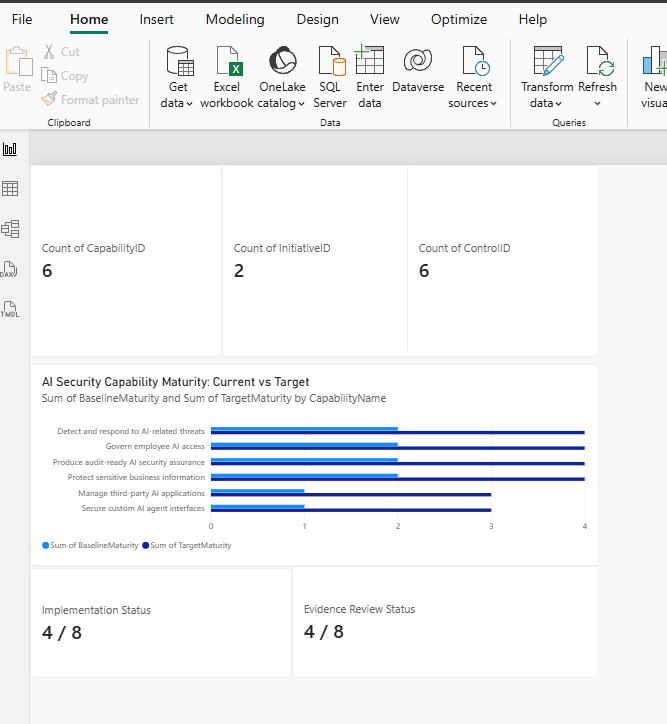
Create a report page called Board Capability Overview. Add a Matrix visual with CapabilityName as rows. Include BaselineMaturity, TargetMaturity, Implemented Mappings, Implementation Coverage % and Reviewed Evidence Records. Add a slicer for InitiativeName, with criticality and owner available as supplementary context.
Use conditional formatting for implementation coverage, but keep maturity and evidence in separate columns. A red capability might be a delivery gap, an evidence gap, or both. The dashboard should tell the board which problem exists instead of combining everything into a single unexplained red/amber/green status.
Executive capability matrix showing baseline maturity, target maturity, implementation coverage and evidence review status.
Step 5: drill into capability traceability
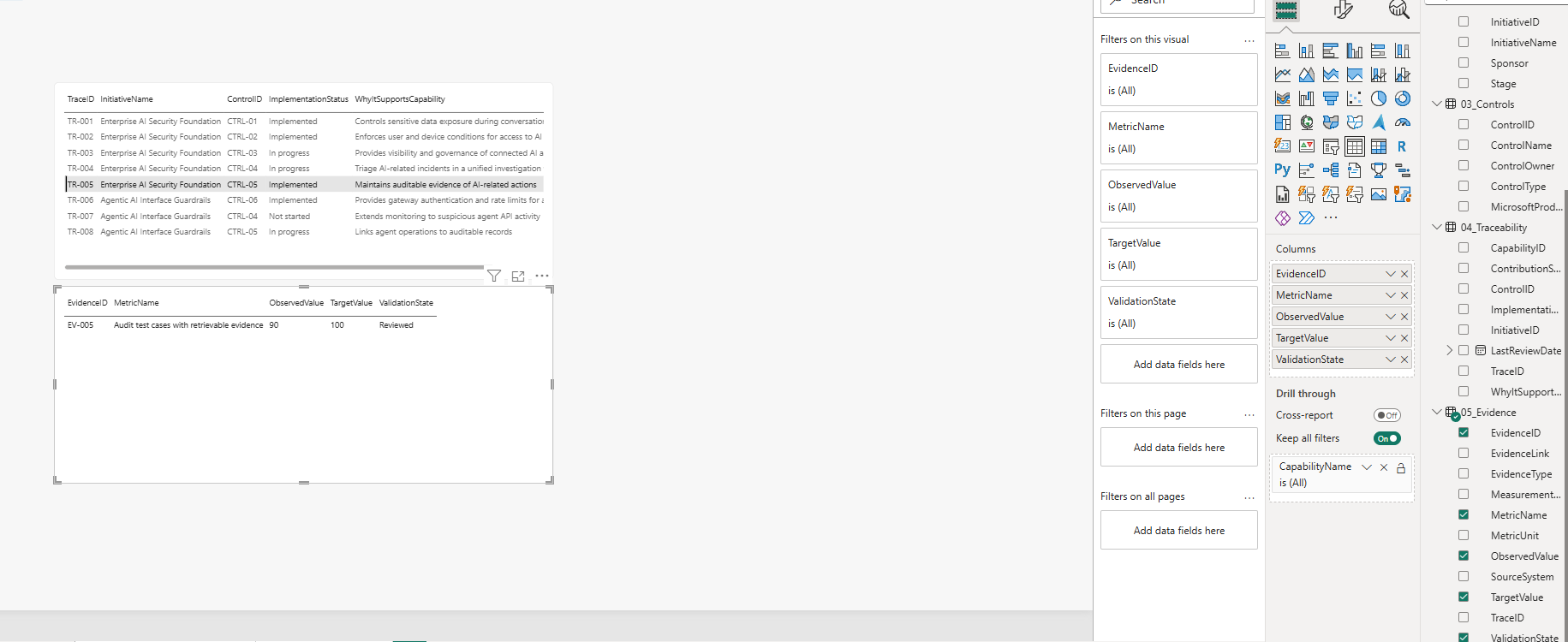
Create a second page named Capability Traceability. Add CapabilityID to the page’s drillthrough fields. Include the selected capability, mapped initiative, control name, implementation status, rationale, owner and evidence validation state.
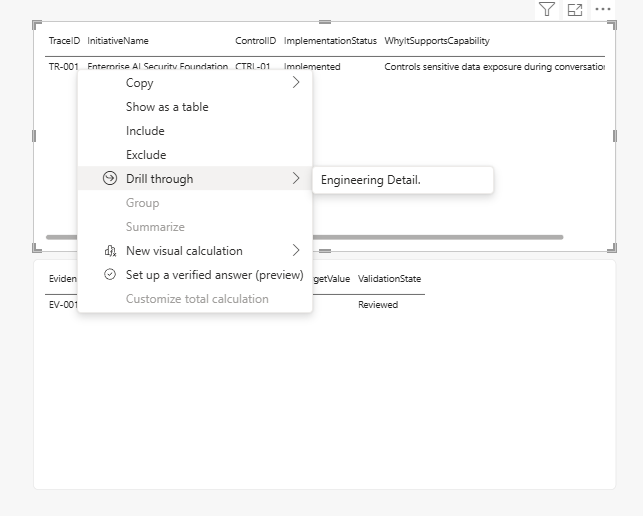
From the board report, right click a capability and use Drill through → Capability Traceability. Add a Back button for a natural navigation path. Microsoft documents this pattern in its Power BI drillthrough guidance.
Our fictional example should let the reviewer start with Protect sensitive business information, inspect the Enterprise AI Security Foundation initiative, see the mapped Purview Copilot DLP control, and open its synthetic test evidence record. This is traceability from a high level capability to implementation, not just another static slide.
Capability drillthrough page showing the mapped control, test result, review state and control owner.
Step 6: keep the detailed technical architecture
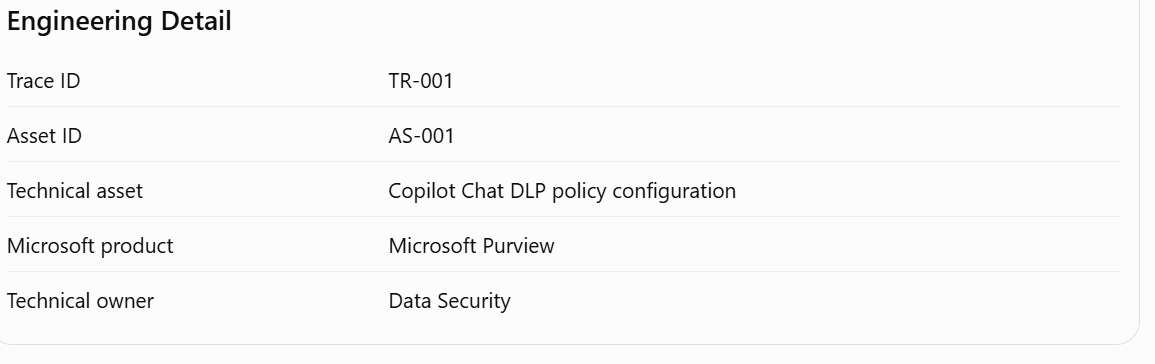
Create a third page called Engineering Detail. Display the policy set, API gateway, application interface, audit source or other technical asset referenced by the selected traceability record. Include architecture diagram links as reviewed metadata. This is where the network topology belongs.
For custom agents, Azure API Management can enforce token validation and request throttling. Refer to validate-jwt, validate-azure-ad-token for Entra-issued tokens, and rate-limit-by-key. The dashboard should link to tested implementation details without displaying secrets, tokens or unnecessary user data.
Engineering detail page, with a technical component inventory
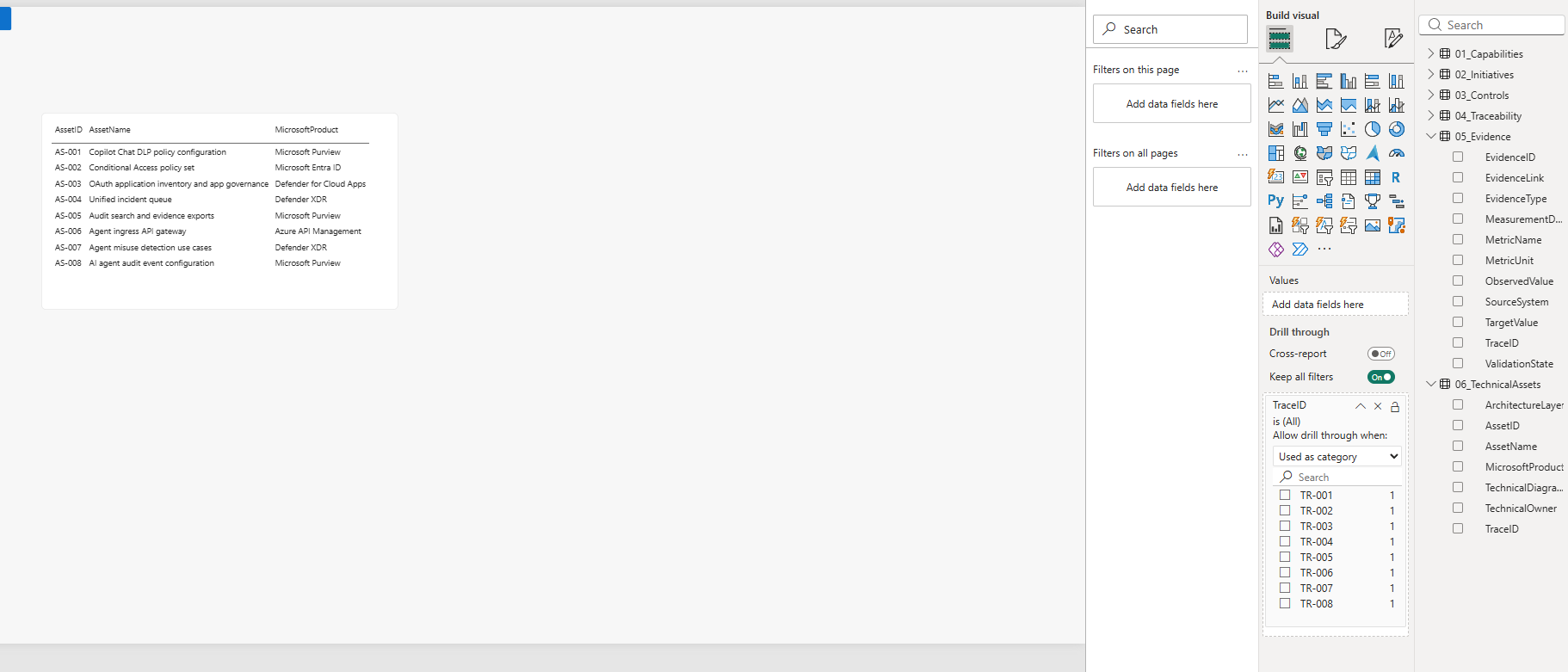
Now do the Drill through by going to the capability traceability tabe
And after that it must show the expected result
Step 7: move from CSV to Microsoft Lists and security evidence
Once the static report works, create six Microsoft Lists in SharePoint using the same fields. In Power BI Desktop use Get data → SharePoint Online List, enter the SharePoint site URL and select the lists. Microsoft documents the supported connector in Power Query’s SharePoint Online List reference.
For a later version, enrich the Evidence list using carefully permissioned exports or APIs. Example sources include app governance reviews, Entra policy test results, Purview audit data and Microsoft Graph security incidents. Microsoft Graph exposes an incident listing API, but API permissions, retention, schema and licensing must be verified. Do not assume every Purview DLP event can be fetched through the same API or that evidence is available in every tenant.
Store only approved aggregates and reference links in the board facing dataset. Don’t load raw prompts, secrets, individual user identities or unrestricted incident descriptions into a broadly shared Power BI semantic model. Apply SharePoint permissions and Power BI row level security or audience separation where required.
Where ArchiMate fits
The modeling logic can be expressed through ArchiMate’s distinct concerns: Motivation for stakeholder concerns and goals, Strategy for capabilities, Implementation and Migration for delivery work packages, and Application/Technology for the supporting services and components.
The Power BI data relationships are a reporting model inspired by those ideas, not literal ArchiMate connector definitions. If a formal ArchiMate artifact is needed, create and validate the view in a modeling tool such as the free Archi, using the Open Group ArchiMate specification and guidance to choose appropriate elements and relationships.
What this dashboard proves, and what it does not
- It can show: mapped capabilities, accountable owners, planned versus implemented controls, test results, last review dates and links to technical implementations.
- It cannot automatically prove: a real reduction in AI risk, regulatory compliance, higher capability maturity or a causal return on investment.
- To demonstrate improvement: define the outcome KPI, establish a baseline, agree on the test method, capture time-bound results and record independent review.
Closing thoughts
The engineering architecture and the executive capability view are both necessary, but they serve different audiences. A board member should be able to start with what the investment strengthens. An architect should be able to drill into how it is implemented. And an auditor should be able to follow what evidence exists.
By connecting these views in Power BI and Microsoft Lists, we make enterprise AI security architecture easier to explain without losing the underlying technical detail. The next enhancement would be a small, controlled pipeline that refreshes selected evidence from Microsoft security services, with explicit review and data access boundaries.

