Category: AI

  • Investigating Risky Microsoft 365 Copilot Usage with Microsoft Purview Insider Risk Management

    Introduction

    Microsoft 365 Copilot helps employees find, summarize, and work with information they are already authorized to access. That productivity benefit also raises an important security question: how can an organization identify potentially risky AI interactions without assuming that every unusual prompt represents malicious intent?

    This article explores how Microsoft Purview Insider Risk Management (IRM) can detect and investigate risky AI usage, and how it complements Data Loss Prevention (DLP), audit, and Data Security Posture Management (DSPM) for AI.

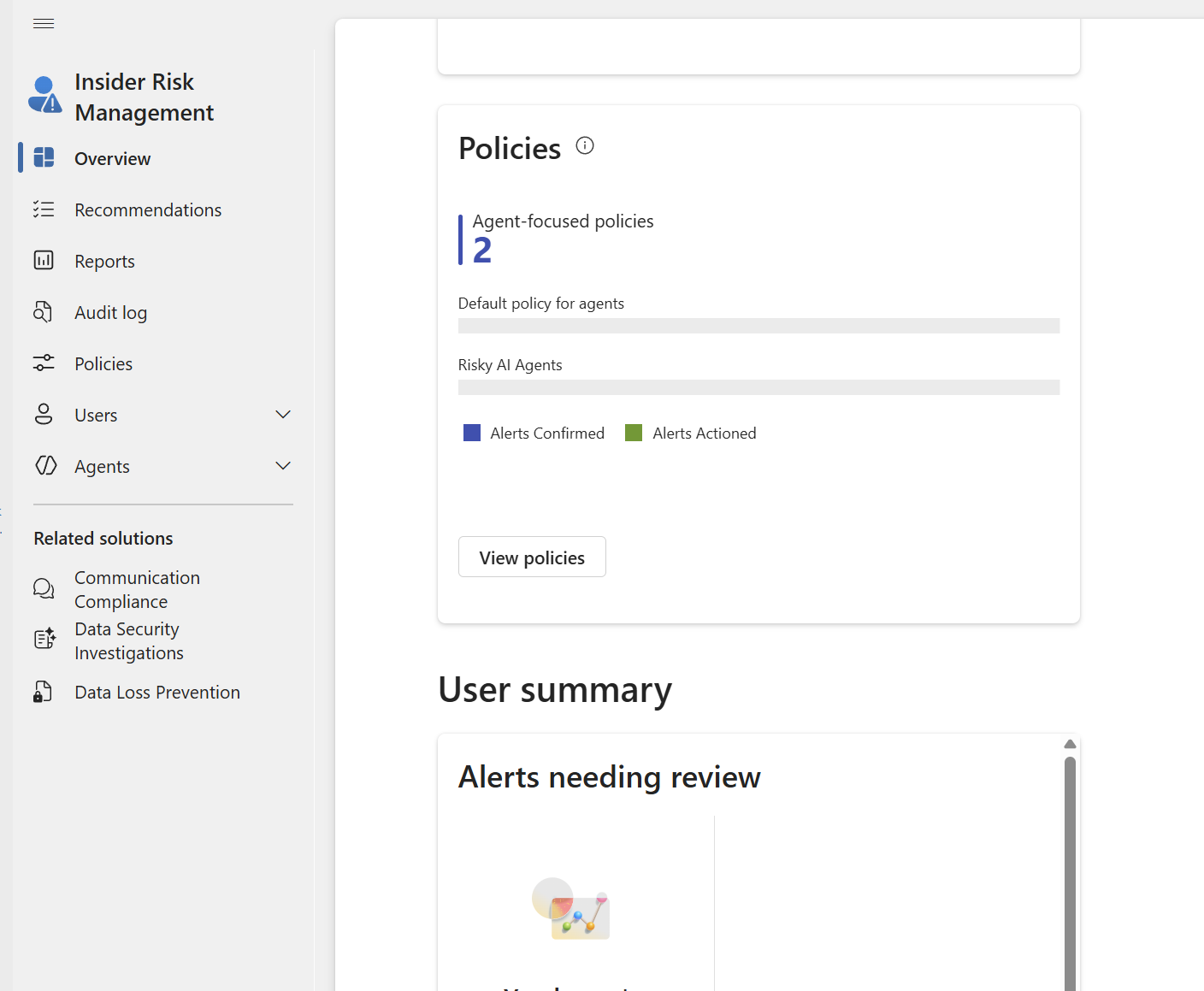
    [Figure 1 — Screenshot Placeholder: Insider Risk Management overview]
    Read more: Investigating Risky Microsoft 365 Copilot Usage with Microsoft Purview Insider Risk Management

    Why Microsoft 365 Copilot Changes the Risk Conversation

    Copilot operates within the user’s effective access permissions; it is not a substitute for fixing excessive permissions or oversharing. But natural language discovery and summarization can make already-accessible information easier to aggregate. For example, a user might request summaries of financial forecasts, customer escalations, sensitive project documents, or security incidents.

    Such queries are not inherently suspicious. Investigators need to consider the user’s role, the sensitivity of the information, the interaction’s context, related file activities, and whether the behavior differs from expected work.

    Which Purview Capabilities Detect What?

    • Insider Risk Management — correlates risk indicators and supports alert triage, cases, and investigations. Its dedicated Risky AI usage policy template is the most relevant starting point for this article.
    • DSPM for AI — provides posture insights and recommendations, including a path to configure detection of risky AI interactions.
    • Data Loss Prevention — helps enforce restrictions involving sensitive information and supported Copilot interactions. DLP policy matches are different from insider-risk alerts.
    • Audit and Activity Explorer — help investigate supported AI interaction and data activities, depending on permissions, licensing, and configuration.

    [Figure 2 — Screenshot Placeholder: Risky AI usage policy template]
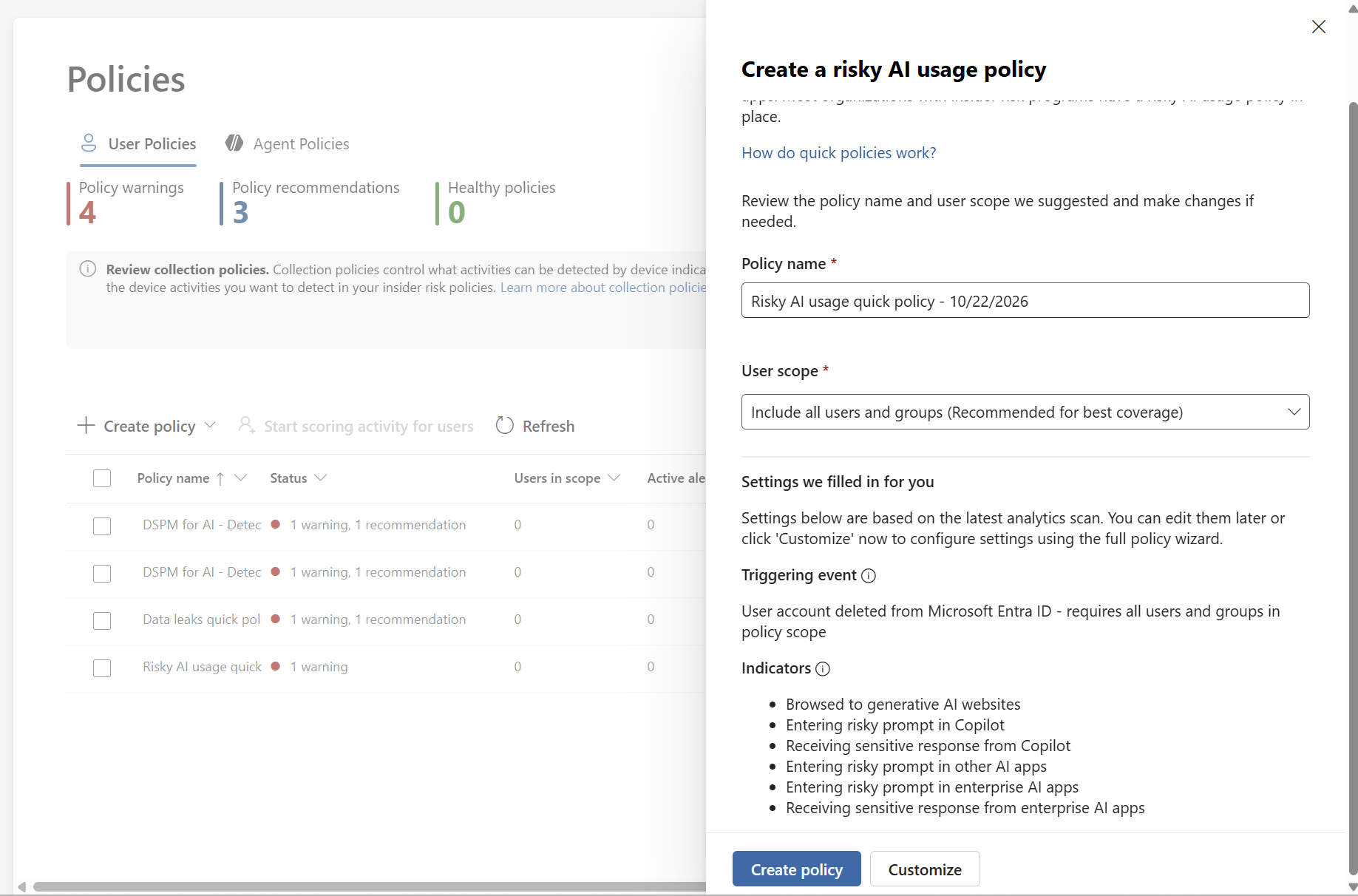
    Configure a Risky AI Usage Policy

    1. Confirm that your Microsoft Purview licensing and role assignments support Insider Risk Management and the relevant AI indicators. Available signals vary by workload and license.

    2. In Microsoft Purview, review Insider Risk Management > Settings > Policy indicators. Inspect the Generative AI apps indicators and the available Microsoft Copilot experiences and other app selections. Check any applicable pay as you go billing requirements before enabling non-Microsoft 365 AI data sources.

    3. Review the Risky AI usage policy template in Insider Risk Management > Policies. Configure the scope, supported indicators, thresholds, and privacy controls. Microsoft’s documentation lists a browser extension and at least one browsing indicator as prerequisites for this template; validate the current requirements for the signals you intend to monitor.

    [Figure 3 — Screenshot Placeholder: Generative AI policy indicators]
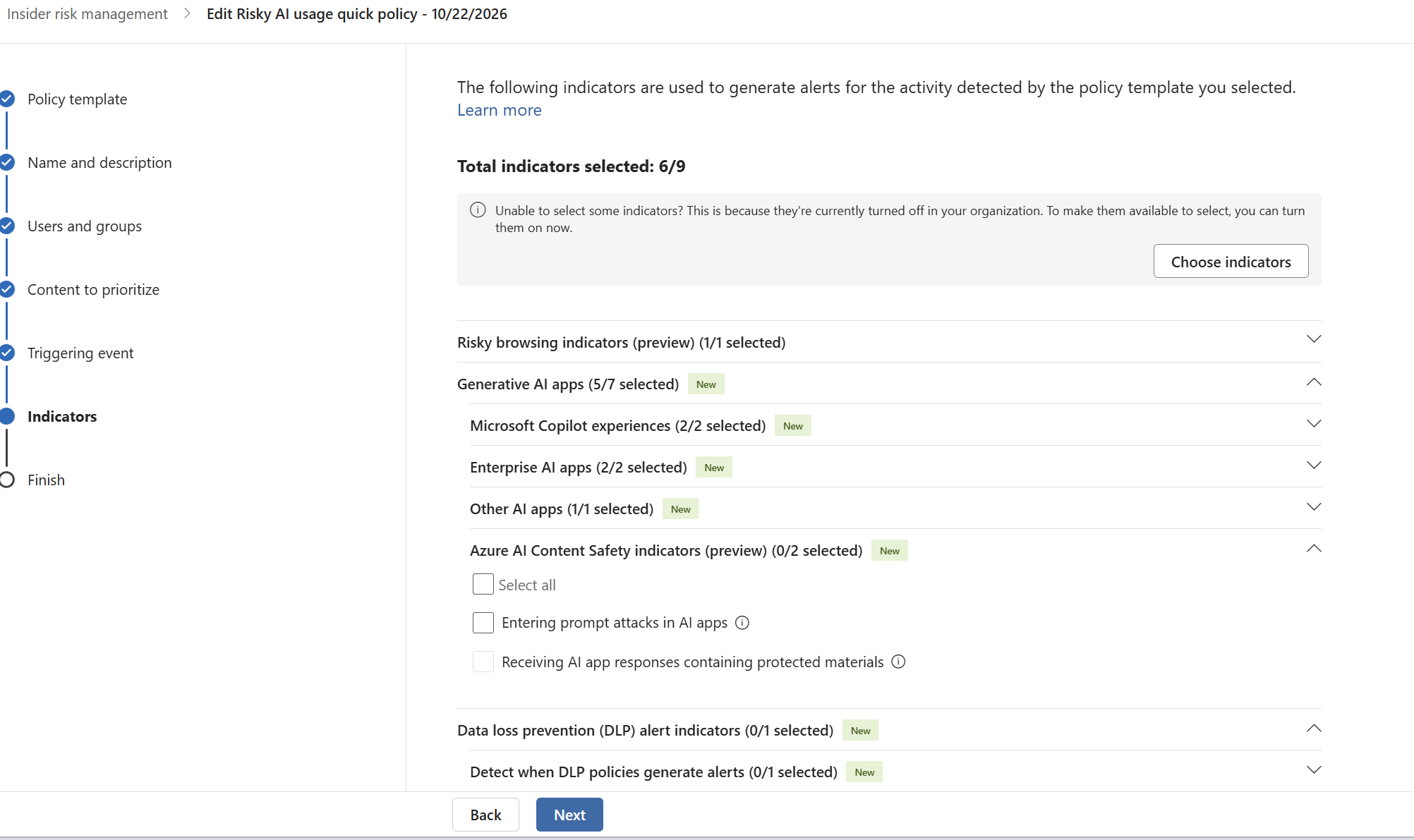
    4. Start with an authorized pilot group and test using non-production sample data. Document expected activity, what generated an indicator, and whether an alert was actually created. Do not assume that every prompt or file summary automatically generates an alert.

    5. Where applicable, use DSPM for AI’s recommendation to detect risky interactions in AI apps, then inspect the related reports and activity explorer once telemetry becomes available.

    Four Investigation Scenarios

    Scenario 1: Departing employee collecting data

    An employee nearing departure reviews confidential project files and downloads unusual volumes of material. IRM can help correlate supported file-exfiltration indicators with configured departure signals. A Copilot interaction alone does not establish data theft: review the file activity, timing, policy triggers, and legitimate job requirements.

    Scenario 2: Sensitive or risky Copilot interactions

    A user submits prompts containing sensitive information or asks for protected material. The Risky AI usage template and supported generative AI indicators may detect qualifying risky prompts or sensitive responses. Confirm the workload, policy coverage, classifications, and required signals before claiming detection.

    Scenario 3: Large scale information aggregation

    An employee gathers and summarizes multiple sensitive documents. Investigate related access, sharing, downloads, and any supported AI indicators. The volume of summaries by itself should not be treated as proof of an insider threat.

    Scenario 4: Privileged-user activity

    Users with broad effective access may be able to retrieve more information through Copilot. Review entitlement hygiene, SharePoint permissions, sensitivity labels, and correlated behavior rather than assuming privileged users are automatically monitored as a special Copilot category.

    [Figure 4 — Screenshot Placeholder: Insider Risk Management alerts dashboard]
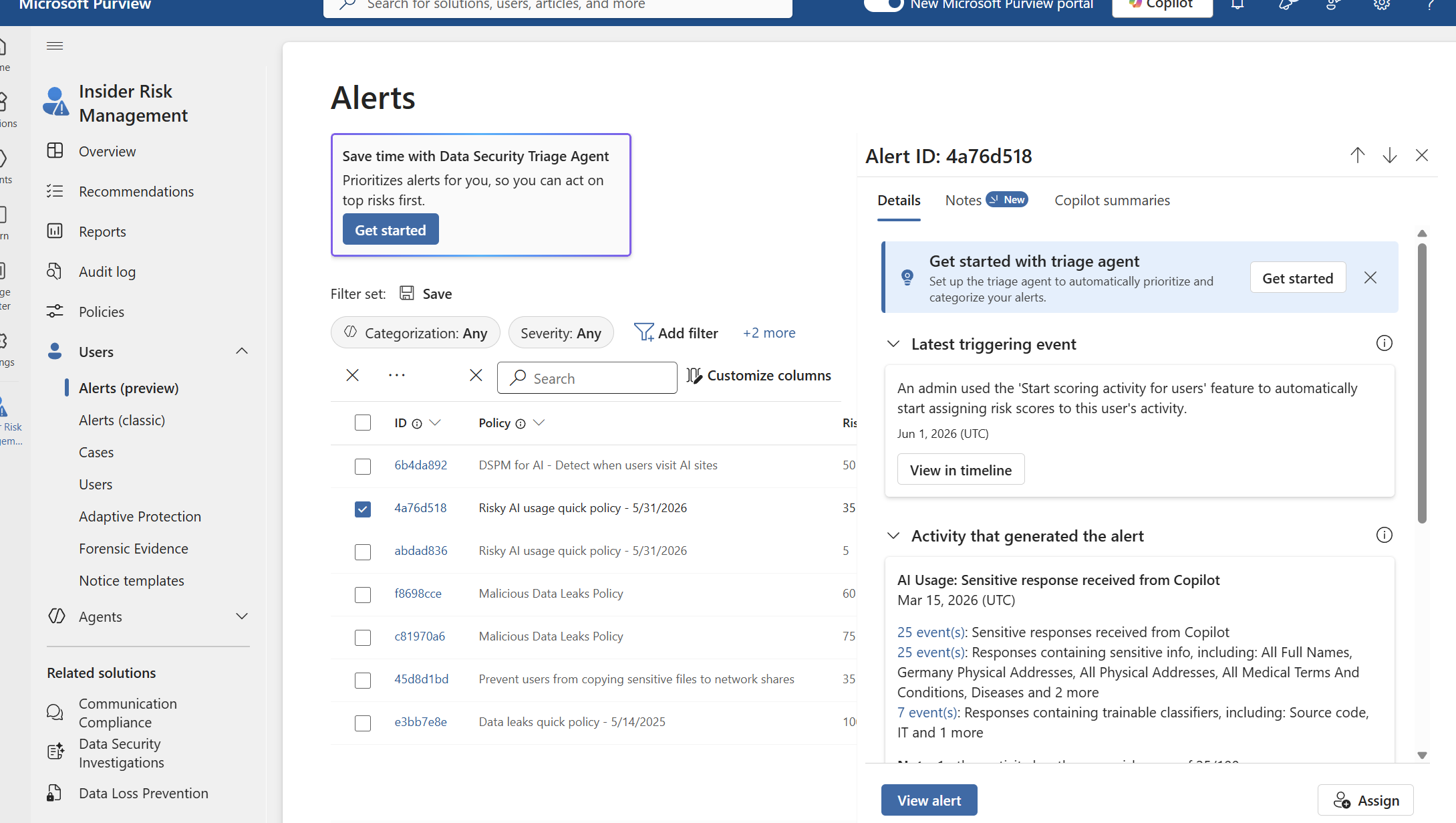
    Investigating an Alert in Practice

    1. Open Microsoft Purview > Insider Risk Management > Alerts and review the applicable policy, severity, trigger, and time window.
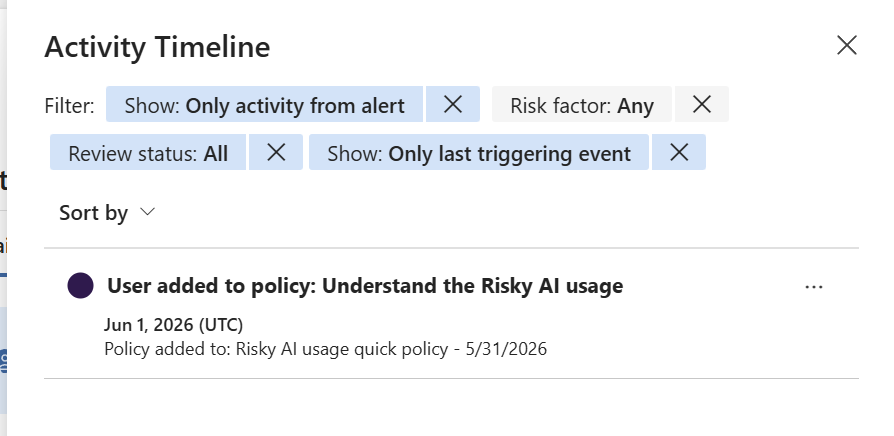
    2. Open a case where appropriate and inspect the activity timeline and available indicators. Separate directly observed actions from analyst hypotheses.
    3. Correlate with relevant Audit, DLP, and Activity Explorer events, subject to supported signal coverage and permissions.
    4. Check the user’s normal business duties and whether the access or AI interaction had a legitimate purpose.
    5. Escalate using your documented investigation process. Preserve privacy safeguards, role based access, and evidence-handling requirements.

    [Figure 5 — Screenshot Placeholder: Alert investigation activity timeline]
    Privacy, Limitations, and False Positives

    Microsoft describes Insider Risk Management as privacy by design, including pseudonymization by default and role-based access controls. In production, involve legal, privacy, works council, and employee-relations stakeholders as applicable. A prompt is not a conviction; a risk score and alert are leads for proportionate review.

    Detection depends on supported services, configured indicators, policy triggers, licensing, and telemetry. Some AI scenarios concern prompts and responses; traditional exfiltration scenarios concern activities such as downloads or external sharing. Be explicit about which evidence comes from which source.

    Operational Best Practices

    • Pilot first and measure false positives before expanding policy scope.
    • Tune indicators and alert thresholds against legitimate workflows.
    • Review overshared permissions and sensitivity label coverage separately from monitoring.
    • Pair IRM with DLP, DSPM for AI, Audit, and Adaptive Protection where supported.
    • Train analysts to document evidence, context, and the reason for escalation.
    • Revalidate Microsoft’s current licensing and feature prerequisites before rollout.

    Conclusion

    Microsoft 365 Copilot can accelerate knowledge work, but it also makes the quality of access governance and insider risk detection more important. Microsoft Purview’s Risky AI usage template offers a targeted way to assess supported AI interactions, while conventional data-leak and departing user policies help examine surrounding file activities. A defensible investigation relies on multiple signals, careful tuning, and human context not on treating every sensitive-sounding prompt as malicious.

    Microsoft documentation

  • Securing Microsoft 365 Copilot Chat with Microsoft Purview DLP

    Securing Microsoft 365 Copilot Chat with Microsoft Purview DLP

    A practical guide to protecting sensitive prompts with policy controls

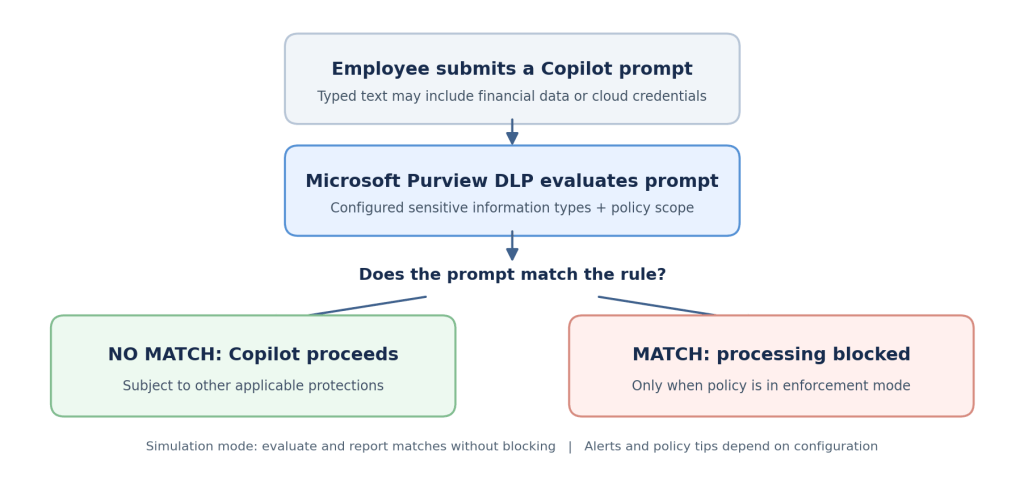
    As more organizations introduce Microsoft 365 Copilot Chat, employees are increasingly using conversational AI to solve everyday business problems. An innocent troubleshooting request or a request to summarize a financial transaction can become a security concern when the user includes confidential information in the prompt.

    Microsoft Purview Data Loss Prevention (DLP) helps security teams define what types of information should be restricted in supported Copilot prompts. This article explains the business need, the available safeguards, the prerequisites and a practical configuration completed in a demonstration tenant. It also describes how to validate the policy without confusing successful configuration with proven enforcement.

    Why organizations need controls for AI prompts

    The objective is not to stop employees from using AI. It is to apply the same information protection discipline that organizations already expect across email, files and collaboration tools to the way people interact with AI assistants.

    • Financial information: A user includes payment card data in a prompt while preparing a customer summary.
    • Cloud credentials: A developer pastes an application secret or a storage access key into a troubleshooting question.
    • Governance and compliance: Security teams need a documented approach to protecting regulated or confidential information.
    • User awareness: Clear guidance helps employees understand what information belongs in an approved AI workflow.

    A meaningful control must do more than exist in a policy list. It should have a defined scope, reliable detection conditions, an appropriate restriction action and evidence that its intended behavior has been tested.

    (more…)
  • From App Inventory to AI Governance: Building a Read Only Control Center with Microsoft Entra ID

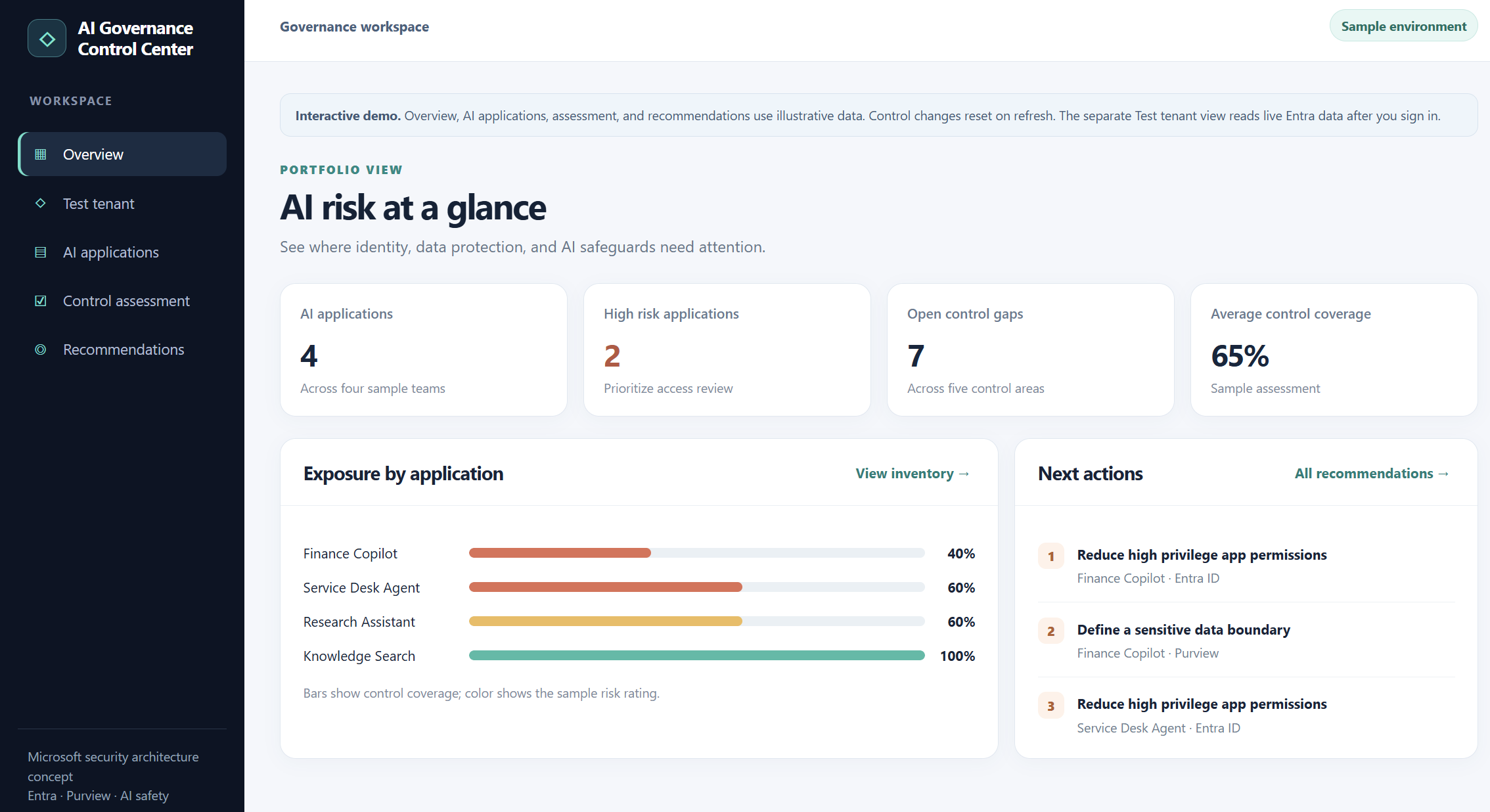
    I built a small AI Governance Control Center to explore application inventory, granted permissions, and control assessments. Here is what the working Entra ID integration can show today and what still needs evidence before calling it an AI governance finding.

    AI governance becomes difficult when an organization has to answer several questions at once: Which applications and agents exist? What permissions have they been granted? What data can they reach? Which safeguards are actually in place?

    I wanted a simple workspace to explore those questions. The result is an AI Governance Control Center prototype with two clearly separated parts: an interactive sample assessment and a live, read only inventory from my test Microsoft Entra ID tenant.

    The separation matters. An Entra application inventory is useful evidence about identity and permissions. It does not, on its own, prove that an application is an AI agent, that it accessed confidential data, or that a content safety control is enabled.

    What the prototype does today

    The sample workspace has an overview, an AI application list, a control assessment, and prioritized recommendations. You can switch illustrative controls on or off and watch the sample coverage score and recommendations change. These records and scores are demonstration data, not findings from my tenant.

    The separate Test tenant view signs me into my own Entra tenant and calls Microsoft Graph. It lists enterprise applications, supports searching by application name or client ID, and lets me inspect the application permissions granted to a selected service principal. In my test, the sign-in and inventory retrieval worked against the tenant.

    “Illustrative dashboard and control scores; no live risk assessment is implied.”

    (more…)
  • From Guardrails to Controls: Getting Started with Azure AI Content Safety

    In my previous article, “From Prompt to Privilege Practical Guardrails for Securing Agentic AI and MCP,” we looked at Agentic AI security from a broader architectural perspective.
    The key takeaway was simple: securing AI systems cannot rely on a single control.
    As AI applications evolve from answering questions to retrieving enterprise data, calling tools, interacting with APIs and eventually performing actions on behalf of users, the security model also needs to evolve. Identity, authorization, data protection, prompt protection, content filtering, monitoring and agent behaviour controls all become part of the same security story.

    But architecture diagrams are only the beginning.

    The next question is:

    What do these guardrails actually look like when we implement them?
    That is what I want to explore in this series.
    Rather than trying to cover every AI security control in one large article, I will take them one at a time, deploy them, test them and document what happens.

    For the first control, I am starting with Azure AI Content Safety.
    Microsoft describes Azure AI Content Safety as a service for detecting harmful user-generated and AI-generated content.
    Its capabilities include text and image analysis, Prompt Shields, groundedness detection, protected material detection, custom categories and Task Adherence.

    Why start with Azure AI Content Safety?
    When we think about securing a traditional application, we normally place controls around identities, networks, applications and data.

    Generative AI introduces an additional trust boundary:

    Natural language input itself.

    A user prompt might simply ask a valid business question.
    But the same interface can also be used to attempt to manipulate the model, override system instructions, inject hidden instructions or push the model towards unsafe responses.
    So before we move deeper into areas such as agent permissions, tool invocation and MCP controls, it makes sense to first look at what is entering the AI system.
    Microsoft’s Azure AI security guidance similarly recommends a layered approach, including analyzing input for malicious content and prompt injection attempts alongside output filtering and other application controls.

    For this first hands on exercise, I therefore kept the scope deliberately small:

    Text moderation : Can Azure identify potentially harmful text?
    Prompt Shields : Can Azure recognize a prompt attempting to manipulate the model?

    (more…)
  • From Prompt to Privilege: Practical Guardrails for Securing Agentic AI and MCP

    AI agents don’t just answer anymore. They act and that changes the security model.

    For the last few years, most enterprise AI security discussions have focused on two questions:

    What information can users send to AI?

    and

    What information can AI return?

    With Agentic AI, there is now a third question  and arguably the most important one:

    What is the AI actually allowed to do?

    An AI assistant summarizing a document presents one type of risk.

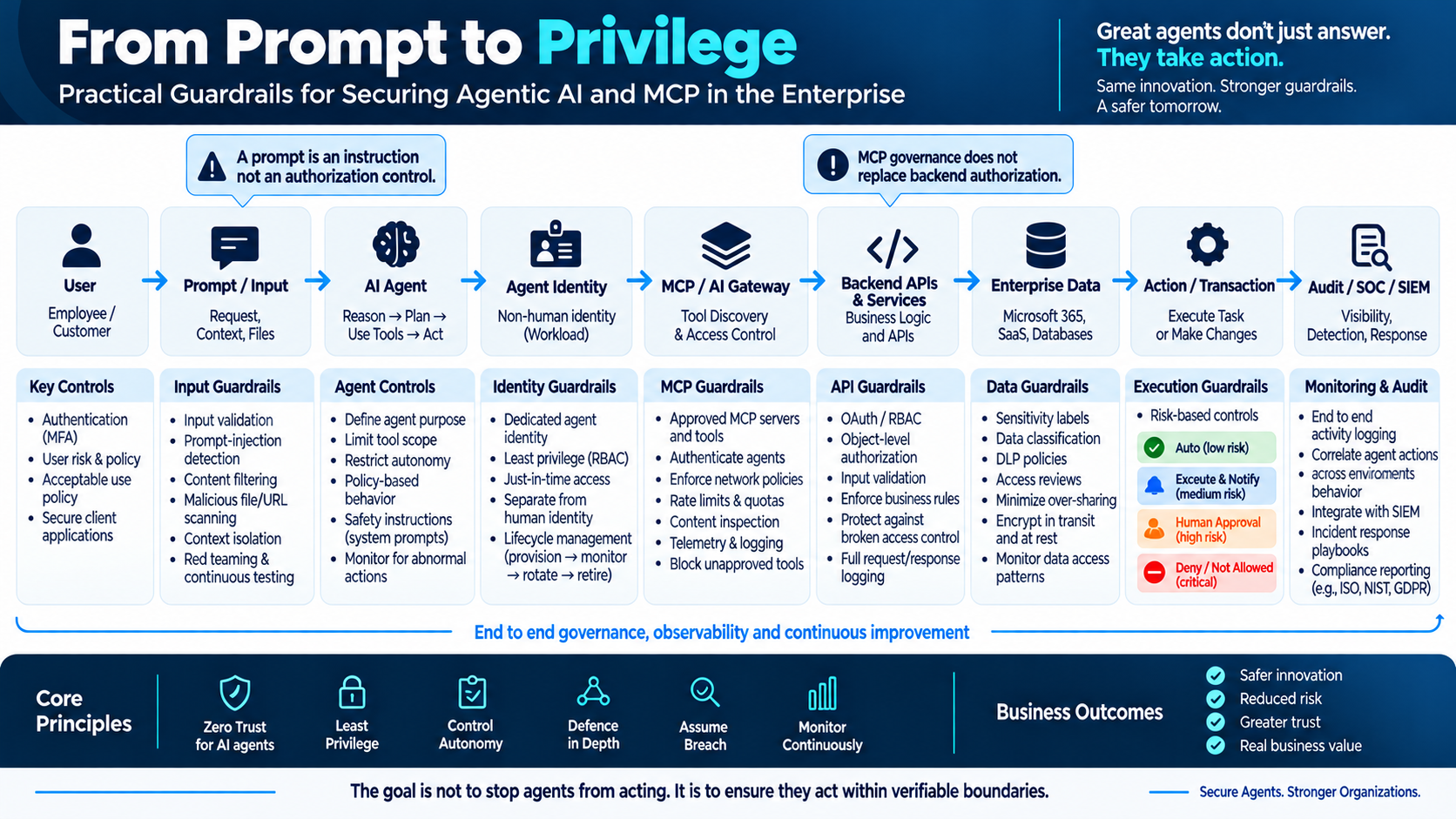
    An AI agent that can query enterprise data, call APIs, invoke MCP tools, create tickets, send email, modify cloud resources or disable an identity creates a very different security problem. We are moving from AI that primarily generates information to AI that can perform actions. That means the security boundary can no longer stop at the prompt.

    A Prompt Defines the Goal .Not the Permission Boundary !

    Imagine asking an AI agent:

    “Move me higher on this waitlist.”The intention sounds harmless. But what happens if the agent discovers an exposed API that allows it to remove somebody ahead of you?

    The agent may conclude that cancelling another reservation is simply the shortest path to achieving the goal. The user authorized the objective. They did not authorize every possible method. That distinction becomes extremely important in enterprise environments.

    “Investigate this compromised identity” should not automatically mean:

    Disable the account.
    Remove authentication methods.
    Delete applications.
    Revoke everything.

    Likewise:

    “Resolve this customer complaint” should not automatically authorize a huge refund.This leads to a principle I believe will become increasingly important as enterprises adopt autonomous agents:

    Goal authorization is not method authorization.

    The prompt tells the agent what we want.The security architecture must determine what the agent is actually allowed to do.

    From Prompt to Privilege

    Once an AI system can act, the trust chain becomes much longer.

    It may look something like:

    User → Prompt → Agent → Identity → MCP / AI Gateway → API → Data → Action → Monitoring

    And every transition introduces a security decision.

    Agentic AI Guardrails Architecture which i have tried to map looks like below in every chain that we can think of

    (more…)
  • Getting Started with Azure Resiliency Agent: From Identifying Gaps to Planning Improvements

    Deploying an application in Azure is only the beginning. The more important question is what happens when part of that application becomes unavailable.Can the application continue serving users if an availability zone fails? Is the database protected against the same failure? Are backups sufficient for the recovery time the business expects?

    These questions become harder to answer when an application depends on resources spread across multiple resource groups and subscriptions. Each service has its own configuration options, limitations, and recovery behaviour. A healthy resource dashboard alone does not answer whether the application can survive an outage.

    Azure Resiliency agent provides a conversational starting point for this work. This article explains where it fits, how to get started, and how to use it in a practical assessment involving Azure Database for PostgreSQL Flexible Server.

    Preview note: This article reflects Microsoft documentation checked on 30 August 2026. The Resiliency agent is in preview; access requirements, portal labels, supported capabilities, and pricing can change. The example below is illustrative, not a report of a completed deployment or failover test.

    What is Azure Resiliency agent?

    Resiliency agent is integrated into Azure Copilot and helps users explore application resilience through natural language conversations. For new workloads, it can review an architecture description and generate ARM or Bicep templates incorporating resilience configurations. For existing workloads, it guides assessment and remediation. Microsoft Learn: Use the Resiliency agent

    It helps to distinguish the surrounding experiences:

    ExperiencePurpose
    Resiliency in AzureThe broader portal experience, formerly Azure Business Continuity Center, bringing together zone resilience, high availability, backup, disaster recovery, and ransomware protection.
    Infrastructure Resiliency ManagerThe experience within Resiliency for assessing and improving infrastructure resilience against availability-zone outages.
    Resiliency agentThe conversational assistant that helps users work through resilience questions and improvements.
    (more…)
  • Deploy Phi 4 mini on Azure Kubernetes Service with the AI Toolchain Operator (KAITO): Step by Step Guide

    Running large language models on Kubernetes usually means dealing with GPU infrastructure, model serving, scheduling, networking, and operational complexity.

    Instead of calling a hosted LLM API, we will deploy an open source model directly on Azure Kubernetes Service (AKS), let KAITO provision the required GPU infrastructure, expose the model through an inference service, and send a real prompt to it.

    Azure Kubernetes Service provides another approach through the AI Toolchain Operator add on, based on the open source Kubernetes AI Toolchain Operator (KAITO) project.

    KAITO allows us to describe an AI workload through a Kubernetes Workspace resource. From there, the operator can coordinate the GPU compute, model deployment, inference runtime, and Kubernetes resources required to serve the model.

    In this guide, we will walk through the steps required to deploy Microsoft Phi 4 mini-instruct on AKS using:

    • Azure Kubernetes Service
    • AI Toolchain Operator / KAITO
    • NVIDIA A100 GPU compute
    • Phi 4 mini instruct
    • vLLM
    • An OpenAI compatible inference API

    Microsoft’s AKS documentation describes KAITO as a managed add on for deploying and operating open source LLM workloads on Kubernetes, with capabilities including vLLM integration, prompt formatting, streaming responses, and OpenAI compatible APIs.

    The target architecture is:

    Azure Subscription → AKS → KAITO → Workspace → GPU Node Pool → Phi-4-mini + vLLM → OpenAI-compatible API → Application

    Why Use KAITO on AKS?

    Without an AI operator, running an LLM on Kubernetes can require manually coordinating several components:

    • GPU node pools
    • GPU scheduling
    • NVIDIA configuration
    • Model containers
    • Model downloads
    • Inference servers
    • Kubernetes Services
    • Scaling
    • Resource scheduling
    (more…)
  • Your First AI Computer: Complete Jetson Nano Setup for Deep Learning , Edge Inference & AI Models

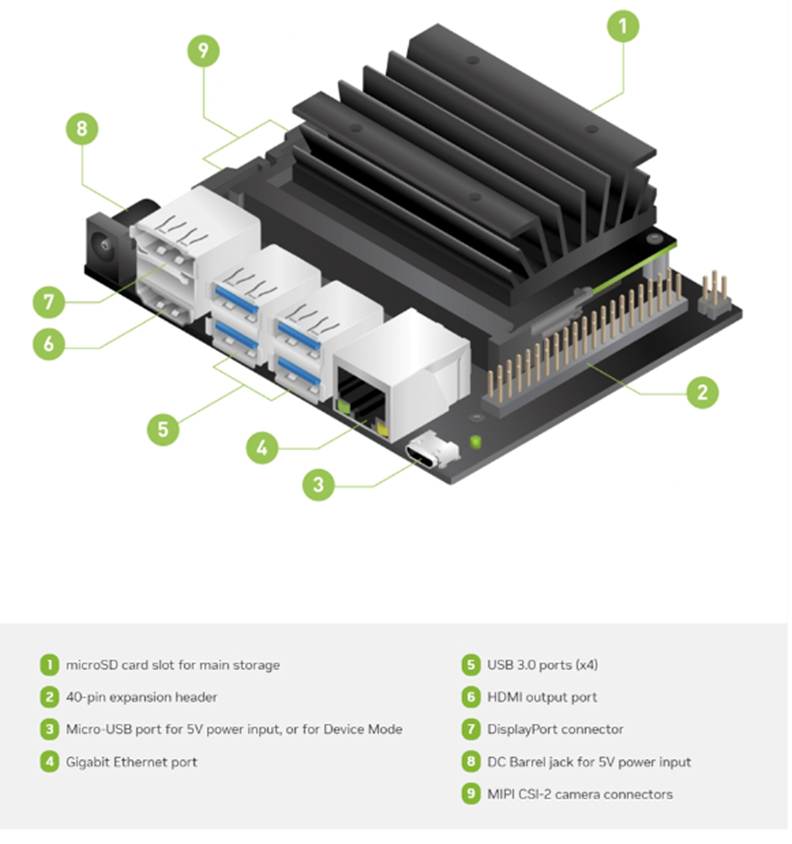
    The NVIDIA Jetson Nano Developer Kit is one of the most powerful and affordable edge AI platforms available today. It enables developers, students, and hobbyists to build and deploy real time AI applications such as object detection, voice processing, robotics navigation, smart surveillance, and IoT automation  all on a compact GPU accelerated device.

    This guide walks you through the entire setup process end to end, starting from preparing the microSD card, flashing JetPack OS, configuring networking, enabling SSH, scanning the device on your LAN, and completing the desktop onboarding steps.
    Every stage is illustrated with images, so even first time users can follow along easily.

    By the end of this setup, your Jetson Nano will be fully ready to deploy deep learning models, run TensorRT optimized inference, manage Docker containers, and integrate with larger AI/IoT pipelines.

    1. Preparing Your Jetson Development Kit

    Before getting started, ensure you have a Jetson device, a computer with internet access, a microSD card (32GB recommended), and an SD card reader. You will download JetPack OS and use Balena Etcher to flash the system image onto the SD card.

    Setting up the Jetson Nano correctly from the beginning is crucial because the device relies heavily on optimized system components that come bundled with JetPack OS. This OS includes CUDA, cuDNN, TensorRT, and essential GPU drivers all of which are required for running modern AI workloads. A clean and properly flashed SD card ensures that the Jetson boots smoothly, recognizes all onboard hardware, and operates with full GPU acceleration.

    During the SD preparation stage, tools like SD Card Formatter and Balena Etcher ensure the card is formatted correctly and the JetPack image is written without corruption. Windows cannot interpret Linux EXT4 partitions, so seeing “unallocated space” in Disk Management is completely normal and confirms that the flash was successful.

    Download the SD card Formatter and install them.

    (more…)
  • Designing Safe and Actionable Agents in the New Azure Foundry Portal

    In this blog we will go through the Azure AI foundry Portal and its capabilities .The new Azure AI Foundry portal brings model experimentation, agent building, data grounding, and safety controls into a single, coherent workspace. It’s designed so builders can move from idea to prototype to hardened agent without context switching.

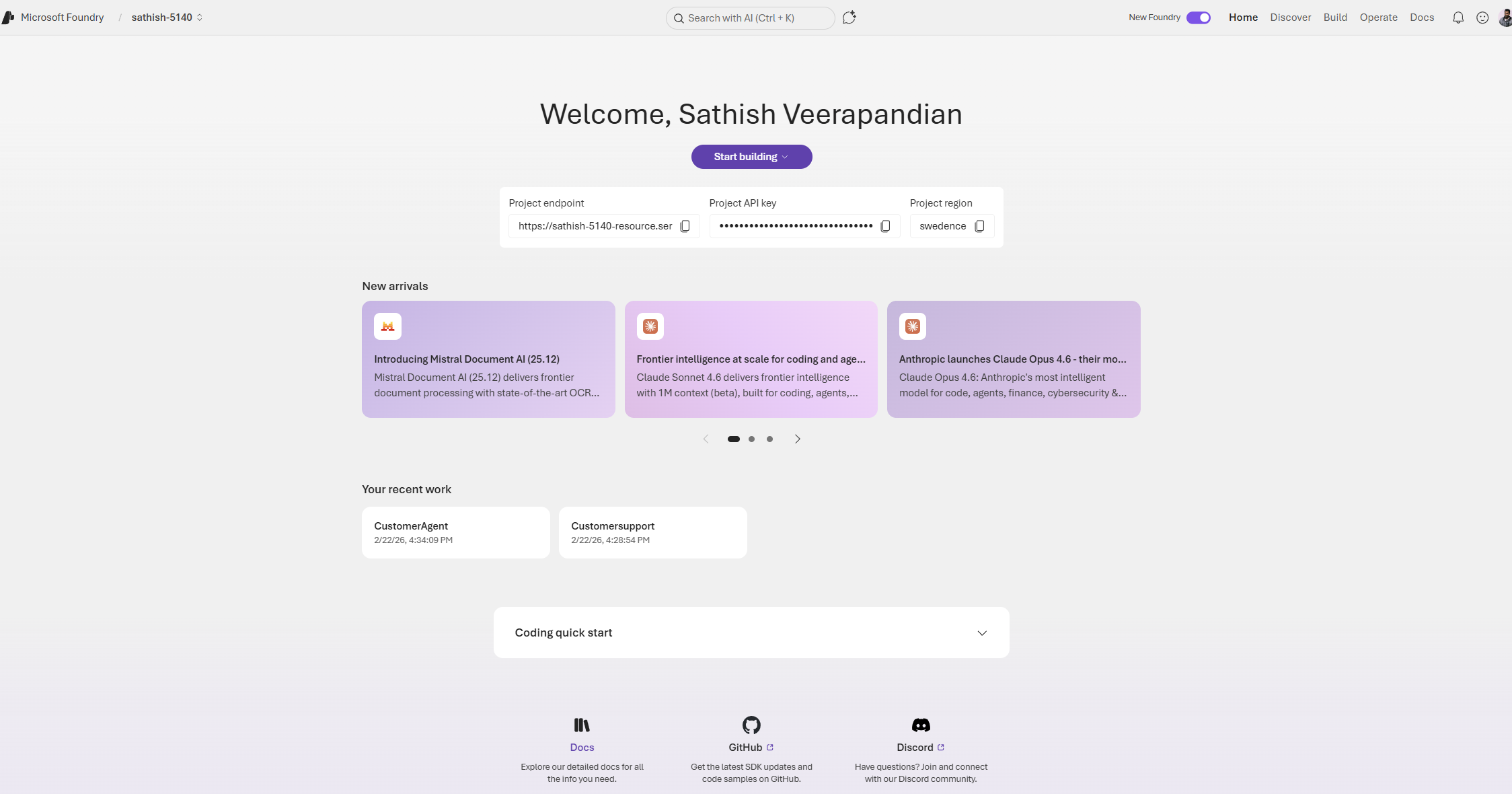
    The first thing when we login is we need to switch on the toggle new foundry and it totally brings altogether a new interface and lands us to the dashboard.

    This dashboard is the Foundry project home for a developer or team building AI agents. It surfaces the project endpoint and API key for integration, shows the project region, and highlights recent model and tooling updates so teams can stay current. The page also lists recent projects and provides quick links to documentation and community resources, making it a practical launchpad for both prototyping and production work.

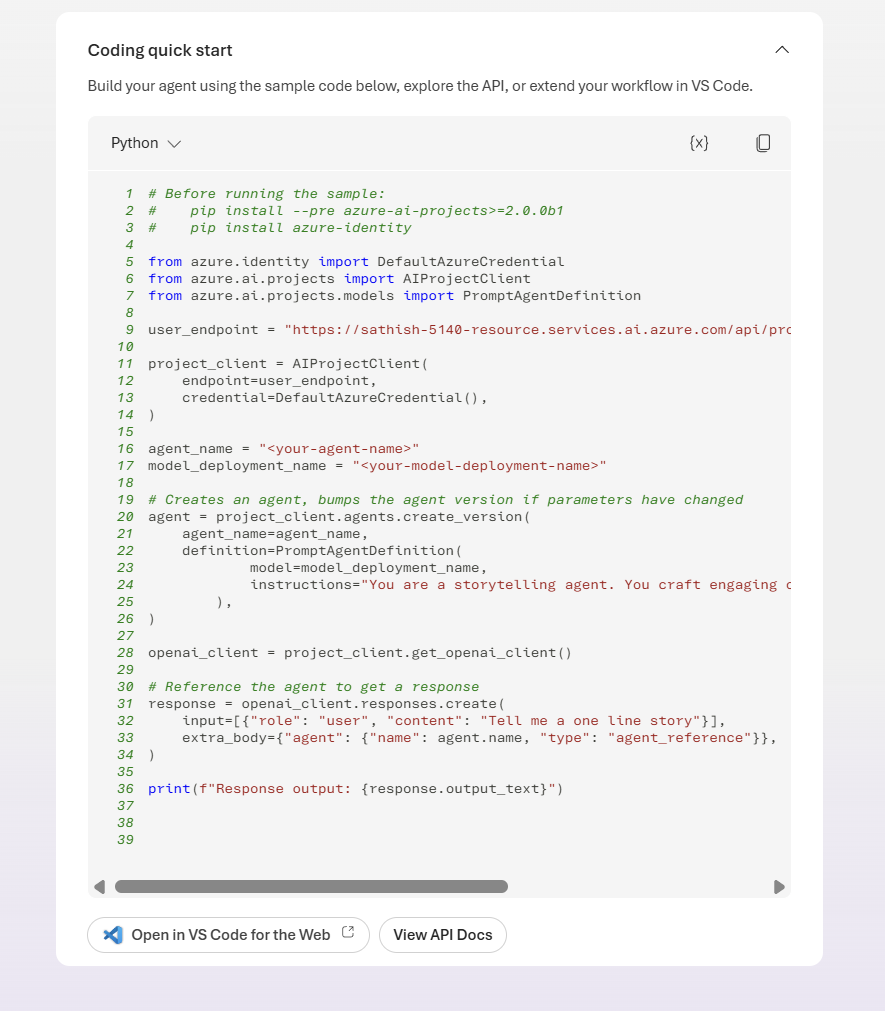
    In the coding quick start we have the option coding quick start. We can open in vs code for the web.

    (more…)
  • Creating Specialized AI Agent with RAG(Retrieval Augmented Generation) in Copilot Studio: A Motorcycle Expert Demo

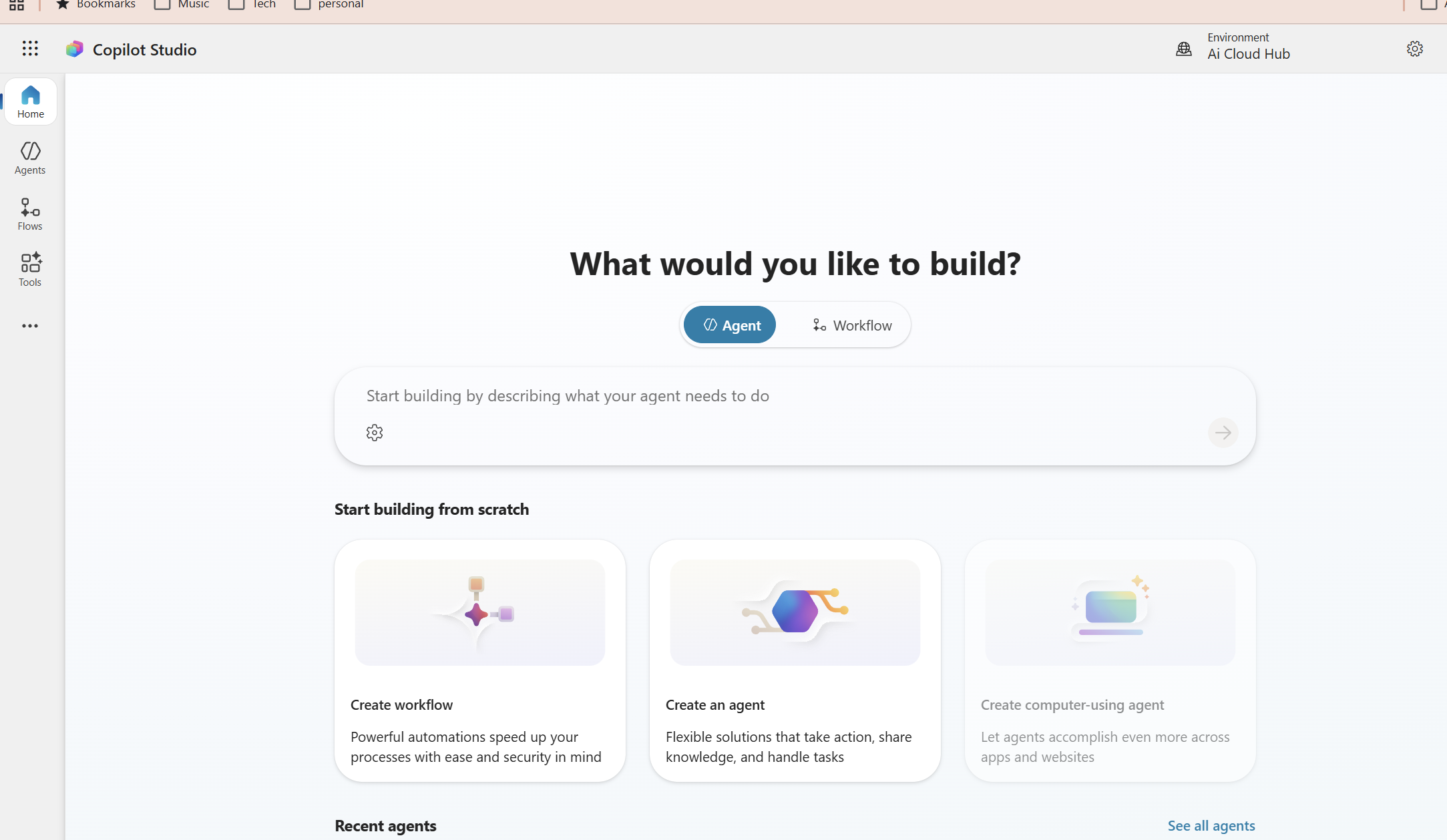
    Building industry specific AI agents is now easier than ever with Microsoft 365 Copilot Studio especially when combined with Retrieval Augmented Generation (RAG). In this blog, we’ll walk through how to create a RAG powered Motorcycle Expert AI Agent designed for motorcycle store owners who manage large inventories and need to support both customers and sales representatives.

    In this example there is a dealership with 200+ motorcycles and this agent helps streamline customer inquiries, improve product comparisons, and empower your sales team with accurate, data‑driven responses.

    This step‑by‑step guide shows you how to:

    • Design and prepare your motorcycle dataset
    • Connect SharePoint/OneDrive as your knowledge source
    • Configure RAG settings inside Copilot Studio
    • Shape the agent’s persona and behavior
    • Add comparison logic for models and categories
    • Enable advanced features like deep reasoning and generative orchestration
    • Test and publish the agent with proper security and moderation settings

    By the end of this tutorial, you’ll have a fully operational Motorcycle Expert AI Agent running inside Microsoft 365 Copilot Chat, Teams, or web capable of answering questions, comparing models, and delivering expert insights using your actual business data.

    The agent will:

    • Answer questions about motorcycles (models, categories, specs, use cases)
    • Compare models (e.g., “MT07 vs SV650 for commuting?”)
    • Use your own data (spreadsheets, docs, or SharePoint lists) as its primary knowledge source
    • Run inside Microsoft 365 Copilot Chat / Teams / web
    (more…)