After applying updates on Exchange 2013 environment we might come across the below symptom from end users while accessing OWA
User can use outlook to send/receive emails normally, but when the user try to login OWA, a “something went wrong” screen with the following information appears:

An unexpected error occurred and your request couldn’t be handled.
X-OWA-Error: System.NullReferenceException
X-OWA-Version: 15.0.775.32
X-FEServer: {2013 CAS server}
X-BEServer: {2013 Mailbox server}
Date: **
1) Rebuilding OWA/ECP virtual directories will not help
2) Playing with owa authentication settings will not help
3) Re-installing exchange server also will not help at times
While looking into the event logs you can find the below log with the description

Description :
Event code: 3005
Event message: An unhandled exception has occurred.
Event time: 8/30/2013 11:02:13 AM
Event time (UTC): 8/30/2013 4:02:13 PM
Event ID: f959d55d927a45f8b3b69051bbd62038
Event sequence: 2
Event occurrence: 1
Event detail code: 0
Application information:
Application domain: /LM/W3SVC/2/ROOT/owa-1-130223042171473642
Trust level: Full
Application Virtual Path: /owa
Application Path: C:\Program Files\Microsoft\Exchange Server\V15\ClientAccess\owa\
Machine name: EXC2013CAS
Process information:
Process ID: 13764
Process name: w3wp.exe
Account name: NT AUTHORITY\SYSTEM
Exception information:
Exception type: NullReferenceException
Exception message: Object reference not set to an instance of an object.
at Microsoft.Exchange.Clients.Common.Canary15.Init(Byte[] userContextIdBinary, Byte[] timeStampBinary, String logonUniqueKey, Byte[] hashBinary, String logData)
at Microsoft.Exchange.Clients.Common.Canary15..ctor(String logonUniqueKey)
at Microsoft.Exchange.Clients.Common.Canary15Cookie.TryCreateFromHttpCookie(HttpCookie cookie, String logonUniqueKey, Canary15Profile profile)
at Microsoft.Exchange.Clients.Common.Canary15Cookie.TryCreateFromHttpContext(HttpContext httpContext, String logOnUniqueKey, Canary15Profile profile)
at Microsoft.Exchange.Clients.Owa2.Server.Core.OwaRequestHandler.InternalOnPostAuthorizeRequest(Object sender)
at Microsoft.Exchange.Clients.Owa2.Server.Core.OwaRequestHandler.OnPostAuthorizeRequest(Object sender, EventArgs e)
at System.Web.HttpApplication.SyncEventExecutionStep.System.Web.HttpApplication.IExecutionStep.Execute()
at System.Web.HttpApplication.ExecuteStep(IExecutionStep step, Boolean& completedSynchronously)
Request information:
Request URL: https://localhost:444/owa/logoff.owa
Request path: /owa/logoff.owa
User host address: 127.0.0.1
User: CORJESU\SM_cab26786a5604c759
Is authenticated: True
Authentication Type: Kerberos
Thread account name: NT AUTHORITY\SYSTEM
Thread information:
Thread ID: 12
Thread account name: NT AUTHORITY\SYSTEM
Is impersonating: False
Stack trace: at Microsoft.Exchange.Clients.Common.Canary15.Init(Byte[] userContextIdBinary, Byte[] timeStampBinary, String logonUniqueKey, Byte[] hashBinary, String logData)
at Microsoft.Exchange.Clients.Common.Canary15..ctor(String logonUniqueKey)
at Microsoft.Exchange.Clients.Common.Canary15Cookie.TryCreateFromHttpCookie(HttpCookie cookie, String logonUniqueKey, Canary15Profile profile)
at Microsoft.Exchange.Clients.Common.Canary15Cookie.TryCreateFromHttpContext(HttpContext httpContext, String logOnUniqueKey, Canary15Profile profile)
at Microsoft.Exchange.Clients.Owa2.Server.Core.OwaRequestHandler.InternalOnPostAuthorizeRequest(Object sender)
at Microsoft.Exchange.Clients.Owa2.Server.Core.OwaRequestHandler.OnPostAuthorizeRequest(Object sender, EventArgs e)
at System.Web.HttpApplication.SyncEventExecutionStep.System.Web.HttpApplication.IExecutionStep.Execute()
at System.Web.HttpApplication.ExecuteStep(IExecutionStep step, Boolean& completedSynchronously)
By looking into the event viewer we can see this is related to Active Directory Cache error related with CAS server for a value called Canary Data
What is this Canary Data ?
Basically Canary Data is an attribute that is created during the first exchange 2013 schema preparation.
It creates 4 attributes while schema preparation or it may be even just one attriubute
msExchCanaryData0
msExchCanaryData1
msExchCanaryData2
msExchCanaryData3
Why do we need this Canary Data ?
It is a secret token that exchanges between the clients and the server for services OWA,ECP and other exchange web services.
So these values gets stored in the cookie collection of the clients browser.
So for any owa,ECP,EWS requests from clients the browser sends the GUID value that is stored in the cache and compares it with the GUID that is in the URL (server).
If they dont match then the request from the client is considered as malicious and blocked
Also an event regarding the same is logged with the originating IP address.
Below is the solution to fix this type of issue :
1) Open ADSI Edit
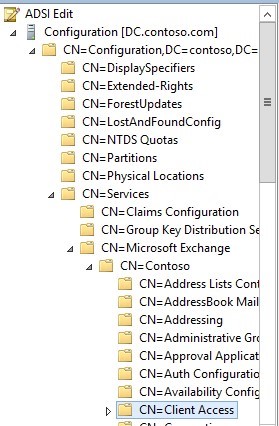
2) Right click 【CN=Client Access】and click properties, scroll down to look for values
【msExchCanaryData0】
【msExchCanaryData1】
【msExchCanaryData2】
【msExchCanaryData3】
parameter, as below:
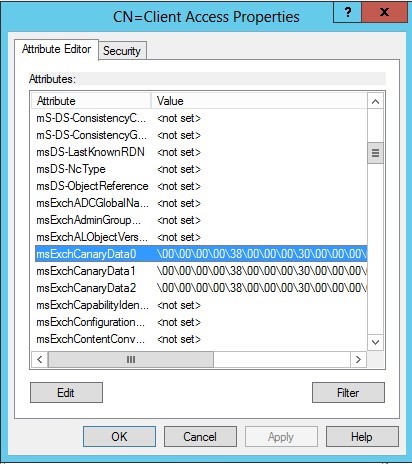
3) Take a backup to be safe and clear all these values to not set as shown below

4.Open IIS Manager on your CAS server, go to 【Application Pools】, right click 【MSExchangeOWAAppPool】 and click Recycling
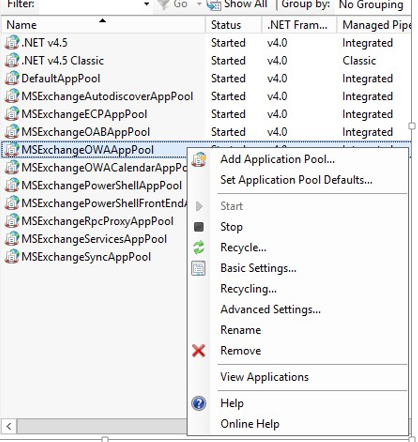
After doing the above its better to restart Mailbox and CAS server and this issue will be resolved.
Also Refer –
Thanks
Sathish Veerapandian
MVP – Exchange Server

