Tag Archives: Azure

Getting Started with Azure Resiliency Agent: From Identifying Gaps to Planning Improvements

Deploying an application in Azure is only the beginning. The more important question is what happens when part of that application becomes unavailable.Can the application continue serving users if an availability zone fails? Is the database protected against the same failure? Are backups sufficient for the recovery time the business expects?

These questions become harder to answer when an application depends on resources spread across multiple resource groups and subscriptions. Each service has its own configuration options, limitations, and recovery behaviour. A healthy resource dashboard alone does not answer whether the application can survive an outage.

Azure Resiliency agent provides a conversational starting point for this work. This article explains where it fits, how to get started, and how to use it in a practical assessment involving Azure Database for PostgreSQL Flexible Server.

Preview note: This article reflects Microsoft documentation checked on 30 August 2026. The Resiliency agent is in preview; access requirements, portal labels, supported capabilities, and pricing can change. The example below is illustrative, not a report of a completed deployment or failover test.

What is Azure Resiliency agent?

Resiliency agent is integrated into Azure Copilot and helps users explore application resilience through natural language conversations. For new workloads, it can review an architecture description and generate ARM or Bicep templates incorporating resilience configurations. For existing workloads, it guides assessment and remediation. Microsoft Learn: Use the Resiliency agent

It helps to distinguish the surrounding experiences:

ExperiencePurpose
Resiliency in AzureThe broader portal experience, formerly Azure Business Continuity Center, bringing together zone resilience, high availability, backup, disaster recovery, and ransomware protection.
Infrastructure Resiliency ManagerThe experience within Resiliency for assessing and improving infrastructure resilience against availability-zone outages.
Resiliency agentThe conversational assistant that helps users work through resilience questions and improvements.
Continue reading

The Future of Account Recovery: Microsoft Entra Verified ID Powered by AU10TIX for Account Recovery (Preview)

Introduction

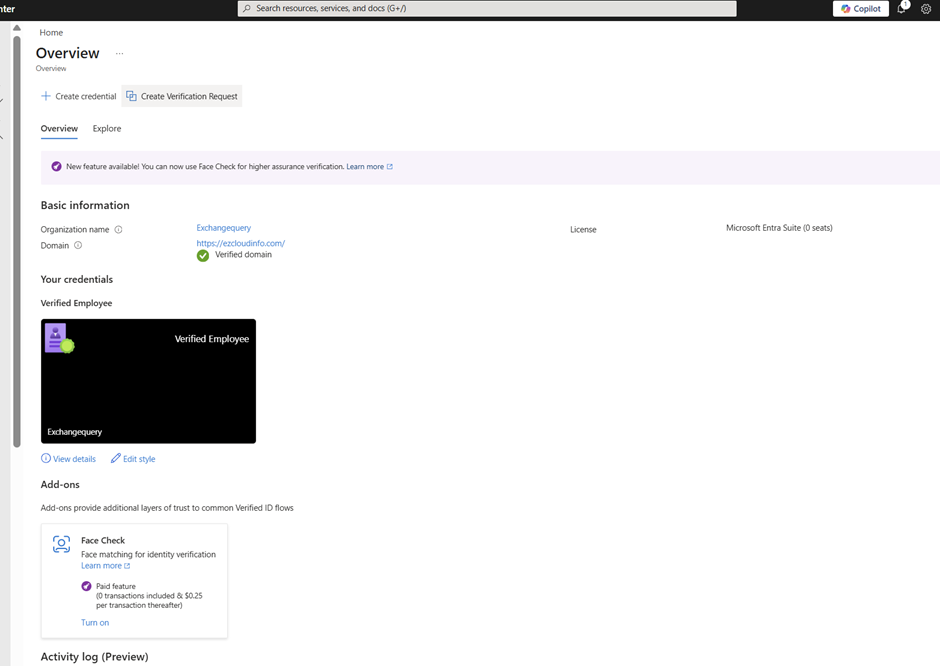
Microsoft Entra Verified ID transforms identity verification by enabling secure, privacy‑preserving, verifiable credentials. Whether you’re implementing Account Recovery (Preview) or integrating a trusted identity verification partner like AU10TIX, the onboarding process requires a few key steps: enabling the provider, provisioning resources, activating the integration, and validating the recovery flow.

This blog walks through the full, end‑to‑end Verified ID setup using AU10TIX as the identity verification provider. You’ll find prerequisites, detailed configuration steps, screenshots, and a summary to help you complete the setup smoothly

Prerequisites

Before you begin, ensure the following:

  1. Verified ID Setup :

You need to have the Verified ID setup properly configured in your tenant first and the foremost thing to do before proceeding to any steps. If this one is not setup then the account recovery (Preview) is not going to work . Especially your domain needs to be a verified domain here.

Also in the Authentication method you must have the Temproary Access Pass Enabled

Continue reading

Rethinking Network Access: A Deep Dive into Microsoft Entra Global Secure Access Diagnostics & Troubleshooting

Modern network access has evolved, and Microsoft Entra Global Secure Access (GSA) is leading the transformation. Whether users are accessing private resources, Microsoft 365 services, or the internet, every request is now routed through an identity aware, Zero Trust-aligned infrastructure. This shift introduces new troubleshooting paradigms and this guide is here to help.

Why Global Secure Access Exists

Global Secure Access combines multiple security layers to deliver robust protection and optimized routing:

  • Zero Trust enforcement for all traffic
  • Unified identity, device, and network controls
  • VPN replacement for private apps
  • Secure outbound internet access
  • Optimized Microsoft 365 routing

Traffic Profiles Explained

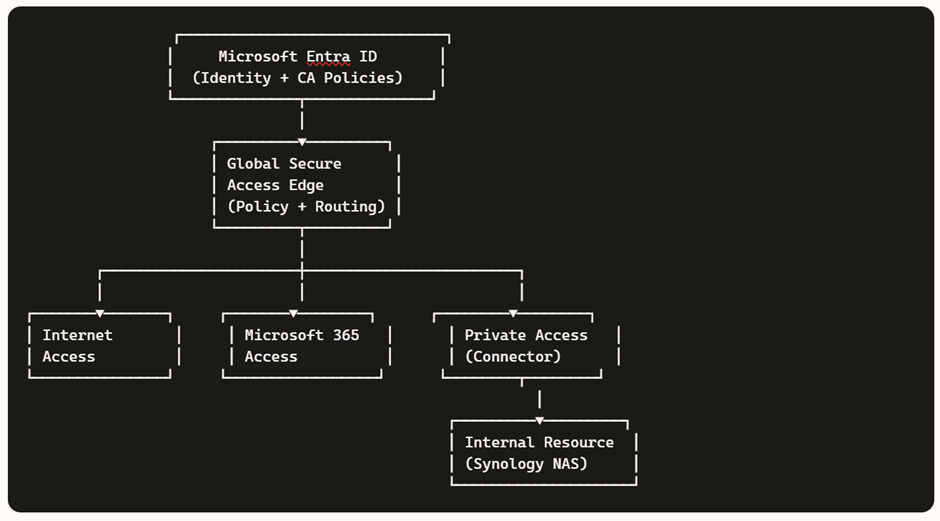
GSA categorizes traffic into three distinct profiles:

  • Internet Access → Secure outbound browsing
  • Microsoft 365 Access → Optimized, identity-aware routing
  • Private Access → Zero Trust access to internal apps

For architectural flow diagrams and examples (e.g., Synology NAS), refer to my previous blog.

Continue reading

From Home to Zero Trust: A Hands-On Guide to Microsoft Entra Private Access

In today’s hybrid work environment, secure access to internal resources without relying on traditional VPNs is a key requirement. Microsoft Entra Private Access, part of the Global Secure Access suite, enables Zero Trust-based connectivity to private applications hosted on-premises or in private networks.

In this demo, we’ll walk through setting up a home lab using an Azure tenant, installing the Entra connector, and configuring access to a Synology NAS as a private application—all from a personal laptop and home network.

Before starting, make sure you have:

  • Microsoft Entra ID tenant with Global Secure Access enabled.
  • Microsoft Entra Global Secure Access license (Private Access feature).
  • Windows 11 Pro device (required for advanced networking and policy support).
  • Device joined to Microsoft Entra ID (Azure AD joined or Hybrid joined).
  • Intune-managed device for policy enforcement and NRPT configuration.
  • Administrative access to your Azure tenant and local machine.
  • Microsoft Entra Connector installer downloaded from the Entra Admin Center.
  • Global Secure Access Client installer for Windows.
  • Internal resource (Synology NAS or similar) reachable on your home network.
  • Internal IP address of the resource (e.g., 10.0.x.x).
  • Optional DNS setup:
    • Private DNS zone or hosts file entry for FQDN (e.g., demo.synology.me).
  • Self-signed certificate (optional) for HTTPS access.
  • Internet connectivity for connector registration and client sign-in.
Continue reading

What’s New in Azure Firewall: Draft & Deploy, Selective Logging, Explicit Proxy, Security Copilot & More

Azure Firewall continues to evolve with powerful new features that enhance security, governance, and operational efficiency.

Whether you’re managing complex enterprise environments or hybrid architectures, these updates offer greater control, visibility, and automation.

Here’s an overview into the latest innovations:

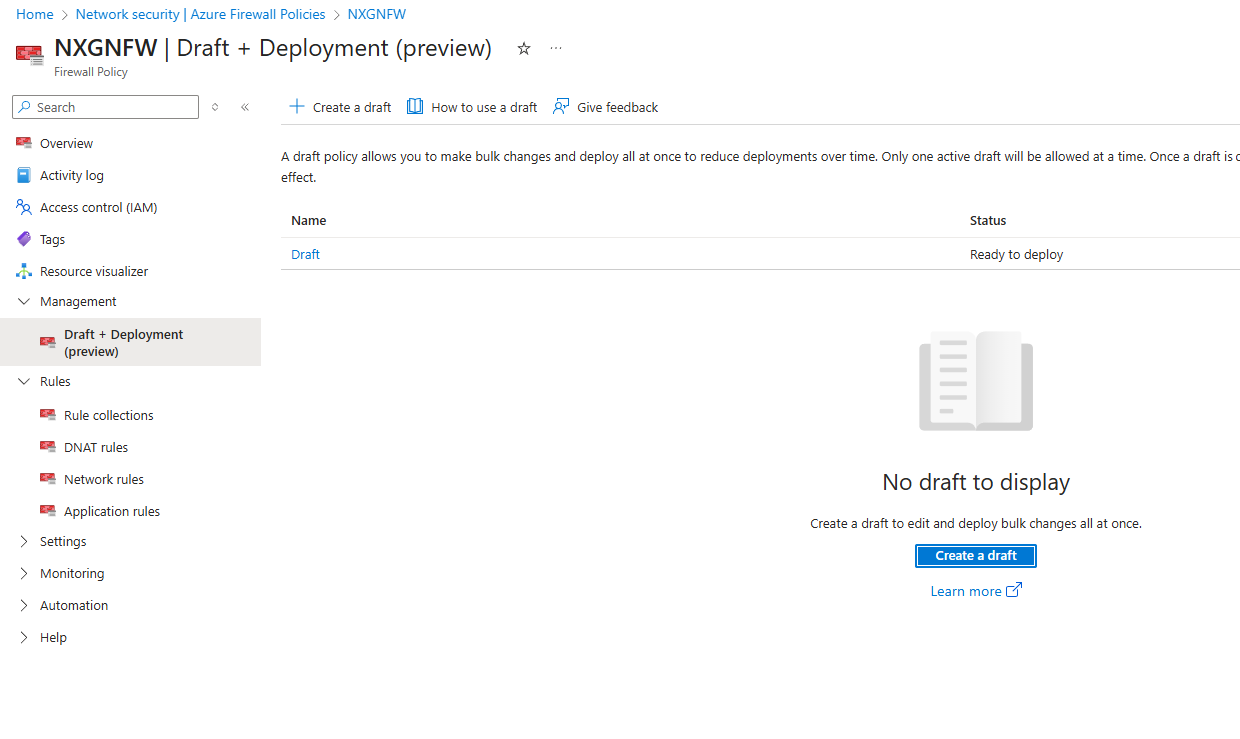
Draft and Deploy – Azure Firewall Policy Changes (Preview)

Managing firewall policies just got smarter.

With the Draft and Deploy feature, administrators can now:

  • Clone active policies to create editable drafts.
  • Collaborate on bulk changes without impacting live environments.
  • Stage deployments to minimize disruption.
  • Apply all changes at once, improving governance and reducing human error.

This is a game changer for environments requiring frequent policy updates, such as dynamic cloud workloads or multi team operations.

Continue reading

Creating Your First AI Agent with Azure AI Agent Service

Introduction

Azure AI Agent Service allows you to create, deploy, and manage AI agents that can perform various tasks. This service leverages powerful AI models to enable agents to perform a wide range of tasks, from answering queries to automating complex workflows. With its user-friendly interface and robust infrastructure, Azure AI Agent Service makes it easy for developers to build intelligent agents that can enhance applications and improve productivity.

This guide will walk you through the steps to set up and run your first agent with the help of Azure AI agent service.

Prerequisites:

  • An Azure subscription.
  • You need a GitHub Account.
  • Basic knowledge of PowerShell and Python.

So first step is to setup your workspace in the GitHUb

GitHub Codespaces: A Convenient Cloud-Based Development Environment

GitHub Codespaces offers a virtual machine in the cloud, providing a clean environment with all necessary prerequisites pre-installed. This makes it incredibly easy to set up and run your code, even on a standard laptop without high-end specifications.

Key Features:

  • Cloud-Based Computation: All computations are performed in the cloud, allowing you to work efficiently on a standard laptop.
  • Easy Setup: Setting up Codespaces is straightforward and quick, making it accessible for developers of all levels.
Continue reading