Deploying an application in Azure is only the beginning. The more important question is what happens when part of that application becomes unavailable.Can the application continue serving users if an availability zone fails? Is the database protected against the same failure? Are backups sufficient for the recovery time the business expects?
These questions become harder to answer when an application depends on resources spread across multiple resource groups and subscriptions. Each service has its own configuration options, limitations, and recovery behaviour. A healthy resource dashboard alone does not answer whether the application can survive an outage.
Azure Resiliency agent provides a conversational starting point for this work. This article explains where it fits, how to get started, and how to use it in a practical assessment involving Azure Database for PostgreSQL Flexible Server.
Preview note: This article reflects Microsoft documentation checked on 30 August 2026. The Resiliency agent is in preview; access requirements, portal labels, supported capabilities, and pricing can change. The example below is illustrative, not a report of a completed deployment or failover test.
What is Azure Resiliency agent?
Resiliency agent is integrated into Azure Copilot and helps users explore application resilience through natural language conversations. For new workloads, it can review an architecture description and generate ARM or Bicep templates incorporating resilience configurations. For existing workloads, it guides assessment and remediation. Microsoft Learn: Use the Resiliency agent
It helps to distinguish the surrounding experiences:
| Experience | Purpose |
| Resiliency in Azure | The broader portal experience, formerly Azure Business Continuity Center, bringing together zone resilience, high availability, backup, disaster recovery, and ransomware protection. |
| Infrastructure Resiliency Manager | The experience within Resiliency for assessing and improving infrastructure resilience against availability-zone outages. |
| Resiliency agent | The conversational assistant that helps users work through resilience questions and improvements. |
Sources: Resiliency overview, Infrastructure Resiliency Manager overview.
For this walkthrough, the focus is zone resilience: Understanding whether the components of an application are prepared for an availability zone failure.
Why use it ?
A common challenge in architecture reviews is connecting a business requirement to the configuration of every supporting service. This connection is crucial because it ensures that all components of the system align with the organization’s goals and deliver the desired value. By establishing a clear link between business objectives and technical configurations, teams can identify potential gaps or redundancies in their architecture early in the process. Furthermore, this approach promotes better communication among stakeholders, facilitating collaboration across departments and leading to more informed decision making. Ultimately, addressing this challenge not only enhances the overall efficiency of the architecture review process but also contributes to the successful realization of business strategies in a rapidly evolving technological landscape.
For example, a team might say, “This application must remain available during a zone outage.” That requirement needs to translate into decisions about compute placement, database availability, network configuration, and recovery procedures.
Addressing this gap is crucial to ensure seamless operations and minimize disruption during unforeseen circumstances.
The agent provides the team with a starting point for that conversation. Rather than merely asking if a feature is enabled, the team should inquire about which failures it addresses, what dependencies still exist, and how the change ought to be validated.
Before you start
This is especially useful when preparing a design review, reviewing an existing application, or turning a broad resilience requirement into a list of engineering tasks. The value comes from making the questions more specific and the next steps easier to review.
Microsoft currently lists two agent specific prerequisites: your tenant must be allowlisted, and Agents (Preview) must be enabled under Azure Copilot admin center → Settings → Access management. The agent setup documentation includes the access request form.
For an existing workload assessment, also check the permissions required for your intended actions:
| Action | Documented permissions |
| View service group resource counts | Service Group Reader |
| View individual resource status and recommendations | Service Group Reader plus Reader on the resources |
| Create a service group and add or remove members | Service Group Contributor plus Microsoft.Relationship/ServiceGroupMember/write on the resources |
| Assign goals or rediscover resources | The support matrix lists Service Group Contributor plus Microsoft.Relationship/ServiceGroupMember/read on the resources |
Use the current support matrix to confirm the permissions for your scenario. Do not grant broad subscription ownership simply to get past an access error.
Prepare a small application inventory before opening the agent: resource IDs, region, application owner, critical dependencies, and recovery requirements. Start with a nonproduction workload whose architecture you understand.
Getting started in the Azure portal
1. Open the Resiliency experience
Sign in to the Azure portal, search for Resiliency, and open the dashboard. This is the entry point documented by Microsoft. Resiliency overview
In the screenshot accompanying this article, the Getting started page includes an AI Assisted Resilience journey card. Select Get started with Resiliency agent to open the conversation.
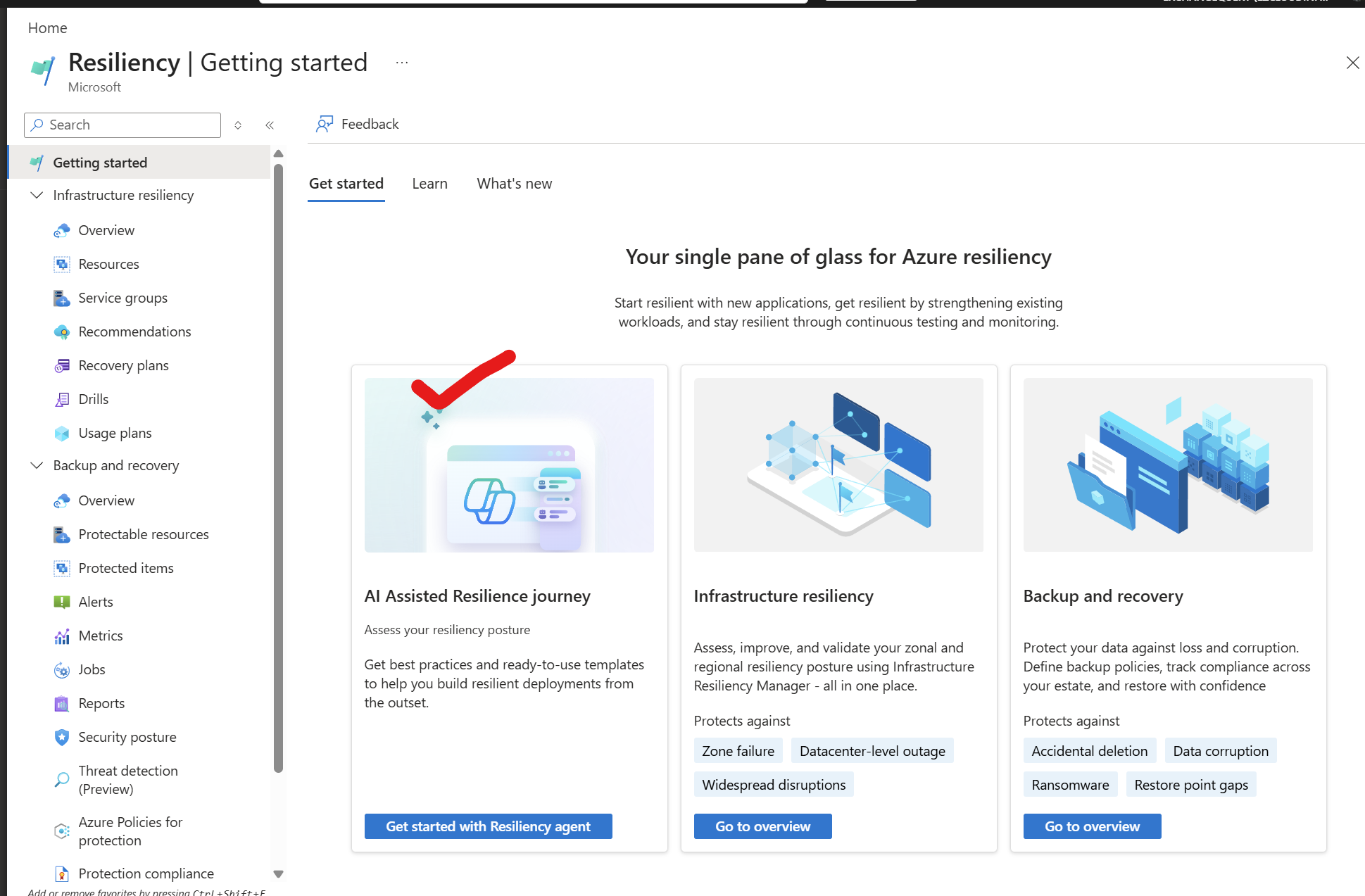
If the option is missing, check the tenant and preview access requirements first. When entering through Azure Copilot directly, Microsoft also instructs users to enable agent mode in the chat window. Resiliency capabilities in Azure Copilot
Once we start the resilency agent will be triggered
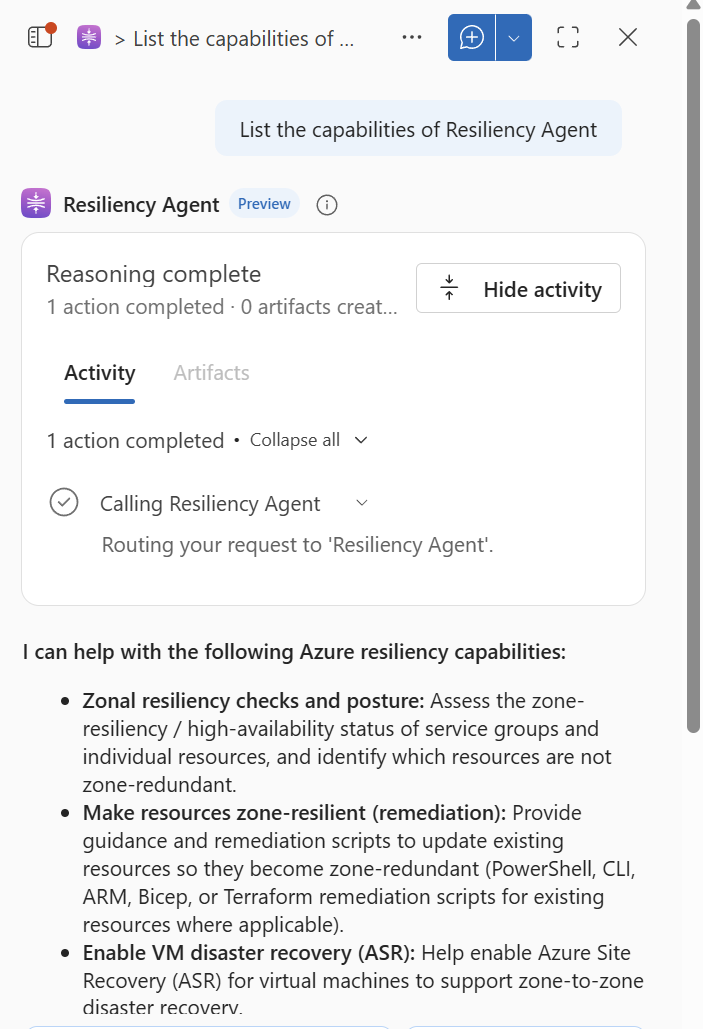
2. Define the application scope
Start with a specific request rather than “Check my Azure environment.”
For example:
Help me assess zone resilience for an application running on Azure virtual machines behind a Standard Load Balancer, with Azure Database for PostgreSQL Flexible Server as its database. First confirm the application scope and the information you need. Do not execute changes.
Instead of immediately producing generic resiliency recommendations, the agent first interprets the architecture and confirms the resources that will be evaluated.
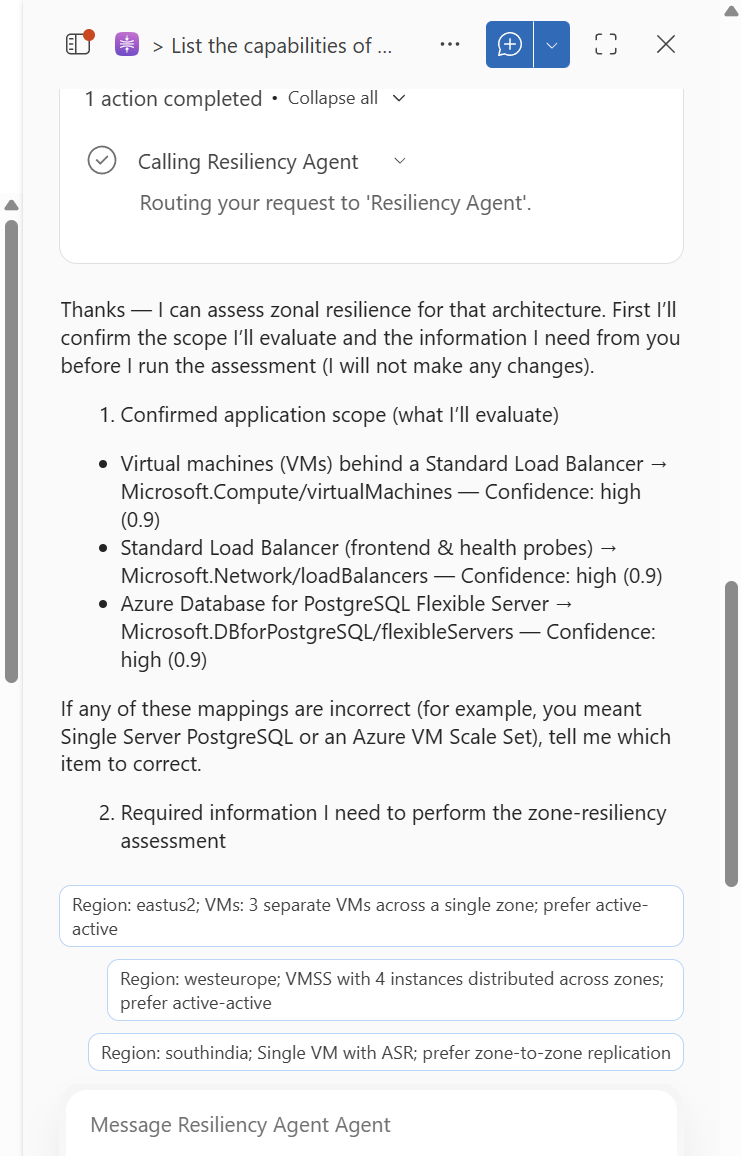
What I particularly like about this interaction is that the agent follows a structured assessment process. It first identifies the Azure resources involved and maps them to their corresponding Azure resource types, including:
- Azure Virtual Machines –
Microsoft.Compute/virtualMachines - Azure Standard Load Balancer –
Microsoft.Network/loadBalancers - Azure Database for PostgreSQL Flexible Server –
Microsoft.DBforPostgreSQL/flexibleServers
The agent also provides a confidence level for its interpretation. This is useful because it gives us an opportunity to validate whether the architecture has been understood correctly before continuing with the resiliency assessment.
For existing applications, Microsoft describes supplying resource lists to the agent to model the application as a service group. Agent workflow
A service group can represent an application across subscription and resource-group boundaries. Review its membership carefully: shared services and omitted dependencies can materially change the assessment. Service-group use cases
3. Enrol the service group and assign goals
For the service group assessment, enrol in a usage plan, then open Goals and Recommendations → Assign goals → Save. The Basic plan covers posture and recommendations; Standard adds recovery and drill capabilities. Review the plan details before selecting one. Assign goals and view posture
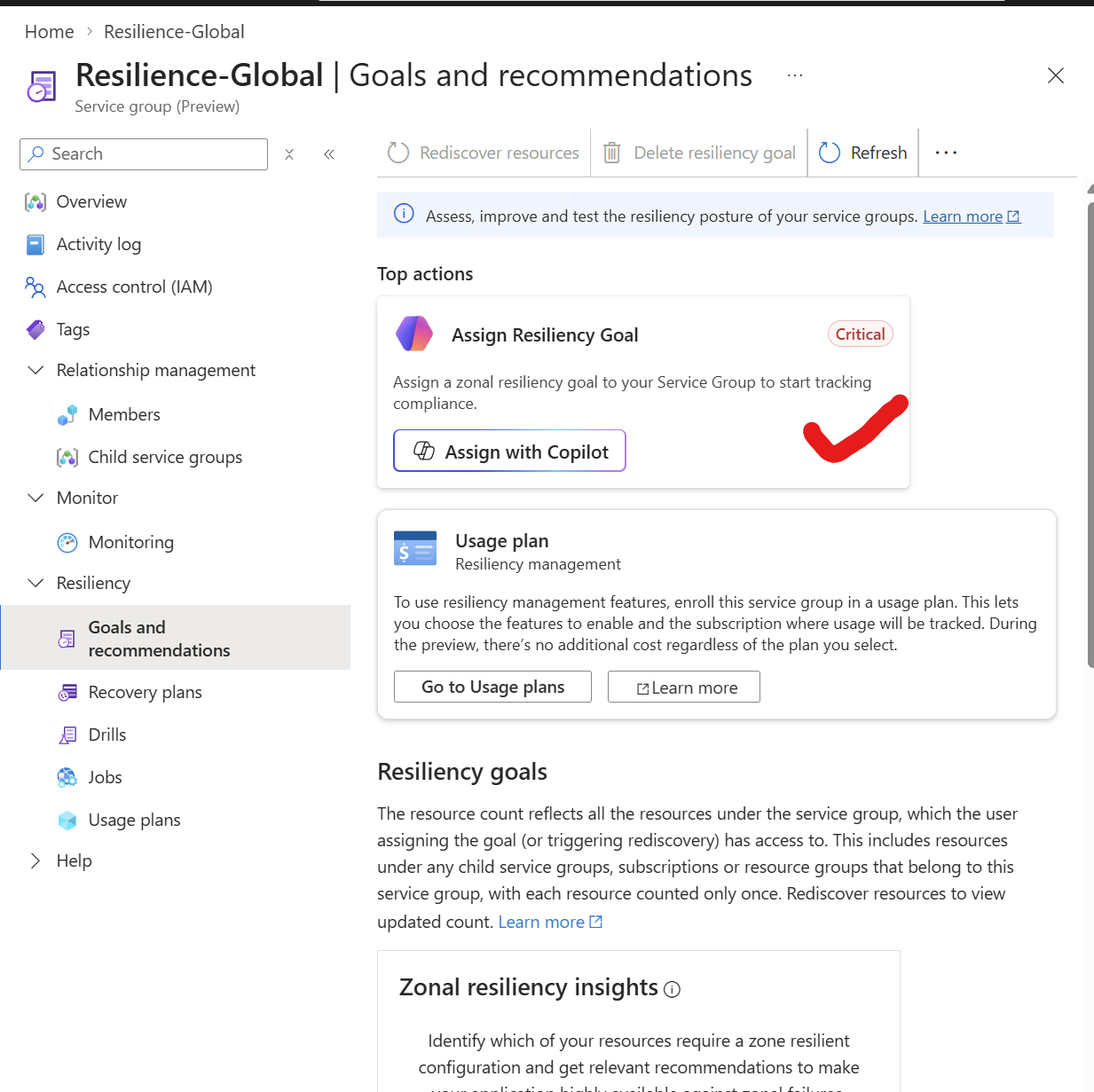
Then it could take few minutes to perform an initial discovery and provide a suggestion
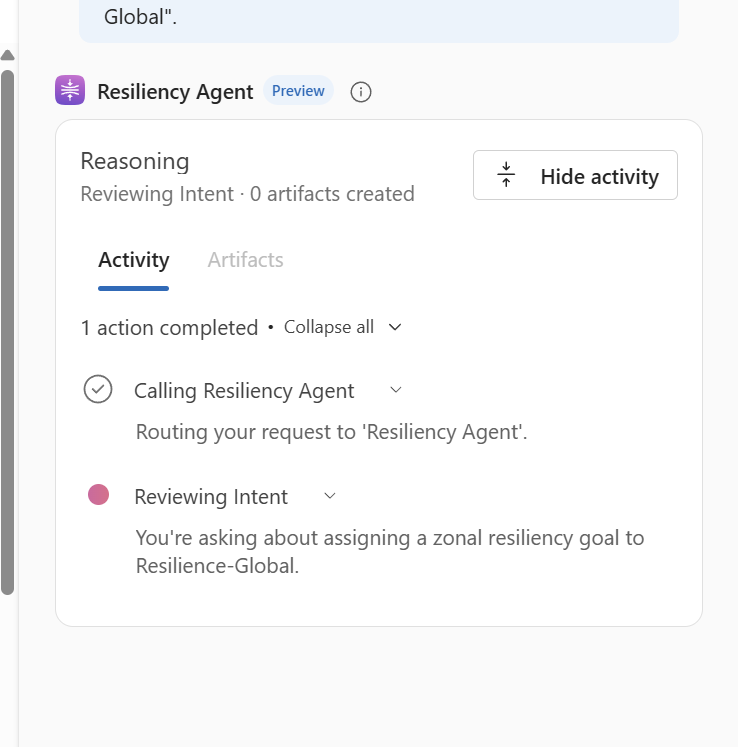
State the business requirement in the conversation as well:
The application must tolerate an availability-zone outage. Identify resources that do not meet the zone-resilience goal, distinguish unsupported or unevaluated resources, and explain any assumptions.
A business recovery-time objective is useful context, but do not assume the tool has measured it. The documented goals currently cover zonal resilience. Current scope
4. Review recommendations before implementation
Open each recommendation and inspect its affected resources, rationale, remediation steps, and cost implications where available. Review recommendations
For each proposed change, ask:
Explain the failure scenario this change addresses, the prerequisites, potential service interruption, cost drivers, validation steps, and any remaining risks. Identify information you cannot verify. Microsoft states that this agent workflow does not automatically modify resources; changes require confirmation and manual execution. Treat generated instructions and templates as material for engineering review. Agent workflow
Practical example: PostgreSQL Flexible Server
Consider an illustrative application with these components:
| Component | Assumed starting point | Review question |
| Application VMs | Multiple instances, zone placement unverified | Could losing one zone remove all usable application instances? |
| Standard Load Balancer | Frontend zone configuration unverified | Does the frontend configuration support the intended zone resilience? |
| PostgreSQL Flexible Server | High availability disabled | How would the database recover if its zone became unavailable? |
These are example assumptions, not findings from the screenshot.
Ask a focused database question
Assess the zone-resilience configuration of PostgreSQL Flexible Server <server-resource-id>. Check whether zone-redundant high availability is enabled. Explain whether the current region and compute tier support it, and outline the implementation and validation steps. Do not execute changes.
Microsoft’s support matrix recognises PostgreSQL high availability with zone redundancy and Standard Load Balancer zone-redundant frontends as detected zone-resilience solutions. Supported solutions
In the supplied screenshot, the activity panel shows guidance searches for Microsoft.DBforPostgreSQL/flexibleServers and Microsoft.Network/loadBalancers. This illustrates the agent looking up service-specific guidance. It does not, by itself, establish that either resource is correctly configured or that remediation has completed.
Understand the database recommendation
If PostgreSQL has no high availability configured, zone-redundant HA is a candidate improvement to evaluate. It places the primary and standby in different availability zones and uses synchronous replication. Same-zone HA places both in one zone and therefore does not offer the same protection against loss of that zone. PostgreSQL high availability
Check eligibility before planning the change. Microsoft documents HA support for General Purpose and Memory Optimized tiers, but not Burstable. Zone-redundant deployment also depends on regional support. Configure PostgreSQL high availability
Backups answer a different recovery question. PostgreSQL supports point-in-time restoration within the configured retention period, but restoring data is not equivalent to keeping the application serving requests through a failure. Review backup and restore requirements alongside HA. PostgreSQL backup and restore
Turn the recommendation into a change plan
Use the following as a review checklist, not a claim that these changes have already been performed:
- Confirm the business requirement and database eligibility.
- Estimate the additional infrastructure cost and obtain the necessary approval.
- Review the generated guidance against the PostgreSQL documentation and your existing infrastructure code.
- Implement the approved configuration in a nonproduction environment first.
- Confirm the resulting HA mode and primary/standby zone placement.
- Run an approved failover test and measure application errors, reconnection behaviour, and recovery time.
- Record the results and remaining dependencies before planning production rollout.
Database resilience is not enough to prove application resilience; include an actual user transaction in the test, such as signing in, retrieving a record, and performing a write operation.
How to interpret the results responsibly
Keep three limitations in mind:
- Coverage: “Not evaluated” can mean unsupported or excluded; it is not a pass.
- Freshness: Newly added resources require rediscovery, and recommendations can lag posture updates.
- Visibility: Rediscovery evaluates resources accessible to the user who starts it, so incomplete permissions can produce an incomplete view.
These behaviours are documented in Assign goals and view resiliency posture.
Also separate configuration evidence from operational evidence. An activity entry saying that guidance was found does not demonstrate successful failover. A favourable posture assessment does not replace a tested recovery procedure or establish that every application dependency will remain available.
Before adopting the agent in a regulated environment, review your organisation’s requirements for preview services, AI usage, access control, and information handling. Avoid including credentials, connection strings, or customer records in prompts.
Benefits and the case for using it
The strongest reason to use Resiliency agent is to make resilience reviews easier to start and more actionable.
A more focused assessment. Natural language questions help connect an availability requirement to concrete resource-level checks.
Better review conversations. Asking why a recommendation matters encourages discussion of the failure scenario, rather than a checkbox exercise.
Clearer engineering tasks. A recommendation can become a reviewed change with an owner, cost estimate, validation plan, and recorded outcome.
Earlier design feedback. For a new workload, the conversation can begin before resources are deployed, when architectural changes are usually easier to make.
A repeatable review habit. Teams can reuse their assessment questions after significant architecture changes, while checking that scope and evidence remain current.
These are practical benefits to evaluate in your own environment, not guarantees of reduced outages or a quantified return on investment. For a first trial, choose one small application, confirm its dependencies, assess its zone resilience, and work through one recommendation from explanation to validation. That provides a useful basis for deciding whether the agent improves your team’s review process.
The goal is confidence backed by evidence: knowing which failure the application is designed to survive, what changes were made, and how that behaviour was tested.
Resiliency Agent can help identify configuration gaps and recommend improvements, but it does not replace architecture review, operational testing, or application level failover validation. A workload should only be considered resilient when the expected failure scenarios have been tested and the resulting recovery behaviour has been measured.


Leave a Reply