A practical guide to protecting sensitive prompts with policy controls
As more organizations introduce Microsoft 365 Copilot Chat, employees are increasingly using conversational AI to solve everyday business problems. An innocent troubleshooting request or a request to summarize a financial transaction can become a security concern when the user includes confidential information in the prompt.
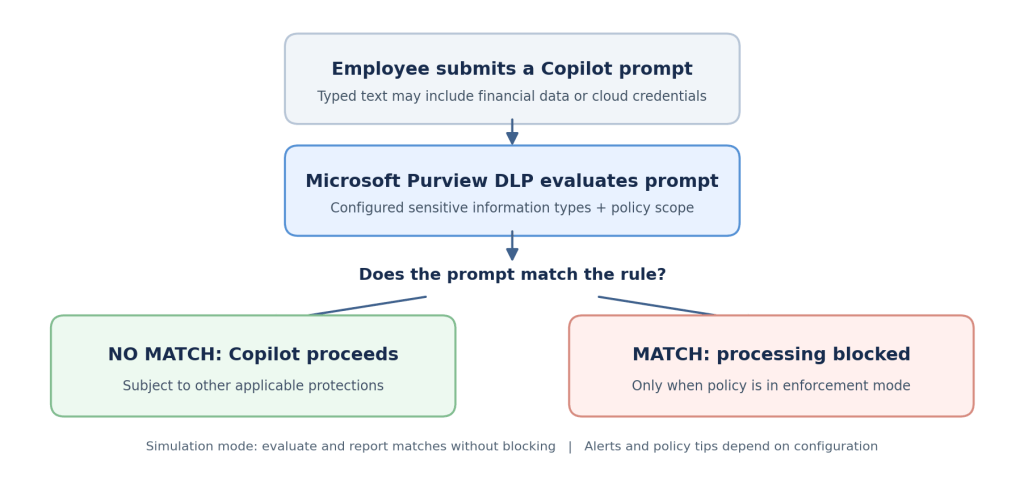
Microsoft Purview Data Loss Prevention (DLP) helps security teams define what types of information should be restricted in supported Copilot prompts. This article explains the business need, the available safeguards, the prerequisites and a practical configuration completed in a demonstration tenant. It also describes how to validate the policy without confusing successful configuration with proven enforcement.
Why organizations need controls for AI prompts
The objective is not to stop employees from using AI. It is to apply the same information protection discipline that organizations already expect across email, files and collaboration tools to the way people interact with AI assistants.
- Financial information: A user includes payment card data in a prompt while preparing a customer summary.
- Cloud credentials: A developer pastes an application secret or a storage access key into a troubleshooting question.
- Governance and compliance: Security teams need a documented approach to protecting regulated or confidential information.
- User awareness: Clear guidance helps employees understand what information belongs in an approved AI workflow.
A meaningful control must do more than exist in a policy list. It should have a defined scope, reliable detection conditions, an appropriate restriction action and evidence that its intended behavior has been tested.
(more…)