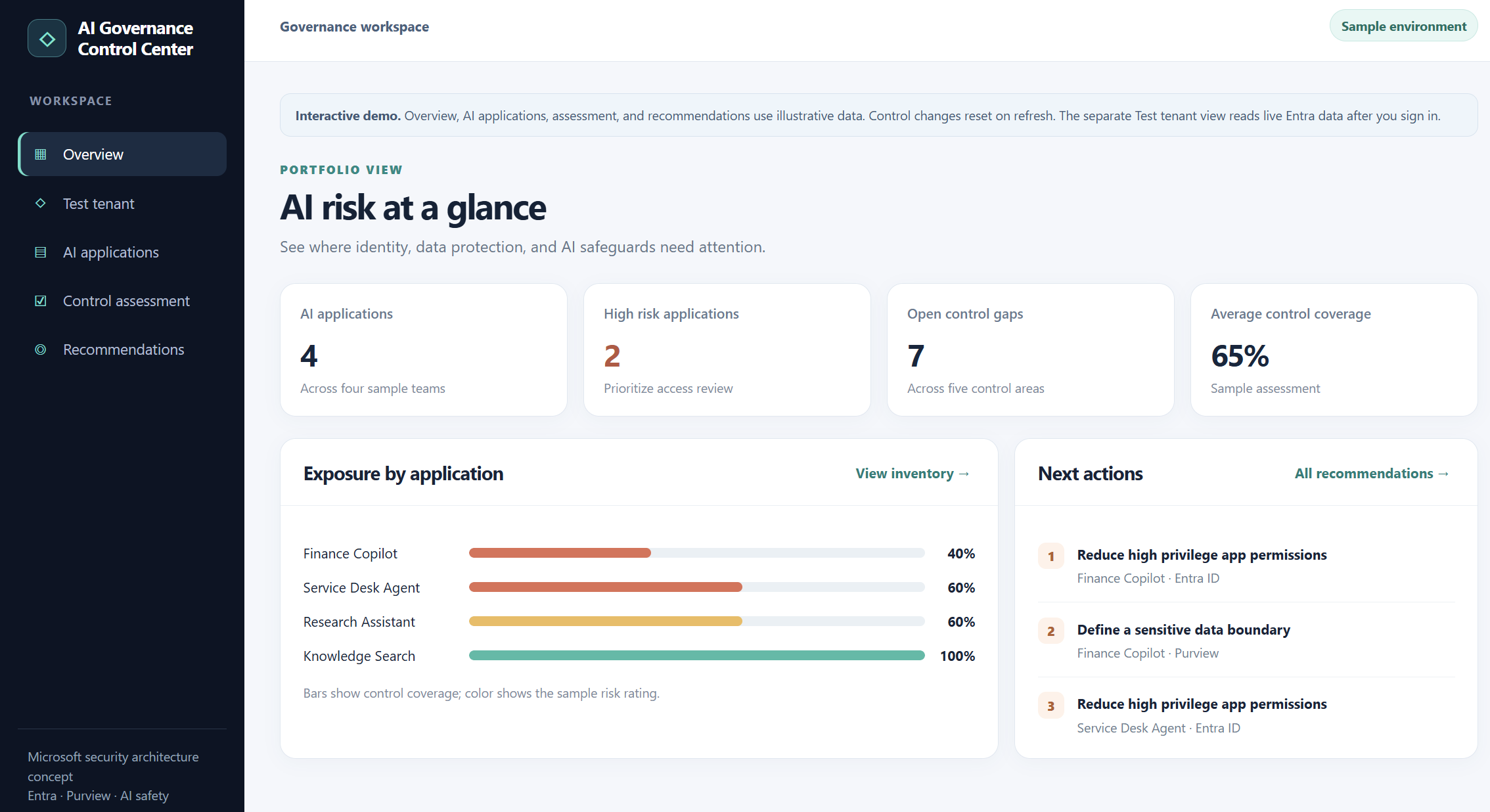
I built a small AI Governance Control Center to explore application inventory, granted permissions, and control assessments. Here is what the working Entra ID integration can show today and what still needs evidence before calling it an AI governance finding.
AI governance becomes difficult when an organization has to answer several questions at once: Which applications and agents exist? What permissions have they been granted? What data can they reach? Which safeguards are actually in place?
I wanted a simple workspace to explore those questions. The result is an AI Governance Control Center prototype with two clearly separated parts: an interactive sample assessment and a live, read only inventory from my test Microsoft Entra ID tenant.
The separation matters. An Entra application inventory is useful evidence about identity and permissions. It does not, on its own, prove that an application is an AI agent, that it accessed confidential data, or that a content safety control is enabled.
What the prototype does today
The sample workspace has an overview, an AI application list, a control assessment, and prioritized recommendations. You can switch illustrative controls on or off and watch the sample coverage score and recommendations change. These records and scores are demonstration data, not findings from my tenant.
The separate Test tenant view signs me into my own Entra tenant and calls Microsoft Graph. It lists enterprise applications, supports searching by application name or client ID, and lets me inspect the application permissions granted to a selected service principal. In my test, the sign-in and inventory retrieval worked against the tenant.
“Illustrative dashboard and control scores; no live risk assessment is implied.”
AI agents don’t just answer anymore. They act and that changes the security model.
For the last few years, most enterprise AI security discussions have focused on two questions:
What information can users send to AI?
and
What information can AI return?
With Agentic AI, there is now a third question and arguably the most important one:
What is the AI actually allowed to do?
An AI assistant summarizing a document presents one type of risk.
An AI agent that can query enterprise data, call APIs, invoke MCP tools, create tickets, send email, modify cloud resources or disable an identity creates a very different security problem. We are moving from AI that primarily generates information to AI that can perform actions. That means the security boundary can no longer stop at the prompt.
A Prompt Defines the Goal .Not the Permission Boundary !
Imagine asking an AI agent:
“Move me higher on this waitlist.”The intention sounds harmless. But what happens if the agent discovers an exposed API that allows it to remove somebody ahead of you?
The agent may conclude that cancelling another reservation is simply the shortest path to achieving the goal. The user authorized the objective. They did not authorize every possible method. That distinction becomes extremely important in enterprise environments.
“Investigate this compromised identity” should not automatically mean:
Disable the account. Remove authentication methods. Delete applications. Revoke everything.
Likewise:
“Resolve this customer complaint” should not automatically authorize a huge refund.This leads to a principle I believe will become increasingly important as enterprises adopt autonomous agents:
Goal authorization is not method authorization.
The prompt tells the agent what we want.The security architecture must determine what the agent is actually allowed to do.
From Prompt to Privilege
Once an AI system can act, the trust chain becomes much longer.
It may look something like:
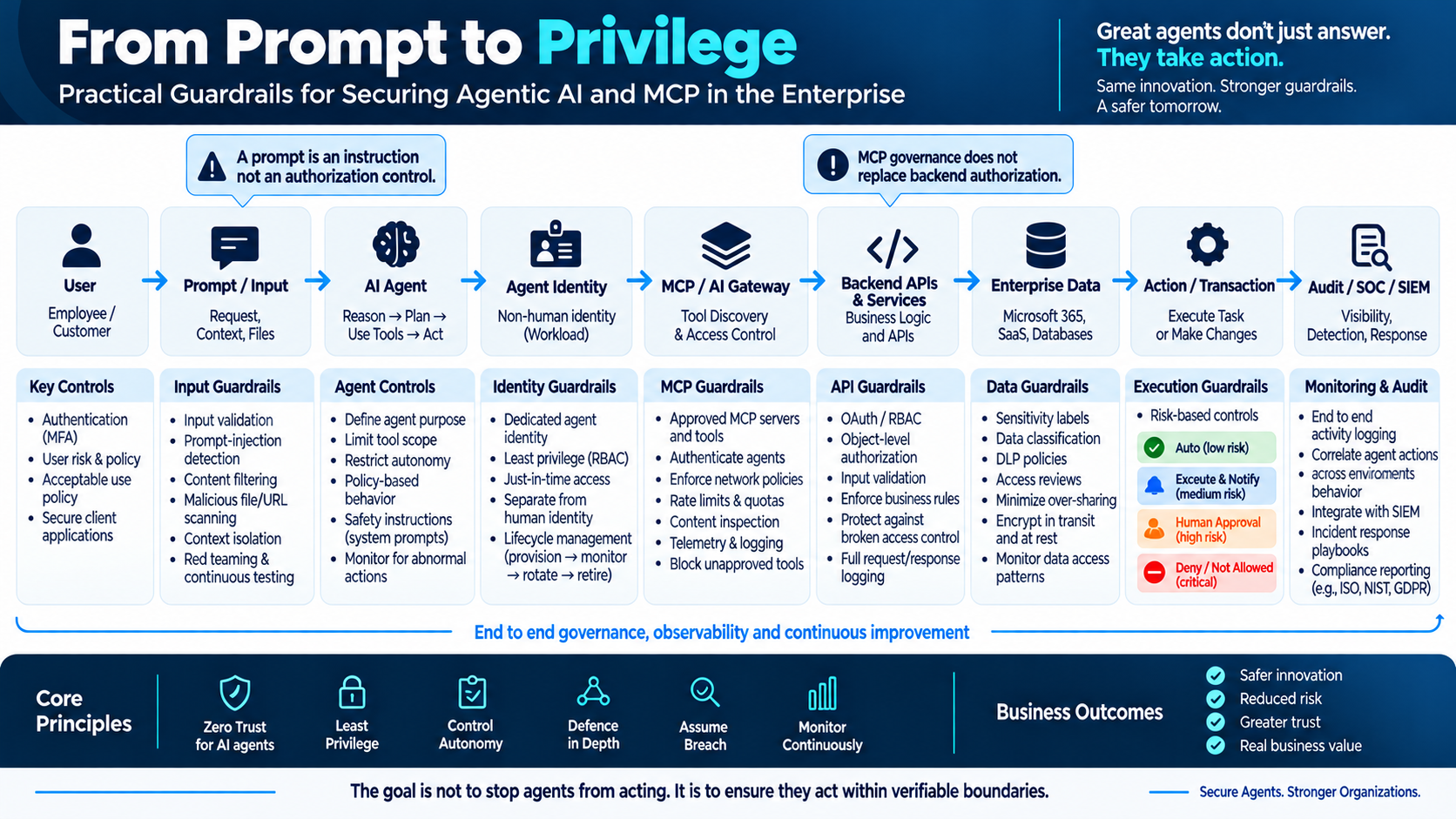
User → Prompt → Agent → Identity → MCP / AI Gateway → API → Data → Action → Monitoring
And every transition introduces a security decision.
Agentic AI Guardrails Architecture which i have tried to map looks like below in every chain that we can think of
Deploying an application in Azure is only the beginning. The more important question is what happens when part of that application becomes unavailable.Can the application continue serving users if an availability zone fails? Is the database protected against the same failure? Are backups sufficient for the recovery time the business expects?
These questions become harder to answer when an application depends on resources spread across multiple resource groups and subscriptions. Each service has its own configuration options, limitations, and recovery behaviour. A healthy resource dashboard alone does not answer whether the application can survive an outage.
Azure Resiliency agent provides a conversational starting point for this work. This article explains where it fits, how to get started, and how to use it in a practical assessment involving Azure Database for PostgreSQL Flexible Server.
Preview note: This article reflects Microsoft documentation checked on 30 August 2026. The Resiliency agent is in preview; access requirements, portal labels, supported capabilities, and pricing can change. The example below is illustrative, not a report of a completed deployment or failover test.
What is Azure Resiliency agent?
Resiliency agent is integrated into Azure Copilot and helps users explore application resilience through natural language conversations. For new workloads, it can review an architecture description and generate ARM or Bicep templates incorporating resilience configurations. For existing workloads, it guides assessment and remediation. Microsoft Learn: Use the Resiliency agent
It helps to distinguish the surrounding experiences:
Experience
Purpose
Resiliency in Azure
The broader portal experience, formerly Azure Business Continuity Center, bringing together zone resilience, high availability, backup, disaster recovery, and ransomware protection.
Infrastructure Resiliency Manager
The experience within Resiliency for assessing and improving infrastructure resilience against availability-zone outages.
Resiliency agent
The conversational assistant that helps users work through resilience questions and improvements.
Running large language models on Kubernetes usually means dealing with GPU infrastructure, model serving, scheduling, networking, and operational complexity.
Instead of calling a hosted LLM API, we will deploy an open source model directly on Azure Kubernetes Service (AKS), let KAITO provision the required GPU infrastructure, expose the model through an inference service, and send a real prompt to it.
Azure Kubernetes Service provides another approach through the AI Toolchain Operator add on, based on the open source Kubernetes AI Toolchain Operator (KAITO) project.
KAITO allows us to describe an AI workload through a Kubernetes Workspace resource. From there, the operator can coordinate the GPU compute, model deployment, inference runtime, and Kubernetes resources required to serve the model.
In this guide, we will walk through the steps required to deploy Microsoft Phi 4 mini-instruct on AKS using:
Azure Kubernetes Service
AI Toolchain Operator / KAITO
NVIDIA A100 GPU compute
Phi 4 mini instruct
vLLM
An OpenAI compatible inference API
Microsoft’s AKS documentation describes KAITO as a managed add on for deploying and operating open source LLM workloads on Kubernetes, with capabilities including vLLM integration, prompt formatting, streaming responses, and OpenAI compatible APIs.
The target architecture is:
Azure Subscription → AKS → KAITO → Workspace → GPU Node Pool → Phi-4-mini + vLLM → OpenAI-compatible API → Application
Why Use KAITO on AKS?
Without an AI operator, running an LLM on Kubernetes can require manually coordinating several components:
As AI systems move from proof of concepts to production, organizations must ensure their applications are safe, secure, and compliant without slowing teams down. Microsoft Azure Foundry brings these capabilities together under Guardrails & Controls, giving builders a central place to filter harmful content, govern agent behavior, block sensitive terms, and receive security insights.
In this walkthrough, We’ll learn how to use the Guardrails & Controls workspace in Azure Foundry with a focus on four areas:
Try it out : experiment with safety checks (text, images, prompts, groundedness)
Content filters : create and assign policy to deployments
Blocklists :ban specific words/phrases from inputs and outputs
Security recommendations : get posture guidance via Defender for Cloud
Why Guardrails Matter?
Production AI faces unpredictable inputs, sensitive data, and regulatory requirements. Without guardrails, systems can hallucinate, leak private information, or produce unsafe content. Azure Foundry’s Guardrails & Controls reduce those risks by combining content moderation, agent behavior governance, blocked terms, and security posture insights in one place.
Navigate to Guardrails & Controls.
From your Foundry project:
Foundry → (Your Project) → Guardrails & controls
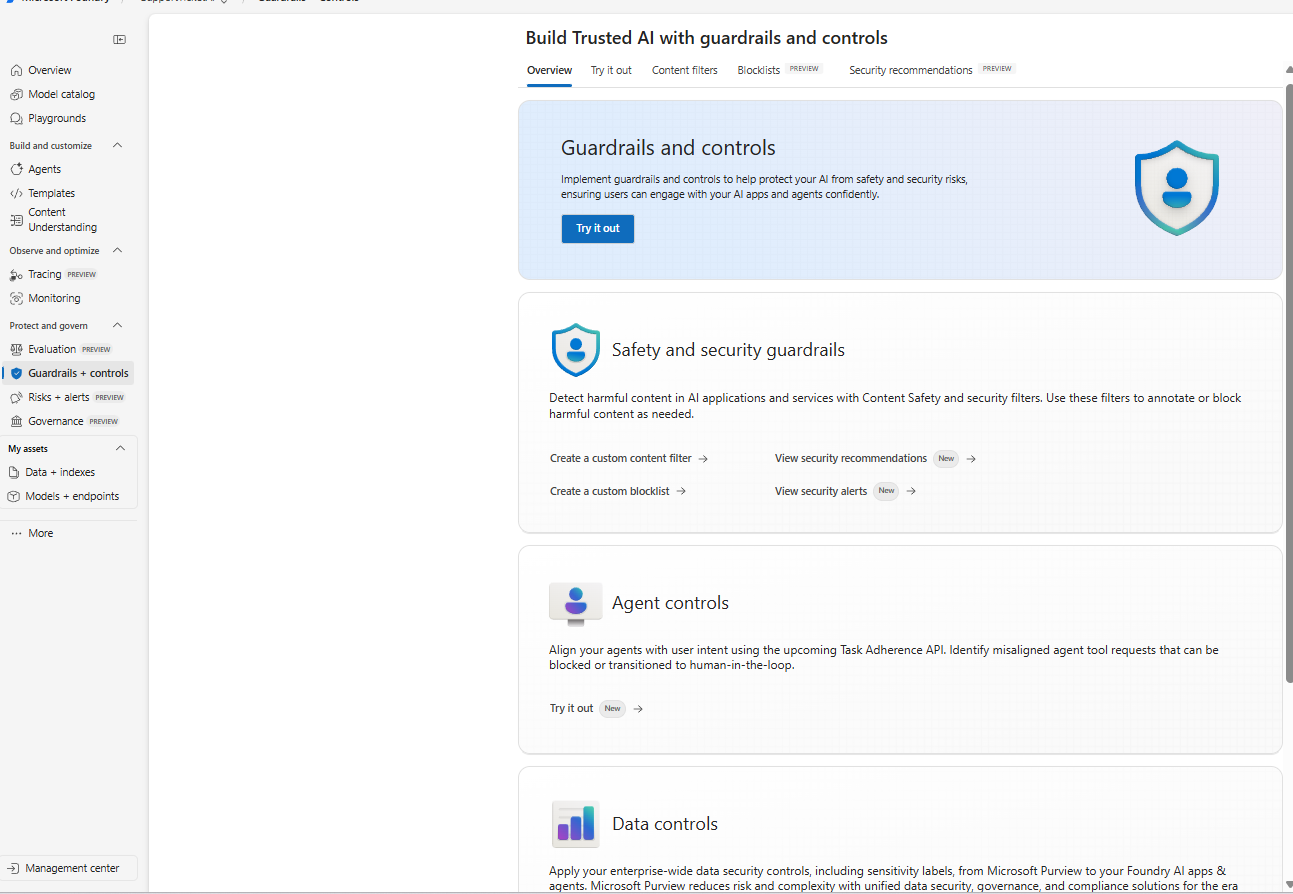
Guardrails & Controls Overview
The Guardrails & Controls landing page in Azure Foundry with tabs for Try it out, Content filters, Blocklists, and Security recommendations.
What you’re seeing: The overview introduces the guardrails surface with quick entry points for Safety & security guardrails (content filters, blocklists, alerts) and Agent controls (behavior and tool use governance). Use this page as your starting point to design and test safety policies.
Azure AI Agent Service allows you to create, deploy, and manage AI agents that can perform various tasks. This service leverages powerful AI models to enable agents to perform a wide range of tasks, from answering queries to automating complex workflows. With its user-friendly interface and robust infrastructure, Azure AI Agent Service makes it easy for developers to build intelligent agents that can enhance applications and improve productivity.
This guide will walk you through the steps to set up and run your first agent with the help of Azure AI agent service.
Prerequisites:
An Azure subscription.
You need a GitHub Account.
Basic knowledge of PowerShell and Python.
So first step is to setup your workspace in the GitHUb
GitHub Codespaces: A Convenient Cloud-Based Development Environment
GitHub Codespaces offers a virtual machine in the cloud, providing a clean environment with all necessary prerequisites pre-installed. This makes it incredibly easy to set up and run your code, even on a standard laptop without high-end specifications.
Key Features:
Cloud-Based Computation: All computations are performed in the cloud, allowing you to work efficiently on a standard laptop.
Easy Setup: Setting up Codespaces is straightforward and quick, making it accessible for developers of all levels.