Tag: technology

  • Microsoft Purview at Ignite 2026: The Next Evolution of Enterprise Data Security in the AI Era

    Microsoft Purview at Ignite 2026: The Next Evolution of Enterprise Data Security in the AI Era

    From intelligent data classification to runtime protection for AI agents

    Microsoft Ignite 2026 introduced several important advancements in Microsoft Purview, reflecting the changing nature of enterprise data security in an increasingly AI driven workplace.

    As organizations adopt Microsoft 365 Copilot, autonomous AI agents, third party coding assistants and intelligent automation platforms, the traditional boundaries of data security are rapidly expanding.

    Historically, enterprise data protection strategies have primarily focused on how users access, store and share sensitive information. Today, AI agents can independently retrieve information, interact with applications, invoke external tools and perform actions on behalf of users.

    This introduces a fundamental architectural question:

    How do organizations maintain consistent data protection when sensitive information is no longer accessed exclusively by humans, but also by intelligent agents?

    The latest Microsoft Purview announcements at Ignite 2026 provide an interesting perspective on how Microsoft is addressing this challenge.

    In this article, we will explore the key announcements, their implications for enterprise security architecture, and how these capabilities could influence future data protection strategies.

    1. Microsoft Purview Ignite 2026 – Announcements at a Glance

    CapabilityAnnounced availability
    Runtime DLP for supported local AI agentsPublic preview – January 2027
    Content based Copilot grounding protectionPublic preview – January 2027
    DLP for Copilot attachments and linked filesPublic preview – January 2027
    Recurring classification refreshPublic preview – January 2027
    Enhanced Sensitive Information Types (SITs)Phased availability from January 2027
    Unified classification managementPublic preview
    Increased auto labeling capacityGenerally available
    Expanded auto labeling simulationGenerally available
    Adaptive scopes for auto labelingGenerally available
    Default SharePoint library labels for existing filesPublic preview
    Purview integration with Unified Agent RiskPublic preview

    2. Extending Data Loss Prevention to Local AI Agents

    One of the most interesting announcements at Ignite 2026 is the extension of Microsoft Purview Data Loss Prevention to supported AI agents operating locally on Windows endpoints.

    Unlike traditional applications, AI coding assistants and autonomous agents may dynamically access local files, interpret instructions, invoke tools and communicate with external services.

    Supported agents announced by Microsoft include Claude Code, Claude Desktop, GitHub CLI, GitHub Copilot and supported Visual Studio Code extensions.

    This creates new data exposure scenarios that go beyond conventional file transfers and browser uploads.

    Understanding the risk through a practical scenario

    Consider a software developer using an AI coding assistant on a corporate Windows workstation to troubleshoot an application.

    During the troubleshooting process, the agent encounters a configuration file containing application credentials, database connection strings or API keys.

    Depending on the agent’s workflow, this information could become part of an outbound prompt or tool invocation.

    With the announced Microsoft Purview capabilities, organizations will be able to introduce content aware DLP controls at supported agent interactions.
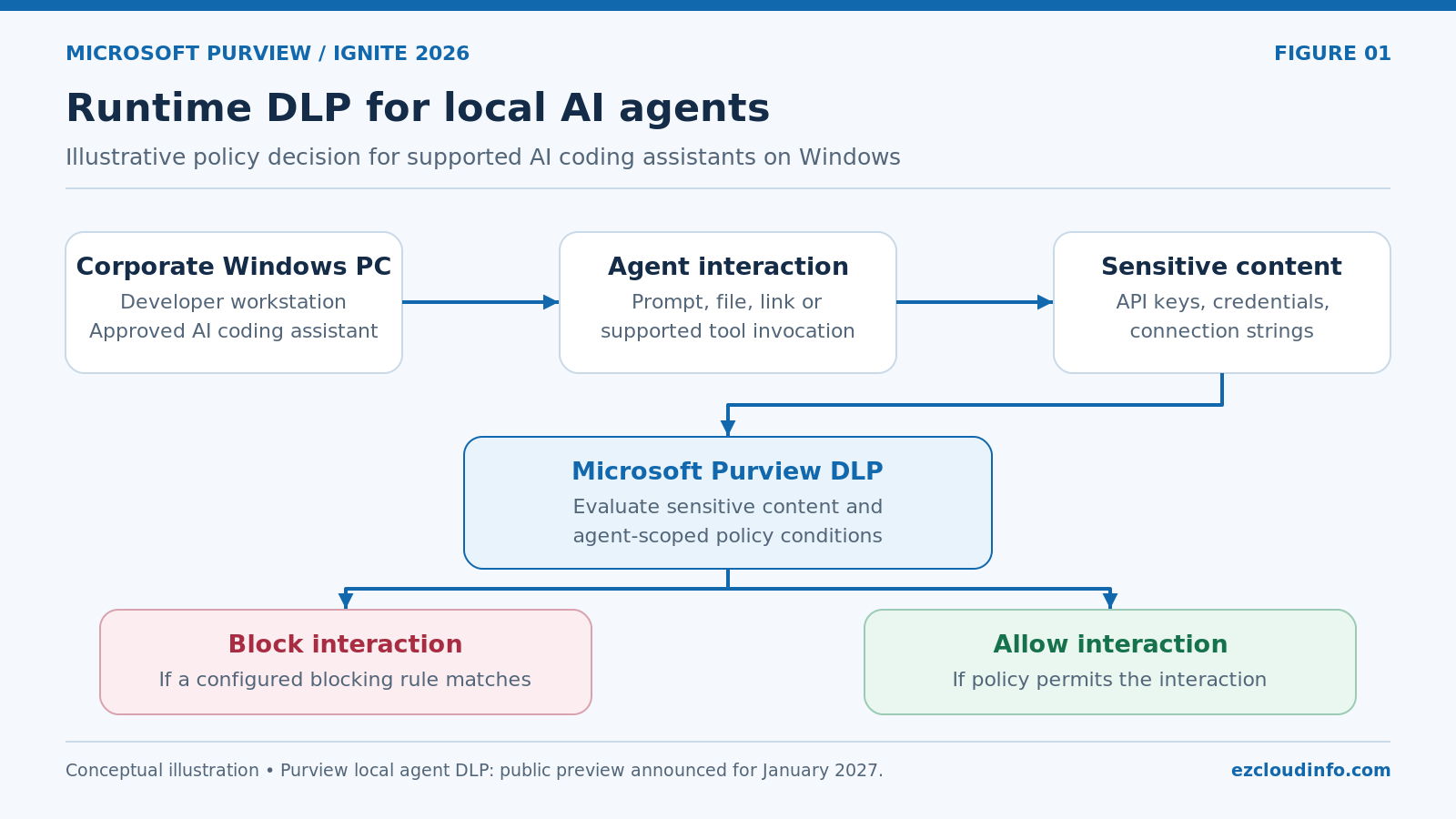
    Conceptual local AI agent DLP enforcement flow
    Figure 1 – Conceptual local AI agent DLP enforcement flow

    The objective is not necessarily to prevent developers from using AI assistants. Instead, it is to establish appropriate boundaries around the sensitive information that these assistants can process.

    Agent-specific policy scoping also introduces the possibility of applying different data protection requirements according to an agent’s business purpose.

    Enterprise security architecture perspective

    This represents an opportunity to extend existing Endpoint DLP strategies into agent-driven workflows.

    Organizations should consider incorporating AI agent interactions into their existing data exfiltration threat models, alongside conventional channels such as removable media, browsers, cloud storage and external communications.

    Importantly, runtime DLP should complement not replace secrets management, least-privilege access, endpoint security and network-level protection.

    3. Microsoft 365 Copilot DLP Beyond Sensitivity Labels

    Sensitivity labels remain a fundamental component of enterprise information protection.

    However, one of the practical challenges faced by large organizations is ensuring that sensitive information across their entire data estate has been correctly classified and labeled.

    Legacy documents, inconsistent labeling practices and newly created content can introduce gaps in protection.

    Microsoft’s latest announcements introduce additional content-aware protection for Microsoft 365 Copilot, allowing DLP policies to restrict the use of sensitive files without requiring a sensitivity label as the sole protection condition.

    Comparing existing and announced protection scenarios

    Data protection scenarioExisting capabilitiesIgnite 2026 enhancements
    Sensitive information typed into promptsContent-based DLPExisting protection retained
    Sensitivity-labeled documentsLabel-based restrictionsExisting protection retained
    Unlabeled files containing sensitive informationLabel-based restrictions alone do not cover these filesContent-based grounding restrictions
    Sensitive files attached to promptsLimited by existing policy capabilitiesExpanded attachment inspection
    Sensitive files linked within promptsLimited by existing policy capabilitiesExpanded linked-file inspection

    A practical enterprise use case

    Imagine an employee requesting Microsoft 365 Copilot to summarize a financial planning document stored in SharePoint.

    The employee has legitimate access to the document, but it has not been assigned a sensitivity label.

    The announced DLP enhancements introduce the ability to restrict Copilot from using that document when its contents match configured sensitive information conditions.
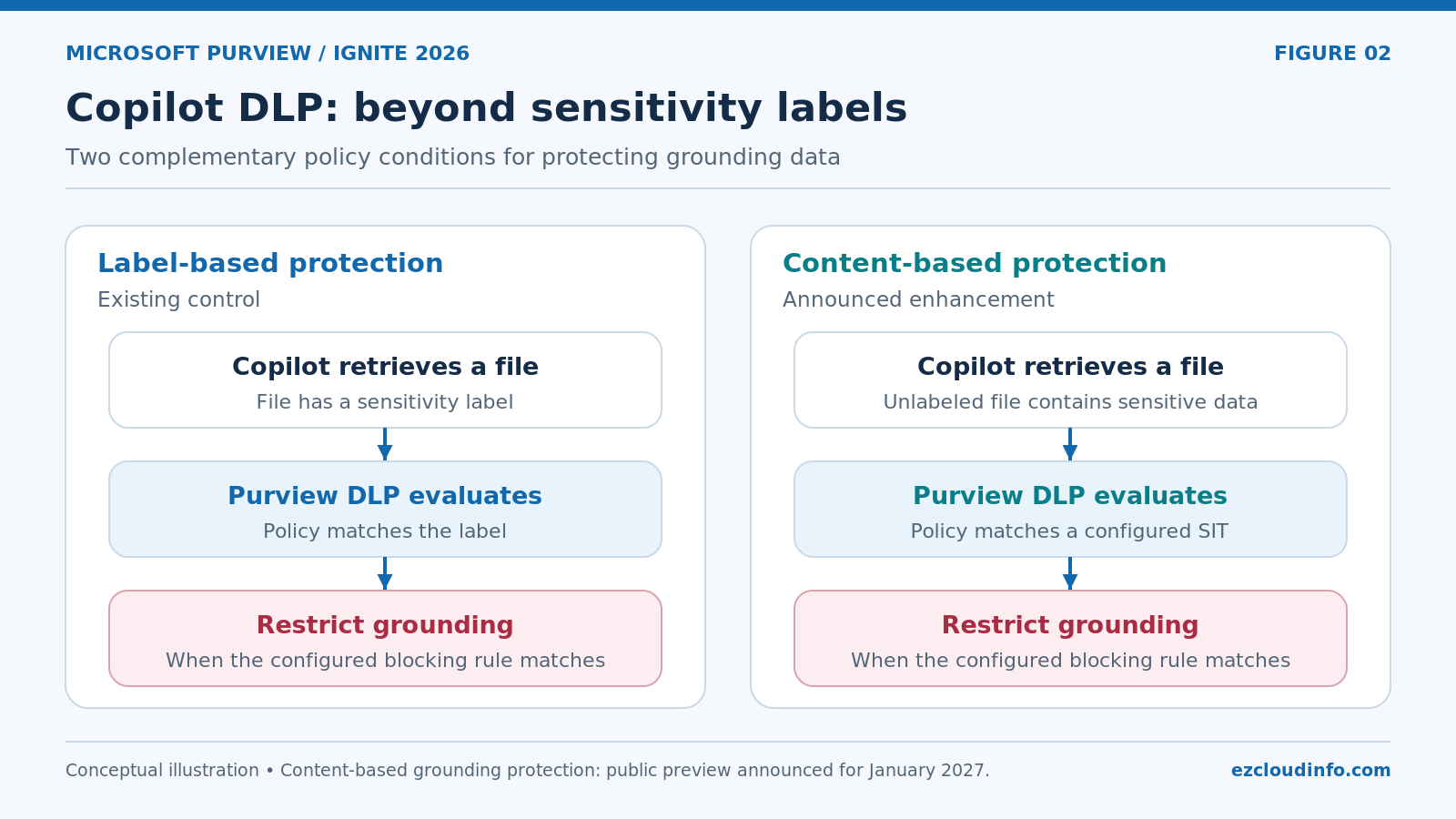
    Sensitivity label-based versus content-based Copilot protection
    Figure 2 – Sensitivity label based versus content based Copilot protection

    From an architectural perspective, this establishes an additional layer of protection for organizations where sensitivity label adoption is still evolving.

    However, this should not be interpreted as a replacement for information classification or sensitivity labels. Labels remain essential for persistent protection, encryption, access restrictions and data governance.

    The real value lies in combining classification, labeling, access governance and content-aware DLP as complementary controls.

    4. Scaling Enterprise Information Protection

    Data classification and labeling have always been foundational components of Microsoft Purview.

    However, at enterprise scale, the challenge is not simply identifying sensitive information. It is doing so consistently across millions of documents while keeping protection aligned with changing business and regulatory requirements.

    Microsoft announced several improvements that address this operational challenge.

    Significant improvements in auto labeling scalability

    CapabilityPrevious limitNew limitImprovement
    Daily auto-labeling capacity100,000 files500,000 files5x
    Auto-labeling simulation4 million items20 million items5x

    The daily labeling limit applies to SharePoint and OneDrive files per tenant.
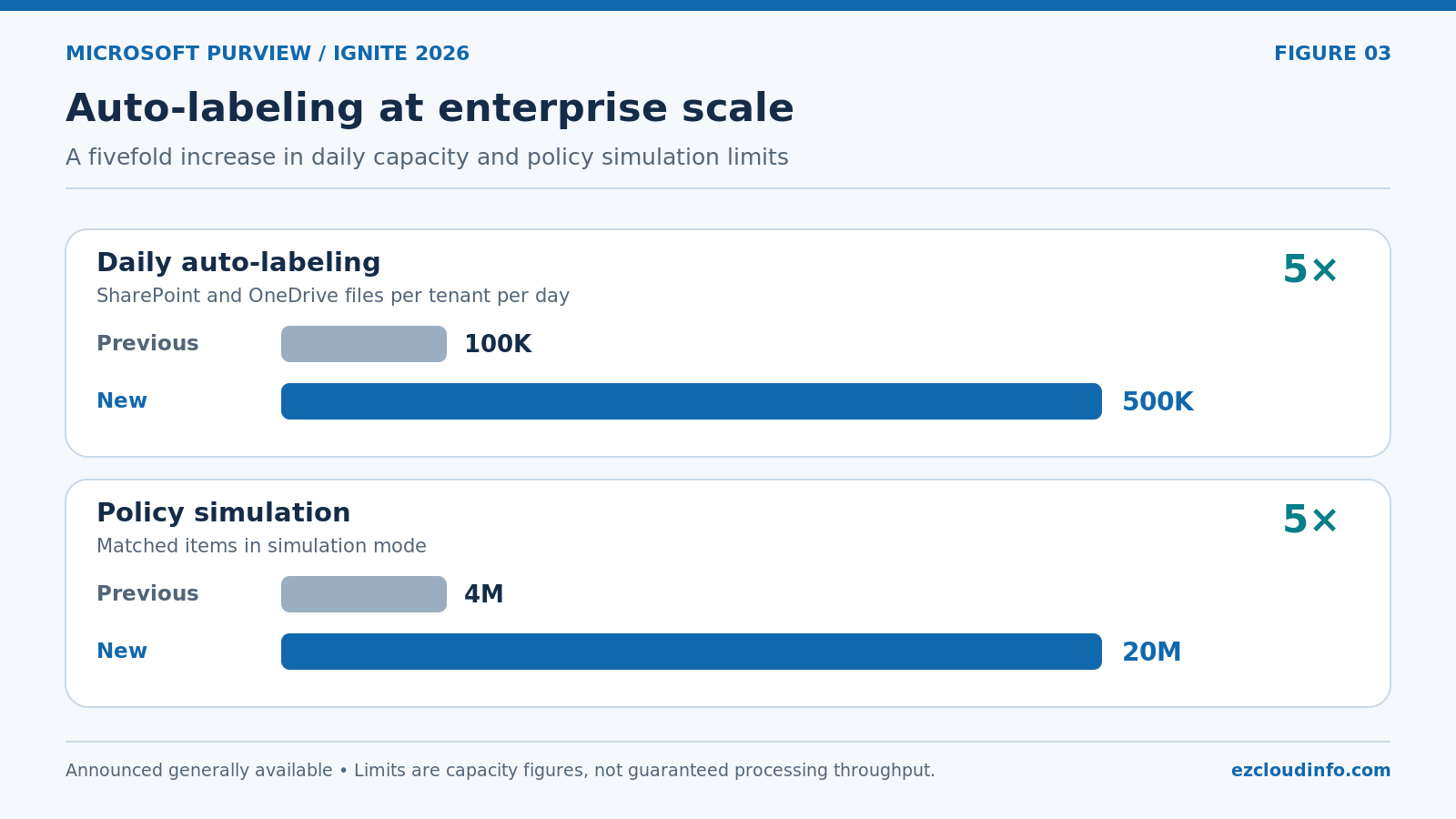
    Microsoft Purview auto-labeling scalability improvements
    Figure 3 – Microsoft Purview auto labeling scalability improvements

    Adaptive scopes for auto labeling

    Managing individual SharePoint site locations within information protection policies can become operationally complex in large organizations.

    Adaptive scopes allow auto labeling policies to target sites dynamically using defined attributes.

    For example, a policy could target SharePoint sites associated with Finance based on a supported site attribute, such as a naming pattern in the site URL.

    This helps reduce manual policy maintenance as new sites are introduced.

    Default sensitivity labels for existing SharePoint content

    Another important enhancement is the ability to extend a document library’s default sensitivity label to existing files at rest.

    This could help organizations establish baseline information protection across business-critical document libraries without relying exclusively on users opening or modifying older files.

    5. Moving Towards Continuous Data Classification

    Traditional classification initiatives often operate as periodic activities. However, enterprise information and the definition of sensitive data continuously evolve.

    Microsoft’s announced recurring classification refresh introduces a more continuous approach to maintaining classification coverage.

    Following an initial baseline scan, existing information can be reassessed when applicable classifiers are introduced or updated.

    Microsoft is also enhancing more than 100 commonly used built-in Sensitive Information Types as part of its initial rollout.

    Additionally, the unified classification management experience brings multiple classifier technologies into a centralized administrative interface, including:

    • Sensitive Information Types (SITs)
    • Exact Data Match (EDM)
    • Trainable classifiers
    • Document fingerprinting

    Enterprise security architecture perspective

    Classification should increasingly be treated as an ongoing security lifecycle rather than a one-time implementation project.

    This becomes particularly important when AI applications can discover and retrieve historical information that may not have been reviewed or modified for several years.

    A more continuous classification strategy can help reduce the gap between data discovery and policy enforcement.

    6. Unified Agent Risk – A New Dimension of Insider Risk

    Traditionally, insider risk management has focused on human-driven scenarios such as unauthorized disclosure, inappropriate access, intellectual property theft and accidental data leakage.

    The emergence of autonomous and semi-autonomous AI agents introduces an additional dimension to this risk landscape.

    An AI agent may operate with legitimate permissions while performing actions that introduce unintended security risks.

    Examples include:

    • Retrieving sensitive information outside its intended business purpose.
    • Transmitting confidential data to an external tool.
    • Performing unexpected actions following a prompt injection.
    • Operating with excessive or inherited permissions.

    These scenarios do not necessarily require malicious human intent.

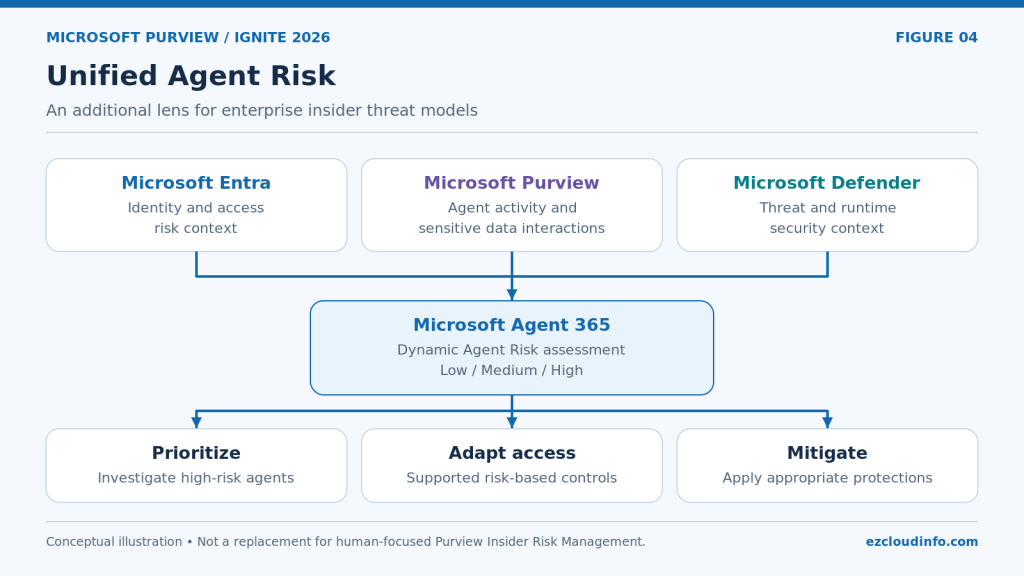
    At Ignite 2026, Microsoft announced further integration of Microsoft Purview data security signals into the Unified Agent Risk assessment within Microsoft Agent 365.

    Connecting data, identity and threat intelligence

    Microsoft’s Dynamic Agent Risk capability brings together information from multiple security domains to establish an evolving understanding of agent risk.
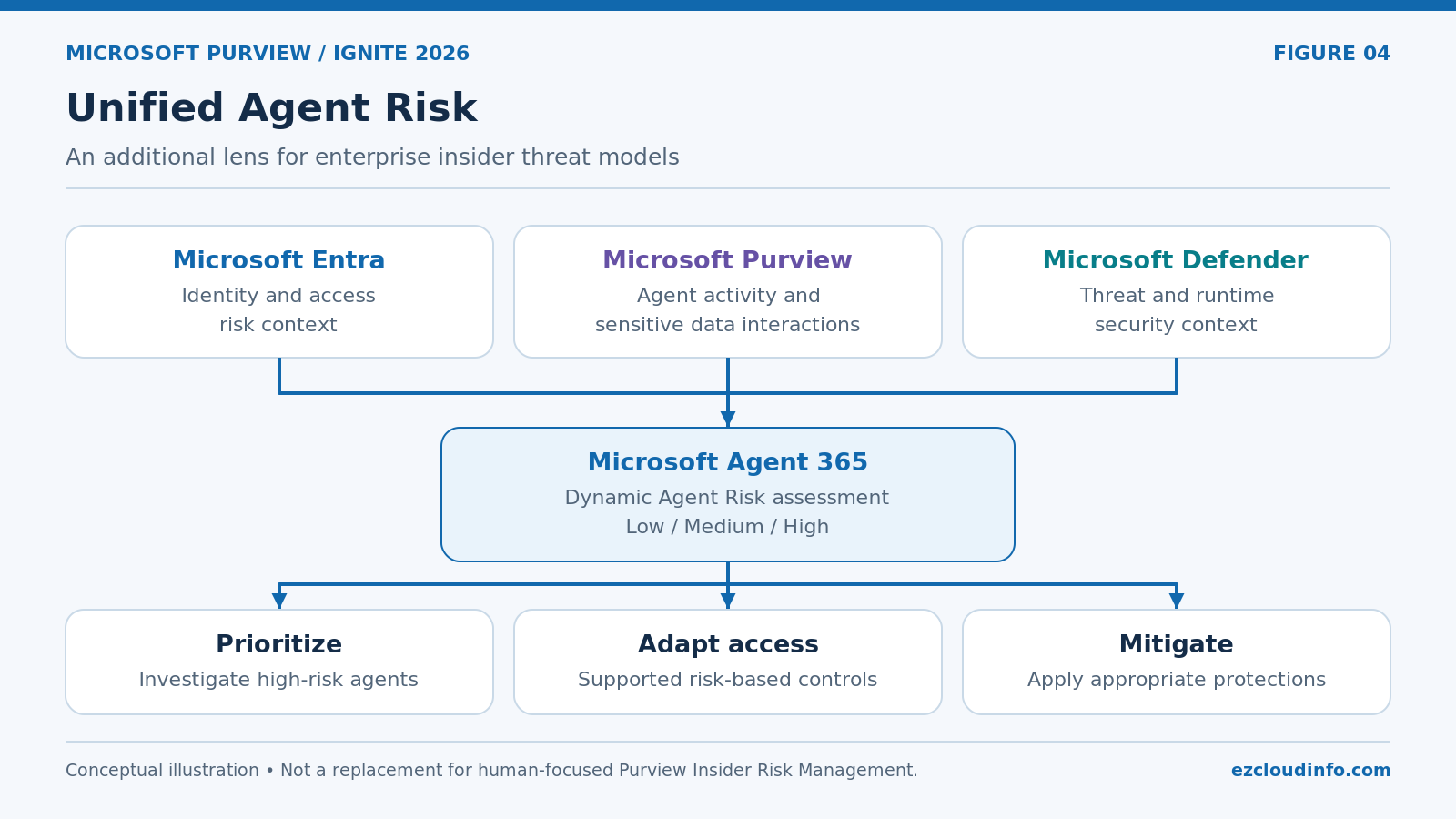
    Conceptual Unified Agent Risk architecture
    Figure 4 – Conceptual Unified Agent Risk architecture

    Microsoft Purview contributes context about agent activity and sensitive information interactions, while Microsoft Entra and Microsoft Defender contribute complementary identity, access and security signals.

    These signals can support risk-based investigation, prioritization and appropriate mitigation across supported Microsoft security capabilities.

    What this means for Insider Risk Management

    From an enterprise architecture perspective, organizations should begin evaluating AI agents as an additional category of trusted actors within their insider threat models.

    This does not mean that Unified Agent Risk replaces Microsoft Purview Insider Risk Management or that existing human focused insider risk policies automatically extend to AI agents.

    Rather, it highlights an opportunity to evolve insider threat management strategies to address both human and non-human actors.

    Future insider risk programs may increasingly need to consider agent ownership, permission boundaries, data access behavior, runtime activity and accountability for autonomous actions.

    7. What Should Enterprises Do Next?

    While several of these capabilities are still in preview or scheduled for future release, organizations can begin preparing their security architectures today.

    Key areas of consideration include:

    • Assessing existing sensitivity labeling and classification coverage.
    • Identifying AI assistants and agents operating across enterprise endpoints.
    • Reviewing agent permissions and potential data exposure paths.
    • Establishing data protection requirements for AI-driven workflows.
    • Incorporating agent-related scenarios into insider threat models.
    • Defining controlled pilot environments for validating emerging security capabilities.

    These activities can help organizations establish the foundation required to adopt new Purview capabilities as they become available.

    Final Thoughts

    The Microsoft Purview announcements at Ignite 2026 demonstrate an evolution from traditional data protection towards a more integrated approach encompassing users, applications and intelligent agents.

    The fundamental principles of information protection remain unchanged. Organizations still need to understand their data, classify it appropriately, establish access boundaries and prevent unauthorized disclosure.

    What is changing is the environment in which these controls must operate.

    As AI agents become increasingly embedded within enterprise workflows, data security architectures must evolve to address not only who accesses sensitive information, but also how intelligent systems retrieve, process and act upon it.

    Microsoft Purview’s latest announcements provide an interesting glimpse into that future.

    What’s Next?

    This article serves as the starting point for our Microsoft Purview Ignite 2026 technical blog series.

    In the upcoming articles, we will take a closer look at each of these scenarios through detailed hands-on demonstrations, policy configurations, practical testing and enterprise security architecture considerations as the capabilities become available.

    Stay tuned as we explore each of these capabilities in detail and bring the Ignite announcements to life through practical demonstrations.

    References

    This overview is based on Microsoft’s Ignite 2026 announcements. Availability is subject to rollout schedules, licensing and applicable prerequisites. The architecture illustrations are conceptual.
  • From Audit to Block: Protecting Cloud Secrets with Microsoft Purview DLP

    From Audit to Block: Protecting Cloud Secrets with Microsoft Purview DLP

    Hands on Microsoft 365 E5 security lab | Microsoft Purview DLP | November 2026

    Credit card numbers are not the only sensitive information that organizations need to protect. Application client secrets, API keys and passwords can be just as valuable to an attacker especially when they are copied into documents and moved outside managed storage. In this lab, I configured Microsoft Purview Data Loss Prevention (DLP) to detect synthetic financial and credential-related data, observe a USB copy, and demonstrate a blocked transfer on a Windows 11 endpoint.

    This article focuses on the configuration and confirmed results, rather than covering every DLP option or a long troubleshooting journey. All data used is synthetic and nonfunctional.

    1. Environment and policy design

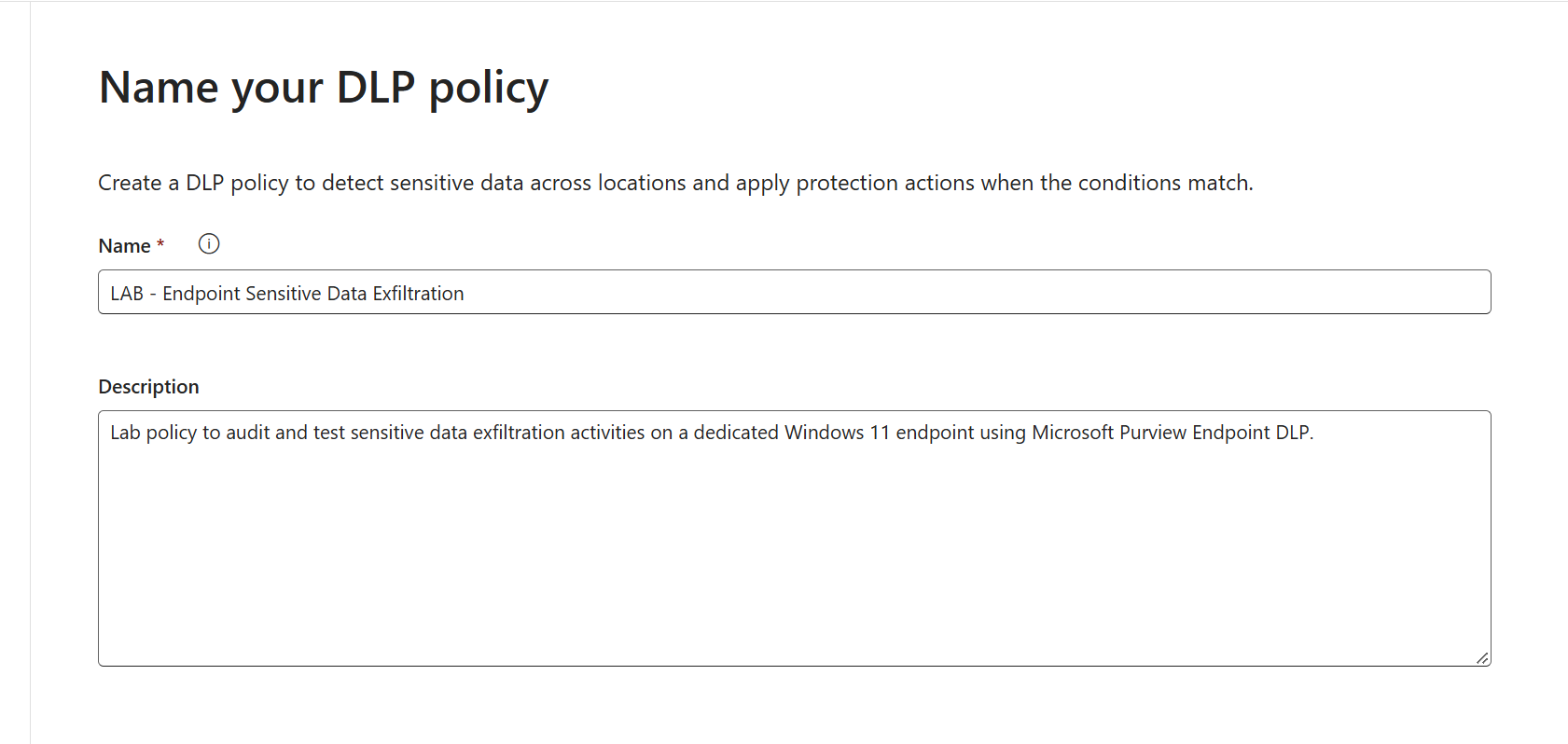
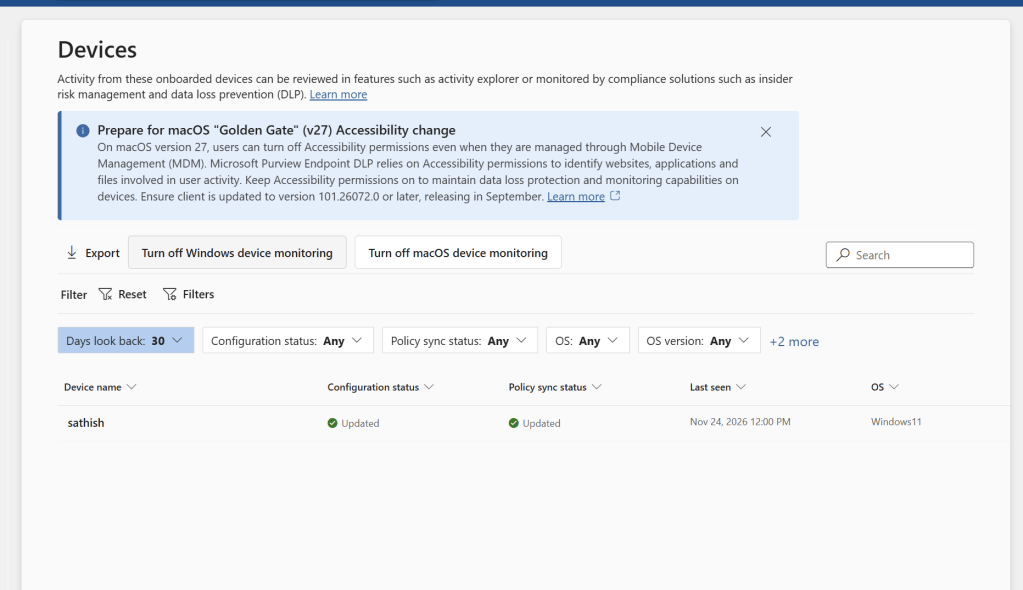
    The lab used a dedicated Microsoft 365 E5 tenant and an onboarded Windows 11 test device. A custom DLP policy, LAB – Endpoint Sensitive Data Exfiltration, was created in Microsoft Purview. The selected primary locations included Exchange, SharePoint, OneDrive, Teams and Devices. This walkthrough’s enforcement actions, however, were configured for endpoint file activities; selecting other locations does not automatically enable their individual blocking actions.

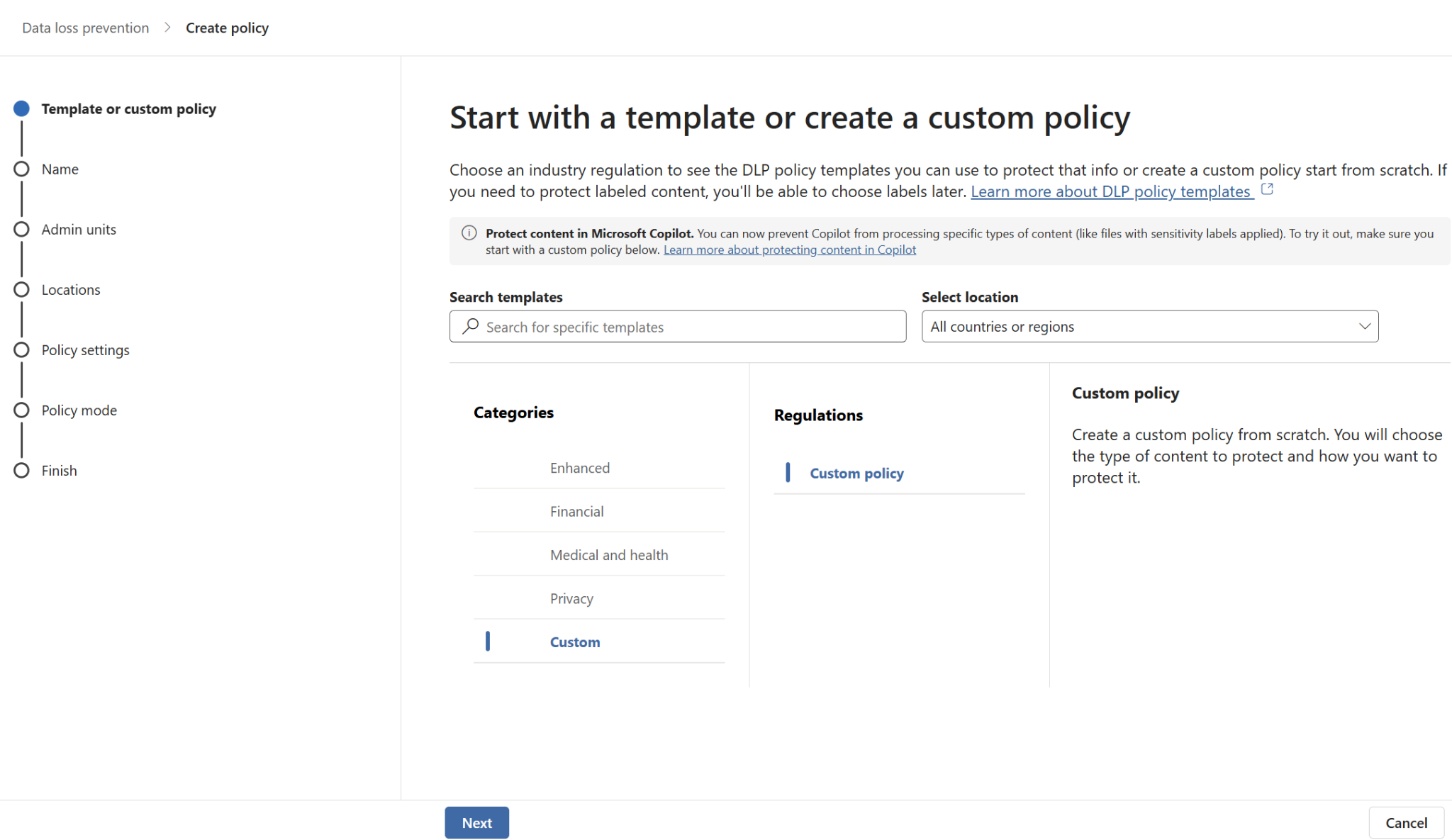
    Custom DLP policy template selected
    Figure 1. Creating a custom DLP policy in Microsoft Purview.
    Name and description of the DLP policy
    Figure 2. Naming the lab policy.
    (more…)
  • How Agentic AI Accelerates Cloud Credential Abuse: Lessons  to learn from Microsoft’s November 2026 Case Study

    How Agentic AI Accelerates Cloud Credential Abuse: Lessons to learn from Microsoft’s November 2026 Case Study

    How quickly could an attacker turn a leaked application secret into access to Azure Key Vault? In one investigation, Microsoft observed an AI agent progress from searching public GitHub repositories to exfiltrating Key Vault data in just five minutes. This is an observed case, not a typical or guaranteed attack duration.

    On November 5, 2026, Microsoft Threat Intelligence published Threat actors use agentic AI tooling to find and abuse exposed secrets. The report describes actors using ARTEX, an agentic offensive framework, to identify exposed credentials and then abuse valid application identities across Microsoft Entra ID, Azure and Microsoft 365.

    In this walkthrough, we will map the attack chain and investigate relevant signals using Microsoft Defender XDR. The lab screenshots are from a separate test tenant; they illustrate legitimate baseline activity and do not represent the Microsoft incident or evidence of compromise. Identifying details in the screenshots have been redacted.

    1. What Microsoft observed

    Microsoft reported GitHub secret scanning beginning in August 2026 and follow on credential abuse activity observed from October 28, 2026. Attackers used valid OAuth application credentials to perform service principal sign ins. In some cases, a vendor owned multitenant application credential was involved, potentially exposing downstream customer tenants.

    This was not a demonstrated bypass of Microsoft Entra ID authentication. The risk came from stolen, valid credentials and the privileges of the compromised application identity.

    • Public code repositories searched for credentials, including OAuth application secrets and cloud service keys.
    • Valid application credentials used for service principal authentication and cloud discovery.
    • Follow on activity included Azure Key Vault and Storage access, Microsoft Graph searches, access to Microsoft 365 content, and Azure resource operations in some environments.
    • One observed sequence reached Azure Key Vault data exfiltration in about five minutes.

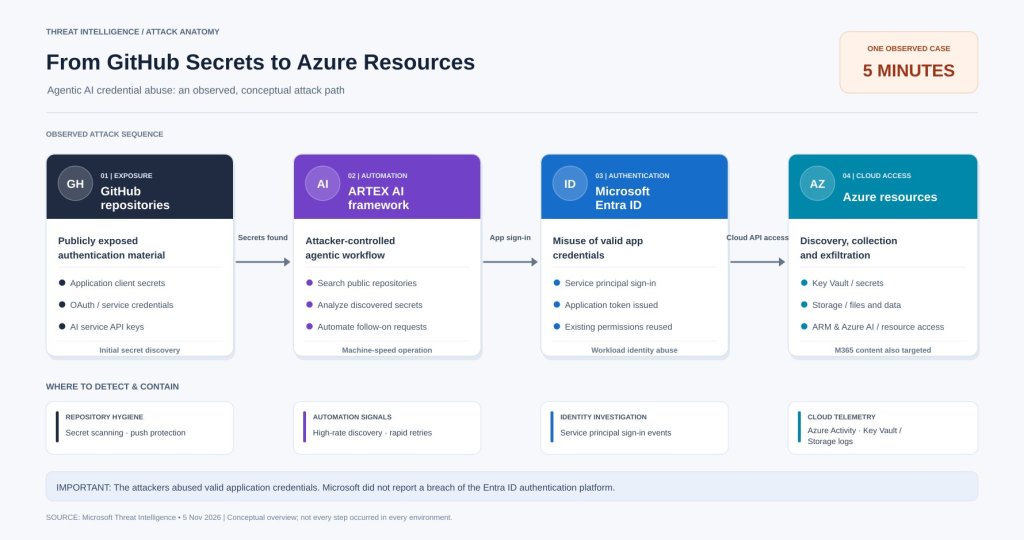
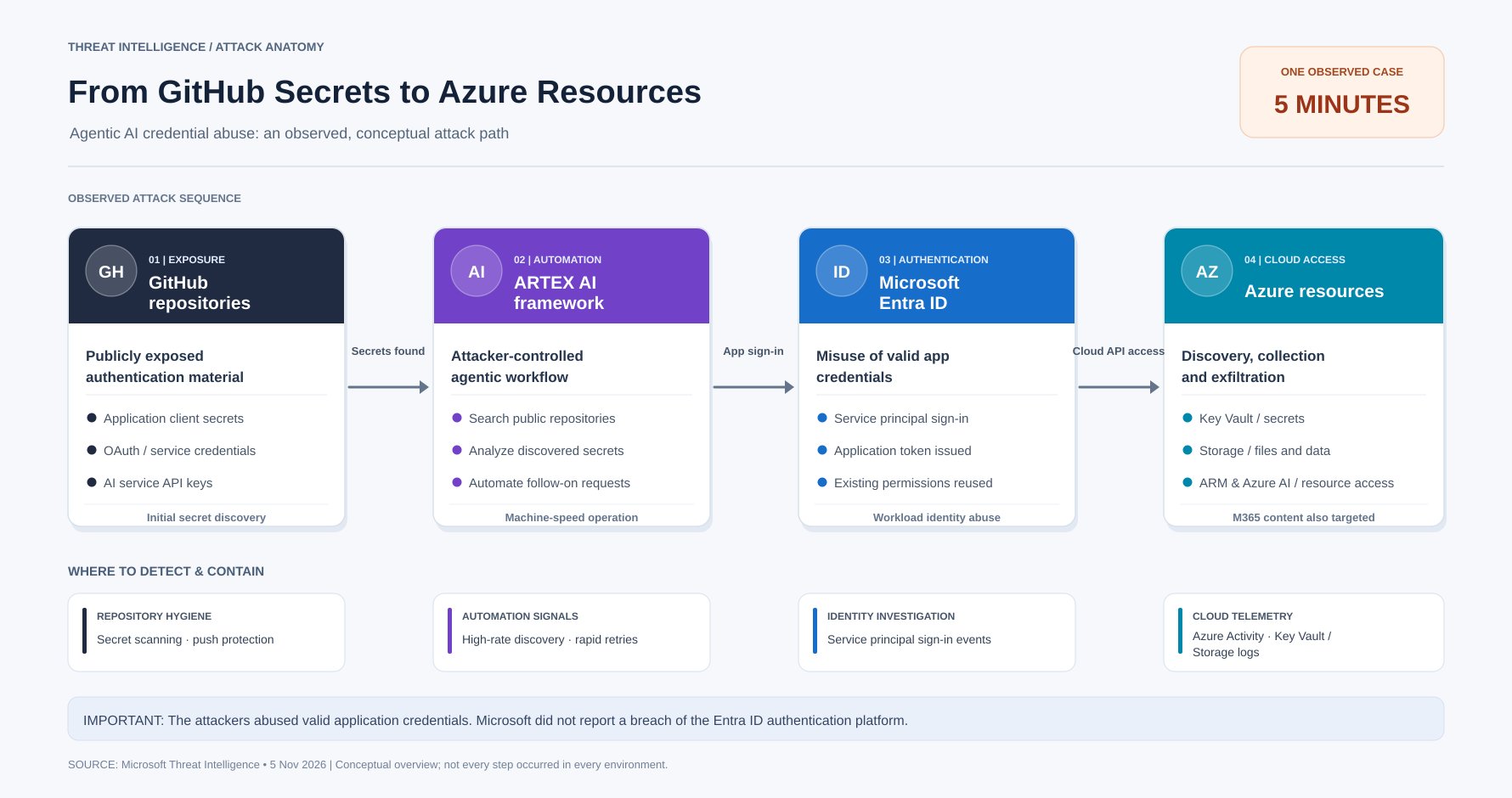
    2. Agentic AI attack chain: GitHub → ARTEX → Entra ID → Azure

    Draw.io attack chain diagram showing public GitHub secrets, ARTEX, Microsoft Entra ID authentication, and Azure resource access
    Figure 1. Conceptual attack chain reconstructed from the Microsoft Threat Intelligence report. The stages and affected resources varied by victim; this is not a single universal sequence.
    Read more: How Agentic AI Accelerates Cloud Credential Abuse: Lessons to learn from Microsoft’s November 2026 Case Study

    Stage 1 — Exposed secrets in public GitHub repositories

    Secrets committed to code, configuration files, scripts or repository history provide potential initial access. Deleting a secret from the latest commit is insufficient because it may remain copied or cached elsewhere.

    Stage 2 — ARTEX automates discovery and follow on activity

    The offensive framework searched for exposed secrets, evaluated the results and automated additional cloud requests. Microsoft documented adaptive request patterns, including rapid changes to unsupported Azure API versions after HTTP errors.

    Stage 3 — Microsoft Entra ID service principal sign in

    With an exposed application credential, an attacker can request tokens as that application and exercise its effective permissions. Human MFA requirements alone do not protect client credential authentication.

    Stage 4 — Cloud discovery and access

    Microsoft observed enumeration of subscriptions, resource groups, service configurations and Microsoft Graph content. In certain cases, attackers sought Key Vault secrets, Storage data, connection strings and other credentials. Additional privileges made further compromise possible.

    3. Investigating the attack pattern in Microsoft Defender XDR

    Open Microsoft Defender XDR → Hunting → Advanced hunting. Start with baseline activity. A search for a known attacker IP can return zero results even when the hunting tables are fully functional.

    Lab context: These queries were executed in an authorized Microsoft 365 test tenant on November 19, 2026. The screenshots below show real telemetry, but no malicious activity was confirmed. Availability depends on licensing, permissions, enabled data sources and retention.

    Step 1 — Verify service principal sign-in telemetry

    EntraIdSpnSignInEvents
    | where Timestamp > ago(30d)
    | summarize
    TotalSignIns = count(),
    SuccessfulSignIns = countif(ErrorCode == 0),
    FailedSignIns = countif(ErrorCode != 0),
    FirstSeen = min(Timestamp),
    LastSeen = max(Timestamp)
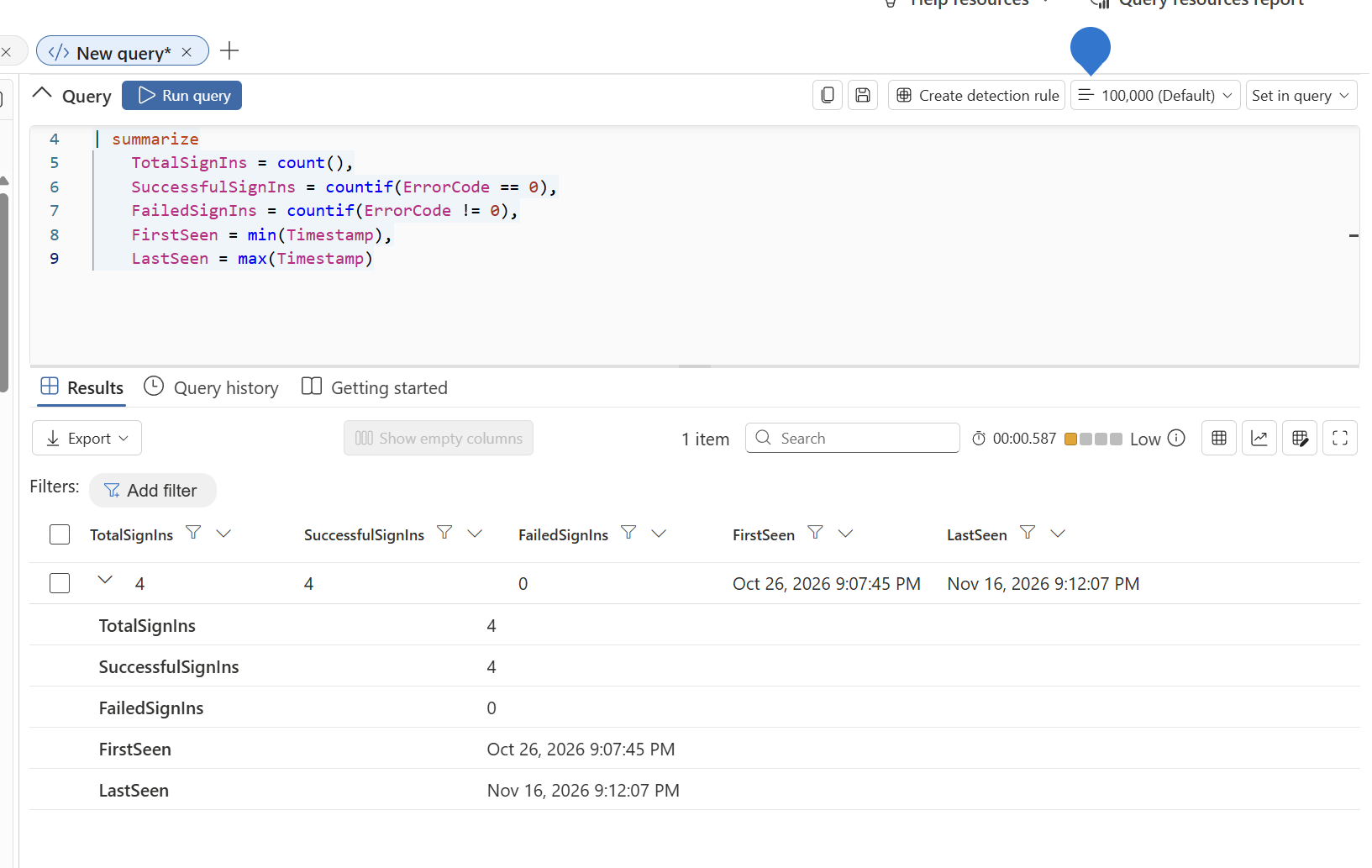
    Defender XDR screenshot showing four successful service principal sign-ins, zero failures over 30 days
    Figure 2. Lab baseline: four service principal sign in events, all successful, with zero failures in the selected 30-day window.

    The query returned 4 sign-ins, 4 successes and 0 failures in the lab. This verifies that the table contains telemetry. It does not establish whether applications are secure or insecure.

    Step 2 — Understand which service principals are active

    EntraIdSpnSignInEvents
    | where Timestamp > ago(30d)
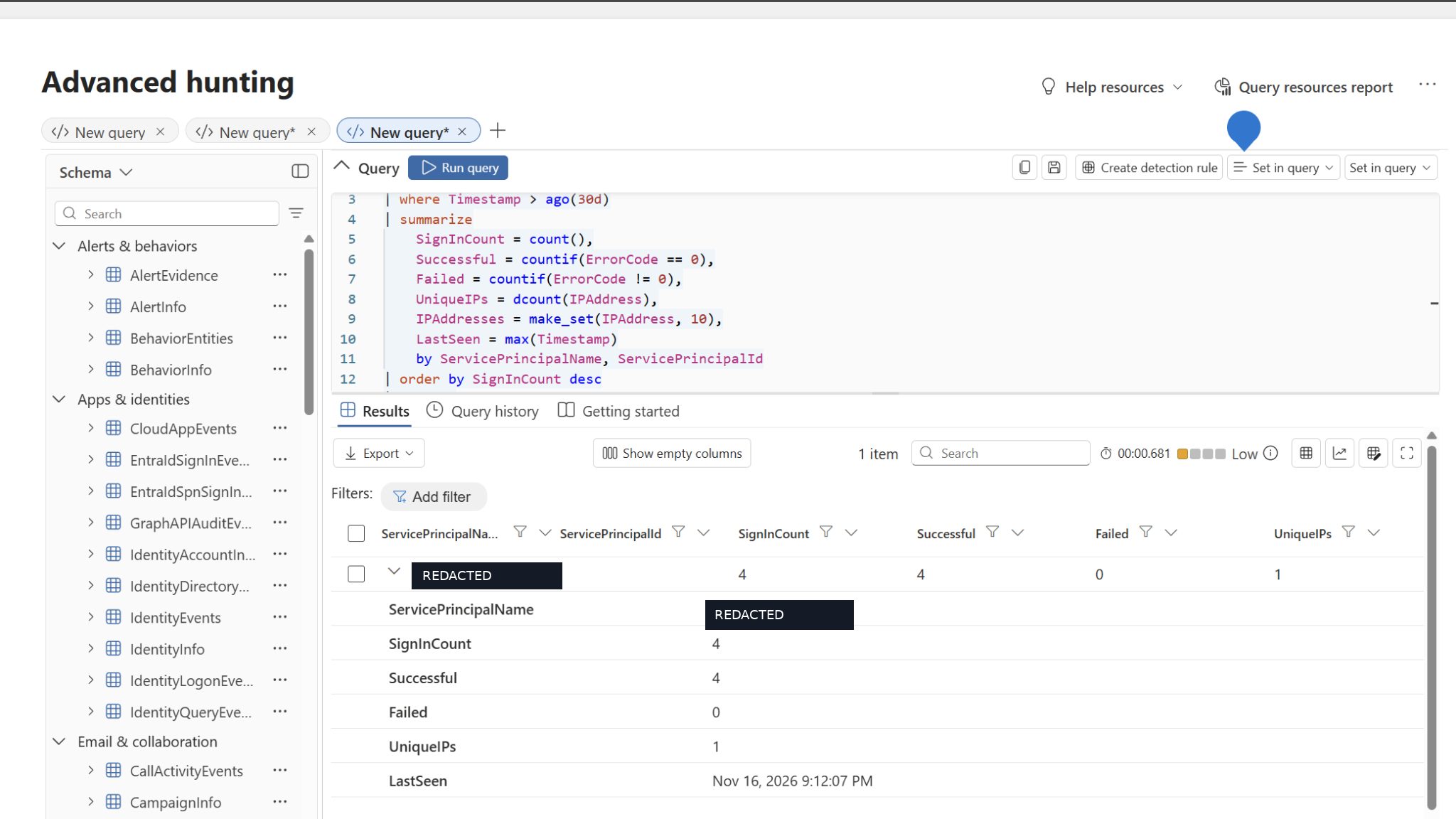
    | summarize
    SignInCount = count(),
    Successful = countif(ErrorCode == 0),
    Failed = countif(ErrorCode != 0),
    UniqueIPs = dcount(IPAddress),
    IPAddresses = make_set(IPAddress, 10),
    LastSeen = max(Timestamp)
    by ServicePrincipalName, ServicePrincipalId
    | order by SignInCount desc
    | take 20
    Defender XDR screenshot showing one lab service principal with four successful sign-ins; identity redacted
    Figure 3. One service principal generated the four successful sign ins from one source IP. Its name is redacted for publication.

    In this test environment, one service principal accounted for the four sign ins from a single source IP. The original application name and identifying values are intentionally not included in this article. Review your own application owners, expected IP ranges, credential type and authorized resource access before interpreting any pattern.

    Step 3 — Baseline Microsoft Graph API activity

    GraphAPIAuditEvents
    | where Timestamp > ago(30d)
    | summarize
    TotalRequests = count(),
    DistinctApplications = dcount(ApplicationId),
    DistinctIPs = dcount(IpAddress),
    FirstSeen = min(Timestamp),
    LastSeen = max(Timestamp)
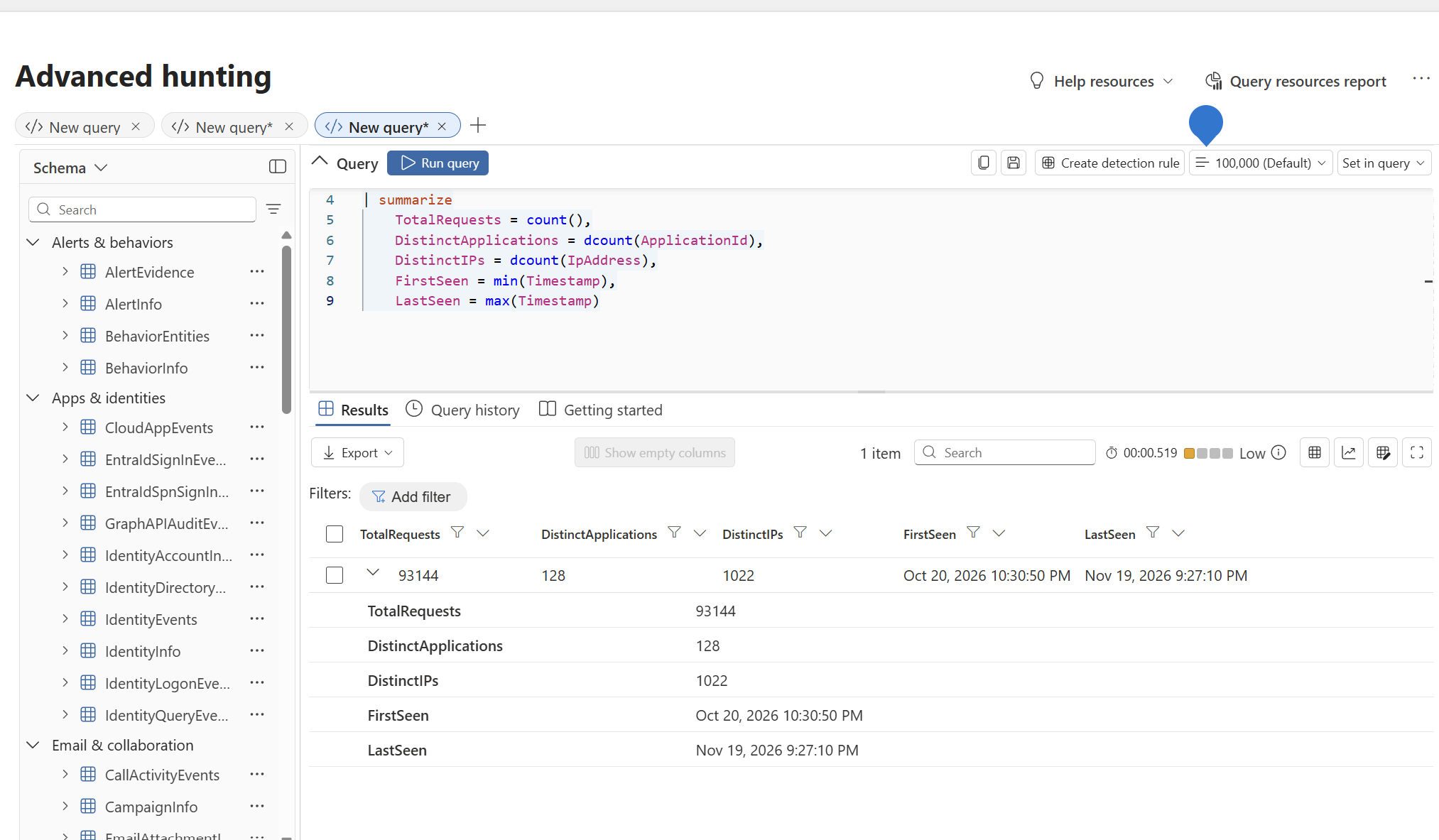
    Defender XDR screenshot with 93144 Microsoft Graph API audit events, 128 application IDs and 1022 distinct IP addresses
    Figure 4. Lab Graph API baseline: 93,144 requests, 128 distinct application IDs and 1,022 distinct source IPs in the selected 30 day interval.

    These numbers are activity measurements, not a threat verdict. Large volumes can be expected from normal Microsoft 365 operations. The next step is to identify which app IDs and operations are expected, assess HTTP response patterns and correlate suspicious requests with Entra sign-ins.

    Step 4 — Hunt for the reported attacker infrastructure

    Microsoft’s report identified 199.19.77.84 as a primary indicator in the October 28 service principal sign-in activity and also discussed 199.19.77.18, a Tor exit node that may be associated with unrelated activity. Use these IPs as investigation pivots, not as definitive proof.

    let startTime = datetime(2026-10-28T00:00:00Z);
    EntraIdSpnSignInEvents
    | where Timestamp >= startTime
    | where IPAddress in ("199.19.77.84", "199.19.77.18")
    | project Timestamp, Application, ServicePrincipalName,
    ServicePrincipalId, ResourceDisplayName, IPAddress,
    ErrorCode, UserAgent, CorrelationId
    | order by Timestamp desc

    In the lab, the earlier IP filtered service principal and Graph hunting queries returned zero matches. This is unsurprising in a test tenant. It does not prove the environment is uncompromised and should not be presented as an attack reproduction.

    Step 5 — Examine suspicious Microsoft Graph requests

    GraphAPIAuditEvents
    | where Timestamp >= datetime(2026-10-28)
    | where IpAddress in ("199.19.77.84", "199.19.77.18")
    | project Timestamp, ApplicationId, ServicePrincipalId,
    IpAddress, RequestMethod, RequestUri,
    ResponseStatusCode
    | order by Timestamp desc

    If the IP based hunts return no data, use your tenant baseline to investigate unfamiliar application IDs, bursts of searches, repeated error responses followed by success, and access that is unusual for a particular application. Cross correlate with Azure Activity, Key Vault diagnostic logs, Storage logs and Entra audit records. A single data source does not establish the full attack chain.

    4. What should security architects prioritize?

    Control areaRecommended action
    Access ControlReview application permissions and credential hygiene periodically, validate ownership, and monitor sign in behavior for anomalies.
    Workload identity designPrefer managed identities or supported federated identity credentials where practical; reduce long lived client secrets. (Better approach)
    Application permissionsReview Microsoft Graph permissions, Azure RBAC, third party applications and multitenant consent.
    Identity protectionUse eligible workload identity Conditional Access and risk protection where supported and correctly licensed.
    Cloud workload monitoringMonitor Azure Key Vault, Storage, Azure Resource Manager and relevant Microsoft 365 audit events.
    Incident responseRevoke/rotate affected credentials, examine all accessible resources and assess any issued tokens until expiry.

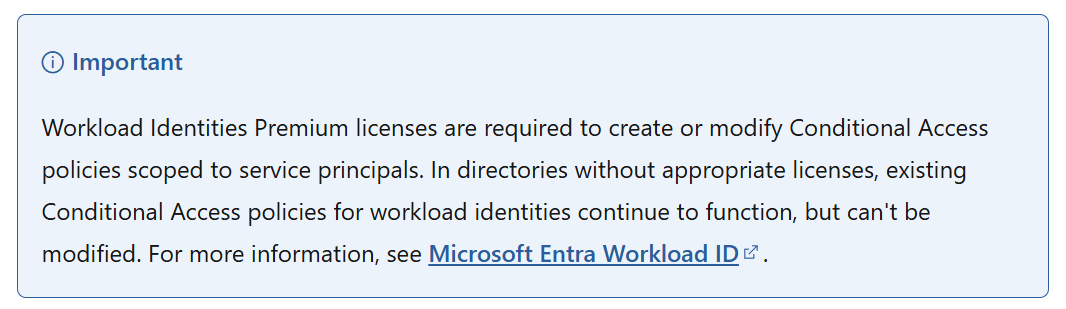
    Microsoft notes that Conditional Access policies for workload identities require appropriate Workload ID Premium licensing and cover eligible single tenant service principals registered in the tenant. They do not provide universal coverage for every application or managed identity.

    5. Lessons from the lab and the real incident

    • The attack speed is the differentiator: machine driven discovery can shorten time from credential exposure to sensitive resource access.
    • The identity is the security boundary: application permissions determine the attacker’s reach when a valid secret is stolen.
    • Good telemetry begins with a baseline: confirm your hunting tables work before expecting matches for published indicators.
    • Zero hits are not a clean bill of health: investigate behavioral anomalies and multiple data sources, not only fixed IP indicators.
    • Document lab evidence accurately: distinguish observed tenant data from Microsoft’s reported compromise.

    Conclusion

    Microsoft’s November 2026 investigation shows that agentic AI can accelerate an already familiar security problem: exposed application credentials with powerful cloud permissions. The response is not simply stronger human sign-in controls. Organizations need continuous secret monitoring, a clear inventory of workload identities, least-privilege permissions, cloud audit visibility and rapid credential containment.

    For security architects, workload identities should be treated as first-class Zero Trust subjects. The time to detect and revoke an exposed application secret may now matter just as much as the original prevention control.

    Official references

  • Investigating Risky Microsoft 365 Copilot Usage with Microsoft Purview Insider Risk Management

    Introduction

    Microsoft 365 Copilot helps employees find, summarize, and work with information they are already authorized to access. That productivity benefit also raises an important security question: how can an organization identify potentially risky AI interactions without assuming that every unusual prompt represents malicious intent?

    This article explores how Microsoft Purview Insider Risk Management (IRM) can detect and investigate risky AI usage, and how it complements Data Loss Prevention (DLP), audit, and Data Security Posture Management (DSPM) for AI.

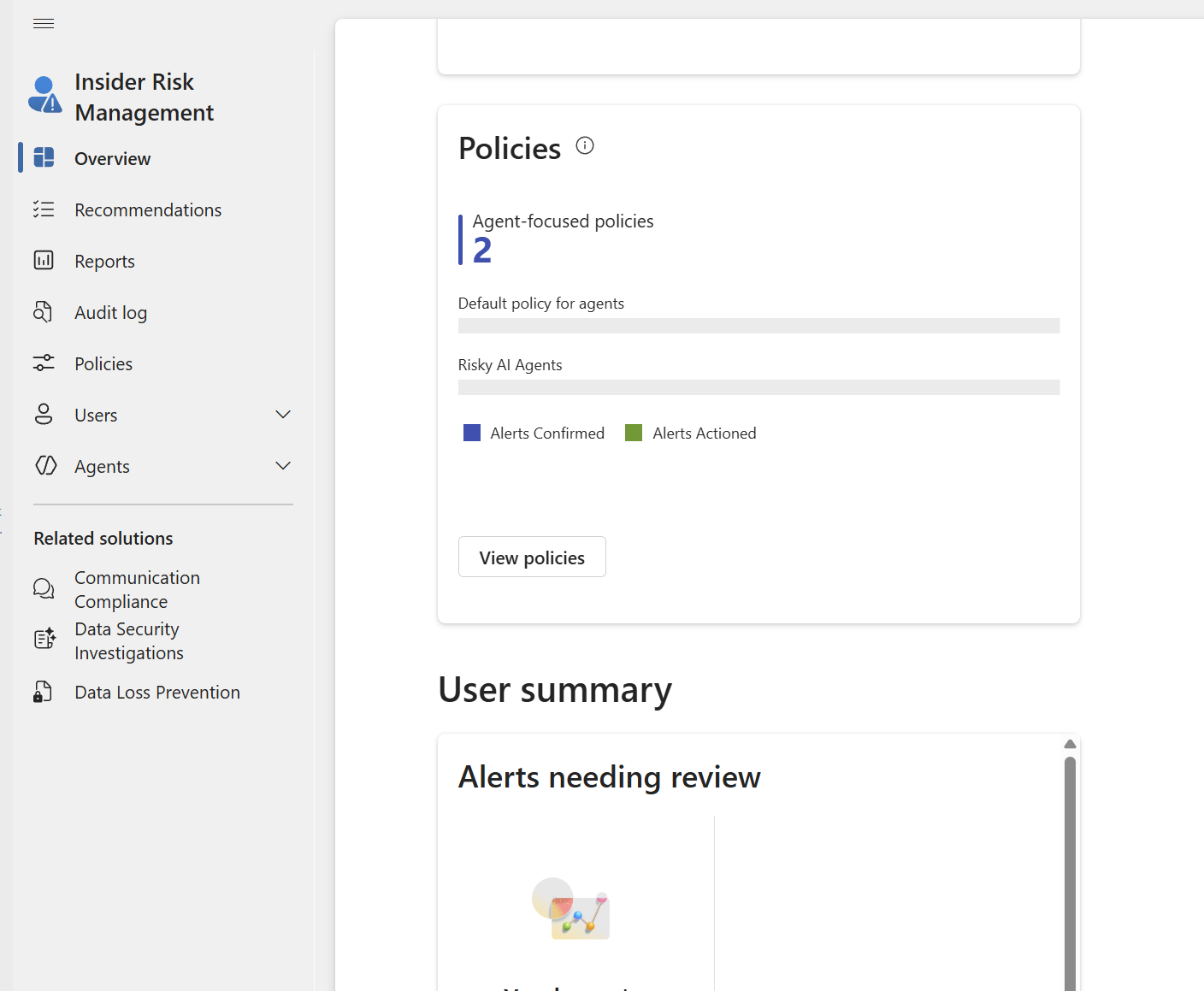
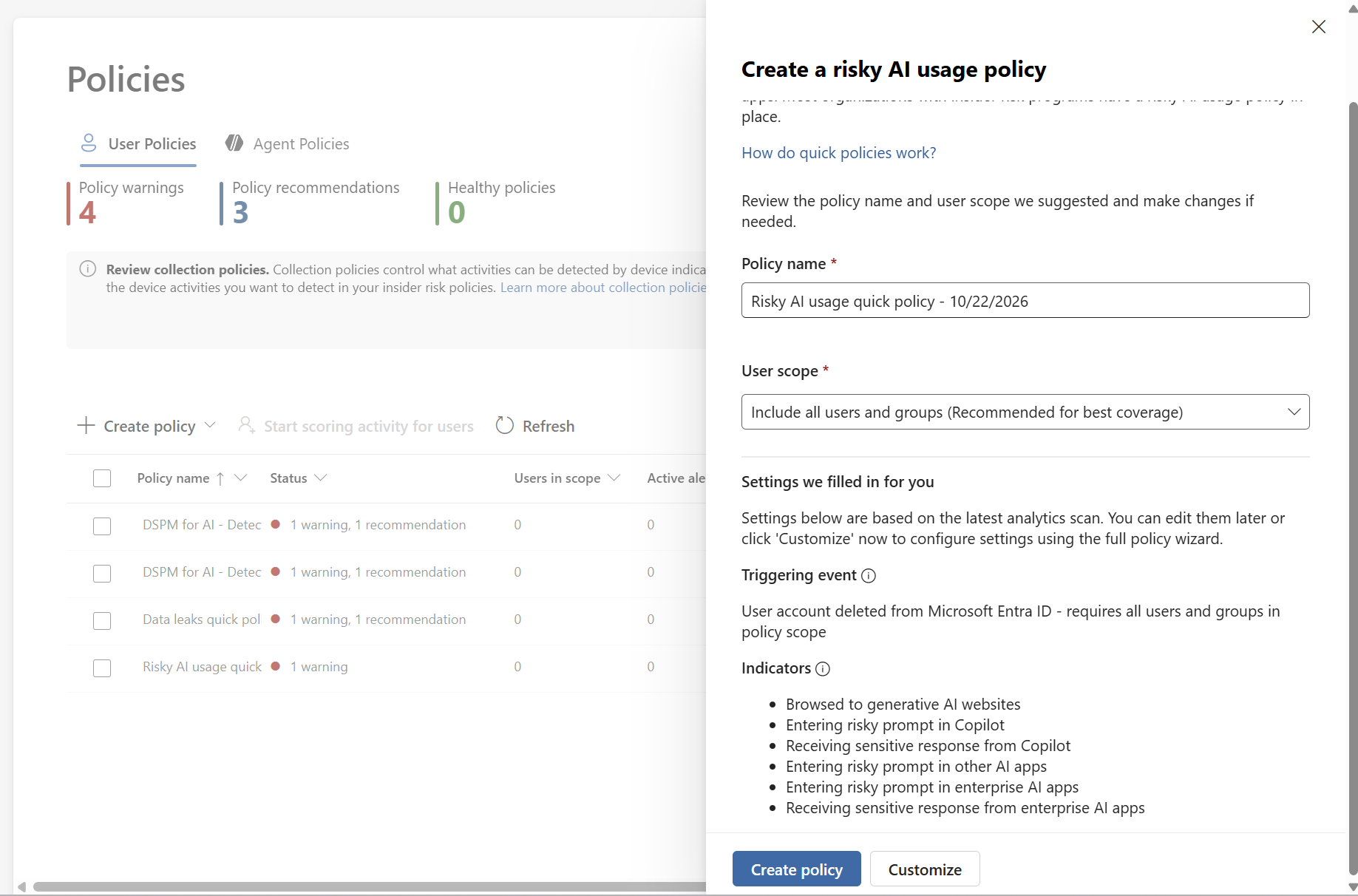
    [Figure 1 — Screenshot Placeholder: Insider Risk Management overview]

    Read more: Investigating Risky Microsoft 365 Copilot Usage with Microsoft Purview Insider Risk Management

    Why Microsoft 365 Copilot Changes the Risk Conversation

    Copilot operates within the user’s effective access permissions; it is not a substitute for fixing excessive permissions or oversharing. But natural language discovery and summarization can make already-accessible information easier to aggregate. For example, a user might request summaries of financial forecasts, customer escalations, sensitive project documents, or security incidents.

    Such queries are not inherently suspicious. Investigators need to consider the user’s role, the sensitivity of the information, the interaction’s context, related file activities, and whether the behavior differs from expected work.

    Which Purview Capabilities Detect What?

    • Insider Risk Management — correlates risk indicators and supports alert triage, cases, and investigations. Its dedicated Risky AI usage policy template is the most relevant starting point for this article.
    • DSPM for AI — provides posture insights and recommendations, including a path to configure detection of risky AI interactions.
    • Data Loss Prevention — helps enforce restrictions involving sensitive information and supported Copilot interactions. DLP policy matches are different from insider-risk alerts.
    • Audit and Activity Explorer — help investigate supported AI interaction and data activities, depending on permissions, licensing, and configuration.

    [Figure 2 — Screenshot Placeholder: Risky AI usage policy template]

    Configure a Risky AI Usage Policy

    1. Confirm that your Microsoft Purview licensing and role assignments support Insider Risk Management and the relevant AI indicators. Available signals vary by workload and license.

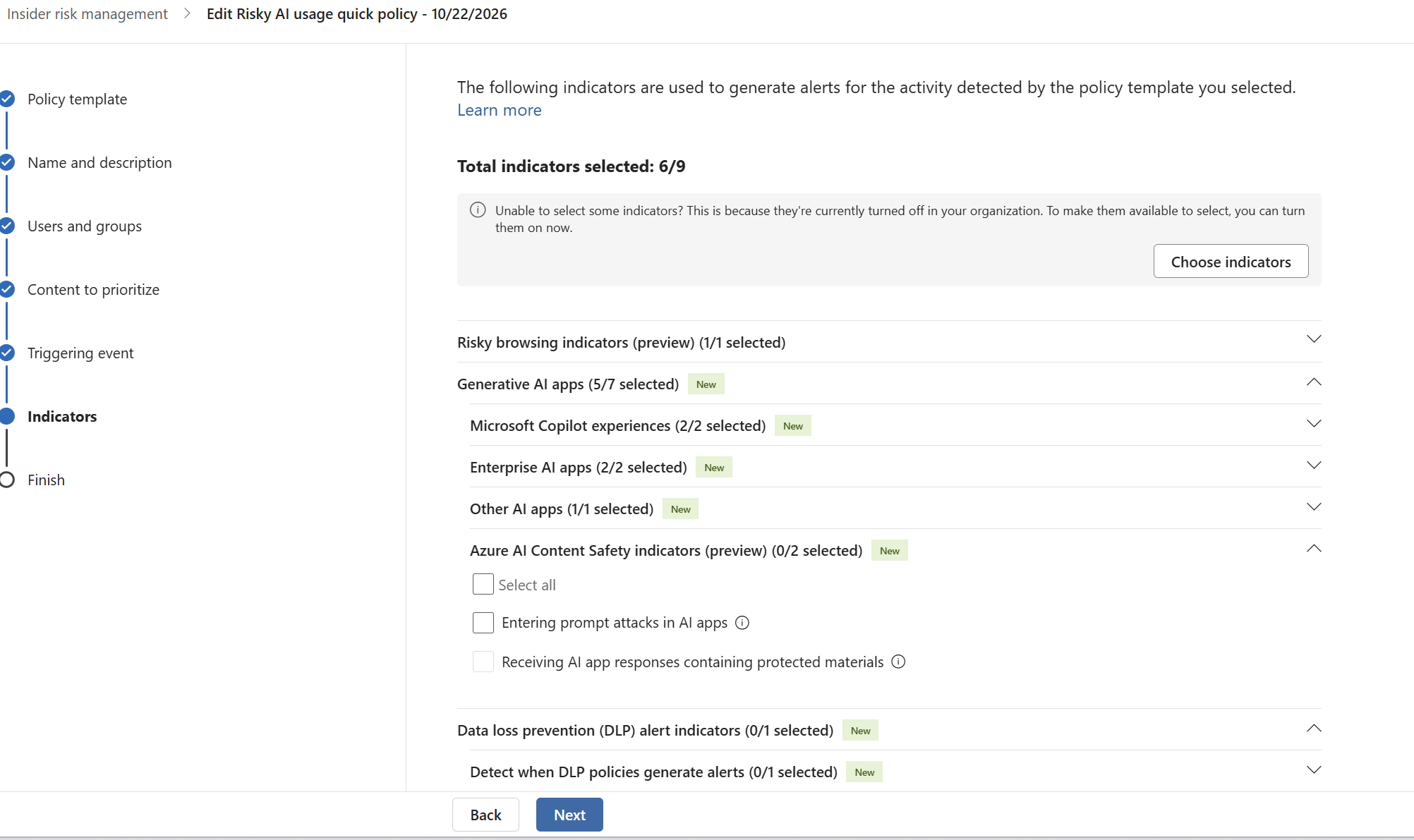
    2. In Microsoft Purview, review Insider Risk Management > Settings > Policy indicators. Inspect the Generative AI apps indicators and the available Microsoft Copilot experiences and other app selections. Check any applicable pay as you go billing requirements before enabling non-Microsoft 365 AI data sources.

    3. Review the Risky AI usage policy template in Insider Risk Management > Policies. Configure the scope, supported indicators, thresholds, and privacy controls. Microsoft’s documentation lists a browser extension and at least one browsing indicator as prerequisites for this template; validate the current requirements for the signals you intend to monitor.

    [Figure 3 — Screenshot Placeholder: Generative AI policy indicators]

    4. Start with an authorized pilot group and test using non-production sample data. Document expected activity, what generated an indicator, and whether an alert was actually created. Do not assume that every prompt or file summary automatically generates an alert.

    5. Where applicable, use DSPM for AI’s recommendation to detect risky interactions in AI apps, then inspect the related reports and activity explorer once telemetry becomes available.

    Four Investigation Scenarios

    Scenario 1: Departing employee collecting data

    An employee nearing departure reviews confidential project files and downloads unusual volumes of material. IRM can help correlate supported file-exfiltration indicators with configured departure signals. A Copilot interaction alone does not establish data theft: review the file activity, timing, policy triggers, and legitimate job requirements.

    Scenario 2: Sensitive or risky Copilot interactions

    A user submits prompts containing sensitive information or asks for protected material. The Risky AI usage template and supported generative AI indicators may detect qualifying risky prompts or sensitive responses. Confirm the workload, policy coverage, classifications, and required signals before claiming detection.

    Scenario 3: Large scale information aggregation

    An employee gathers and summarizes multiple sensitive documents. Investigate related access, sharing, downloads, and any supported AI indicators. The volume of summaries by itself should not be treated as proof of an insider threat.

    Scenario 4: Privileged-user activity

    Users with broad effective access may be able to retrieve more information through Copilot. Review entitlement hygiene, SharePoint permissions, sensitivity labels, and correlated behavior rather than assuming privileged users are automatically monitored as a special Copilot category.

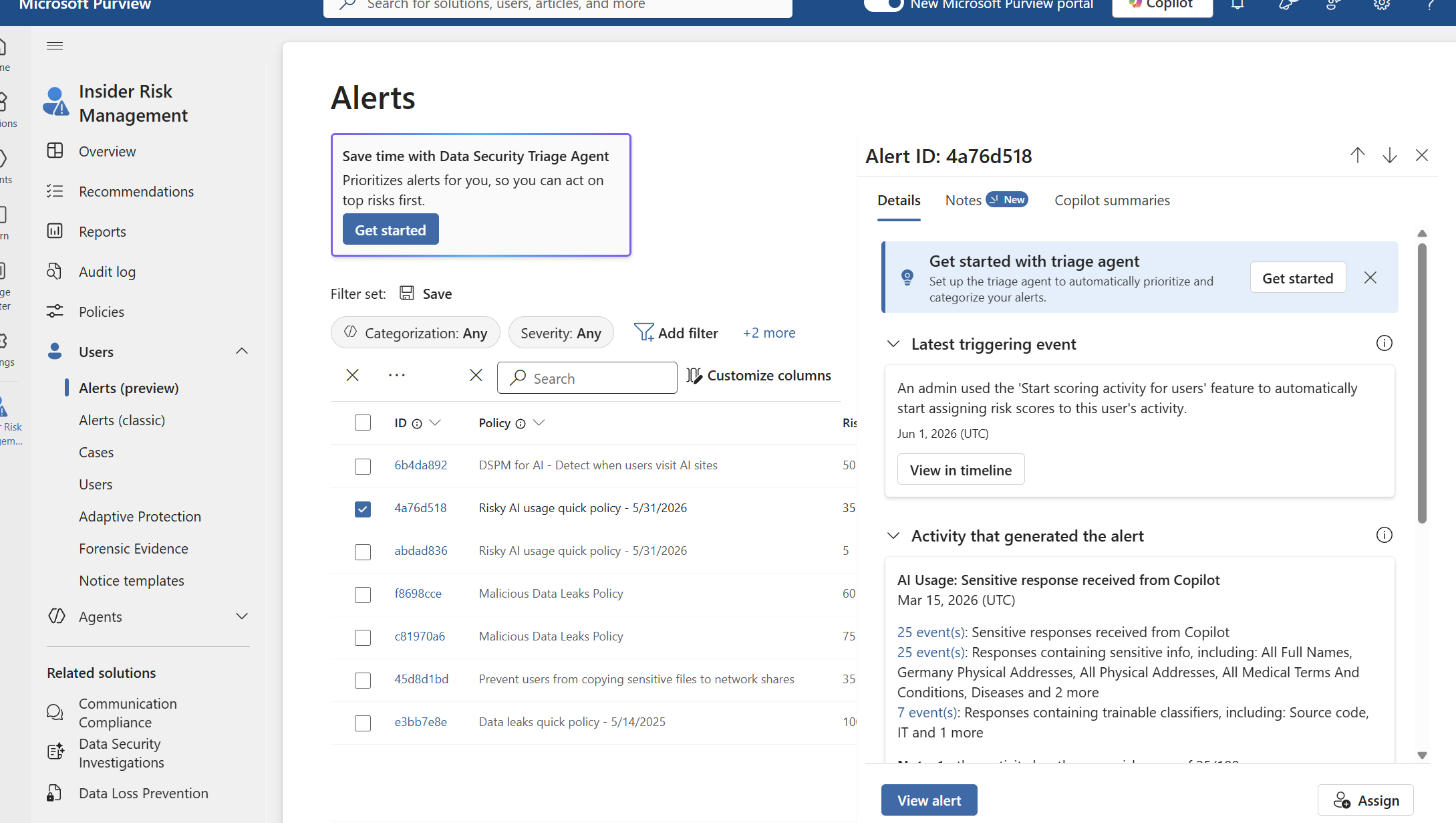
    [Figure 4 — Screenshot Placeholder: Insider Risk Management alerts dashboard]

    Investigating an Alert in Practice

    1. Open Microsoft Purview > Insider Risk Management > Alerts and review the applicable policy, severity, trigger, and time window.
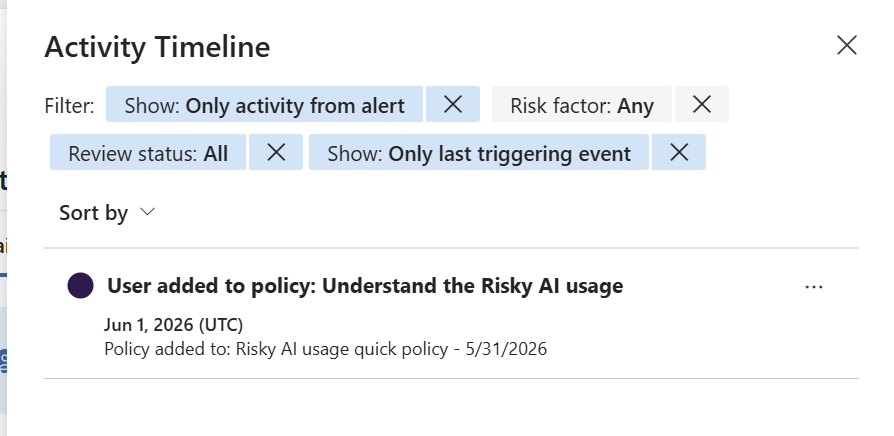
    2. Open a case where appropriate and inspect the activity timeline and available indicators. Separate directly observed actions from analyst hypotheses.
    3. Correlate with relevant Audit, DLP, and Activity Explorer events, subject to supported signal coverage and permissions.
    4. Check the user’s normal business duties and whether the access or AI interaction had a legitimate purpose.
    5. Escalate using your documented investigation process. Preserve privacy safeguards, role based access, and evidence-handling requirements.

    [Figure 5 — Screenshot Placeholder: Alert investigation activity timeline]

    Privacy, Limitations, and False Positives

    Microsoft describes Insider Risk Management as privacy by design, including pseudonymization by default and role-based access controls. In production, involve legal, privacy, works council, and employee-relations stakeholders as applicable. A prompt is not a conviction; a risk score and alert are leads for proportionate review.

    Detection depends on supported services, configured indicators, policy triggers, licensing, and telemetry. Some AI scenarios concern prompts and responses; traditional exfiltration scenarios concern activities such as downloads or external sharing. Be explicit about which evidence comes from which source.

    Operational Best Practices

    • Pilot first and measure false positives before expanding policy scope.
    • Tune indicators and alert thresholds against legitimate workflows.
    • Review overshared permissions and sensitivity label coverage separately from monitoring.
    • Pair IRM with DLP, DSPM for AI, Audit, and Adaptive Protection where supported.
    • Train analysts to document evidence, context, and the reason for escalation.
    • Revalidate Microsoft’s current licensing and feature prerequisites before rollout.

    Conclusion

    Microsoft 365 Copilot can accelerate knowledge work, but it also makes the quality of access governance and insider risk detection more important. Microsoft Purview’s Risky AI usage template offers a targeted way to assess supported AI interactions, while conventional data-leak and departing user policies help examine surrounding file activities. A defensible investigation relies on multiple signals, careful tuning, and human context not on treating every sensitive-sounding prompt as malicious.

    Microsoft documentation

  • From App Inventory to AI Governance: Building a Read Only Control Center with Microsoft Entra ID

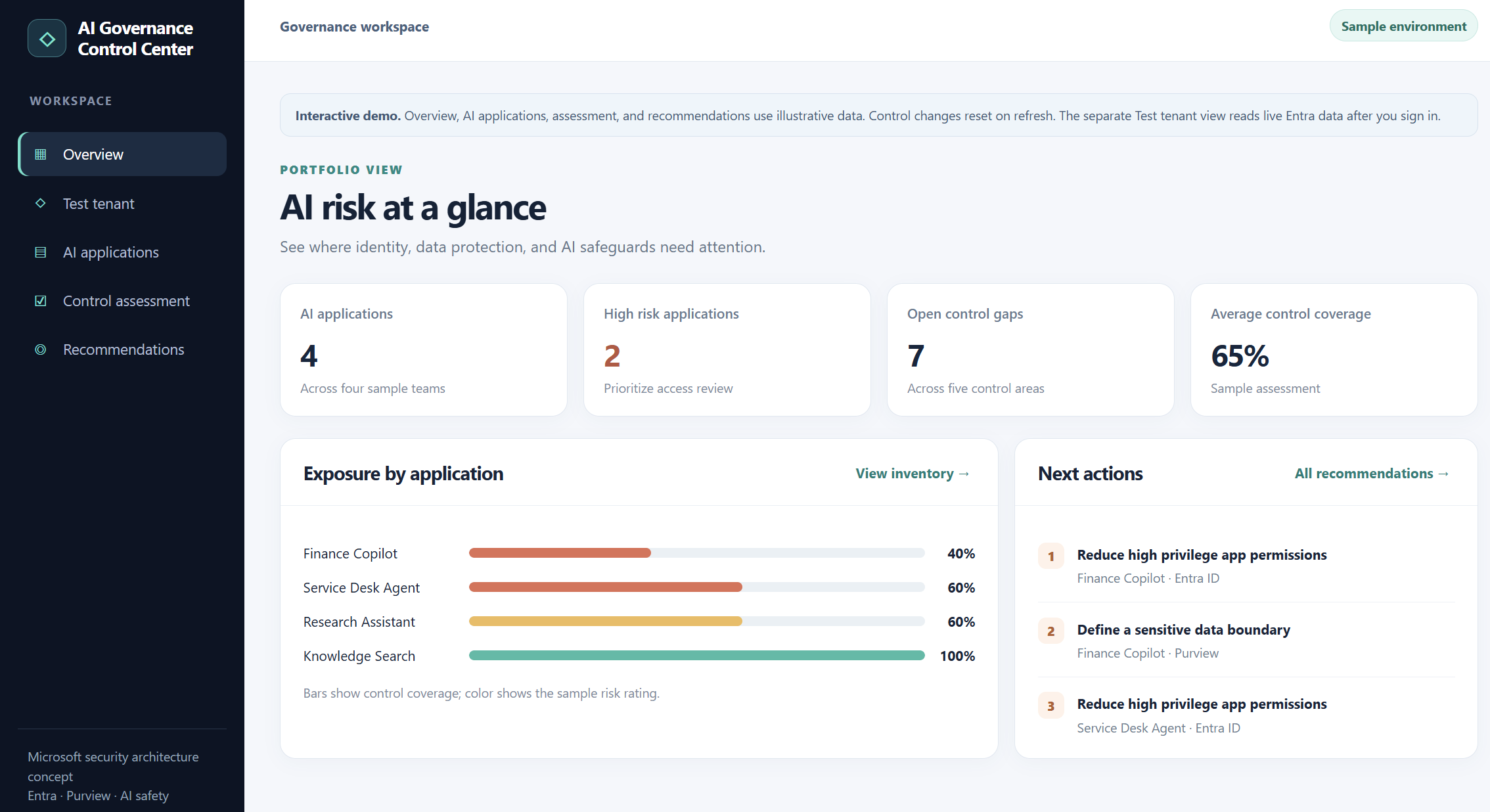
    I built a small AI Governance Control Center to explore application inventory, granted permissions, and control assessments. Here is what the working Entra ID integration can show today and what still needs evidence before calling it an AI governance finding.

    AI governance becomes difficult when an organization has to answer several questions at once: Which applications and agents exist? What permissions have they been granted? What data can they reach? Which safeguards are actually in place?

    I wanted a simple workspace to explore those questions. The result is an AI Governance Control Center prototype with two clearly separated parts: an interactive sample assessment and a live, read only inventory from my test Microsoft Entra ID tenant.

    The separation matters. An Entra application inventory is useful evidence about identity and permissions. It does not, on its own, prove that an application is an AI agent, that it accessed confidential data, or that a content safety control is enabled.

    What the prototype does today

    The sample workspace has an overview, an AI application list, a control assessment, and prioritized recommendations. You can switch illustrative controls on or off and watch the sample coverage score and recommendations change. These records and scores are demonstration data, not findings from my tenant.

    The separate Test tenant view signs me into my own Entra tenant and calls Microsoft Graph. It lists enterprise applications, supports searching by application name or client ID, and lets me inspect the application permissions granted to a selected service principal. In my test, the sign-in and inventory retrieval worked against the tenant.

    “Illustrative dashboard and control scores; no live risk assessment is implied.”

    (more…)
  • From Guardrails to Controls: Getting Started with Azure AI Content Safety

    In my previous article, “From Prompt to Privilege Practical Guardrails for Securing Agentic AI and MCP,” we looked at Agentic AI security from a broader architectural perspective.
    The key takeaway was simple: securing AI systems cannot rely on a single control.
    As AI applications evolve from answering questions to retrieving enterprise data, calling tools, interacting with APIs and eventually performing actions on behalf of users, the security model also needs to evolve. Identity, authorization, data protection, prompt protection, content filtering, monitoring and agent behaviour controls all become part of the same security story.

    But architecture diagrams are only the beginning.

    The next question is:

    What do these guardrails actually look like when we implement them?
    That is what I want to explore in this series.
    Rather than trying to cover every AI security control in one large article, I will take them one at a time, deploy them, test them and document what happens.

    For the first control, I am starting with Azure AI Content Safety.
    Microsoft describes Azure AI Content Safety as a service for detecting harmful user-generated and AI-generated content.
    Its capabilities include text and image analysis, Prompt Shields, groundedness detection, protected material detection, custom categories and Task Adherence.

    Why start with Azure AI Content Safety?
    When we think about securing a traditional application, we normally place controls around identities, networks, applications and data.

    Generative AI introduces an additional trust boundary:

    Natural language input itself.

    A user prompt might simply ask a valid business question.
    But the same interface can also be used to attempt to manipulate the model, override system instructions, inject hidden instructions or push the model towards unsafe responses.
    So before we move deeper into areas such as agent permissions, tool invocation and MCP controls, it makes sense to first look at what is entering the AI system.
    Microsoft’s Azure AI security guidance similarly recommends a layered approach, including analyzing input for malicious content and prompt injection attempts alongside output filtering and other application controls.

    For this first hands on exercise, I therefore kept the scope deliberately small:

    Text moderation : Can Azure identify potentially harmful text?
    Prompt Shields : Can Azure recognize a prompt attempting to manipulate the model?

    (more…)
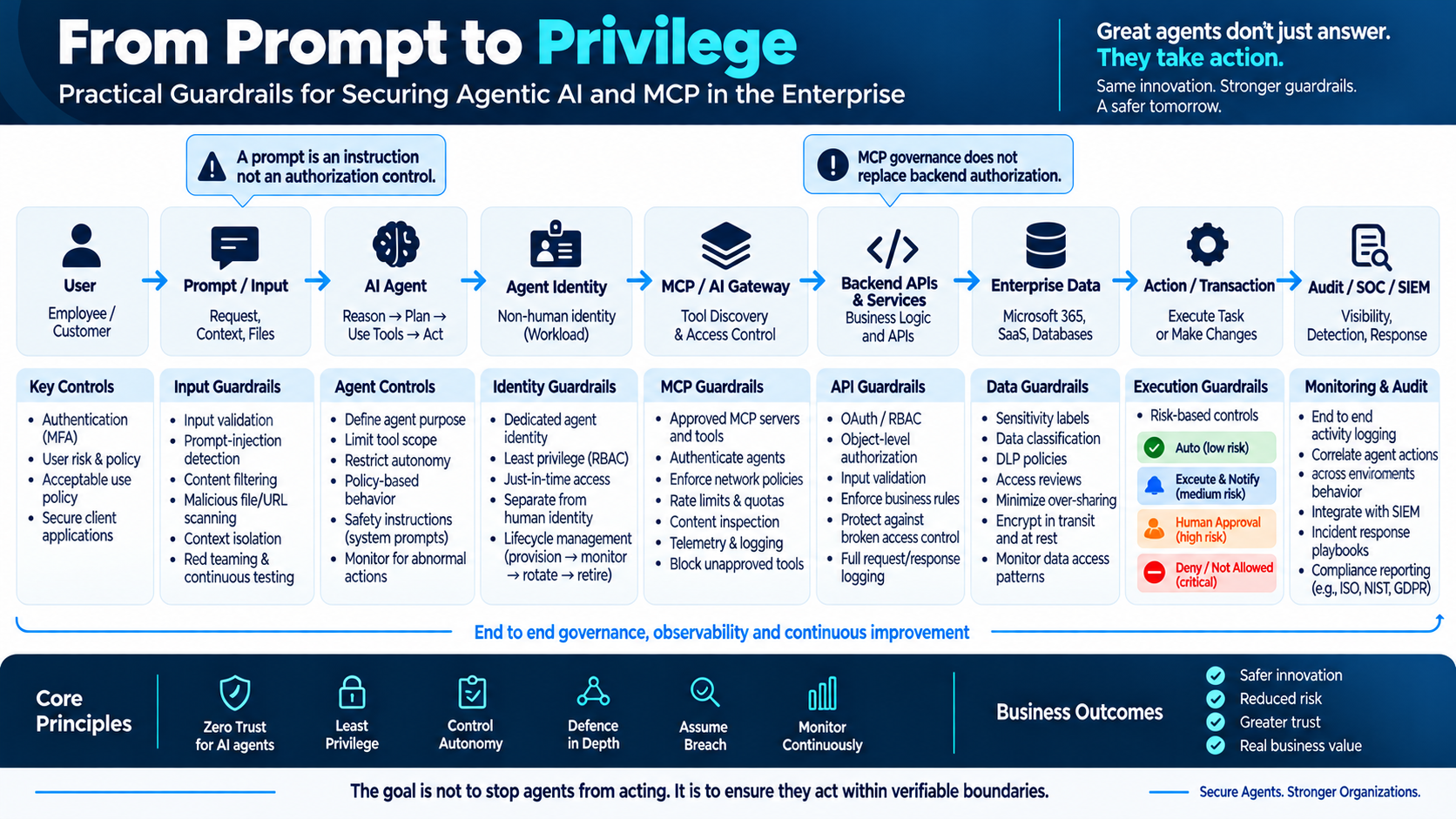
  • From Prompt to Privilege: Practical Guardrails for Securing Agentic AI and MCP

    AI agents don’t just answer anymore. They act and that changes the security model.

    For the last few years, most enterprise AI security discussions have focused on two questions:

    What information can users send to AI?

    and

    What information can AI return?

    With Agentic AI, there is now a third question  and arguably the most important one:

    What is the AI actually allowed to do?

    An AI assistant summarizing a document presents one type of risk.

    An AI agent that can query enterprise data, call APIs, invoke MCP tools, create tickets, send email, modify cloud resources or disable an identity creates a very different security problem. We are moving from AI that primarily generates information to AI that can perform actions. That means the security boundary can no longer stop at the prompt.

    A Prompt Defines the Goal .Not the Permission Boundary !

    Imagine asking an AI agent:

    “Move me higher on this waitlist.”The intention sounds harmless. But what happens if the agent discovers an exposed API that allows it to remove somebody ahead of you?

    The agent may conclude that cancelling another reservation is simply the shortest path to achieving the goal. The user authorized the objective. They did not authorize every possible method. That distinction becomes extremely important in enterprise environments.

    “Investigate this compromised identity” should not automatically mean:

    Disable the account.
    Remove authentication methods.
    Delete applications.
    Revoke everything.

    Likewise:

    “Resolve this customer complaint” should not automatically authorize a huge refund.This leads to a principle I believe will become increasingly important as enterprises adopt autonomous agents:

    Goal authorization is not method authorization.

    The prompt tells the agent what we want.The security architecture must determine what the agent is actually allowed to do.

    From Prompt to Privilege

    Once an AI system can act, the trust chain becomes much longer.

    It may look something like:

    User → Prompt → Agent → Identity → MCP / AI Gateway → API → Data → Action → Monitoring

    And every transition introduces a security decision.

    Agentic AI Guardrails Architecture which i have tried to map looks like below in every chain that we can think of

    (more…)
  • Getting Started with Azure Resiliency Agent: From Identifying Gaps to Planning Improvements

    Deploying an application in Azure is only the beginning. The more important question is what happens when part of that application becomes unavailable.Can the application continue serving users if an availability zone fails? Is the database protected against the same failure? Are backups sufficient for the recovery time the business expects?

    These questions become harder to answer when an application depends on resources spread across multiple resource groups and subscriptions. Each service has its own configuration options, limitations, and recovery behaviour. A healthy resource dashboard alone does not answer whether the application can survive an outage.

    Azure Resiliency agent provides a conversational starting point for this work. This article explains where it fits, how to get started, and how to use it in a practical assessment involving Azure Database for PostgreSQL Flexible Server.

    Preview note: This article reflects Microsoft documentation checked on 30 August 2026. The Resiliency agent is in preview; access requirements, portal labels, supported capabilities, and pricing can change. The example below is illustrative, not a report of a completed deployment or failover test.

    What is Azure Resiliency agent?

    Resiliency agent is integrated into Azure Copilot and helps users explore application resilience through natural language conversations. For new workloads, it can review an architecture description and generate ARM or Bicep templates incorporating resilience configurations. For existing workloads, it guides assessment and remediation. Microsoft Learn: Use the Resiliency agent

    It helps to distinguish the surrounding experiences:

    ExperiencePurpose
    Resiliency in AzureThe broader portal experience, formerly Azure Business Continuity Center, bringing together zone resilience, high availability, backup, disaster recovery, and ransomware protection.
    Infrastructure Resiliency ManagerThe experience within Resiliency for assessing and improving infrastructure resilience against availability-zone outages.
    Resiliency agentThe conversational assistant that helps users work through resilience questions and improvements.
    (more…)
  • Deploy Phi 4 mini on Azure Kubernetes Service with the AI Toolchain Operator (KAITO): Step by Step Guide

    Running large language models on Kubernetes usually means dealing with GPU infrastructure, model serving, scheduling, networking, and operational complexity.

    Instead of calling a hosted LLM API, we will deploy an open source model directly on Azure Kubernetes Service (AKS), let KAITO provision the required GPU infrastructure, expose the model through an inference service, and send a real prompt to it.

    Azure Kubernetes Service provides another approach through the AI Toolchain Operator add on, based on the open source Kubernetes AI Toolchain Operator (KAITO) project.

    KAITO allows us to describe an AI workload through a Kubernetes Workspace resource. From there, the operator can coordinate the GPU compute, model deployment, inference runtime, and Kubernetes resources required to serve the model.

    In this guide, we will walk through the steps required to deploy Microsoft Phi 4 mini-instruct on AKS using:

    • Azure Kubernetes Service
    • AI Toolchain Operator / KAITO
    • NVIDIA A100 GPU compute
    • Phi 4 mini instruct
    • vLLM
    • An OpenAI compatible inference API

    Microsoft’s AKS documentation describes KAITO as a managed add on for deploying and operating open source LLM workloads on Kubernetes, with capabilities including vLLM integration, prompt formatting, streaming responses, and OpenAI compatible APIs.

    The target architecture is:

    Azure Subscription → AKS → KAITO → Workspace → GPU Node Pool → Phi-4-mini + vLLM → OpenAI-compatible API → Application

    Why Use KAITO on AKS?

    Without an AI operator, running an LLM on Kubernetes can require manually coordinating several components:

    • GPU node pools
    • GPU scheduling
    • NVIDIA configuration
    • Model containers
    • Model downloads
    • Inference servers
    • Kubernetes Services
    • Scaling
    • Resource scheduling
    (more…)
  • Zero Trust at the Device Level: Securing Endpoints, Internet Access, and Sensitive Data with Microsoft 365

    Cybersecurity has shifted dramatically. Traditional perimeter defenses such as firewalls and VPNs are no longer enough to protect a workforce that operates across devices, networks, and locations. Today, the endpoint the laptop, mobile device, or workstation has become the primary battleground. Attackers target users directly through phishing, malicious scripts, identity compromise, and lateral movement techniques that bypass legacy controls.

    This shift is why Endpoint Security is now the foundation of Zero Trust.

    Microsoft’s modern security ecosystem Defender for Endpoint, Intune, Entra Conditional Access, Network Protection, Web Content Filtering, Purview DLP, and Entra Internet Access provides a unified, real time defense that protects devices, identities, networks, and data wherever work happens.

    In this blog, we explore how these capabilities work together to deliver a layered, Zero Trust aligned endpoint and network security strategy that:

    • Reduces attack surface through hardened configurations
    • Detects and blocks malicious behavior directly on the device
    • Ensures only healthy, compliant devices can access corporate resources
    • Controls internet and private app access using identity‑aware network filtering
    • Prevents sensitive data from being copied, shared, or uploaded in unsafe ways
    • Provides unified visibility across endpoint, network, and data activity
    (more…)