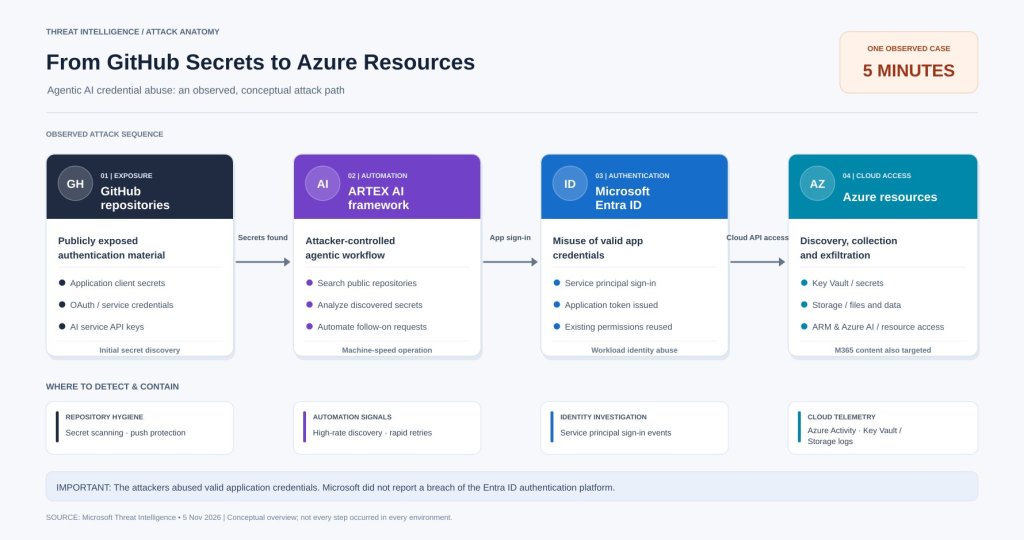
How quickly could an attacker turn a leaked application secret into access to Azure Key Vault? In one investigation, Microsoft observed an AI agent progress from searching public GitHub repositories to exfiltrating Key Vault data in just five minutes. This is an observed case, not a typical or guaranteed attack duration.
On November 5, 2026, Microsoft Threat Intelligence published Threat actors use agentic AI tooling to find and abuse exposed secrets. The report describes actors using ARTEX, an agentic offensive framework, to identify exposed credentials and then abuse valid application identities across Microsoft Entra ID, Azure and Microsoft 365.
In this walkthrough, we will map the attack chain and investigate relevant signals using Microsoft Defender XDR. The lab screenshots are from a separate test tenant; they illustrate legitimate baseline activity and do not represent the Microsoft incident or evidence of compromise. Identifying details in the screenshots have been redacted.
1. What Microsoft observed
Microsoft reported GitHub secret scanning beginning in August 2026 and follow on credential abuse activity observed from October 28, 2026. Attackers used valid OAuth application credentials to perform service principal sign ins. In some cases, a vendor owned multitenant application credential was involved, potentially exposing downstream customer tenants.
This was not a demonstrated bypass of Microsoft Entra ID authentication. The risk came from stolen, valid credentials and the privileges of the compromised application identity.
- Public code repositories searched for credentials, including OAuth application secrets and cloud service keys.
- Valid application credentials used for service principal authentication and cloud discovery.
- Follow on activity included Azure Key Vault and Storage access, Microsoft Graph searches, access to Microsoft 365 content, and Azure resource operations in some environments.
- One observed sequence reached Azure Key Vault data exfiltration in about five minutes.
2. Agentic AI attack chain: GitHub → ARTEX → Entra ID → Azure
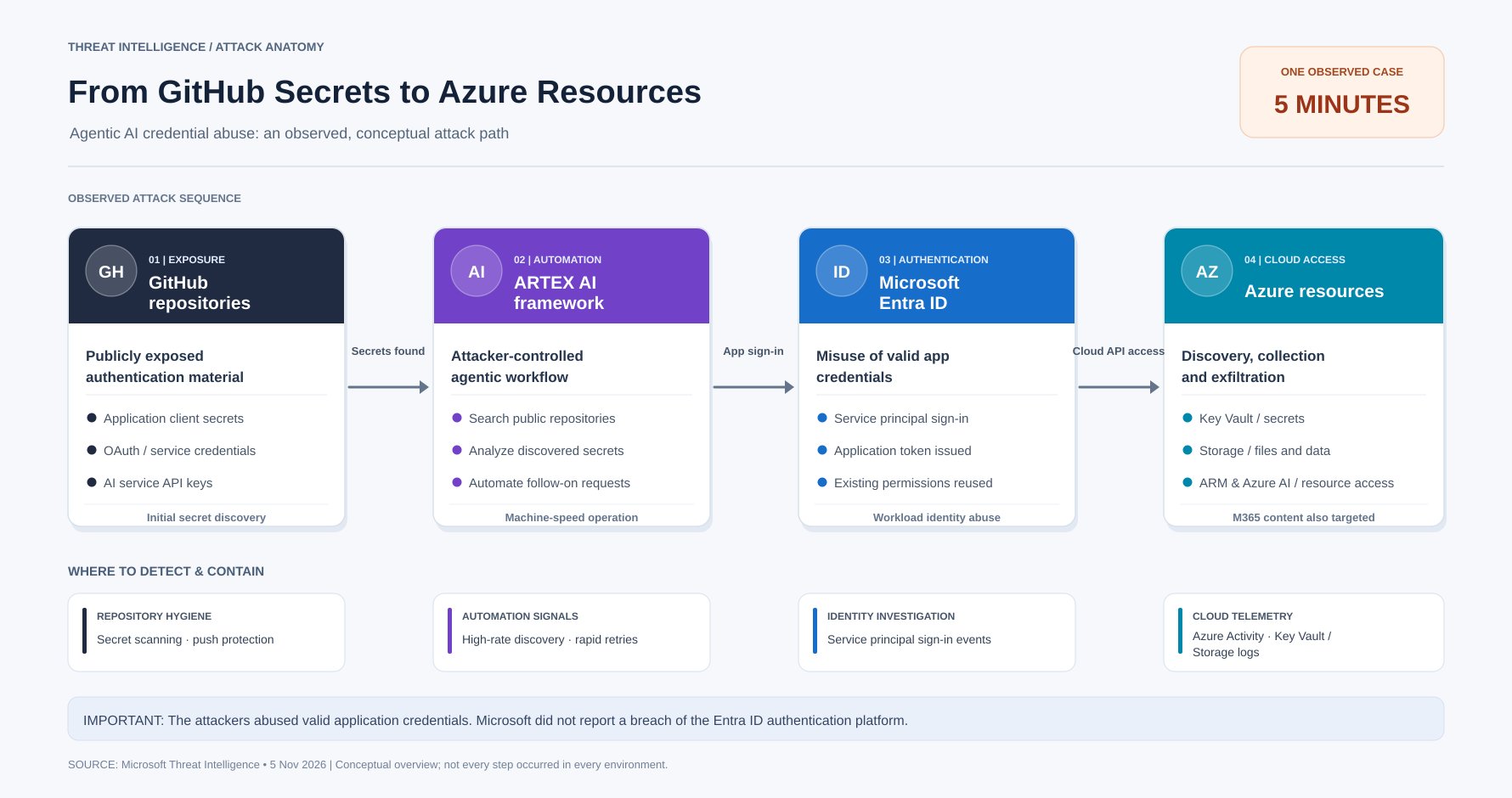
Stage 1 — Exposed secrets in public GitHub repositories
Secrets committed to code, configuration files, scripts or repository history provide potential initial access. Deleting a secret from the latest commit is insufficient because it may remain copied or cached elsewhere.
Stage 2 — ARTEX automates discovery and follow on activity
The offensive framework searched for exposed secrets, evaluated the results and automated additional cloud requests. Microsoft documented adaptive request patterns, including rapid changes to unsupported Azure API versions after HTTP errors.
Stage 3 — Microsoft Entra ID service principal sign in
With an exposed application credential, an attacker can request tokens as that application and exercise its effective permissions. Human MFA requirements alone do not protect client credential authentication.
Stage 4 — Cloud discovery and access
Microsoft observed enumeration of subscriptions, resource groups, service configurations and Microsoft Graph content. In certain cases, attackers sought Key Vault secrets, Storage data, connection strings and other credentials. Additional privileges made further compromise possible.
3. Investigating the attack pattern in Microsoft Defender XDR
Open Microsoft Defender XDR → Hunting → Advanced hunting. Start with baseline activity. A search for a known attacker IP can return zero results even when the hunting tables are fully functional.
Lab context: These queries were executed in an authorized Microsoft 365 test tenant on November 19, 2026. The screenshots below show real telemetry, but no malicious activity was confirmed. Availability depends on licensing, permissions, enabled data sources and retention.
Step 1 — Verify service principal sign-in telemetry
EntraIdSpnSignInEvents| where Timestamp > ago(30d)| summarize TotalSignIns = count(), SuccessfulSignIns = countif(ErrorCode == 0), FailedSignIns = countif(ErrorCode != 0), FirstSeen = min(Timestamp), LastSeen = max(Timestamp)
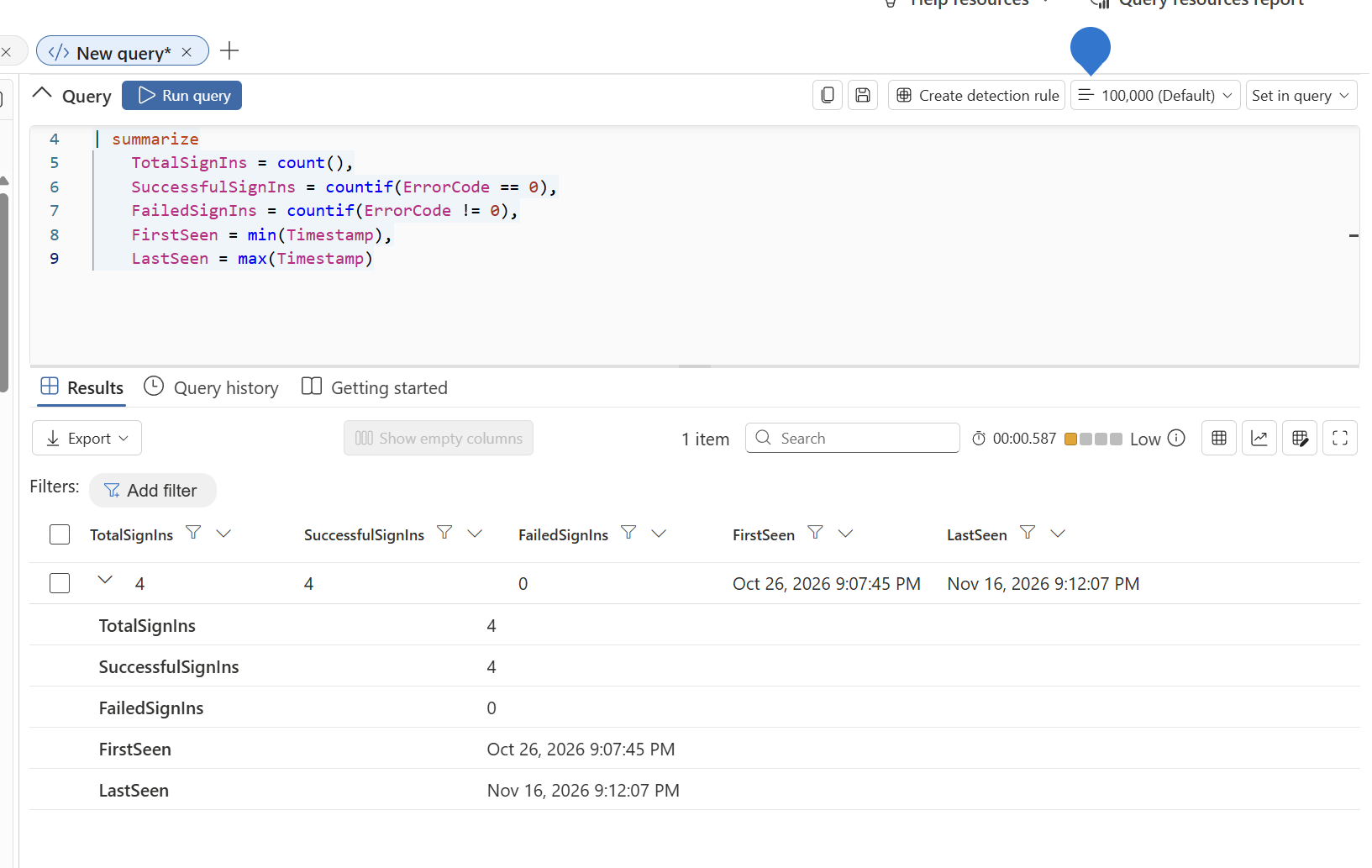
The query returned 4 sign-ins, 4 successes and 0 failures in the lab. This verifies that the table contains telemetry. It does not establish whether applications are secure or insecure.
Step 2 — Understand which service principals are active
EntraIdSpnSignInEvents| where Timestamp > ago(30d)| summarize SignInCount = count(), Successful = countif(ErrorCode == 0), Failed = countif(ErrorCode != 0), UniqueIPs = dcount(IPAddress), IPAddresses = make_set(IPAddress, 10), LastSeen = max(Timestamp) by ServicePrincipalName, ServicePrincipalId| order by SignInCount desc| take 20
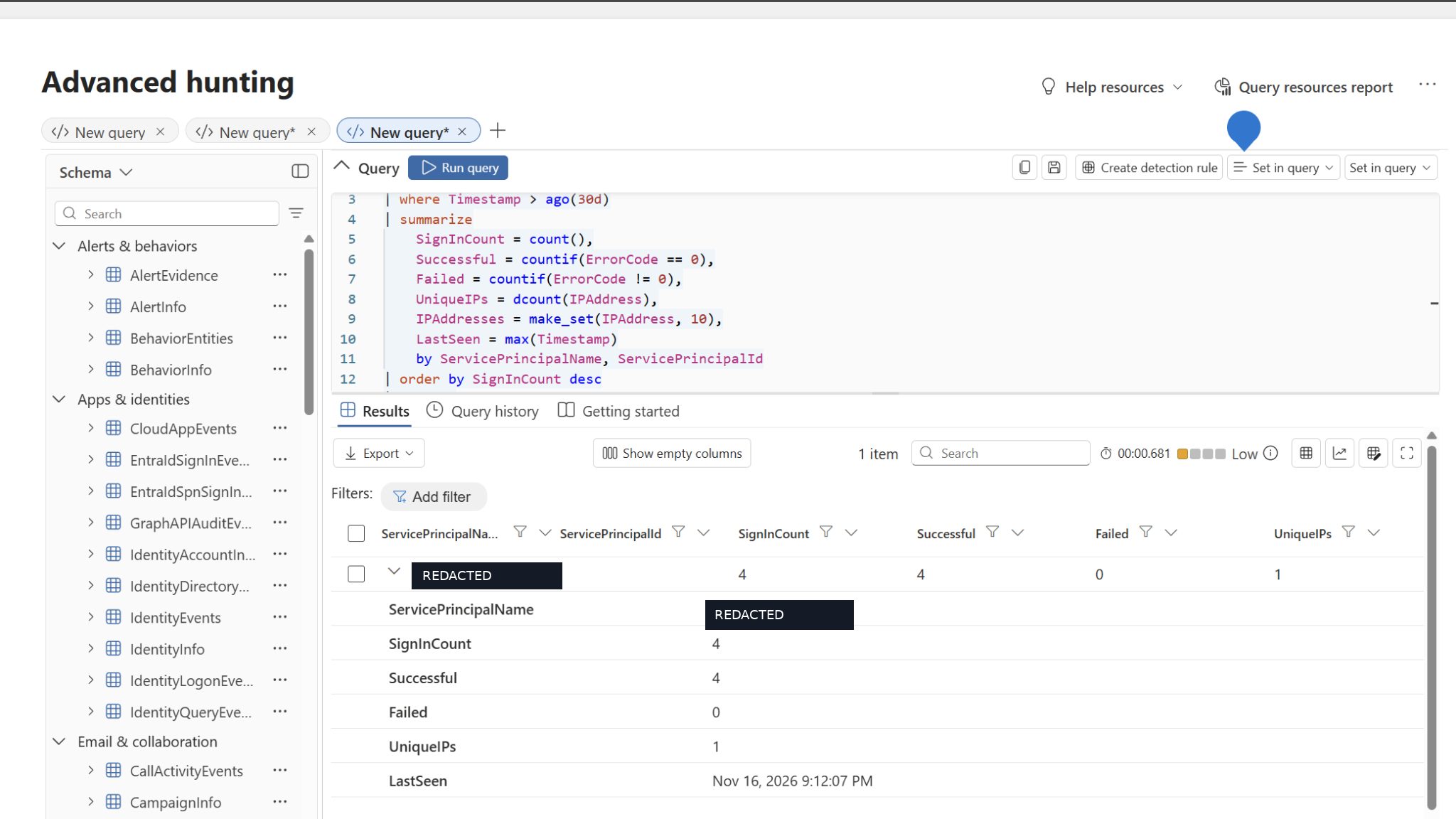
In this test environment, one service principal accounted for the four sign ins from a single source IP. The original application name and identifying values are intentionally not included in this article. Review your own application owners, expected IP ranges, credential type and authorized resource access before interpreting any pattern.
Step 3 — Baseline Microsoft Graph API activity
GraphAPIAuditEvents| where Timestamp > ago(30d)| summarize TotalRequests = count(), DistinctApplications = dcount(ApplicationId), DistinctIPs = dcount(IpAddress), FirstSeen = min(Timestamp), LastSeen = max(Timestamp)
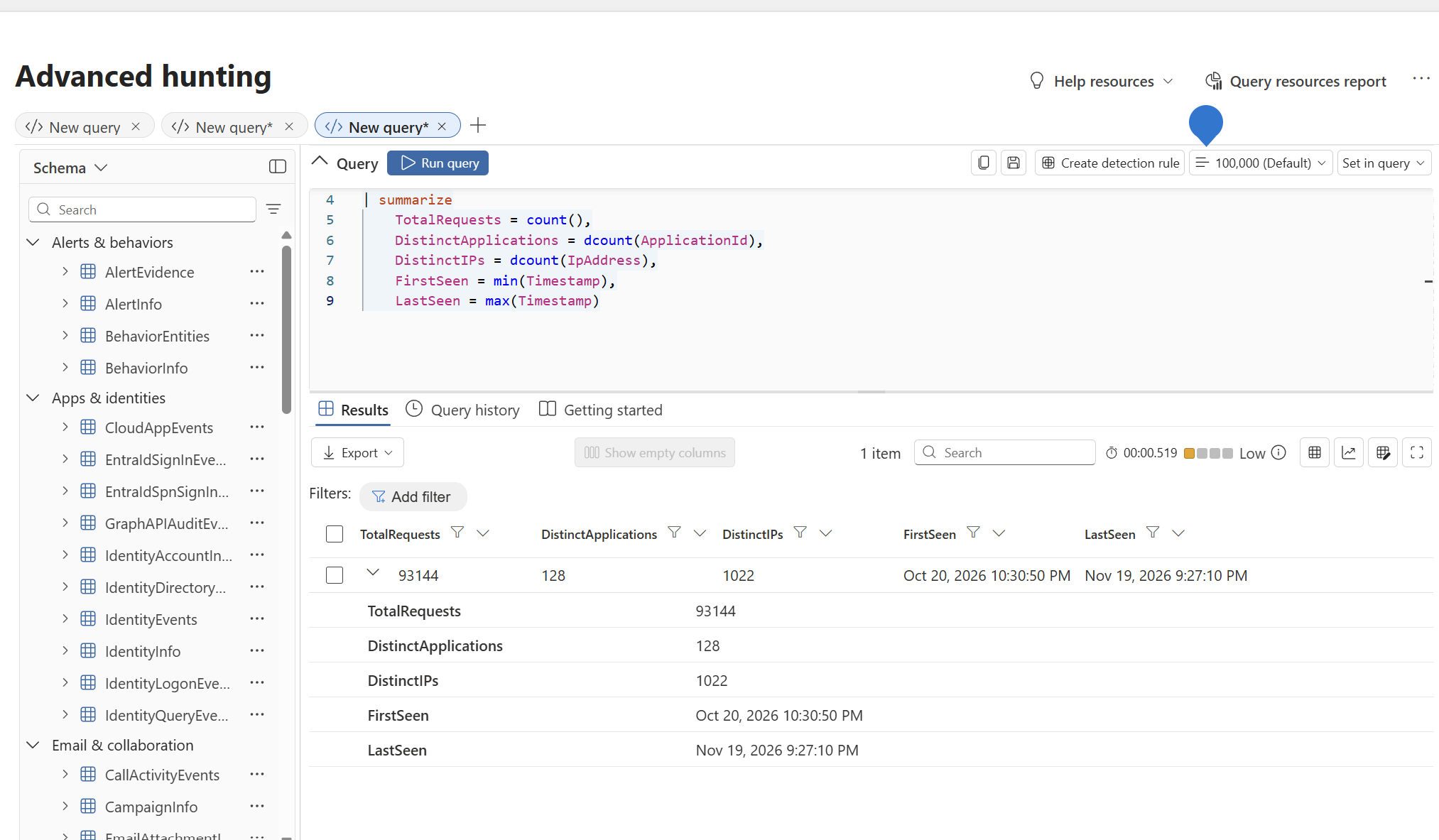
These numbers are activity measurements, not a threat verdict. Large volumes can be expected from normal Microsoft 365 operations. The next step is to identify which app IDs and operations are expected, assess HTTP response patterns and correlate suspicious requests with Entra sign-ins.
Step 4 — Hunt for the reported attacker infrastructure
Microsoft’s report identified 199.19.77.84 as a primary indicator in the October 28 service principal sign-in activity and also discussed 199.19.77.18, a Tor exit node that may be associated with unrelated activity. Use these IPs as investigation pivots, not as definitive proof.
let startTime = datetime(2026-10-28T00:00:00Z);EntraIdSpnSignInEvents| where Timestamp >= startTime| where IPAddress in ("199.19.77.84", "199.19.77.18")| project Timestamp, Application, ServicePrincipalName, ServicePrincipalId, ResourceDisplayName, IPAddress, ErrorCode, UserAgent, CorrelationId| order by Timestamp desc
In the lab, the earlier IP filtered service principal and Graph hunting queries returned zero matches. This is unsurprising in a test tenant. It does not prove the environment is uncompromised and should not be presented as an attack reproduction.
Step 5 — Examine suspicious Microsoft Graph requests
GraphAPIAuditEvents| where Timestamp >= datetime(2026-10-28)| where IpAddress in ("199.19.77.84", "199.19.77.18")| project Timestamp, ApplicationId, ServicePrincipalId, IpAddress, RequestMethod, RequestUri, ResponseStatusCode| order by Timestamp desc
If the IP based hunts return no data, use your tenant baseline to investigate unfamiliar application IDs, bursts of searches, repeated error responses followed by success, and access that is unusual for a particular application. Cross correlate with Azure Activity, Key Vault diagnostic logs, Storage logs and Entra audit records. A single data source does not establish the full attack chain.
4. What should security architects prioritize?
| Control area | Recommended action |
|---|---|
| Access Control | Review application permissions and credential hygiene periodically, validate ownership, and monitor sign in behavior for anomalies. |
| Workload identity design | Prefer managed identities or supported federated identity credentials where practical; reduce long lived client secrets. (Better approach) |
| Application permissions | Review Microsoft Graph permissions, Azure RBAC, third party applications and multitenant consent. |
| Identity protection | Use eligible workload identity Conditional Access and risk protection where supported and correctly licensed. |
| Cloud workload monitoring | Monitor Azure Key Vault, Storage, Azure Resource Manager and relevant Microsoft 365 audit events. |
| Incident response | Revoke/rotate affected credentials, examine all accessible resources and assess any issued tokens until expiry. |
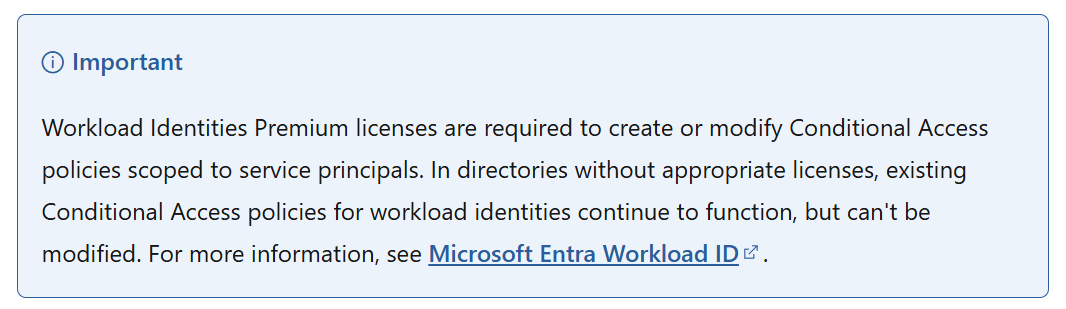
Microsoft notes that Conditional Access policies for workload identities require appropriate Workload ID Premium licensing and cover eligible single tenant service principals registered in the tenant. They do not provide universal coverage for every application or managed identity.
5. Lessons from the lab and the real incident
- The attack speed is the differentiator: machine driven discovery can shorten time from credential exposure to sensitive resource access.
- The identity is the security boundary: application permissions determine the attacker’s reach when a valid secret is stolen.
- Good telemetry begins with a baseline: confirm your hunting tables work before expecting matches for published indicators.
- Zero hits are not a clean bill of health: investigate behavioral anomalies and multiple data sources, not only fixed IP indicators.
- Document lab evidence accurately: distinguish observed tenant data from Microsoft’s reported compromise.
Conclusion
Microsoft’s November 2026 investigation shows that agentic AI can accelerate an already familiar security problem: exposed application credentials with powerful cloud permissions. The response is not simply stronger human sign-in controls. Organizations need continuous secret monitoring, a clear inventory of workload identities, least-privilege permissions, cloud audit visibility and rapid credential containment.
For security architects, workload identities should be treated as first-class Zero Trust subjects. The time to detect and revoke an exposed application secret may now matter just as much as the original prevention control.


Leave a Reply