From intelligent data classification to runtime protection for AI agents
Microsoft Ignite 2026 introduced several important advancements in Microsoft Purview, reflecting the changing nature of enterprise data security in an increasingly AI driven workplace.
As organizations adopt Microsoft 365 Copilot, autonomous AI agents, third party coding assistants and intelligent automation platforms, the traditional boundaries of data security are rapidly expanding.
Historically, enterprise data protection strategies have primarily focused on how users access, store and share sensitive information. Today, AI agents can independently retrieve information, interact with applications, invoke external tools and perform actions on behalf of users.
This introduces a fundamental architectural question:
How do organizations maintain consistent data protection when sensitive information is no longer accessed exclusively by humans, but also by intelligent agents?
The latest Microsoft Purview announcements at Ignite 2026 provide an interesting perspective on how Microsoft is addressing this challenge.
In this article, we will explore the key announcements, their implications for enterprise security architecture, and how these capabilities could influence future data protection strategies.
1. Microsoft Purview Ignite 2026 – Announcements at a Glance
| Capability | Announced availability |
|---|---|
| Runtime DLP for supported local AI agents | Public preview – January 2027 |
| Content based Copilot grounding protection | Public preview – January 2027 |
| DLP for Copilot attachments and linked files | Public preview – January 2027 |
| Recurring classification refresh | Public preview – January 2027 |
| Enhanced Sensitive Information Types (SITs) | Phased availability from January 2027 |
| Unified classification management | Public preview |
| Increased auto labeling capacity | Generally available |
| Expanded auto labeling simulation | Generally available |
| Adaptive scopes for auto labeling | Generally available |
| Default SharePoint library labels for existing files | Public preview |
| Purview integration with Unified Agent Risk | Public preview |
2. Extending Data Loss Prevention to Local AI Agents
One of the most interesting announcements at Ignite 2026 is the extension of Microsoft Purview Data Loss Prevention to supported AI agents operating locally on Windows endpoints.
Unlike traditional applications, AI coding assistants and autonomous agents may dynamically access local files, interpret instructions, invoke tools and communicate with external services.
Supported agents announced by Microsoft include Claude Code, Claude Desktop, GitHub CLI, GitHub Copilot and supported Visual Studio Code extensions.
This creates new data exposure scenarios that go beyond conventional file transfers and browser uploads.
Understanding the risk through a practical scenario
Consider a software developer using an AI coding assistant on a corporate Windows workstation to troubleshoot an application.
During the troubleshooting process, the agent encounters a configuration file containing application credentials, database connection strings or API keys.
Depending on the agent’s workflow, this information could become part of an outbound prompt or tool invocation.
With the announced Microsoft Purview capabilities, organizations will be able to introduce content aware DLP controls at supported agent interactions.
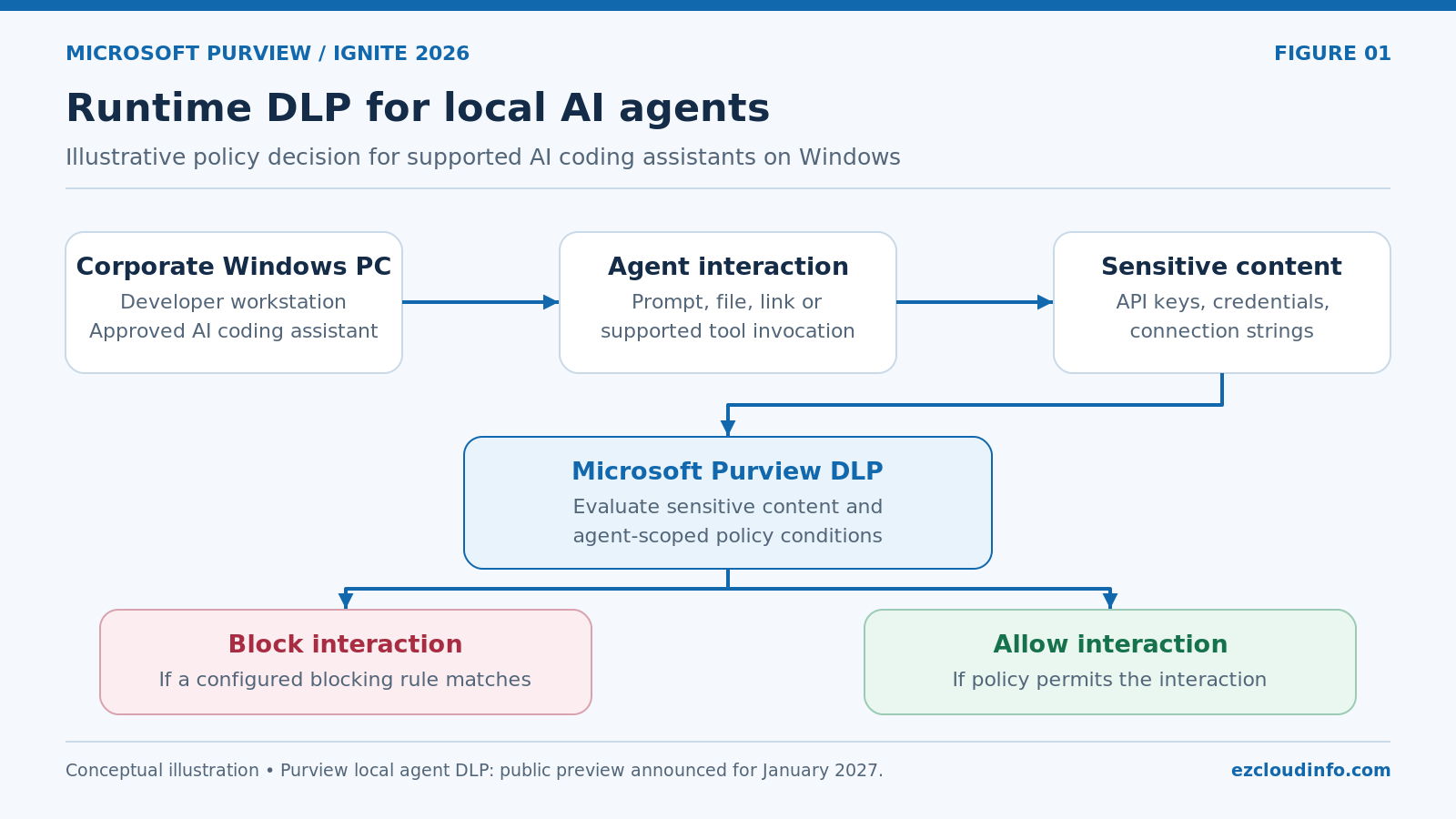
The objective is not necessarily to prevent developers from using AI assistants. Instead, it is to establish appropriate boundaries around the sensitive information that these assistants can process.
Agent-specific policy scoping also introduces the possibility of applying different data protection requirements according to an agent’s business purpose.
Enterprise security architecture perspective
This represents an opportunity to extend existing Endpoint DLP strategies into agent-driven workflows.
Organizations should consider incorporating AI agent interactions into their existing data exfiltration threat models, alongside conventional channels such as removable media, browsers, cloud storage and external communications.
Importantly, runtime DLP should complement not replace secrets management, least-privilege access, endpoint security and network-level protection.
3. Microsoft 365 Copilot DLP Beyond Sensitivity Labels
Sensitivity labels remain a fundamental component of enterprise information protection.
However, one of the practical challenges faced by large organizations is ensuring that sensitive information across their entire data estate has been correctly classified and labeled.
Legacy documents, inconsistent labeling practices and newly created content can introduce gaps in protection.
Microsoft’s latest announcements introduce additional content-aware protection for Microsoft 365 Copilot, allowing DLP policies to restrict the use of sensitive files without requiring a sensitivity label as the sole protection condition.
Comparing existing and announced protection scenarios
| Data protection scenario | Existing capabilities | Ignite 2026 enhancements |
|---|---|---|
| Sensitive information typed into prompts | Content-based DLP | Existing protection retained |
| Sensitivity-labeled documents | Label-based restrictions | Existing protection retained |
| Unlabeled files containing sensitive information | Label-based restrictions alone do not cover these files | Content-based grounding restrictions |
| Sensitive files attached to prompts | Limited by existing policy capabilities | Expanded attachment inspection |
| Sensitive files linked within prompts | Limited by existing policy capabilities | Expanded linked-file inspection |
A practical enterprise use case
Imagine an employee requesting Microsoft 365 Copilot to summarize a financial planning document stored in SharePoint.
The employee has legitimate access to the document, but it has not been assigned a sensitivity label.
The announced DLP enhancements introduce the ability to restrict Copilot from using that document when its contents match configured sensitive information conditions.
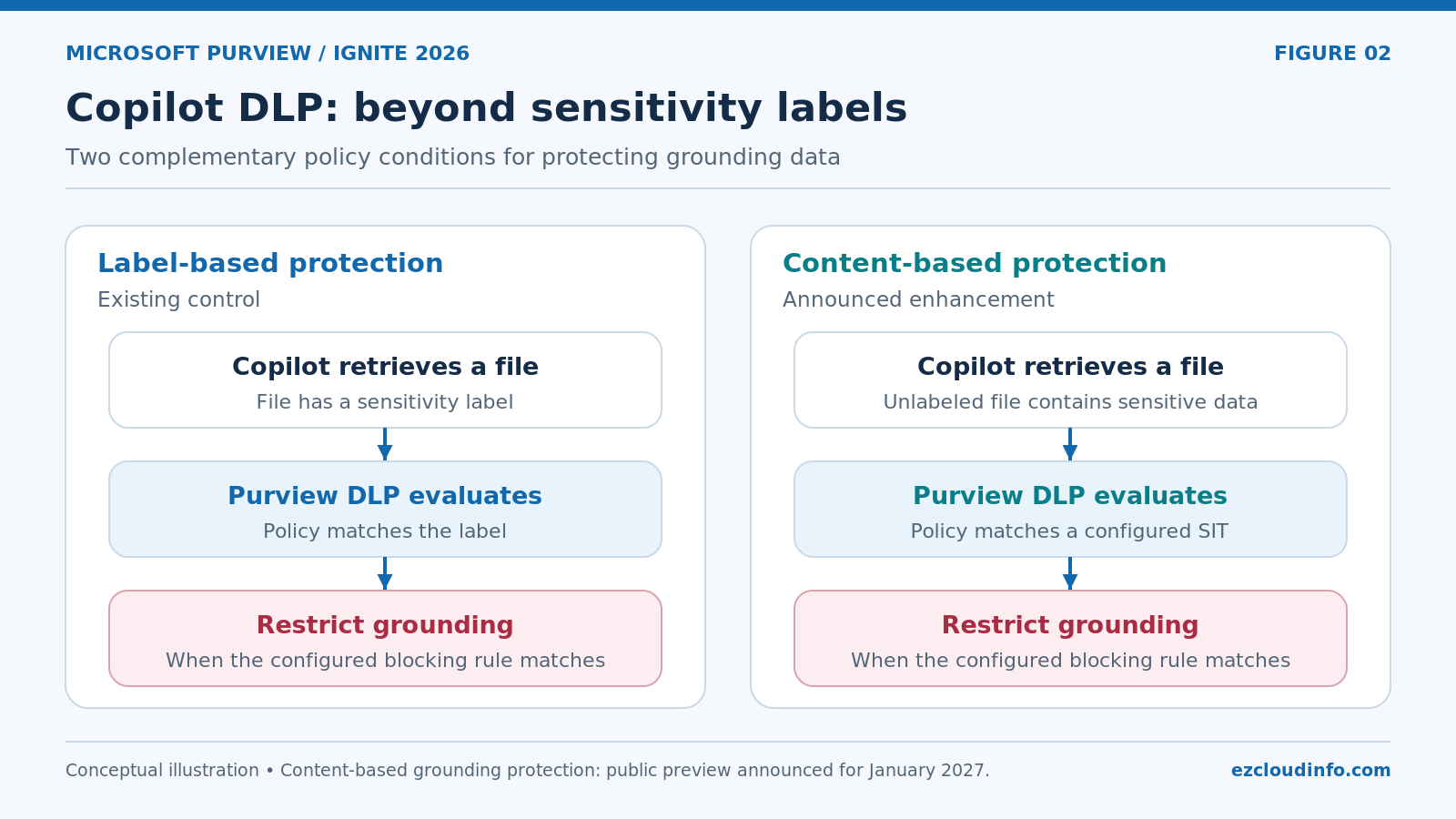
From an architectural perspective, this establishes an additional layer of protection for organizations where sensitivity label adoption is still evolving.
However, this should not be interpreted as a replacement for information classification or sensitivity labels. Labels remain essential for persistent protection, encryption, access restrictions and data governance.
The real value lies in combining classification, labeling, access governance and content-aware DLP as complementary controls.
4. Scaling Enterprise Information Protection
Data classification and labeling have always been foundational components of Microsoft Purview.
However, at enterprise scale, the challenge is not simply identifying sensitive information. It is doing so consistently across millions of documents while keeping protection aligned with changing business and regulatory requirements.
Microsoft announced several improvements that address this operational challenge.
Significant improvements in auto labeling scalability
| Capability | Previous limit | New limit | Improvement |
|---|---|---|---|
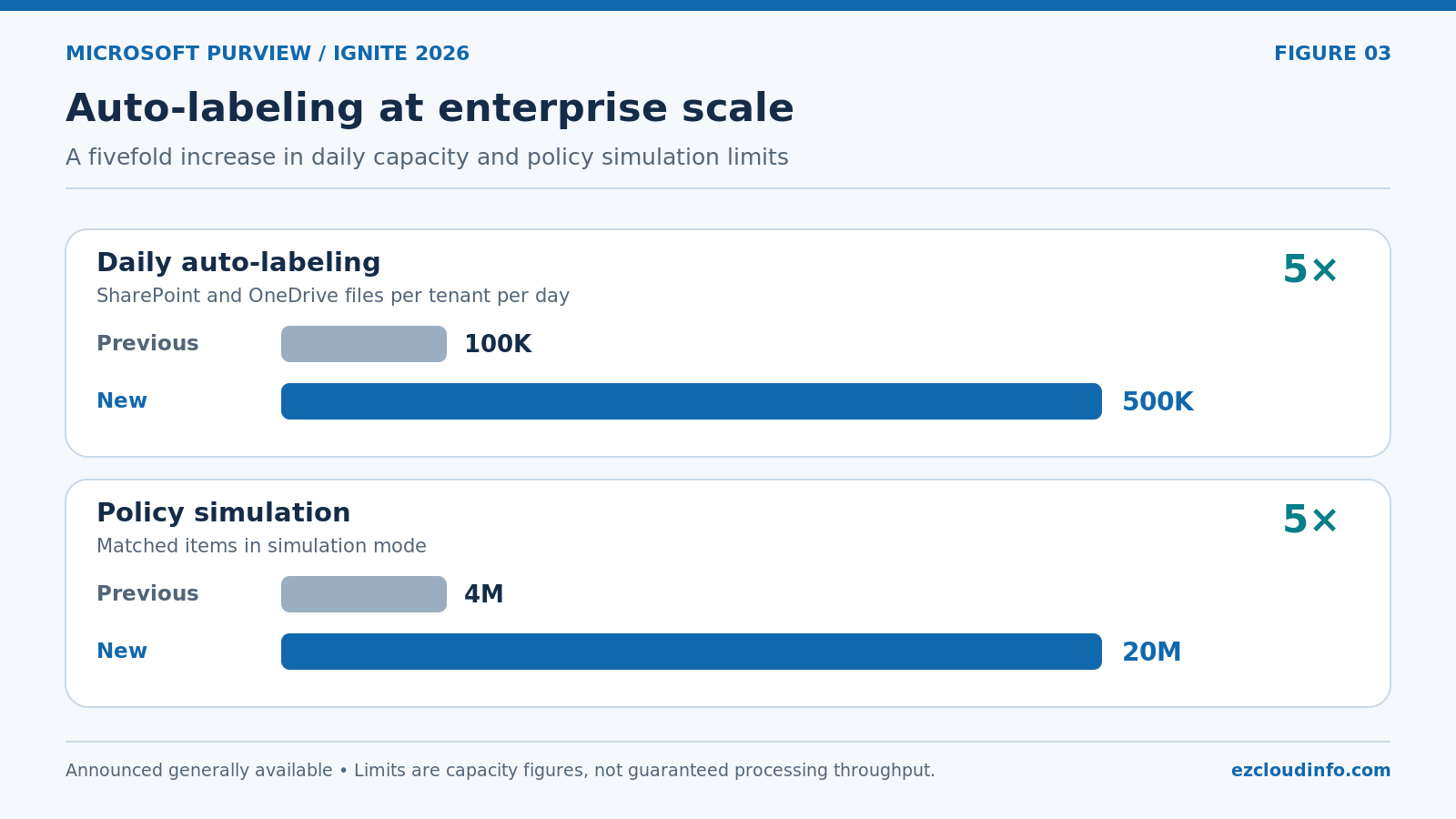
| Daily auto-labeling capacity | 100,000 files | 500,000 files | 5x |
| Auto-labeling simulation | 4 million items | 20 million items | 5x |
The daily labeling limit applies to SharePoint and OneDrive files per tenant.
Adaptive scopes for auto labeling
Managing individual SharePoint site locations within information protection policies can become operationally complex in large organizations.
Adaptive scopes allow auto labeling policies to target sites dynamically using defined attributes.
For example, a policy could target SharePoint sites associated with Finance based on a supported site attribute, such as a naming pattern in the site URL.
This helps reduce manual policy maintenance as new sites are introduced.
Default sensitivity labels for existing SharePoint content
Another important enhancement is the ability to extend a document library’s default sensitivity label to existing files at rest.
This could help organizations establish baseline information protection across business-critical document libraries without relying exclusively on users opening or modifying older files.
5. Moving Towards Continuous Data Classification
Traditional classification initiatives often operate as periodic activities. However, enterprise information and the definition of sensitive data continuously evolve.
Microsoft’s announced recurring classification refresh introduces a more continuous approach to maintaining classification coverage.
Following an initial baseline scan, existing information can be reassessed when applicable classifiers are introduced or updated.
Microsoft is also enhancing more than 100 commonly used built-in Sensitive Information Types as part of its initial rollout.
Additionally, the unified classification management experience brings multiple classifier technologies into a centralized administrative interface, including:
- Sensitive Information Types (SITs)
- Exact Data Match (EDM)
- Trainable classifiers
- Document fingerprinting
Enterprise security architecture perspective
Classification should increasingly be treated as an ongoing security lifecycle rather than a one-time implementation project.
This becomes particularly important when AI applications can discover and retrieve historical information that may not have been reviewed or modified for several years.
A more continuous classification strategy can help reduce the gap between data discovery and policy enforcement.
6. Unified Agent Risk – A New Dimension of Insider Risk
Traditionally, insider risk management has focused on human-driven scenarios such as unauthorized disclosure, inappropriate access, intellectual property theft and accidental data leakage.
The emergence of autonomous and semi-autonomous AI agents introduces an additional dimension to this risk landscape.
An AI agent may operate with legitimate permissions while performing actions that introduce unintended security risks.
Examples include:
- Retrieving sensitive information outside its intended business purpose.
- Transmitting confidential data to an external tool.
- Performing unexpected actions following a prompt injection.
- Operating with excessive or inherited permissions.
These scenarios do not necessarily require malicious human intent.
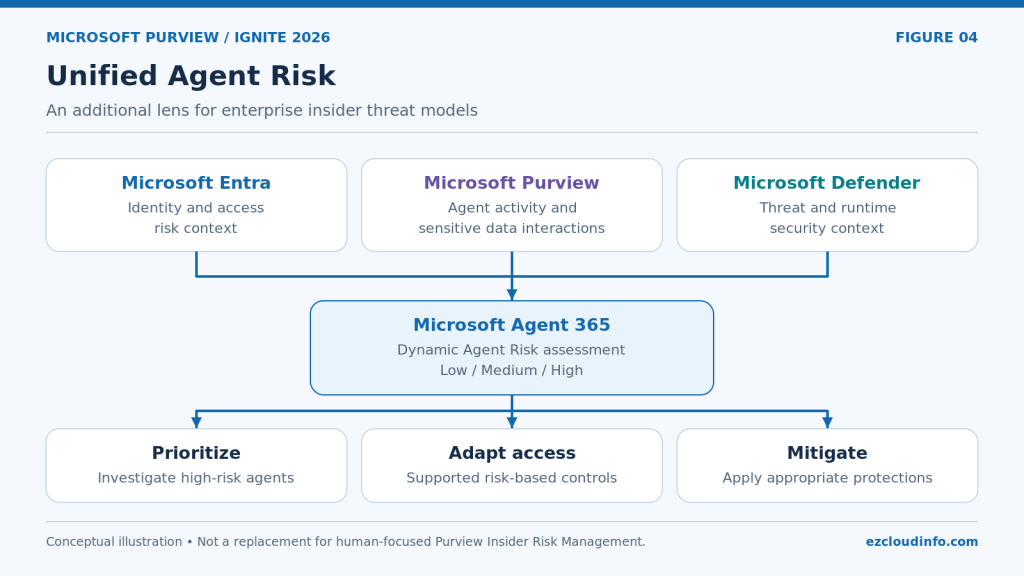
At Ignite 2026, Microsoft announced further integration of Microsoft Purview data security signals into the Unified Agent Risk assessment within Microsoft Agent 365.
Connecting data, identity and threat intelligence
Microsoft’s Dynamic Agent Risk capability brings together information from multiple security domains to establish an evolving understanding of agent risk.
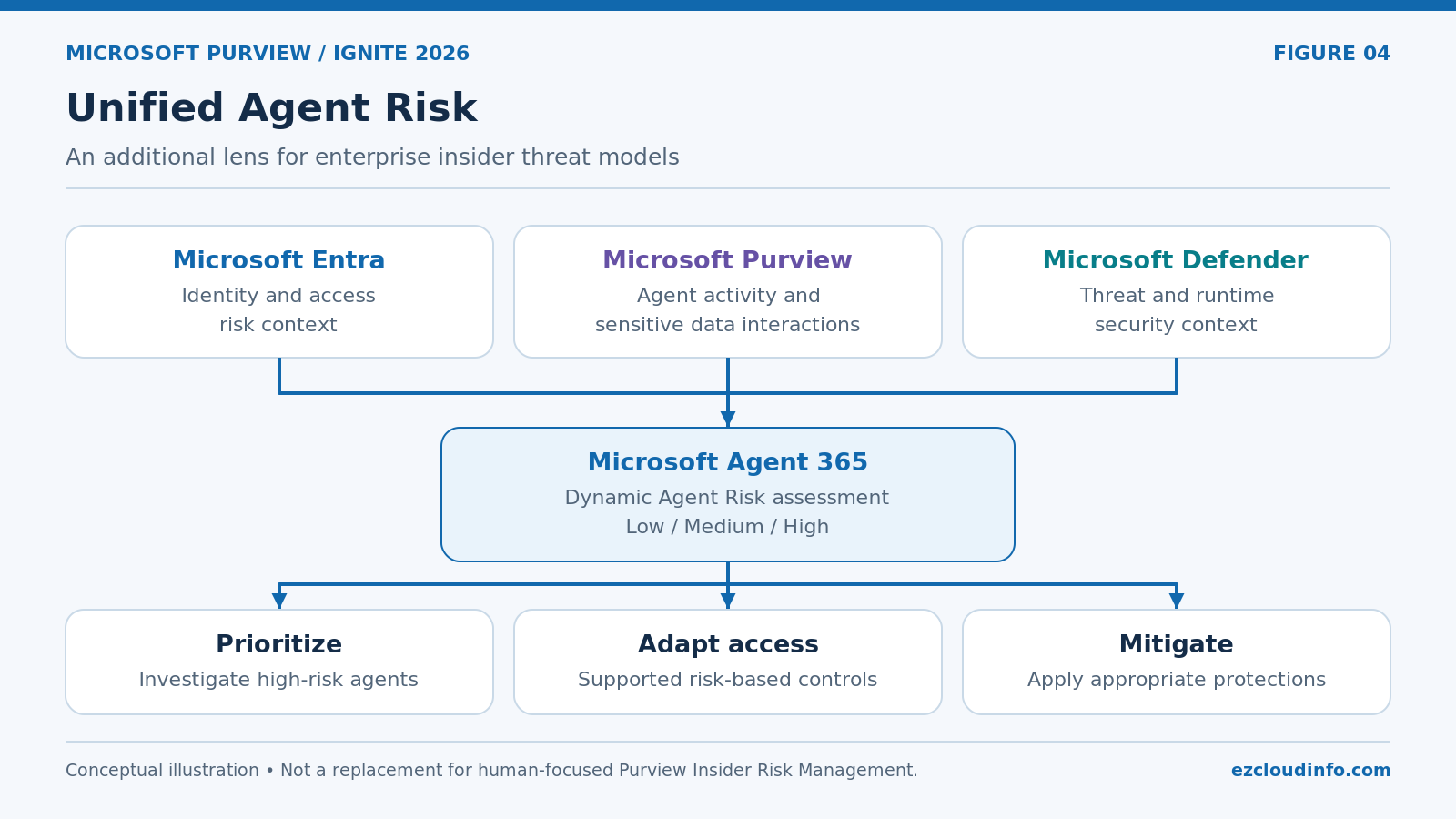
Microsoft Purview contributes context about agent activity and sensitive information interactions, while Microsoft Entra and Microsoft Defender contribute complementary identity, access and security signals.
These signals can support risk-based investigation, prioritization and appropriate mitigation across supported Microsoft security capabilities.
What this means for Insider Risk Management
From an enterprise architecture perspective, organizations should begin evaluating AI agents as an additional category of trusted actors within their insider threat models.
This does not mean that Unified Agent Risk replaces Microsoft Purview Insider Risk Management or that existing human focused insider risk policies automatically extend to AI agents.
Rather, it highlights an opportunity to evolve insider threat management strategies to address both human and non-human actors.
Future insider risk programs may increasingly need to consider agent ownership, permission boundaries, data access behavior, runtime activity and accountability for autonomous actions.
7. What Should Enterprises Do Next?
While several of these capabilities are still in preview or scheduled for future release, organizations can begin preparing their security architectures today.
Key areas of consideration include:
- Assessing existing sensitivity labeling and classification coverage.
- Identifying AI assistants and agents operating across enterprise endpoints.
- Reviewing agent permissions and potential data exposure paths.
- Establishing data protection requirements for AI-driven workflows.
- Incorporating agent-related scenarios into insider threat models.
- Defining controlled pilot environments for validating emerging security capabilities.
These activities can help organizations establish the foundation required to adopt new Purview capabilities as they become available.
Final Thoughts
The Microsoft Purview announcements at Ignite 2026 demonstrate an evolution from traditional data protection towards a more integrated approach encompassing users, applications and intelligent agents.
The fundamental principles of information protection remain unchanged. Organizations still need to understand their data, classify it appropriately, establish access boundaries and prevent unauthorized disclosure.
What is changing is the environment in which these controls must operate.
As AI agents become increasingly embedded within enterprise workflows, data security architectures must evolve to address not only who accesses sensitive information, but also how intelligent systems retrieve, process and act upon it.
Microsoft Purview’s latest announcements provide an interesting glimpse into that future.
What’s Next?
This article serves as the starting point for our Microsoft Purview Ignite 2026 technical blog series.
In the upcoming articles, we will take a closer look at each of these scenarios through detailed hands-on demonstrations, policy configurations, practical testing and enterprise security architecture considerations as the capabilities become available.
Stay tuned as we explore each of these capabilities in detail and bring the Ignite announcements to life through practical demonstrations.
References
- Microsoft Ignite 2026 – Book of News
- Secure the data that fuels AI with Microsoft Purview
- What’s new in Microsoft Agent 365: Ignite 2026
- Security for the agentic era, powered by Microsoft Perception
This overview is based on Microsoft’s Ignite 2026 announcements. Availability is subject to rollout schedules, licensing and applicable prerequisites. The architecture illustrations are conceptual.


Leave a Reply