
Category Archives: Global Secure Access

Rethinking Network Access: A Deep Dive into Microsoft Entra Global Secure Access Diagnostics & Troubleshooting

Modern network access has evolved, and Microsoft Entra Global Secure Access (GSA) is leading the transformation. Whether users are accessing private resources, Microsoft 365 services, or the internet, every request is now routed through an identity aware, Zero Trust-aligned infrastructure. This shift introduces new troubleshooting paradigms and this guide is here to help.

Why Global Secure Access Exists

Global Secure Access combines multiple security layers to deliver robust protection and optimized routing:

  • Zero Trust enforcement for all traffic
  • Unified identity, device, and network controls
  • VPN replacement for private apps
  • Secure outbound internet access
  • Optimized Microsoft 365 routing

Traffic Profiles Explained

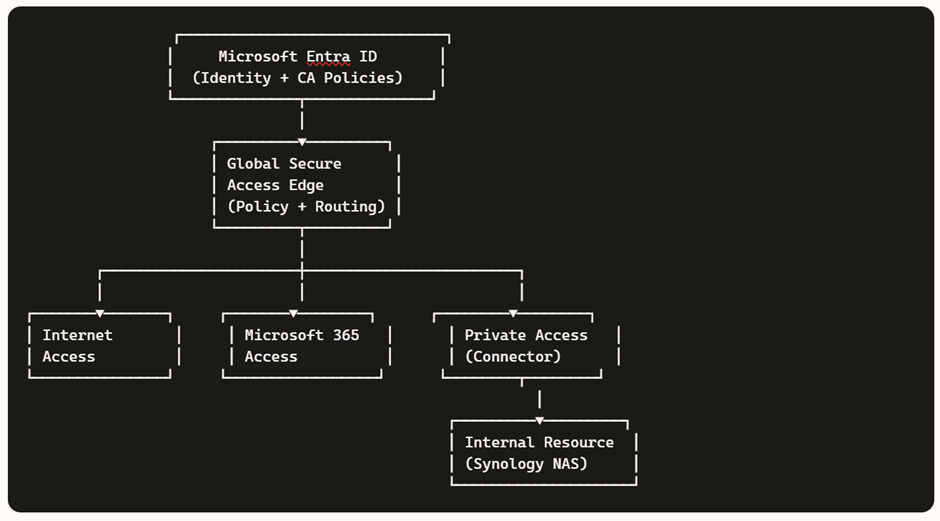
GSA categorizes traffic into three distinct profiles:

  • Internet Access → Secure outbound browsing

  • Microsoft 365 Access → Optimized, identity-aware routing

  • Private Access → Zero Trust access to internal apps

For architectural flow diagrams and examples (e.g., Synology NAS), refer to my previous blog.
Continue reading

From Home to Zero Trust: A Hands-On Guide to Microsoft Entra Private Access

In today’s hybrid work environment, secure access to internal resources without relying on traditional VPNs is a key requirement. Microsoft Entra Private Access, part of the Global Secure Access suite, enables Zero Trust-based connectivity to private applications hosted on-premises or in private networks.

In this demo, we’ll walk through setting up a home lab using an Azure tenant, installing the Entra connector, and configuring access to a Synology NAS as a private application—all from a personal laptop and home network.

Before starting, make sure you have:

  • Microsoft Entra ID tenant with Global Secure Access enabled.
  • Microsoft Entra Global Secure Access license (Private Access feature).
  • Windows 11 Pro device (required for advanced networking and policy support).
  • Device joined to Microsoft Entra ID (Azure AD joined or Hybrid joined).
  • Intune-managed device for policy enforcement and NRPT configuration.
  • Administrative access to your Azure tenant and local machine.
  • Microsoft Entra Connector installer downloaded from the Entra Admin Center.
  • Global Secure Access Client installer for Windows.
  • Internal resource (Synology NAS or similar) reachable on your home network.
  • Internal IP address of the resource (e.g., 10.0.x.x).
  • Optional DNS setup:
    • Private DNS zone or hosts file entry for FQDN (e.g., demo.synology.me).
  • Self-signed certificate (optional) for HTTPS access.
  • Internet connectivity for connector registration and client sign-in.
Continue reading

Microsoft Entra Global Secure Access Preview – Secure Access Service Edge (SASE)

An identity-aware, cloud-based security infrastructure is becoming increasingly necessary for today’s workforce as more and more data and apps move to the cloud. Security Service Edge (SSE) is a new class of network security solutions that is a stand-alone subset of Secure Access Service Edge (SASE).

SASE architecture’s main goal is to provide a seamless and secure user experience while maintaining optimal connectivity.

Take a look at this video to learn more about it.

I hope you enjoyed this video!

Regards

Sathish Veerapandian