Monthly Archives: September 2019

Script to offboard resigned employee in a hybrid environment

The below script can be used in off-boarding below tasks for a resigned employees as a bulk operation.

This script will help in below actions for Exchange online and AD tasks to be removed in a Exchange hybrid environment:

  1. Convert exchange online mailbox to shared Mailbox.
  2. Disable the Mailbox protocols – OWA,ActiveSync, POP, IMAP, MAPI & OWA for devices.
  3. Hide the user from GAL.
  4. Remove the user from respective licenses E3,E5,EMS E3 & EMS E5 Licenses.
  5. Cancel all the calendar future meetings.
  6. Remove the user account from all groups.
  7. Set the account expiry of the AD account.
  8. Remove the IP Phone Attribute.
  9. Remove the manager field.
  10. Set out of office.
Continue reading

Migrate onpremise SQL DB to the Azure SQL Database

Azure dataplatform also provides Azure SQL database as a relational database as a service PAAS which is fully managed by Microsoft.This helps the developers to build their apps very quickly and removes the overhead of database administration.

There are few methods to migrate an on premise SQL database to Azure SQL Database and in this article we will have a look at migrating them with two options.

1) Using BACPAC export and import.

2) Data Migration Assistant.

Using BACPAC export and import:

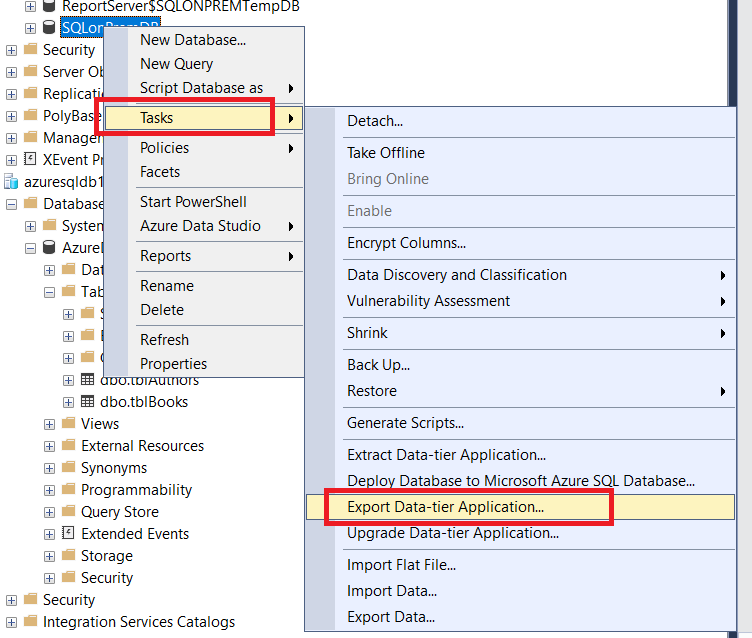
With BACPAC export and import firstly we need to export the SQL database from the on premise SQL instance as a data tier application.

To export – Open SQL Management Studio – Right Click on the desired database and click on tasks – select export data tier application.

Continue reading

Microsoft Azure – Copy VHDs, between storage accounts in managed and unmanaged disks

The most common tasks that we might be receiving in Azure is to copy the blobs between the storage accounts. This article outlines the steps involved in copying the VHDs between managed and unmanaged disks

Copying the VHDs from unmanaged disks to a new storage account is pretty simple and we have two options copying via AzCopy or use Storage explorer

Option 1: Using Az Copy

Step 1: Get the VHD URL – 

Navigate to storage account – Choose the Associated VM SG account – Click on Blobs – Select the container name – Choose Properties – Copy the URL 

Continue reading