
In today’s hybrid work environment, insider threats are becoming increasingly complex. Microsoft Purview’s Adaptive Protection and Insider Risk Management (IRM) offer a dynamic, risk-based approach to protecting sensitive data while enabling SOC teams to investigate and respond to alerts with precision.
This blog provides a step by step walkthrough of how SOC teams can leverage these tools to investigate alerts, assess user behavior, and take appropriate action.
Step 1: Understanding the Adaptive Protection Dashboard
The Adaptive Protection dashboard is the SOC team’s starting point. It provides a bird’s-eye view of user risk levels across the organization, helping analysts prioritize investigations.
Key Elements of the Dashboard:
- User Risk Levels:
- Elevated Risk: Users exhibiting high-risk behavior that may indicate potential data exfiltration or policy violations.
- Moderate Risk: Users with concerning patterns but not yet critical.
- Minor Risk: Users with low level anomalies or early warning signs.
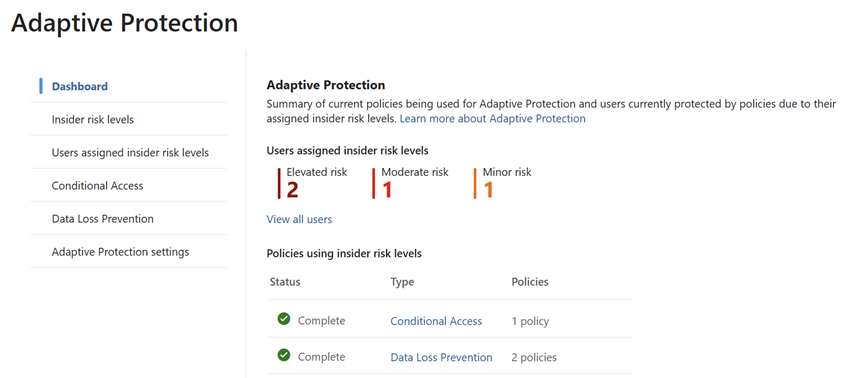
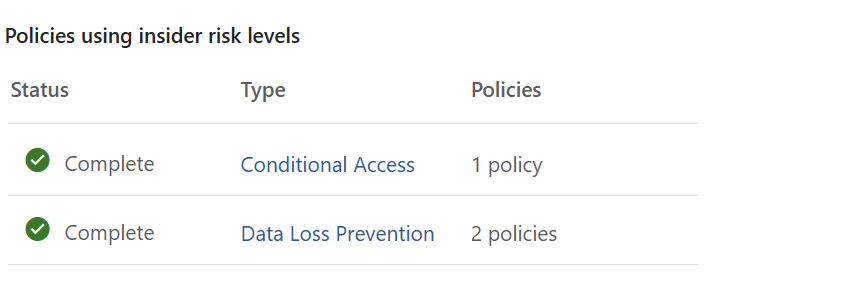
- Policy Integration:
- Shows which Insider Risk policies are actively using these risk levels.
- Helps correlate user behavior with policy triggers, such as data leakage,
- Security violations, or unusual access patterns.

 Tej Pratap
 Ewald Hollestelle
 rsujiraja
 Sathish Veerapandian
 EzCloudInfo