Monthly Archives: April 2016

How certificate revocation works

For any web application which is hosted externally will be SSL encrypted.To establish a secure connection they require a certificate.Basically these certificates have a Public key certificate which has a digital signature  for them so that it  can be trusted  for the name, address , organization it has in the certificate by the client.

In a typical public-key infrastructure (PKI) scheme, the signer is a certificate authority (CA), usually a company which charges customers to issue certificates for them.Browsers ensure user safety by requesting certificate information from the vendor instead of from the web application server.

The job of a CA who issues the certificate is not to just issue the new  certificate requests . It needs to provide the certificate revocation information for all the requests it is receiving from the clients.

In this article we will have a look at how certificate revocation works.

Below are the types of  certificate revocation check that can be configured

1) CRL Distribution. –  Certificate Revocation List.

2) OCSP – Online Certificate Status Protocol.

3) OCSP Staple .

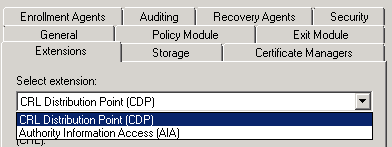
Both the configuration (CRL & OCSP)  needs to be done  on the certificate authority properties extension tab as shown below
CRLL

CRL distribution is the core component of the certificate revocation check.so the latter two options are indirectly and totally dependent on the CRL.

The CRL configuration has below  components:

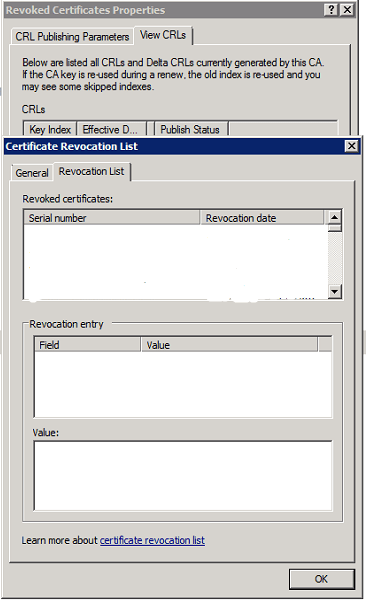
Base CRL – This will contain the whole complete list of revoked certificates (non-expired). so what ever the revoked certificates we have will be present here.

An example below of how it will show in the CRL  and will show all the revoked certificates
C
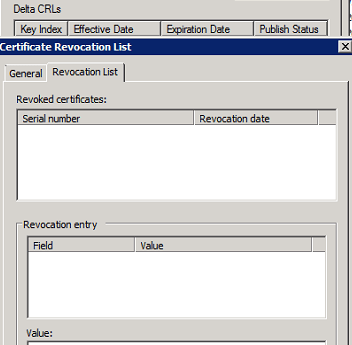
Delta CRL – This will contain only the list of revoked certificates which got from the last CRL distribution points. So this will not have all the revoked certificates.

An example of delta CRL
C1
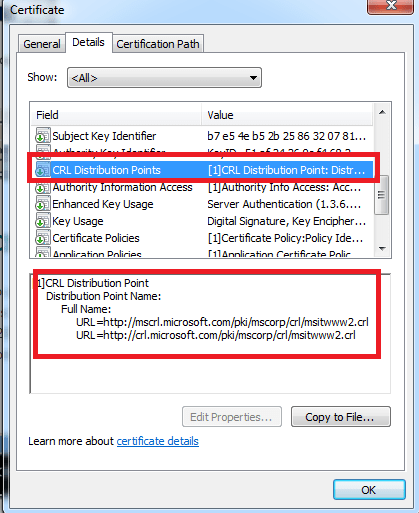
CDP(CRL distribution points) – This CRL distribution point is the place where the Certificate Authority publishes all the certificate information. So the base CRL and the delta CRL gets information from this place only.

A real time example of CRL distribution point wehn seen from the client side.
RT.png

There are 2 types of CRL distribution points which can be configured:

LDAP – Not firewall friendly and complicated. We also need to allow LDAP port for this verification which is normally not feasible. Personally i don’t feel to allow my LDAP port accessed externally for this revocation process.

HTTP – This is easily accessible by all clients.Its very good if configured properly without exposing the internal name space. So basically we need to create a DNS records for the http url to publish ,create a virtual directory for the CRL distribution points and configure a file server.

The disadvantage of CRL’s is that the client has to search through the complete revocation list. More over they are updated periodically and chances are there the client might get wrong information until the next update happens on the CDP. Usually the browsers take more time to load all these certificates and then check the revocation for its required certificate.

OCSP : Online Certificate Status Protocol

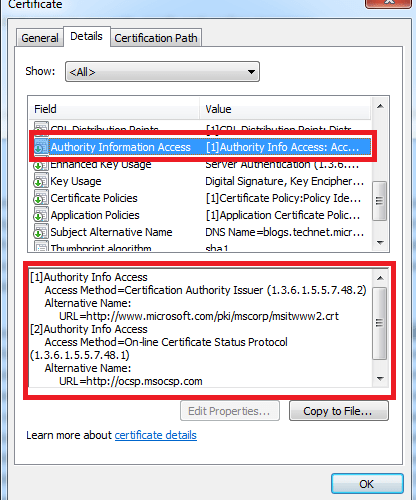
With the OCSP the job has become very simple and easier. This removes the major disadvantage of CRL by allowing the client to check the certificate status of its only one which it owns by providing a serial number to the responder.

OCSP Client – This is the client responsible for querying the certificate check . This OCSP client is available from Windows vista and later versions of operating systems. Operating systems prior to these versions will be using the normal CRL check to validate the certificates. This client is responsible for  providing a serial number to the responder.

OCSP responder (web proxy) – This component is available from Windows 2008 server CA. Servers holding CA prior to this versions will be using the CRL to respond the
requestors. This will check the certificate status of the serial number provided by the client. Then it holds a cache entry of the requests that came so that it would be easier to provide them in future .
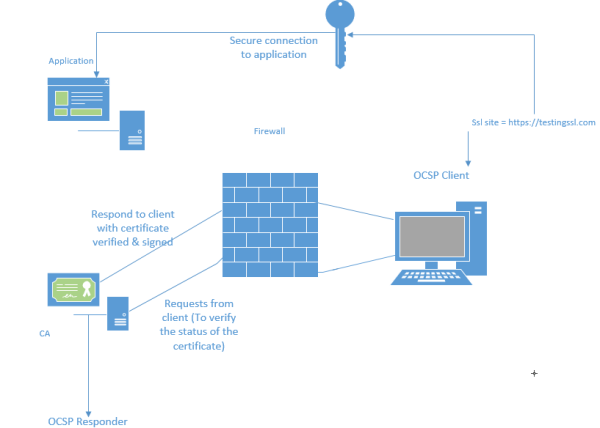
The OCSP client request process in shown below:
1) Client access the website via browser.
2) Client sends OCSP Request to a OCSP Responder (over HTTP) with the certificates serial number for which it requires verification.
3) OCSP Responder replies with a certificate status of either Good, Revoked or Unknown .
Certificate


2 important things for OCSP configuration

1) The Online Responder service runs under the Network Service account. So we need to make sure it Network service has read permission.
2)  we need to enable the value id-pkix-ocsp-nocheck extension for the OCSP by running the below command.

certutil -v -setreg policy\editflags +EDITF_ENABLEOCSPREVNOCHECK

This extension is to avoid the circular revocation checking so that it will not verify the signing certificate from the OCSP requestor.

OCSP stapling:

With OCSP stapling, the web server downloads a copy of the vendor’s response which it can deliver directly to the browser. So the browser do not need to contact the CA seperately rather it will contact the application directly and get the certificate.

With OCSP stapling, the application periodically queries CA and caches a response which is then provided to the browser. By default this setting is configured when we configure OCSP .

The registry key HKEY_LOCAL_MACHINE\SYSTEM\CurrentControlSet\Control\Lsa\Kerberos\Parameters\ controls this behavior.

If we want to disable stapling then all we need to do is create a DWORD called RequestOCSP in the same location and set it to value 0.

A real time example of OCSP distribution point when seen from the client side
RT

Hope this article gave some idea on how certificate revocation works .

Thanks & Regards

Sathish Veerapandian

MVP – Office Servers and Services 

Exchange 2016 install error – Tried to create new default OAB but the object already exists

We might get this below error on installing the first Exchange 2016 on a coexistence setup with Exchange 2013 or Exchange 2010.

When looking through the setup logs we can find the below reason to stop the installation.
{
                Write-ExchangeSetupLog -Warning (“Tried to create new default OAB but the object already exists; it may have been created by another instance of setup.”)
              }

Resolution :
Open ADSI Edit, go to CN=Configuration,DC=domainname,DC=local\CN=Services\CN=Microsoft Exchange\CN=Container\CN=Address Lists Container\CN=Offline Address Lists
Right click on the Exchange 2010/2013 OAB (according to the legacy exchange version you have )and click Properties.

Look for the value ‘msExchOABDefault‘ and Make this value to Not Set or False and then click apply ok.


OAB


What is this  msExchOABDefault ?
This is a Boolean attribute in the offline address book  properties.

The already existing Exchange setup might be having this value set to True.
This value can be either True ,false or Not Set .

If its set to true then this will be the offline address book for any mailbox store, databases in the organization.
Why it fails with this value True is because the Exchange 2016 setup successfully creates the new OAB container in the ADSI EDIT during the installation.When it attempts to set this value to True it fails because the old one has already value set to True.
There can be only one Offline Address Book in a Organization which value can be set to True which is the default OAB.

Now rerun the setup and it should be completed without any issues

After successful installation we can see the default value set to True on the higher version of Exchange as below

OAB1

IMP Note:

Be careful while performing the steps on the ADSI EDIT container since deleting any objects accidentally will lead to a big issue. Better to take a backup before performing any actions on the ADSI Edit.

Thanks 
Sathish Veerapandian

MVP – Office Servers & Services

Content Index and search in Exchange 2016

In this article we will have a look at content index in Exchange 2016 and its improvements

A Small background functionality of how Indexing works in the background:

Index will contain all the search data for database and its copies. This will create a search data for all the mailboxes in that database.This data will be stored in a GUID on corresponding databases on the same location in a folder  and has sub-folders in it.This will help all end users search query from their mailbox.

So basically this will be like an index for a book where we usually look for the subject page location and navigate to the right page. This index functionality is also similar where it looks for the specific email based on the executed search query from the users and returns the appropriate results.

Exchange 2016 uses the same Fast Search index which was introduced from Exchange 2013.

We can see that corresponding file FastSearchIndex as well in the below location on indexing folder in Exchange 2016 as well..
CIII2

So how does the indexing functionality work with Fast Search Index ?

This fast search index has two core components :

CTS – Content Transformation Service:

This service is responsible for performing the actual background work . When the search query reaches here it actually filters the request and performs the search content analysis with  dictionary matches, keyword matches and parsing data with regular expressions. These all  of them are preloaded registered filters on Exchange 2016 Mailbox Server. From Exchange 2016 this parsing retry logic and search result cap have increased from 30 to 250 search refiners which will give a better  search results.

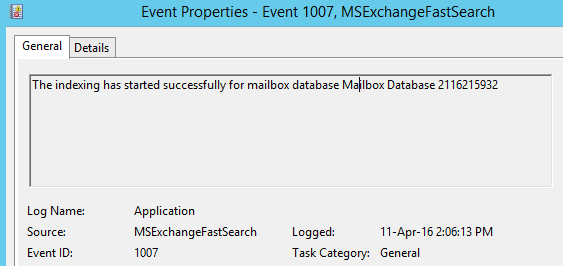
As soon as the search process with this CTS reaches the corresponding database store where the mailbox resides that’s when the below event ID gets created.

CCC

IMS – Interaction Management Service:

This component receives the prepared search results from CMS service processes and then sends the search results back to the user.

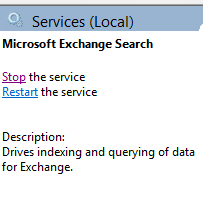
The corresponding service which is responsible for these components is Microsoft Exchange Search.

actual

Rest of the content index operators statistics remains the same as Exchange 2013

C1

What happens when you rebuild an index ?

Usually we don’t require to rebuild the index until the database and copies goes in inconsistent state which is very very rare case in a well planned deployment. But when index is rebuilt Exchange will create a clone copy of the existing database and will use this copy to rebuild the index from the scratch.This will take lot of time to rebuild the index and will consume cpu ,memory and disk .

Search Enhancements and improvements from Exchange 2016:

In earlier versions of Exchange these passive database  copies index will be updated from the active copies.This will  consume more resources CPU time , memory and also disk space 10 to 20 percent.

From Exchange 2016 the indexing of passive copies is done on the passive itself rather than getting it from active copies. This will definitely reduce the utilization of the system resources and network which is very good.

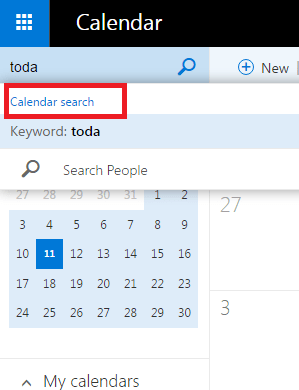
Calendar search which is available only from Outlook Web App at the moment.

actual2


Enhanced server power search and hand off to the end user is available for all Outlook 2016 clients.

Which means from Exchange 2016 with Outlook 2016 client end users will not get this below screen with option “find more on the server”  anymore

actual2

By having this as a default search index from  Outlook 2016 client this will seamlessly search on the local cache(ost) ,Exchange 2016 computer and provide better results in the first search itself. Important point to note is that the client computer needs  an internet connection to have the server side search .

The good thing is that after configuring  outlook profile  for a user having huge mailbox size  on a new laptop the help desk team no longer needs to wait for the local OST file to be cached and indexed since the server side search is attempted on the first try itself.

When  offline, still the search will be performed against the Windows Search Index on the computer.

Based on my experience with the enhanced search from Exchange 2016 is really faster and returns appropriate results with outlook 2016 client.

Thanks  & Regards 

Sathish Veerapandian 

MVP – Office Servers & Services 

Skype for Business leave messages offline

From build 16.0.3331.1000 Skype for Business client 2016 there is an option to send IM to people who are offline. When the users sign in to the Desktop  client all the missed IM conversations will be notified.

We need to follow the below steps to enable this feature for all users.

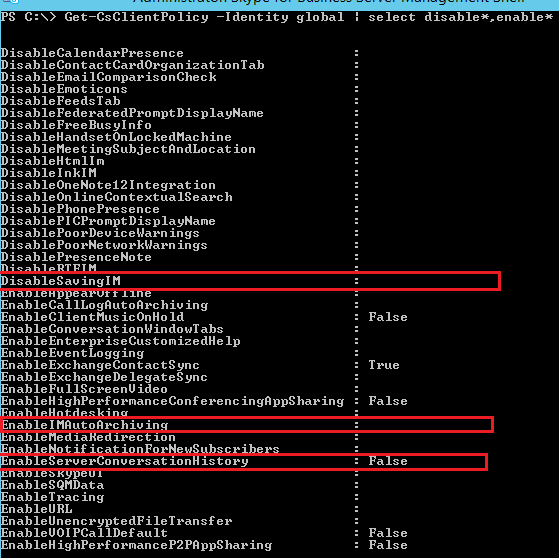
Basically we require 2 parameters that needs to be enabled on the client policy in order for this feature to work.

EnableIMAutoArchiving

DisableSavingIM

By default this value will be set to null with no values as below.

SFB.png

The default option is set to null which means it will save the conversation history locally on the PC and mobile devices and not on the server side unless the option EnableServerConversationHistory value is set to True.

We have 3 options to set:

1) DisableSavingIM value to Null 

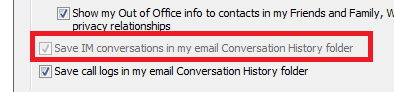
When set end users will have the option either to select or uncheck the option save IM conversations in my email conversation history folder.

2) DisableSavingIM  value to True 

When set end users will not have the option either to select or uncheck the option save IM conversations in my email conversation history folder. The option will be greyed out.

SFB

3) DisableSavingIM value to False 

Setting this value will not

In-order for this feature to work we need to set this value to True  since with the null option and false  it will not work.

post enabling this end users will get this notifications icon on the Skype for business 2016 client.

SFB2.png


If the exchange server integration is enabled for archiving then all these archiving data will be stored on the associated user Exchange Mailbox.

The versions of exchange it supports to integrate the oauth setup is from Exchange 2013 and Exchange 2016 or Exchange Online.
If the version of exchange is 2010 then we do not have this option to store this archiving data on the Exchange.
In this scenario the data will be stored in the Archiving SQL server database.

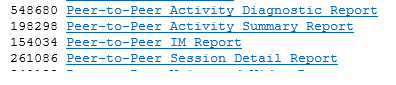
Below sample Dashboard report shows about IM information contained in the archiving database for IM stored on Archiving SQL database.

11

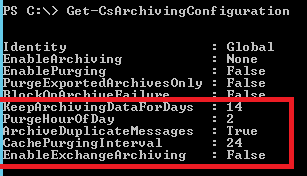
If we have the server side enabled on the Archiving SQL DB its very important we need to look for two values

Test

CachePurging Interval

The system will look for the participants who doesn’t have archive enabled and for them the transcript will be deleted from the database.

Keep Archiving data

By setting this value the system will have only the logs of specified value and purge other records which are older than the specified value.

If in case the data is stored on the Exchange mailbox then we need to make sure a retention policy with the retention tag corresponding to this folder is created which will not increase the Mailbox Quota for end users.

Below are the limitations of this sending Offline IM  feature at this moment:

  1. This feature available only for peer to peer Instant messages at this moment.
  2. This feature is not available for users sending IM to offline persons through mobile devices.
  3. The IM (senders) should be sent from a desktop/laptop thick client. Microsoft might extend this feature to all the clients in future.

Thanks & Regards

Sathish Veerapandian

MVP – Office Servers & Services