Monthly Archives: June 2017

Integrate Cisco TelePresence Management Suite Extension for Exchange with Exchange 2016

This article explains on integrating Cisco Telepresence Suite with Exchange Server 2016. Before that lets have a brief on these components.

Cisco Telepresence Management Suite (Core Component of Video Collaboration):

This component in the Cisco IPT infrastructure provides the on-premises video collaboration.By this component we would be able to configure, Deploy, manage ,schedule , analyze and track the telepresence utilization  within an organization.

Cisco TMS helps in the following:

1) Helps Admins in the daily operations, configuration and maintainence of the telepresence network.
2) Helps consumers to use these telepresence network according to their customization.Like telepresence deployment as a service Example : Setting up meeting rooms of multi-monitors, multi-microphones and multi-channel speaker systems which gives stunning real like audio,video experience.
3) Helps in monitoring the Telepresence utilization and analyzing them.

What is Cisco TelePresence Management Suite Extension for Microsoft Exchange ?

Cisco TelePresence Management Suite Extension for Microsoft Exchange (Cisco TMSXE) is an extension for Cisco TelePresence Management Suite that enables videoconference scheduling via Microsoft Outlook, and replicates Cisco TMS conferences to Outlook room calendars.

Cisco TelePresence Management Suite Extension for Microsoft Exchange (Cisco TMSXE) is one of their extension for Cisco TelePresence Management Suite.

How it helps us in Scheduling the Meeting :

1)By having this it enables the option to Video Conferencing Scheduling via Microsoft Outlook.
2)Replicates Cisco TMS conferences settings to Outlook Room Calendars.
3)Makes end users to book Audio/Video conferences based on the Meeting room Availability from Outlook.

Cisco TMSXE Installation:

This Cisco TMSXE server runs on Windows server Cisco TMSXE component will be installed on this server along with booking service option chosen.
It similarly uses the IIS as web server. Enable https on the Default Website after the installation.

All the other configurations in Cisco components required for this integration like integrating with CUCM , CMS must be configured on the Cisco TMSXE and Cisco TMS server. There are more configurations on the TMS and TMSXE componenets which needs to be performed before integrating with Exchange Server.

In a small deployment the Cisco TMS and its extensions can be co-located on the same server.
In large scale deployments Cisco TMSXE extensions is seperate and remote SQL instance is required. And seperate Cisco TMS and Cisco TMSPE are always co-resident.

DNS Requirements:

The Cisco TMSXE server must be present on the same server VLAN where we have AD,Exchange servers.
The communication will be authenticated using the Cisco TMSXE Exchange service user account.

EWS and Autodiscover must be reachable from the TMS and TMSXE server for them to function.

Licensing:

Each telepresence endpoints to be booked through Cisco TMSXE must be licensed for general Cisco TMS usage.

In our case from Exchange perspective only the Meeting rooms where we need telepresence to be enabled must have the license.

Supported Exchange Server Versions:

  1. Office 365 ( Active Directory Federation Services and the Windows Azure Active Directory Sync tool are required)
  2. Exchange Server 2016 CU1  (latest CU’s preferred)
  3. Exchange Server 2013 SP1  (latest CU’s preferred)
  4. Exchange Server 2010 Sp3  (Latest Roll-ups preferred)
  5. Exchange Server 2007   (Latest Roll-ups preferred)

Exchange Requirements:

  1. TMSXE purely depends upon Exchange  AutoDiscover and EWS components to show the configured resource mailboxes availability
  2. Room Mailboxes added to Cisco TMSXE must have below configurations
  3. a)Delete the subject
    b)Add the organizer’s name to the subject
    c)Remove the private flag on an accepted meeting

    3.Cisco TMSXE Service Account with Mailbox is required.This service account will be used in Cisco TMS to connect to Exchange, Cisco TMSXE and Cisco TMS.

Enable impersonation for the service user in Exchange to prevent throttling issues.

To enable impersonation run the below command:
New-ManagementRoleAssignment –Name:impersonationAssignmentName – Role:ApplicationImpersonation –User:[ServiceUser]

Certificate Requirements:

Https is the default communication protocol for communicating with Cisco TMS and with Exchange Web Services.

Certificate can be issued from a Trusted CA , since this is only server to server communcation between the Exchange CAS services (EWS/AutoDiscover) and TMSXE services no public SSL is required.

So the TMSXE server certificate issued from Trusted CA should have the below:

  1. Should have the host name of the TMSXE server.
  2. Should have the host name of the Exchange servers for the EWS and Autodiscover services in secure communication.

To verify that we have certificates that are valid and working:
1. Launch Internet Explorer on the Cisco TMSXE server.
2. Enter the URL for the Exchange CAS and verify that the URL field turns green.
3. Enter the URL for the Cisco TMS server and verify that the URL field turns green.

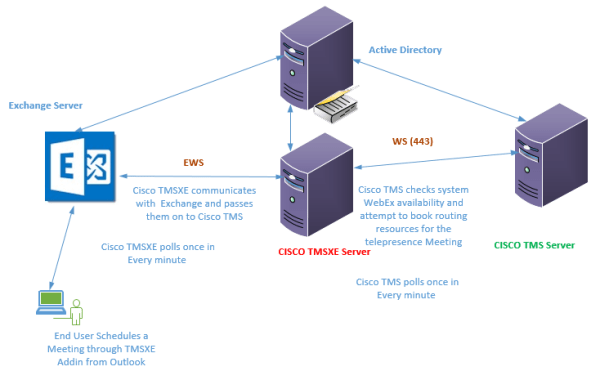
Below will be the Work Flow :
Cisco TMS

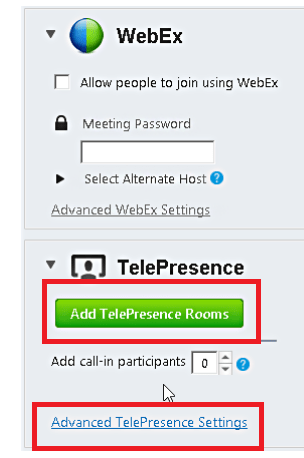
  1. End User Books a meeting through Outlook addin.TP.png
  2. Exchange Checks the resource Mailboxes availability and books the meeting and sends initial confirmation.
  3. Cisco TMSXE communicates with Exchange and passes them on to Cisco TMS.
  4. Cisco TMS checks system and WebEx availability and attempt to book routing resources for the telepresence.

Additional Tips:

  1. The Cisco TMS is dependent only on resource calendars which are configured for this Telepresence feature.
  2. Cisco TMSXE does not have permissions to modify the calendars of personal mailboxes.
  3. All the other configurations  required for this integration must be configured on the Cisco TMSXE and Cisco TMS server.

Thanks & Regards
Sathish Veerapandian
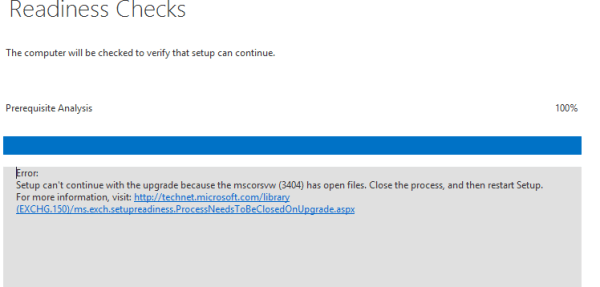
Exchange 2016 CU rollup readiness check fails – MSCORSVW(3404) has open files

During an Exchange CU update we were getting the below message

NGEN

Prior to this all the  Exchange servers were fully patched including  the latest .net assemblies since it was CU5 upgrade.

If we look into the task manager we can see this process running and consuming large CPU resources. This is a .net related process that does the compilation job based on the priorities it is having high priority assemblies  and low priority assemblies.

What is MSCORSVW.exe?

The .Net framework has technology  called Native Image Generator Technology (NGEN) which will speed up the process for .net apps which will run only on a periodic basis purely to improve the performance of that machine

This process MSCORSVW.exe is used by NGEN  to improve the startup performance of .NET apps. So probably after an windows update especially .net patch if we have we can see this process running only at that time and consuming more CPU.

Solution for this problem:

  1. Solution 1: We can wait for a while for this .net compilation job to complete probably 5 or 10 minutes time. Once completed if we rerun the setup  things will  go fine.
  2. Solution 2: By default, NGEN only uses one CPU core for this operation . There is an option to make this work done quickly by making it to use up to 6 cores when we require them. By doing this it will complete its compilation job quickly.

Open CMD in elevated mode and run this command from this path

c:\Windows\Microsoft.NET\Framework\v4.0.30319\ngen.exe executeQueuedItems

Untitlesd

Running the above will  Execute queued compilation jobs with extra CPU cores and make it faster.Now wait for the process to precompile all the assemblies, after a couple of minutes it will be completed.

There will be ngen log as well generated in the same location where we executed this command which we can have a look at after the job completes.

References:

https://msdn.microsoft.com/en-us/library/6t9t5wcf(v=vs.110).aspx
https://blogs.msdn.microsoft.com/dotnet/2013/08/06/wondering-why-mscorsvw-exe-has-high-cpu-usage-you-can-speed-it-up/

Thanks & Regards
Sathish Veerapandian

Failed to store data in the Data Warehouse – SCOM Reports – Exchange Microsoft.Exchange.15.MailboxStatsSubscription

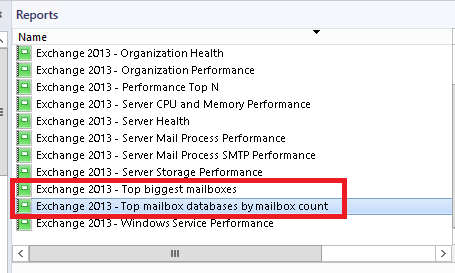
Recently when we tried to generate the top mailbox statistics report with the below option available from SCOM reports we weren’t able to generate them.

SCOMd

It was giving an empty report without any values.

Along with that few report data’s only for Exchange Servers like database IO reads/write  while trying too were empty with no values.

Upon looking into the operations manager log saw the below event ID.

Log Name:      Operations Manager
Source:        Health Service Modules
Date:          20.04.2017 09:36:58
Event ID:      31551
Task Category: Data Warehouse
Level:         Error
Keywords:      Classic
User:          N/A
Computer:      SCOM1.exchangequery.com
Description:
Failed to store data in the Data Warehouse. The operation will be retried.
Exception ‘InvalidOperationException’: The given value of type String from the data source cannot be converted to type nvarchar of the specified target column.
One or more workflows were affected by this.
Workflow name: Microsoft.Exchange.15.MailboxStatsSubscription.Rule
Instance name: SCOM1.exchangequery.com
Instance ID: {466DF86F-CC39-046A-932D-00660D652716}
Management group: ExchangeQueryBy the above error we can see that this mailbox statistics subscription  rule has some problem and hence the reports were not generated.

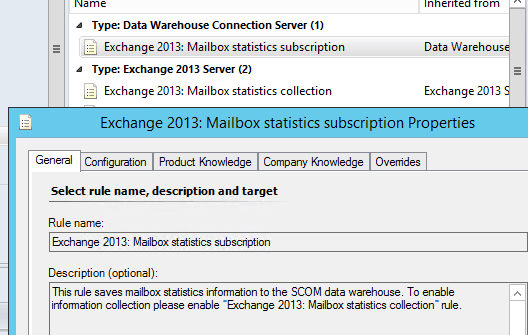
Below 2 rules are required to be enabled to generate this report:

1) Exchange 2013: Mailbox Statistics Subscription.
2) Exchange 2013: Mailbox Statistics Collection.

SCOMd2

So by looking into the above event we can see that the SCOM is having trouble in writing the data into this target tables in the data-warehouse from the stage table.First the generated alerts are written on the operational stage table database by the SCOM. Then the operational database will insert these bulk datas into its Target DataWareHouse. It uses the option SQL bulk Insert because of the amount of data that it needs to insert from its stage table and needs to take this process.

During this process of bulk insert it will compare the value of the data that needs to be inserted with its default allowed values (NVARCHAR values for each tables). So if any of the alert titles have the values more than its default allowed limit then we will run into this problem.

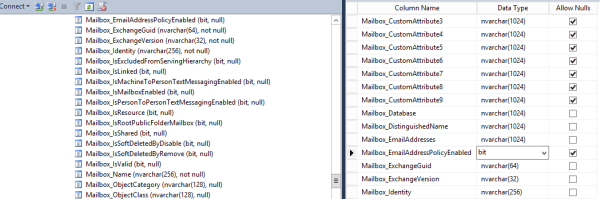
This value can be seen in active stage under the columns in the operational manager database – Tables – Exchange2013mailboxstatsstaging- columns

Here we can see the nvarchar values for each properties of the mailbox which will be used to generate the mailbox statistics report from the scom 2012

SCOMd1

So here if any of  these nvarchar values which is required to generate the report value have exceeded the allowed limit then it will fail inserting the data into the datawarehouse. For example the default length of the allowed limit for Mailbox_EmailAddress is 1024.

Lets say if there is one system mailbox which has multiple smtp addresses added in them which exceeds this character limit then the  entire mailbox stats report will fail.

The SCOM requires in data type Nvarchar for Exchange because to support the unicode type for multi languages mainly. More details on SQL data types can be read here.

In our case we had a service account mailbox which had multiple SMTP addresses added on them and that exceed the allowed limit.

If any one run into the issue here is the simple command to identify the mailbox which has Email addresses of more than 1024 characters.

get-mailbox | where-object { $_.EmailAddresses.ProxyAddressString.ToCharArray().Length -ge 1024 } | foreach-object {write-host “$_”}

Once we find that mailbox we can remove that additional SMTP addresses and make the value less than 1024. After this the reports will be generating without any issues.

Another solution : ( Not Recommended)

Extend the nvarchar field values on the stage table as well as  target table (Exchange2013.MailboxProperties_) in DataWareHouse which will allow the data to get processed and generate the reports even if it has a large amount of data.

Its better not to change the default values as it might go as unsupported model , rather modifying  the mailbox and reducing the character limit which will keep everything in place without any customization.

Thanks & Regards
Sathish Veerapandian