Category Archives: Security

Exploring Microsoft Entra Agent ID (Preview): Identity, Governance & Zero‑Trust for AI Agents

Note: Features are in Preview and may change.

As organizations lean into AI assistants and autonomous workflows, one challenge keeps coming up in every SOC and IAM conversation: agent sprawl. Agents show up in multiple teams and builder platforms, and before you know it, you’ve got non‑human actors touching sensitive data without a clear inventory, lifecycle, or policy boundary.

Microsoft Entra Agent ID and the Agent Registry (Preview) are designed to solve exactly that bringing identities, governance, and Zero Trust controls to AI agents, so you can securely discover, organize, and manage them easily in your directory.


What Agent Registry Adds (and Why You’ll Care)

Agent Registry is an Microsoft Entra integrated metadata repository that gives you a unified view of agents built on Microsoft platforms (e.g., Copilot Studio, Azure AI Foundry) and those from other ecosystems. It separates operational records (Agent Instances) from discoverability metadata (Agent Card Manifests) and introduces Collections to govern which agents can discover and collaborate with each other. Think discovery before access a crucial shift for reducing exposure.


A Quick Look at the Tenant Experience

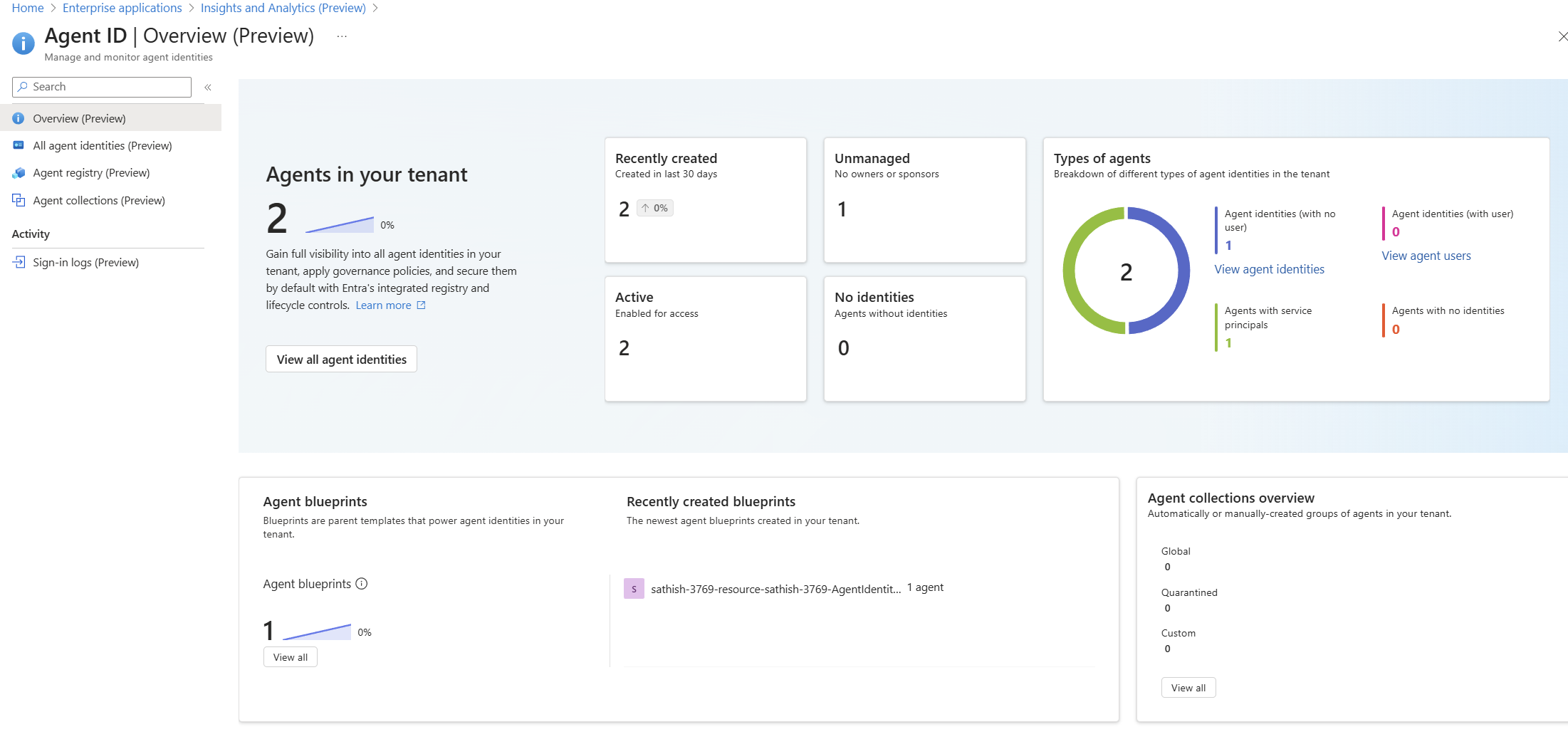
Agent ID Overview (Preview) dashboard showing agent counts, status, types, and blueprints: high-level posture of agents, identities, blueprints, and collections

Continue reading

Top 10 Browser Security Controls that can be Enforced with Microsoft Intune

In today’s enterprise landscape, most applications are accessed through modern browsers like Microsoft Edge and Google Chrome, especially on Windows devices. While these browsers come with built-in security features, organizations must go a step further to enforce consistent and robust browser security policies across all endpoints.

If your organization uses Microsoft Intune, you have powerful tools at your disposal to configure and enforce browser security settings. In this blog, we’ll walk through 10 essential browser security controls you can implement using Intune’s Settings Catalog to enhance protection against web-based threats.

1. Enable Windows Defender SmartScreen

SmartScreen helps protect users from phishing attacks and malicious websites or downloads.

Recommended Settings:

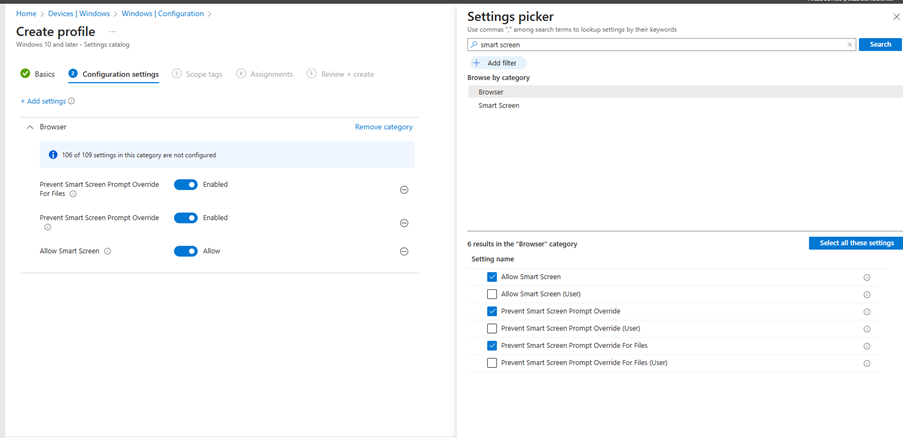
  • Enable Windows Defender SmartScreen
  • Don’t allow SmartScreen warning overrides for unverified files
  • Don’t allow SmartScreen warning overrides
Continue reading

What’s New in Azure Firewall: Draft & Deploy, Selective Logging, Explicit Proxy, Security Copilot & More

Azure Firewall continues to evolve with powerful new features that enhance security, governance, and operational efficiency.

Whether you’re managing complex enterprise environments or hybrid architectures, these updates offer greater control, visibility, and automation.

Here’s an overview into the latest innovations:

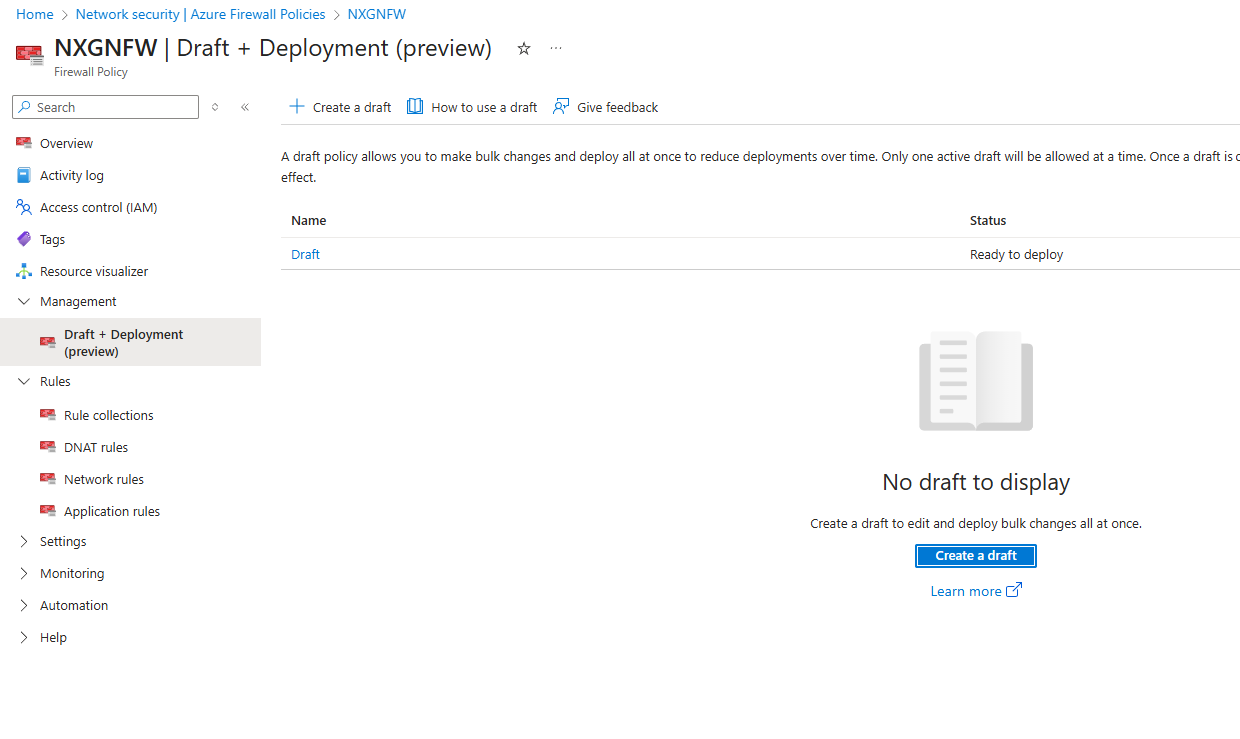
Draft and Deploy – Azure Firewall Policy Changes (Preview)

Managing firewall policies just got smarter.

With the Draft and Deploy feature, administrators can now:

  • Clone active policies to create editable drafts.
  • Collaborate on bulk changes without impacting live environments.
  • Stage deployments to minimize disruption.
  • Apply all changes at once, improving governance and reducing human error.

This is a game changer for environments requiring frequent policy updates, such as dynamic cloud workloads or multi team operations.

Continue reading

First Look at Microsoft AI Hub: What You Need to Know

Prioritize comprehensive security and compliance measures before integrating AI into your IT ecosystem. This video showcases what the Microsoft AI Hub (preview) brings to the table in this context.

Regards
Sathish Veerapandian

Getting started with securing AI with Microsoft CSPM, AI Threat protection and Purview

Protecting Gen AI apps requires a comprehensive strategy that encompasses data privacy, input validation, API security, and monitoring for malicious use of the outputs. Take a look at this video to get started with the options available to explore within the Microsoft Ecosystem

Take a look at this video to know more about the same.

Regards
Sathish Veerapandian

Utilize the Azure WAF to secure your applications from Cyber Attacks

Azure WAF is a critical security service that safeguards web application from common threats and vulnerabilities. Take a look at this video to know more about its features and utilize them in your environment.

Hope you enjoyed this video.

Regards
Sathish Veerapandian

Microsoft Entra Global Secure Access Preview – Secure Access Service Edge (SASE)

An identity-aware, cloud-based security infrastructure is becoming increasingly necessary for today’s workforce as more and more data and apps move to the cloud. Security Service Edge (SSE) is a new class of network security solutions that is a stand-alone subset of Secure Access Service Edge (SASE).

SASE architecture’s main goal is to provide a seamless and secure user experience while maintaining optimal connectivity.

Take a look at this video to learn more about it.

I hope you enjoyed this video!

Regards

Sathish Veerapandian

Azure AD – End user FIDO Security key sign-in and experience

Since I’ve been doing vlogs in my Youtube Channel for the past 10 months, it’s been a while since I last blogged. Today, I made the decision to blog about the procedures for using the Office 365 Apps’ password-free FIDO secure sign-in.

Today we will take a look at how to setup the Passwordless sign-in via FIDO Key from the end user perspective.

In this example we are going to use Fietian FIDO2 certified key in this demo. You can take a look at their products from their website

You can also take a look at the available FIDO key security providers and Fietian is one of them in the Microsoft Docs website

Continue reading

Extending passwordless authentication to OnPremise Applications via Azure

This video explains about how to utilize FIDO key in your environment for passwordless authentication and steps to extend this passwordless functionality to onpremise environment by using Azure AD We have used Yubico FIDO key for this Demo.

Hope you enjoyed this video !!

Sathish Veerapandian

Azure AD – Getting started with Passwordless Authentication

For enterprises that use passwords today banned password list, block reused passwords, stop predictable passwords with strong MFA are the security measures and enforcements. However when you have a shared PC environment for few business cases password less authentication mechanism via FIDO keys provides a better security to the IT Infrastructure. Passwordless authentication methods are more convenient because the password is removed and can be replaced with biometrics.

This video focuses on enabling security key based passwordless authentication and seeing the example via Microsoft Authenticator.

Hope you enjoyed this video !