Tag: Lync

  • Quick Tip – Analyzing logs in Lync server 2013

    In this article we will have a look at the Centralized Logging Service (CLS)  and csclslogging feature in Lync 2013.

    These both logging features will help us to identify any issues in the pool.

    These 2 features are available only from Lync 2013

    First lets have a look at the Centralized Logging Service (CLS)

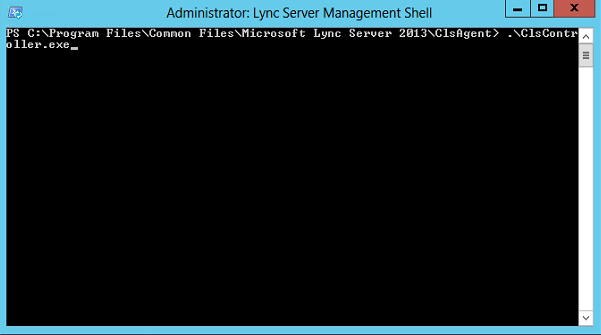
    This is located in the directory

    C:\Program Files\Common Files\Microsoft Lync Server 2013\ClsAgent


    CLS


    Below are the commands that can help you out to identify an issue through clscontroller

    ClsController.exe -start –scenario <scenario> –pools <pool fqdn>
    ClsController.exe -stop –scenario <scenario> –pools <pool fqdn>
    ClsController.exe -flush –pools <pool fqdn>
    ClsController.exe -search –pools <pool fqdn> –components <component> –loglevel <loglevel>
    Below are the supported scenarios
    AlwaysOn, MediaConnectivity, ApplicationSharing, AudioVideoConferencingIssue, HybridVoice, IncomingAndOutgoingCall, VoiceMail, IMAndPresence, AddressBook, DeviceUpdate, LYSSAndUCS, CLS, SP, WAC, UserReplicator, HostedMigration, MonitoringAndArchiving, LILRLegacy, LILRLYSS, MeetingJoin, RGS, CPS, XMPP and CAA.

    Note : This ClsController.exe is present only in the RTM release and later microsoft came up with this powershell based  control which is CsClsLogging

    CsClsLogging :

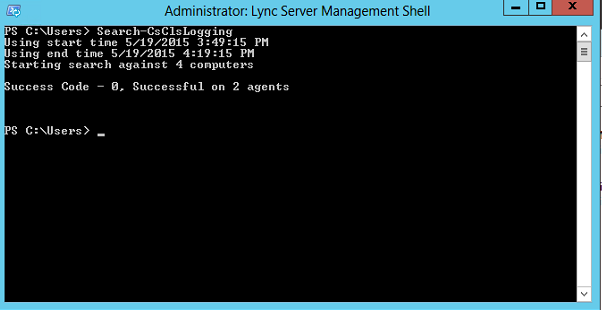
    The Search-CsClsLogging cmdlet provides a command line option for searching the log files generated by the centralized logging service. Lync administrators can analyze the issue with the cmdlet.

    1

    You can run run Search-CsClsLogging cmdlet with start time and end time

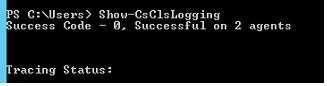
    2


    You can use show-cslogging to check the current status of the centralised logging service

    323


    The following inputs are supported

    Search-CsClsLogging
    Show-CsClsLogging
    Start-CsClsLogging
    Stop-CsClsLogging
    Sync-CsClsLogging


    There is a service responsible for this operation which is called Lync Server Centralized Logging Service Agent.

    66


    So make sure that this service is running else we will face issues in running these commands.

    Thanks
    Sathish Veerapandian

  • Enable Office 365 External Sharing

    In this article we will have a look at enabling the office 365 external sharing option

    Following services can be shared externally from your office 365 tenant.

    1) SharePoint Sites.

    2) Calendar free/busy sharing.

    3) Lync – You can add people outiside your organizations , skype and  can communicate provided the following conditions are met.

    Login to the office 365 portal with admin privilige

    Click on Admin and click on external sharing

    E1

    Now we have external sharing options for 3 of the services

    When we click on SharePoint we get the below option as shown below

    E2

    Also we have an option to share individual site by selecting them and then it gives us the same option.

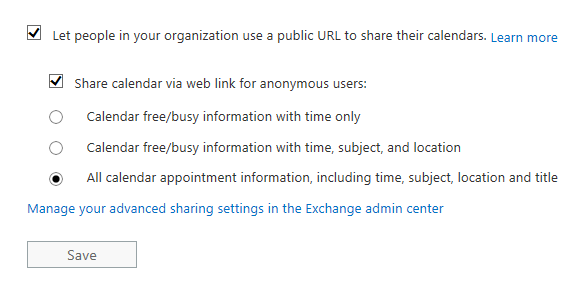
    When we click on the Calendar we have the below option

    C3

    C4

    Once sharing is enabled, users can use Outlook Web App to share their calendars with anyone inside or outside the organization. People inside the organization can view the shared calendar side-by-side with their own. People outside the organization will be sent a URL that they can use to view the calendar. Users decide when to share, how much to share, and when to keep their calendars private

    Note: If you want to share calendars with an organization that uses Exchange Server 2013 (an on-premises solution), the Exchange administrator will need to set up an authentication relationship with the cloud.

    Below is the option that we have for enabling external sharing for lync

    Online2

    The organization you’re communicating with must also allow communication with your domain. If the other organization has Lync Server on premises, refer them to the TechNet article Configuring Federation Support for a Lync Online Customer.

    When you’re communicating with someone in a federated domain, you can only use Lync features (for example, video conversations or desktop sharing) that are turned on in both organizations.

    If the external access setting is changed from “On only for allowed domain” to “On except for blocked domain”, the domains that are listed won’t be kept.

    Thanks 

    Sathish Veerapandian

  • Configure site resiliency for Lync 2013

    In Lync 2010 the site resiliency was given by stretching one FE pool across 2 sites, however this setup was much complicated during disasters and hence it is not supported and was discontinued from Lync 2013.

    In Lync 2013 there is a new concept called pool pairing by which we can have datacenter resiliency by creating a second Enterprise pool and fail-over to that pool in an event of primary datacenter failure. So basically you will need to create two enterprise FE pool in your topology, one pool in primary site & second pool in DR site.

    Below are the steps to configure pool pairing in Lync 2013

    1. In Topology Builder, right-click one the pool you wish to configure site resiliency, and then click Edit Properties.

    2. Click Resiliency in the left pane, and then select Associated Backup Pool in the right pane.

    3. In the box below Associated Backup Pool, select the pool that you want to pair with this pool. Only the pools that are not paired with another pool will be available to select from.

    4. Select Automatic fail-over and fail-back for Voice, and then click OK.
    When you view the details about this pool, the associated pool now appears in the right pane under Resiliency.

    5. Use Topology Builder to publish the topology.

    6. Run Enable-CsTopology.

    7. If the two pools were not yet deployed, deploy them now and the configuration will be completed without any issues.

    However, if the pools were already deployed before you defined the paired relationship in the topology builder then you must complete the following two final steps.

    8. On every Front End Server in both pools, run the following:

    \Program Files\Microsoft Lync Server 2013\Deployment\Bootstrapper.exe
    This configures other services required for backup pairing to work correctly.

    9. From a Lync Server Management Shell command prompt, run the following to restart the lync backup services

    Stop-CsWindowsService -name LyncBackup
    Start-CsWindowsService -name LyncBackup

    10. Force the user and conference data of both pools to be synchronized with each other, with the following cmdlets:

    Invoke-CsBackupServiceSync -PoolFqdn
    Invoke-CsBackupServiceSync -PoolFqdn

    Synchronizing the data may take some time. You can use the following cmdlets to check the status. Make sure that the status in both directions is in steady state.

    Get-CsBackupServiceStatus -PoolFqdn
    Get-CsBackupServiceStatus -PoolFqdn

    SQL Lync Back End server resiliency setup

    Since the CMS is located on the sql server planning for SQL server resiliency is also very much mandatory otherwise we wouldn’t be able to get a full fledged site resiliency in a enterprise edition setup.

    How ever in the standard edition this is not applicable and if the number of users are less than 3000 you can have 2 standard edition each one of them on different sites.This will allow Lync site resiliency with less roles required and much cost effective  because no SQL servers are required here . Lync Front End standard edition is using SQL express installed locally.

    Imp Note:

    You should use the same Back End high availability solution (either  SQL Mirrioring or SQL Clustering) in both pools.i.e, You should not pair a pool using SQL mirroring with a pool using SQL clustering.

    Below are the Reasons to use the same type of SQL high availability solution : 

    SQL clustering requires a shared storage solution, but SQL mirroring does not require shared storage solution.
    SQL mirroring requires SQL witness role (in addition to principal and mirror SQL servers) for the failover of the Back End Server to be automatic. Otherwise, an administrator must manually invoke failover.


    More references : 

    SQL clustering does not require any additional SQL servers to be able to fail over automatically-

    http://technet.microsoft.com/en-us/library/jj204991.aspx

    Back End Server High Availability –

    http://technet.microsoft.com/en-us/library/jj205248.aspx

    Lync 2013 high availability & disaster recovery –

    http://technet.microsoft.com/en-us/library/jj204703.aspx

    Branch-Site Resiliency Requirements –
    http://technet.microsoft.com/en-us/library/gg412772.aspx

    Lync Server 2010 Metropolitan Site Resiliency –
    http://technet.microsoft.com/en-us/library/jj204715.aspx

    http://social.technet.microsoft.com/wiki/contents/articles/29122.configure-site-resiliency-for-lync-2013.aspx

    Thanks 

    Sathish Veerapandian

    MVP – Exchange Server 

    Technology Evangelist