Author Archives: Sathish Veerapandian

Script to offboard resigned employee in a hybrid environment

The below script can be used in off-boarding below tasks for a resigned employees as a bulk operation.

This script will help in below actions for Exchange online and AD tasks to be removed in a Exchange hybrid environment:

  1. Convert exchange online mailbox to shared Mailbox.
  2. Disable the Mailbox protocols – OWA,ActiveSync, POP, IMAP, MAPI & OWA for devices.
  3. Hide the user from GAL.
  4. Remove the user from respective licenses E3,E5,EMS E3 & EMS E5 Licenses.
  5. Cancel all the calendar future meetings.
  6. Remove the user account from all groups.
  7. Set the account expiry of the AD account.
  8. Remove the IP Phone Attribute.
  9. Remove the manager field.
  10. Set out of office.
Continue reading

Migrate onpremise SQL DB to the Azure SQL Database

Azure dataplatform also provides Azure SQL database as a relational database as a service PAAS which is fully managed by Microsoft.This helps the developers to build their apps very quickly and removes the overhead of database administration.

There are few methods to migrate an on premise SQL database to Azure SQL Database and in this article we will have a look at migrating them with two options.

1) Using BACPAC export and import.

2) Data Migration Assistant.

Using BACPAC export and import:

With BACPAC export and import firstly we need to export the SQL database from the on premise SQL instance as a data tier application.

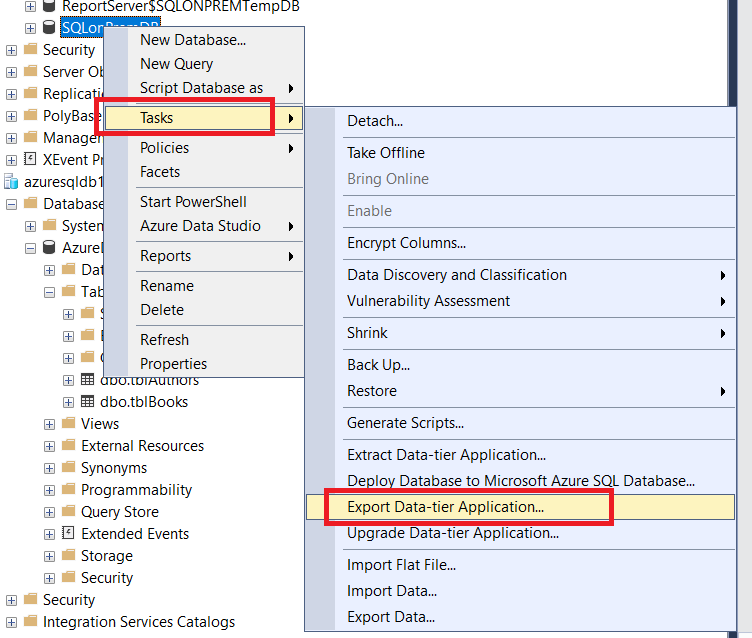
To export – Open SQL Management Studio – Right Click on the desired database and click on tasks – select export data tier application.

Continue reading

Microsoft Azure – Copy VHDs, between storage accounts in managed and unmanaged disks

The most common tasks that we might be receiving in Azure is to copy the blobs between the storage accounts. This article outlines the steps involved in copying the VHDs between managed and unmanaged disks

Copying the VHDs from unmanaged disks to a new storage account is pretty simple and we have two options copying via AzCopy or use Storage explorer

Option 1: Using Az Copy

Step 1: Get the VHD URL – 

Navigate to storage account – Choose the Associated VM SG account – Click on Blobs – Select the container name – Choose Properties – Copy the URL 

Continue reading

Microsoft Teams – Side load 3rd party & custom built apps in Microsoft Teams pane

With all the more new improvements in Microsoft Teams,we have more alternatives to modify the end user client choices from the application perspective to get access to the most frequently used applications from Microsoft Teams.

The Custom built in-house applications can be effectively side-stacked in Microsoft Teams which makes the end users to adequately use these applications.

To start utilizing these options login to Office 365 admin portal and verify if the teams side loading options are migrated to Teams admin portal.

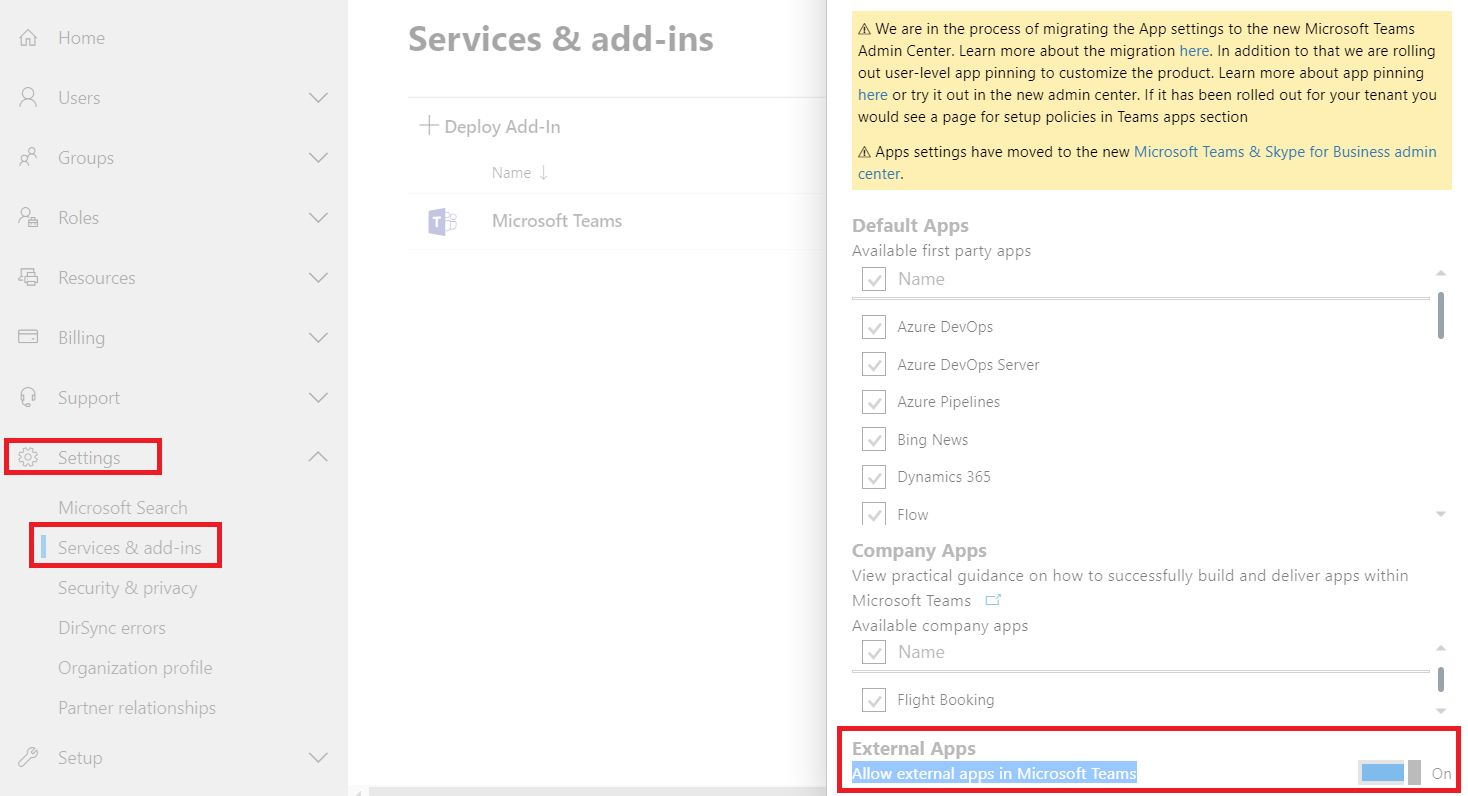
Once logged in navigate to settings – services & addins – search for Microsoft Teams – And see if external apps in turned on.

In below case in this tenant these configurations have been migrated to Microsoft Teams admin portal and hence these settings are greyed out. This will be the case for almost every office 365 tenants.

Continue reading

Overview of DNS services in Microsoft Azure

Like different DNS hosting suppliers, we have DNS facilitating choice both private and public in Microsoft Azure.We have Azure Provided DNS, Bring your own DNS and use Azure private DNS which is in review starting at now.

Azure Provided DNS: (Azure-provided name resolution)

With Azure provided DNS the deployment is a lot simpler, and no complex setup is required from our side.They come up with highly available model and they can be used with in conjunction with our DNS. There are few caveats in this model which is the DNS suffix can’t be changed since they are auto created and given from Azure. DNS Query Traffic is throttled for each VM’s which might need to be taken into consideration for intensive web applications. Thus Wins and Net Bios are likewise not Supported. At last, manual registration of DNS records isn’t supported.

Continue reading

SharePoint Online – Enable External collaboration through B2B extranet Sites

On every business operations its crucial to sanction external partners,vendors to collaborate on their quotidian operations. Withal there are cases wherein only business to business collaboration like sharing between two organization is required and remains a vital factor to their business.

To felicitate a classical external collaboration site it was always bit challenging for administrators from SharePoint on premise workloads. Extensive orchestrating is required in terms of provisioning hardware or VM resource, security hardening and getting the access on the firewalls etc..,

With Office 365 B2B there are much more easier ways to roll out this feature to business with no additional server provisioning, no certificate requirement and simple administration. This magnificently reduces the traditional deployment costs. By default we get secure sharing, seamless collaboration and we have much detailed governance and audit reporting.

Continue reading

Microsoft Teams – Manage External and Guest Access communication for users

Microsoft Teams becoming an unrivaled communication platform its been adopted by most of the corporate organizations right from small, medium and large scale businesses.

Teams adoption rate have been thriving a lot and there are organizations managing their daily operations and projects completely via better organized Teams and channels.

In this article we will have an overview and the options available to expose Microsoft Teams for communication to the external network and other office 365 organizations.

As an initial prerequisite we must ensure that all the Office 365 URL and IP Ranges are allowed.

Login to Microsoft Teams Admin center portal here we have 2 options.

  1. External Access
  2. Guest Access

For external access the screenshot is pretty much explanatory. The best way is to add only the allowed domains which would block the other external organizations.

Continue reading

Create Customized App Package for Azure Bot and publish them in Microsoft Teams

In the previous article , we had an overview and example of how to start creating Microsoft Azure Bots and integrate with Teams. Furthermore once the bots are integrated with teams ,we would need to create application package for our Azure Bot, so that we can provide better end user experience.

To interpret further once the azure bot is available to the end users via teams it will not be showing to them as an application (example shown below). Providing them as vanilla format will not be more intriguing to the consumers.

In Microsoft Teams there is an option to create a customized app package for our azure bots. Once we create and publish them, it will be available for end users in the app section. From Microsoft Teams users can search and install them on their Teams Client.

Continue reading

Create Microsoft Azure Bot and Integrate with Microsoft Teams

As we are heading towards the modern workplace model, we are thriving a lot on reducing the first level of tasks. One of the preferred feasible solution is to create a self-query knowledge base through which the end users can attempt to address their issues on their own before contacting the IT Team. Eventually API integrations with bots can reduce the first level of recurring tasks. Through Microsoft Bot Framework quite a lot of organizations are filling these requirements and increasing the operational excellence values.

In this article we will focus on how to create a bot in Azure and integrate them with Microsoft Teams.

In summary Bot usually comprises of three concepts dialog, channels and state. In my point of view dialog play a fundamental role in the Bot Framework. The dialogues will be organized in a natural sequence based on the input from the user it can respond, skip to next answer or even go in a sequential loop. In the back-end the programs will be configured to respond to the dialogues in a consecutive manner. Currently the underlying solution can be via C# , Node.Js or Rest API

Continue reading

Plan and configure Azure Information Protection

Corporate data leakage and losing critical confidential information is been often considered as to be an employee negligence. These days the corporate services are available to all end users from anywhere which makes the employee more productive and work from anywhere. On the flip side if there are no security enforced, for instance a sales officer might leave a confidential customers list on a shared computer in a public place. Its very important for the employers to classify, label and protect their electronic data based on their business models.

Using Microsoft azure information protection will augment and sheild all the office 365 and azure workloads. We have option to enforce the classification or to provide users the option to classify on their own. This article emphases on enabling the Azure Information Protection on Office 365 workloads.

Continue reading