Author Archives: Sathish Veerapandian

Effective MBOX to PST Converter Tool Review

MBOX to PST Converter Tool Review – Advantage & Drawbacks

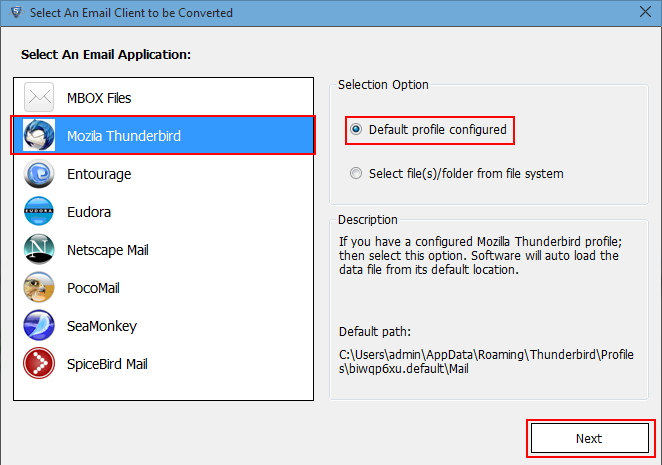
Are you planning to migrate from Mozilla thunderbird to MS Outlook? Of course you need to convert your MBOX emails to PST, in order to access emails in Outlook. MBOX converter tool will enable you to convert emails from MBOX format to PST, so that these emails can be accessed in Outlook also. MBOX converter is smart tool capable to export MBOX files to PST/MSG/EML. This tool is capable to handle MBOX files from multiple mail clients including Mozilla thunderbird, Eudora, etc. It is an excellent tool capable to handle all variants of MBOX family in windows platform. Let’s see the application in detailed.

Things That You Should Cognize about MBOX to PST Converter at First!

Supported Platforms

MBOX files from various mail clients can be exported to PST using the MBOX converter tool. I used this software for migrating Thunderbird folders (.mbox) to MS Outlook 2013. But the software also supports a few more mail clients including Eudora, Entourage, Apple Mail, Netscape, Pocomail, etc.

The tool is compatible with all versions of Windows Operating System – 2000, 2003, 2008, XP, Vista, or Windows 7/8/8.1. The output PST files is compatible with all versions Outlook including 2000, 2003, 2007, 2010, 2013.

Note: I used this tool to migrate Thunderbird emails to MS Outlook 2013 in Windows 8.1. To evaluate in other editions you may try free edition of the software.

Pre-Requirements:

MBOX to PST converter is a standalone tool which does not require any supporting applications as I used recently for my own business. None of the mail clients are required to carry out the conversion process. The only requirement is that the user should possess an MBOX file in order to carry out the conversion process.

Performance:

Every product is valued based on in its performance. Same is with the MBOX converter tool performance values more. The tool is fast and accurate in its actions. The tool converts MBOX to PST without any data loss or file corruption. Emails along with all attributes are exported to PST without any time lag.  The number of MBOX files does not limit the performance of MBOX converter. The designed and development converter tool is done carefully in order to meet all the user requirements.

User Interface & Design:

The design and implementation of user interface of MBOX converter is very effective for all type of users. The internal design of the converter is done with optimized algorithms so that the tool works perfectly and accurately. Browsing of MBOX emails and saving the output PST are made user interactive with the GUI. All type of users can use this tool without any prior experience in file conversion.

1

Prominent Features of the Software and its Working Process


  • Support for Multiple MBOX files

The tool is capable to export multiple MBOX files to PST in batches. Moreover the tool can process all variants of MBOX files from various mail clients. The supported mail clients include Entourage, thunderbird, Apple Mail, etc.
2

  • Selective Exporting Feature

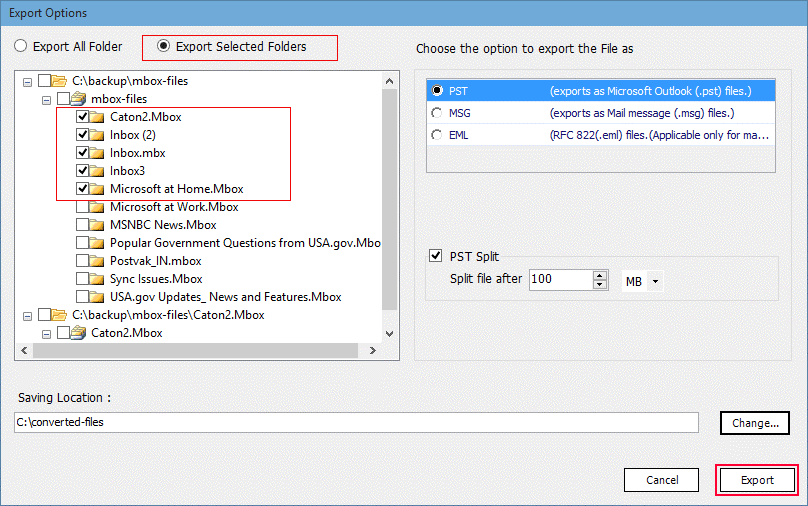
The selective exporting of files/ folders/emails is possible with the tool. The preview of the scanned emails helps the users to view and analyze the emails before exporting to PST.
33

  • Retains All Properties of Emails

The converter tool maintains all the Meta properties of the emails while exporting to PST files. The attachments, date, time, from, to, subjects and all other attributes are retained with email message while converting to PST.

  • Managing of PST Files

The managing of PST files is made easy using the converter tool. The output PST files can be split to manage size of large PST files. The output PST files can be saved in desired location with specified names.
55
Pros:

  1. Multiple MBOX files can be converted into PST files at once.
  2. Several email previews helps me to analyze emails in depth.
  3. Multiple Export choices is an additional benefits to use emails in other email programs.
  4. User face of the software is so simple so everyone can use the tool.

Cons:

  1. Demo version tool has a limit of 25 emails to be exported in PST file
  2. No facility to convert corrupted Thunderbird MBOX files data.
  3. Attached media files of emails can be viewed only after they are exported.


Price of Various Versions

The tool comes in two versions: free version and paid version. Free version is with limited capabilities. It does not allow users to name the files while saving the PST files. And only 25 items per folder can be exported with this free version. MBOX converter Software is available at three level licensing: personal/ Enterprise / Business level. This is worthy tool for just few dollars.

The Verdict:

While analyzing performance, accuracy, features, cost and various other factors of MBOX to PST converter into account I couldn’t find any serious faults in this tool. The outstanding features of MBOX converter makes it to stand different from other converter tools. So I would like to rate 9.5 out of 10 to MBOX to PST converter application. The tool possesses a simple user interface so that anyone can use it without any difficulty.

Thanks & Regards

Zora Stalin

Technology Evangelist

Integrating Lync server 2013/ SFB with Cisco Unified Call Manager

Integrating the existing Lync setup with PBX or SBC’s is always a complicated one. When we look as a overview things looks smaller and easy. We need to choose the right PSTN gateways, SBC’s that are compatible with Lync and SFB.

When the real time scenario of implementation kicks in there are several things , components and factors which needs to be configured  properly.

If no proper planing and study on the existing setup is done ,then we will definitely run into multiple issues. Because we need to configure multiple things in PSTN gateways to create a proper channel route between these two medias.

If you aren’t voice expert its better to discuss this with VOIP  engineer dealing with these PBX gateways or associated vendors so we will get  best integration  advice according to the setup.

In this article i’m going to explain few methods that we can follow to integrate Lync 2013 / SFB with Cisco Unified Call Manager in already existing Lync/SFB  setup.

Speaking from my experience so  far below are the possible ways of implementing this.

1. Cisco unified communication integration for lync (CUCI – Lync) :

You can follow this if you want to utilize the existing Cisco CUCM PSTN enterprise plan for all the end users without investing any other components.

Keep Lync/SFB  only for IM & Presence and not having enterprise voice .

End users will get a Cisco Soft Phone agents  in their desktops for making the calls.

End users have the option whether to use the soft phone or to use their desk-phone.

It is basically like Cisco integrating their PBX with Lync for IM and Presence without the need of Cisco IM and Presence server.

By reading through so many blogs and forums i can see this integration is more complicated.

End users might get confused to understand in how they need to make the call.


But the best thing is you can use your existing CUCM setup and the Lync does not require Lync Plus CAL for the voice functionality.

Less configuration on the Lync side . You can plan for this if you  have a dedicated VOIP handling Cisco Team in your setup.

2. Remote Call Control or Call Via Work:

RCC enables users only  to control their desk  phones by using Lync on their desktop computers.

When a user signs in to the Microsoft Lync client, the Lync server sends instructions, through the IM and

Presence server of Cisco  and then  to the Cisco Unified Communications Manager maintains call features based on the end user action.

By enabling this it gives the end users to use the Lync 2013 user interface (UI) to control calls on their Cisco phones.

  • Make an outgoing call
  • Answer an incoming call
  • Answer an incoming call with an instant message
  • Transfer a call
  • Forward an incoming call

Very IMP note: The Cisco Unified communications manager PBX should have the existing PSTN plan as such.

The  Lync 2013 RCC feature  only sends call control commands to PBX and the  PBX will handle  the call process . No mediation server is required in this scenario.

Unfortunately if you are implementing RCC in Lync 2010/2013 then end users will not be able to make enterprise voice calls when they are remotely connected.

Reason: It is not possible for a user to have both enterprise voice and RCC together in Lync. This is almost a legacy dying technology which we should not think for any new implementation. RCC is depreciated technology and not recommended by Microsoft as well.

It can be a good solution only during the transition period from CUCM to Lync or vice versa.

Call Via Work (SFB 2015) :

People might think Microsoft has replaced CWV in SFB 2015  and why we need to implement this thinking the negative impacts from RCC.

This is an amazing hybrid type of  solution from Microsoft. The end user can set their ring back number in their SFB client.

The function of call via work is, the SFB mediation server will make a call to the configured phone number by end user and a second call to the destination number and connect both calls. The destination number calls will be handled by your PBX gateway. The connectivity from the mediation server to the PBX will be direct SIP. In turn this  will have a configuration of Dialplan, Voicepolicy, Pstnusage,and a Route to a sip trunk or gateway users.

This is very useful when you are in a poor internet connectivity on your trip and you can set your mobile number as callback in your SFB client  and we will have a great calling experience.

The prerequisite for CVW is similar to RCC but we require mediation server in additional.

Advantage :

No need to buy additional hard IP phones for end users if the voice plan stays with your PBX. SFB client perfectly routes and call to the destination with CWV feature.

SIP Trunk:

This type is very good in leveraging and using  the existing Cisco’s CUCM PSTN plans for end users.
This enables enterprise voice features for the end users without having the head ache of deploying additional components SBC’s etc..,

We need to have a direct SIP trunk configured between the both systems CUCM and your mediation server. We need to have mediation server configured in this case. A dedicated mediation server without collocated is recommended for this setup by Microsoft.

This can be used during transitions as well as a permanent solution.

You need to create a SIP trunk and a route pattern between Mediation server and CUCM.

There is an excellent document from Cisco for the same .

Click to access uc-manager.pdf

If you want to plan for the rest  of the above as well there are documents from Cisco as well as Microsoft .

Note : It is very important to have a detailed study and discussion on your existing PBX setup , PSTN plan , Network layout and Lync Setup with all the required teams and vendors before planning for integration.

Thanks & Regards

Sathish Veerapandian

MVP – Exchange Server 


Quick Tip – Integrate Cortona with Office 365 for end users

Now office 365 customers have the option of integrating Office 365 and Cortona in Windows 10 for the end users.

By having this option enabled this will help users to be informed through cortona about their future meetings.
To use Cortana, people must be signed in to their windows 10 PC with their work account inorder to authorize Cortana to access Office 365 on their behalf.

Cortana can also access email and calendar data from users through various client apps running on Windows 10.

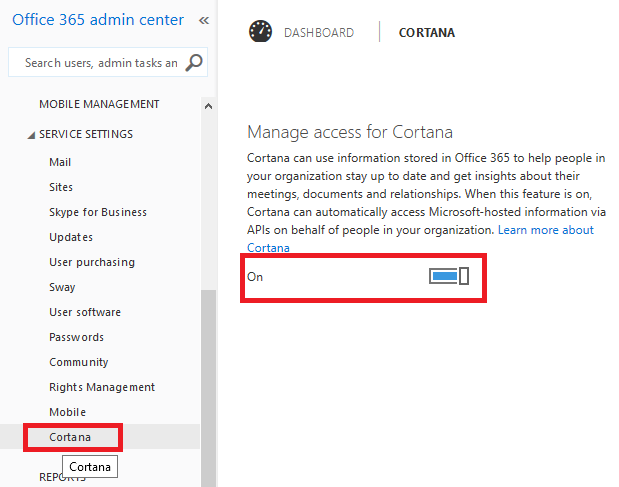
By default this is turned on in office 365 . To turn this off perform the following

Go to the Office 365 admin center.

Expand Service Settings, and select Cortana.

Click Cortana to toggle Cortana off.

Cortona

IMP:

Currently the support for Cortona with Outlook is planned for future release. So inorder to use with office 365 we need to setup the Windows 10 Outlook Universal Mail and Calendar apps with Office 365.

Cortona will work only on devices running on Windows 10 and available only few languages as of now.

Thanks

Sathish Veerapandian

Best practices to be followed to configure Backup in Exchange 2010/2013

Backing up the exchange server is very important thing to protect the data loss . If you aren’t running the Exchange Server Backups  then your Transaction logs will eventually fill up their storage volume

In this article we will  look at few steps that we need to look in configuring the backup in Exchange 2010/2013.

Backups are very much necessary during the case of a whole disaster, retention of datas for a period of time , performing a granular restore for the end users as well.

Choosing the Backup Media

Disk or Tape ?

Over the period of years Tape backup has been doing a great job. Cost wise also they are little bit lesser compared to the SATA storage and disk arrays which needs to be extended as users and our applications increases.
So, tape still has an advantage, particularly for larger backup volumes.
But when comparing the performance factor the disks backups wins the game.
Also Disk-based solutions will usually be better for faster recovery.

More realistically, a disk-based solution will involve copying data between two storage systems over a WAN from one site to another. If you are ready to pay for this expensive WAN links and replication then it should be fine with the disk backup.

Its always better to keep the daily and weekly backups in the disks (virtual tape library) which will help in disaster and daily restore scenarios and larger backups monthly,quarterly and annual in Tapes. Because there is no point to keep all these large data in expensive storage on data-centers  for the purpose of retention since the tapes will do the same job.

Plan for the Retention period

Planning for the retention of the data is very important. This plays a vital role in restoring the data as well as for any old data that is required for any legal cases.

Its very mandate retention needs to be followed for the following backups

Daily Backups

This decides on the single point of restoration for the end users on a specific day. Its better to have daily backup retention at-least to a period of 3 months so that granular restore for a specific date can be done.

Weekly Backups

This decides on the single point of restoration for the end users on a specific week. Its better to have this monthly backups to a retention of at-least 6 months which will help to recover emails if the first case fails.

Monthly Backups

This decides on the single point of restoration for the end users on a specific month. Its better to keep this retention atleast for a period of 1 year.

Quarterly Backups

Quarterly backups are very much important in restoring the data in case of dealing any cases , restoring emails from resigned staffs. So its better to keep this retention for 3 years.

Annual Backups

Annual Backups also does the same job of retention data for dealing with any cases . Its better to have the Annual Backups for a period of 5 Years.

Quarterly and Annual Backups can be taken in a Tape Drive and kept since they will not be used mostly and also will not involve in the disaster cases.

Setting end user Recovery Standards

Setting the scope of possible restores from the backup to the end users is very much important since they need to be aware of the possible restores.

So you need to carefully go through your backup retention periods and inform the users about the possible monthly restores. At any point of time if the users are missing out data within a month then its always advisable from the help-desk to restore them from the dumpster.

So its better you can prepare and create end user Recovery Standard scope document and hand it over to the help desk team so that they are aware of the possible restores.

Check  Mailbox server performance during the backup

This point is very much important and we need to check the performance of the mailbox servers during the backup period. Though the backup will be running on off-production hours but there are cases where your CEO   might be accessing an important  email  after working hours.

ESEUTIL will be running during backup process to verify integrity of the databases  which increases disk I\O intensive.Usually if the storage configuration is not proper then the normal disk read/write operations will increase.  There are chances if the storage is having bottleneck issues then the normal RPC read/write operations will get delayed due to which all the end users will severely experience connectivity issues.

When the backup is triggered you can go to the event viewer on the mailbox servers and look for any RPC , ESE , VSS writers, storage errors etc..,

Create a test account on any of the backup databases login to outlook,owa and activesync and measure the  performance.

If you have DAG configured in your setup and have Active/Passive combined distributed type check your active copies as well .Check if  the I/O operations are increasing on the active copies during the backup.Also you can check the event logs to see if you get anything related to them.

If you don’t see anything on them then the backup should be fine.

Note: The above steps are applicable only when you configure the backup solution for the first time on your mailbox servers.

Later you can prepare a daily check list on your backup status on all the mailbox servers to ensure the backups are completed.Daily checking of the backups is very important since the backup will truncate your old logs which will maintain space on your storage. There are many scripts written by experts on the Technet Gallery which you can schedule them and make them run through task scheduler.

Test the Backup

Testing the backup is very mandatory. As the backups has been configured its not that we are in safe side. Testing the backup is very much necessary.

There are several scenarios we can test and i have listed few of them

Check if the backup is supporting any other languages restore. For Example if i have an  end user who has French Mailbox with all emails in French and backup has been taken for him. When a restore is done for this mailbox it should be successful with all the emails both body and subject visible in French.

Take 2 users with the same UPN different SAM and see if the backup for them is restoring their contents,

Restore the Weekly backup and see the results.

Restore the monthly backup as well and see the results.

Thanks

Sathish Veerapandian

MVP – Exchange Server

Exploring Power BI for Office 365

PowerBI is a new business intelligent offering feature from Microsoft which enables to work, collaborate and gain insights of their excel data  through office 365.
By having this option enabled all the users would be able to easily access their data inside and outside their organization and share the data in a secure way. Also amazing visualizations can be created for their excel data and can be accessed anywhere even from the mobile devices

To know more about this feature kindly read this blog – https://blogs.office.com/2013/07/08/what-powers-power-bi-in-office-365/


Here i will explain few features about the power BI features

You can go here and create a power BI trial account for 60 days

https://powerbi.microsoft.com/?WT.mc_id=Old_Site

Note: For Office 365 account holders to complete signup, sign in with your Office 365 user ID and password.

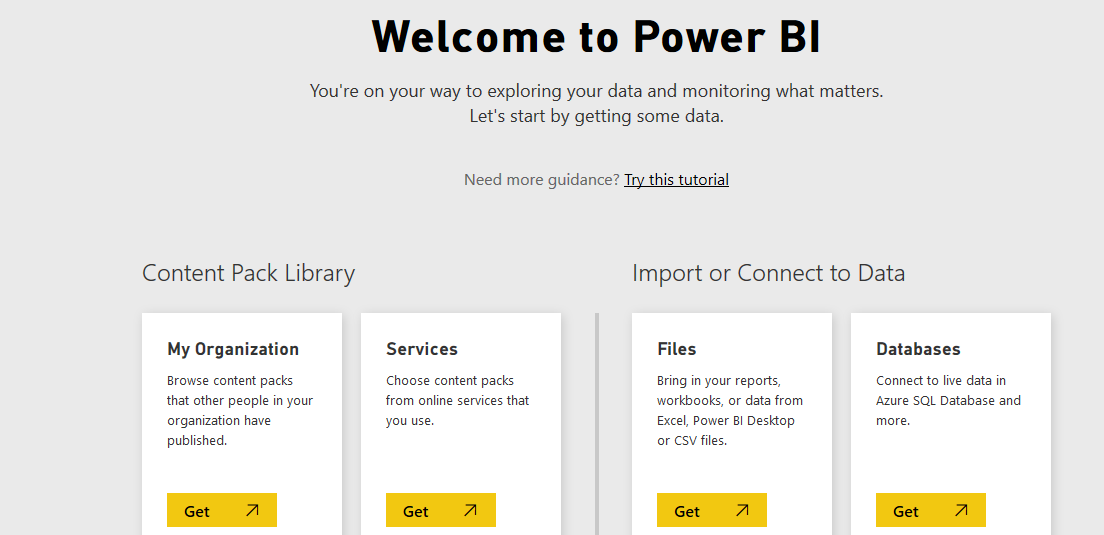
Once after you create a test account we get the below screen.

Power BI

You can create content pack

This content pack is nothing but we are creating a dedicated groups who can have access to these data. So basically we  can create multiple content packs and assign users to different content packs.

Power BI1

When we choose the first option my organization we can select only users in our organization who are members, groups in office 365.

Power BI2


When we choose the other option services for creating content pack we can choose any one of the below online services that you have and create content packs modify,share and collaborate excel data.

This option will be good and easy when we work with partners, vendors to share the data by this option.

powerBI7


So now after creating the content packs we need the data that can be shared among the groups we are member.

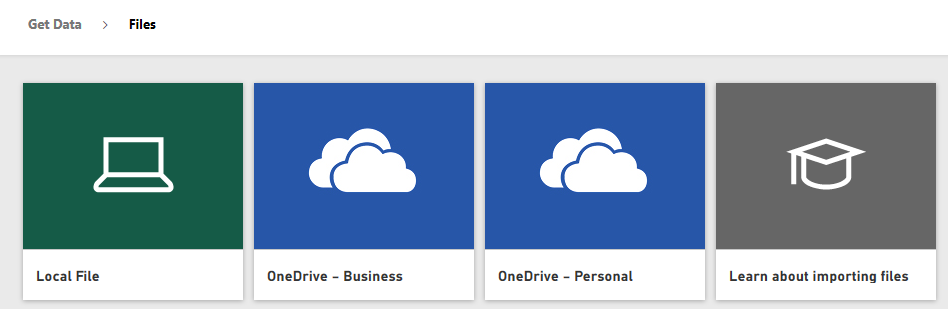
Here we have two below options to import our data from our local system or connect to the live datas.

csvPBI

Below are the options that we get when using the first option . Connecting to one drive and getting the data is also very good option.

PowerBI8

When we select the second option to connect to online DB’s we have all the below options

PowerBI9

Also we can create a separate group work-spaces as below and share the data separately.

PowerBI01

Finally you can prepare a data sets as below share it within your work-spaces and access them from any where and from any devices which is amazing feature.

DSA


By using this feature you can stay connected with your reports and data wherever you are which is a great feature.Power BI pro will cost $9.99 per user per month and offers 10 GB of storage, Active-Directory-controlled collaboration and data privileges, live access to on-premises Microsoft SQL Server instances. Another amazing feature is mobility is supported for accessing these services.

Thanks

Sathish Veerapandian

Migrating Exchange 2010\2013 services from TMG to F5 Big IP

As we all know TMG was such a great fantastic and a fabulous product which was serving good for most of the external published web services. I know most of us are really worried about the reason of discontinuing this awesome product. So now people are moving towards alternatives for replacing TMG.

Among the few good alternatives F5 load balancer  is one of the great product. Recently i had a chance to involve and work in this project which was lead by messaging expert and network specialist.

I would like to share few experience that i gained and things that we need to consider during this migration.

In the TMG we had the option to publish any sites , setting up and controlling the authentication delegation , application settings  and we can set a secure way to access these url’s through this reverse proxy.

I still really feel bad for the reason ISA & TMG being abandoned by Microsoft as deploying exchange, lync  in a environment was equally working in ISA,TMG implementation for most of the deployments.

From F5 Big IP you need to use the IAPP template for the versions of the exchange that you are running currently from the F5 support website.

You can download the latest IAPP for Exchange  template from the link

https://support.f5.com/kb/en-us/solutions/public/13000/400/sol13497.html

I’m not going to explain more on this IAPP templates of importing them on the LTM and how to configure the settings since in this blog i’m going to explain the best practices that we can follow for Exchange 2010 &  2013.

For people who would like to explore more on this they can always explore the virtual ITM trial version on the below link and publish exchange services via this

https://www.f5.com/trial/big-ip-ltm-virtual-edition.php

Just download them and install it on any VM to test this functionality.

Below are the things that we need to consider in this migration :

1) Choose your type of SSL method

Decide what type of SSL encryption that you are going to use.

SSL offload

If you are going to use SSL offload then all the  certificate decryption part will happen in the F5 itself. Then connections from the F5 to the CAS will go in un encrypted way.

Benefits of doing this :

Your CAS will not have the load of performing the SSL decryption.

Disadvantages :

There are possibilities of application layer attacks by doing this method since the connection from the n/w to the app layer goes in a un encrypted way.

SSL bridging :

If you are going to use this method then the SSL decryption will happen in the F5 and inturn it will re encrypt and send the connections encrypted to the CAS servers.

Benefits of doing this :

Double layer SSL connections check is done in the n/w layer by the F5 and the CAS servers.

Disadvantages : If you are using less number of CAS servers then the load on them might be increased which is happens in less scenarios.
I cannot recommend any on this because its you ultimately who needs to evaluate your network structure , performance and extra layer of security that is wrapped up in your environment.

But my best recommendation is always to stick on SSL bridging.

2) Prepare your SSL certificates for Exchange services

For doing any of the above activities you would need to have an SSL certificate for the BIGIP to offload and performing the decryption , encryption part. So get an SSL certificate and install it on the BIGIP system.

You need to  configure your Client Access servers to support SSL offloading, you must first follow the Microsoft documentation. See

http://social.technet.microsoft.com/wiki/contents/articles/how-to-configure-ssl-offloading-in-exchange-2010.aspx

3) If you are using  the new MAPI over HTTP transport protocol  in Exchange 2013 there is a little bit challenge. This new service is not yet included in the iApp template, so you must manually configure the BIG-IP system to support it.

4) As a part of testing in your migration don’t ever direct the external  exchange traffic from TMG to  F5 and then the CAS and later remove TMG.


Below are the reasons:
a) TMG uses ARP requests to prevent switch port flooding in unicast NLB.

b) F5 extracts only the MAC address from the ethernet adapter instead of ARP requests. Since the TMG will mask the MAC address of the hosts F5 will not get the info what it requires.

5) Certificates that you obtain with multiple names must be only in SAN (Subject
Alternative Name) format, not SNI (Server Name Indication) format.

6) Enable TCP request Pooling on the Iapp template

TCP request queuing provides the ability to queue connection requests that exceed the capacity of connections. You can choose this option if its a small deployment with one CAS server.

Basically if the TCP connections exceeds the capacity of the pool it holds the connections instead of dropping the connections.

7) Secure EAC access for Exchange 2013 only

Configure settings in iapp to restrict EAC access by group membership.Select this option if you want to restrict EAC access to the Organization Management group.

The BIG-IP APM module queries Active Directory group membership for the user making the
request to EAC. If the user is not a member of the Organization Management group, the BIG-IP APM policy denies access

8) Choose your authentication for OWA

Use the BIG-IP APM module to provide secure access and proxied authentication (pre-authentication) for
HTTP-based Client Access services: Outlook Web App, Outlook Anywhere, ActiveSync, and Auto-discover). The BIG-IP APM
presents a login page to end users that takes the place of the forms-based login page normally presented by Outlook Web App.

If you have configured the FBA in the CAS VD then you no need to configure this authentication in F5 because users will be prompted for doube authentication one in F5 and other in CAS VD which will be painful. I always prefer to do this part on CAS VD and leave the reverse proxy setting as such.

9) You can configure the health checks for the owa, outlook web app,outlook anywhere in the F5.YOu need to specify how often the system checks the health of the CAS servers. The default recommended value is 30 seconds. You can configure this to monitor all these services.

10 ) Decide and perform the migration

After performing and deciding all the above factors you need to plan for the migration of the services from TMG to F5 . Perform the following steps

a) Arrange a Test PAT ip for auto-discover, Outlook Anywhere and webmail from your Network team
Configure the rules in the iapp template to listen on these IP’s

b) Choose few set of users add host entries of auto-discover , Outlook Anywhere and webmail in their PC’s
c) Monitor and test the connectivity for couple of weeks.
d) If the connectivity tests are successful on a fine day shift the original IP’s of all the exchange services and stop all the TMG services.

The above are few guide lines which might help in migrating the exchange services from TMG to F5

Hope this helps

Sathish Veerapandian

MVP – Exchange Server

Warning all persistent chat servers are down

I recently went through this above error while implementing persistent chat . To fix this error we went around circles and finally we were able to fix this permanently.

There is no single problem that can bring this error.There are so many factors that can cause this persistent chat functionality to break.

In this article i’m going to write up few factors that can cause this functionality to be broken.

Below is the error message that you will be getting when you try to enable PC functionality


PCe


Following below factors can cause the above issue:

1. Issue with SQL database connectivity:

First check  that  SQL database for the persistent chat has been created successfully. If you get             any warnings  related to SQL when you publish the topology for  persistent chat then you shouldn’t         proceed with the setup. Connect to the associated instance  from your SQL back end DB and check         if the DB is created for the newly introduced PC role. If you don’t see anything then you need to             first fix this issue.

Note: Also make sure the below configurations are set correctly on the FE,PC and SQL back-end         database server for a successful SQL DB creation.

a) Make sure the port number 1433 is open between PC role server and the back end SQL. You can            telnet to port 1433 vice versa from SQL back end to PC and check the connectivity.

b) You need to have the network discovery and enable file and printer sharing option to be turned              on in both the servers in-order for the connectivity vice versa.

c) Make sure that you have the sa(super admin) rights on the SQL instance or the server where you           are trying to create the DB for this new server.

2.  Once you publish the persistent chat server from the topology builder you need to run the lync                 deployment wizard .

ldw

Just run the first two steps alone to install the PC component roles and update them.

3. You can run the below command to set the persistent chat servers . Although this is not a                   mandatory step but at times even this can cause this problem.So its better to run this command             from Lync management shell.

Set-CsPErsistentChatActiveServer NAME -ActiveServers @{Add=”NAME_OF_PC_SERVER”} -v

4. Make sure you have the latest Cumulative Updates installed on the PC server. In my case this was   the issue. So as a thumb rule its always better to look for the latest CU’s in the persistent chat               server. Also make sure that the persistent chat services are running fine in the PC servers.

5. Final step is to go back to your Topology Builder ,delete the Chat Pool and rebuild it if none of the     above works.

Delete the chat pool that you have created from the topology builder.Then go to your deployment wizard and run install or update server system and setup or remove lync server components.

Following the above troubleshooting steps will most likely bring up the persistent chat channels in a environment.

Hope this helps

Thanks

Sathish Veerapandian

Technology Evangelist

New enhanced and exiting features in Windows 10

Recently i just explored the Microsoft new operating system Windows 10 and would like to share few exiting things that i noticed.

For the people who would like to explore Windows 10 there are 2 options to do that

There is upgrade option available for users having windows 7 and Windows 8  Follow the below tech-net link to reserve your upgrade

https://www.microsoft.com/en-us/windows/windows-10-upgrade

If its a new PC or if you like a fresh installation then, Download the free 90 day trial of  Windows10  enterprise and install them on your PC.

https://www.microsoft.com/en-us/evalcenter/evaluate-windows-10-enterprise


Below are the list of good features identified on the product :

Improvements in the Command Prompt :

We now have native cut and paste shortcuts in the the Windows command prompt which is easier. I think this should be the same in next version of  Windows server as well.

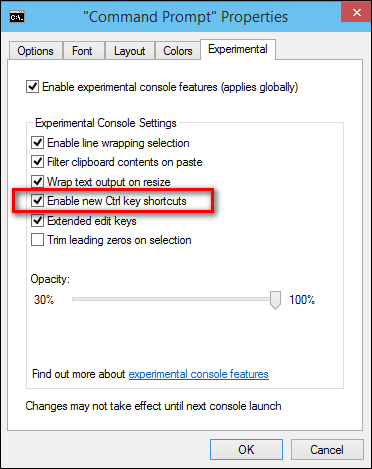
Also we have the experimental tab which gives us more cool new features.

441

There is one more new option called enable new CRTL key shortcuts. By doing this we get more new extra command key shortcuts.

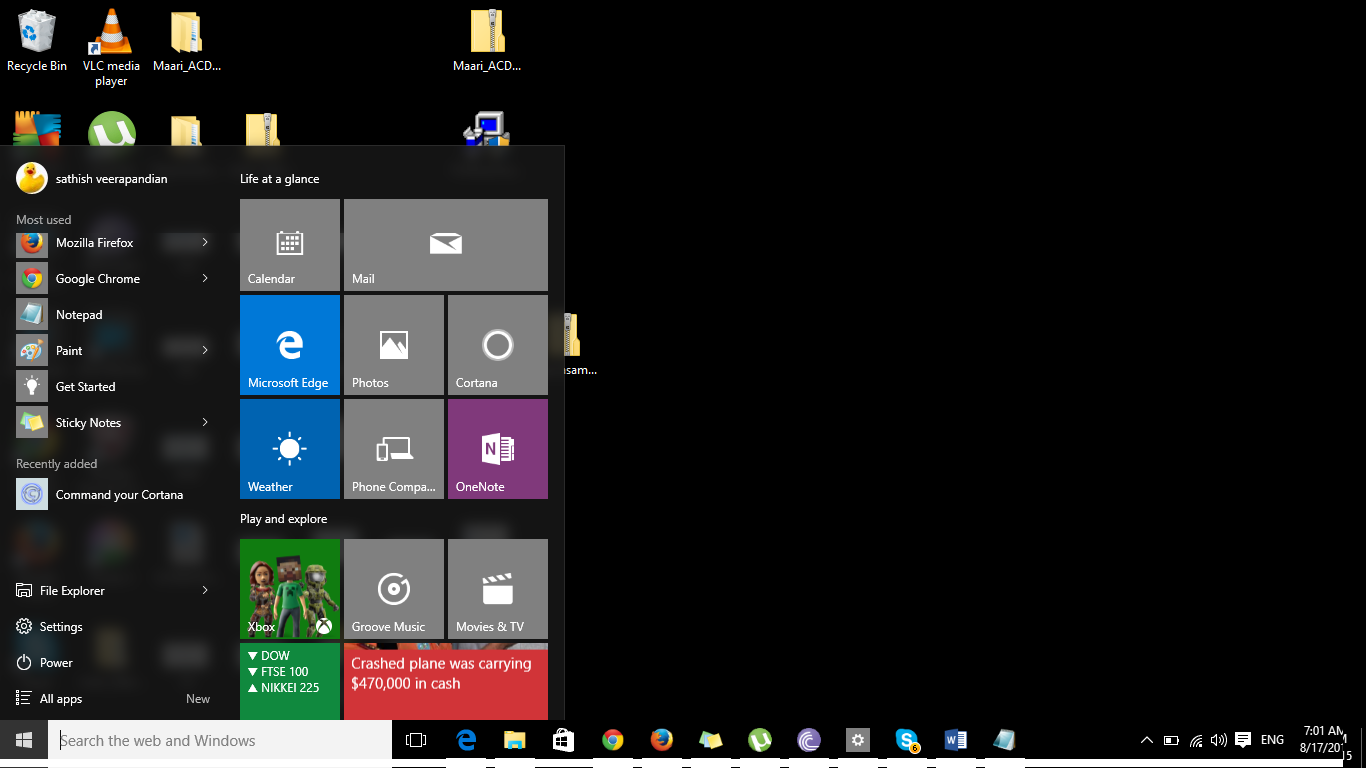
Start Menu is back

For  Windows 8 pessimists who were claiming about the start menu nonavailability Microsoft has brought this back great !!

Start

The Cortona Command :

New Amazing feature Cortona on Desktops,Laptops and Tablets

Microsoft has brought a new feature called Cortona from this version. By using this application you can use the Windows 10 software by voice controlled digital assistant.

By using this feature you will be able to search files , open notepad by commanding your PC through voice.

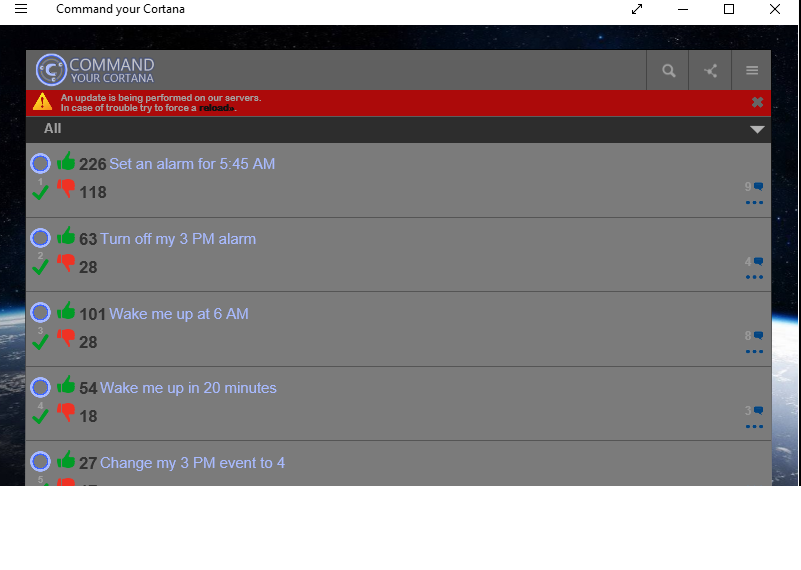
Few samples of Cortona

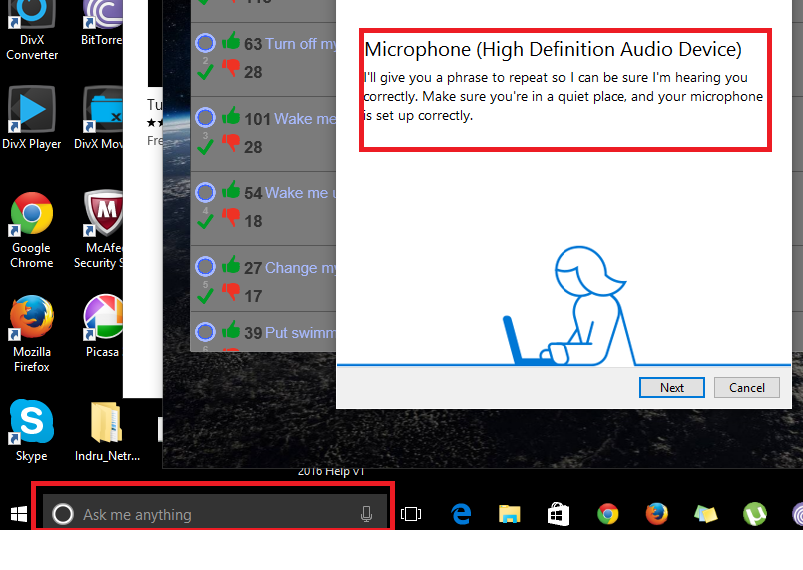
After you download this application from the windows store you get a option called ask me anything with the microphone option as below. Initially you have to set up microphone definition as below for this functionality to work.

Cortona1

Cortona

New Microsoft Edge Browser:

Microsoft new edge browser is really good. The reading layout is appealing especially while looking lengthy articles. Also it includes PDF support.

New option make a web note is very good

Edge1

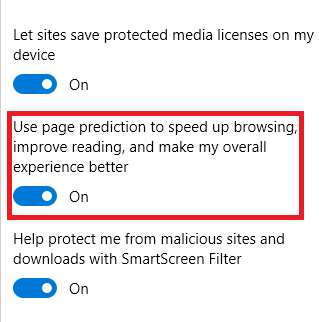
A new option called page prediction which is good

Cortona2

By having this option enabled the browser will predict and load the page ahead and instantaneous response of the page will be given. These predictions are been done based upon Microsoft  understanding browsing patterns like end users browsing habits

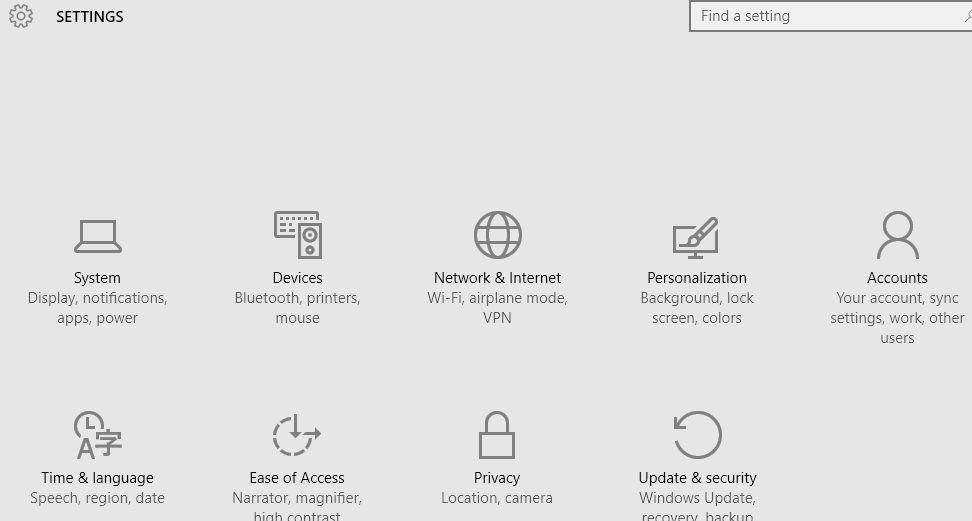
Now all the system settings can be controlled from one place which is more convenient for us

YTR

New Quick Search History :

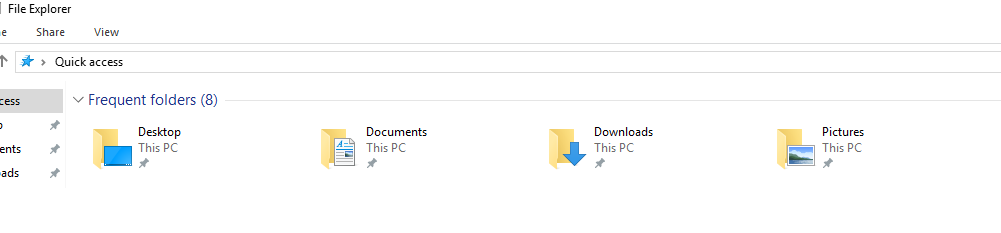
File explorer has a new option with more frequent files used

398

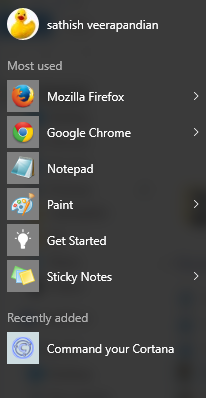
It has this same option in the start menu as well

987

Make multiple virtual desktops:

Now we have an option to create multiple virtual desktops.

D1

By using this option the frequent use of ALT TAB key for switching between the apps can be minimized.

Now we have an option to switch multiple virtual desktops. So we can open as many applications in each of these virtual desktops provided if we have good enough volatile memory.


Enhanced new Photo App:

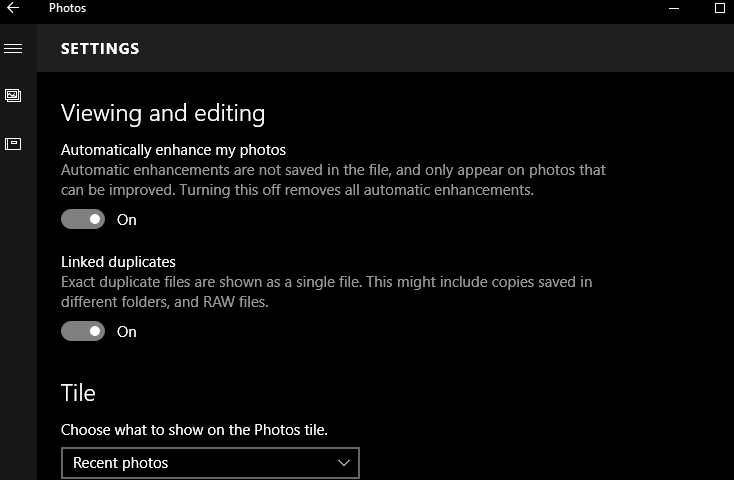
Automatically enhance my photos:

By selecting this option it enhances the saved photos.

This photo app will automatically enhance the saved pictures like colour , contrast , brightness ,etc

Note: The changes are not not saved to the original file. You can revert them by switching off this option.

pj2


Also it organizes and creates album. It has features to edit and enhance.

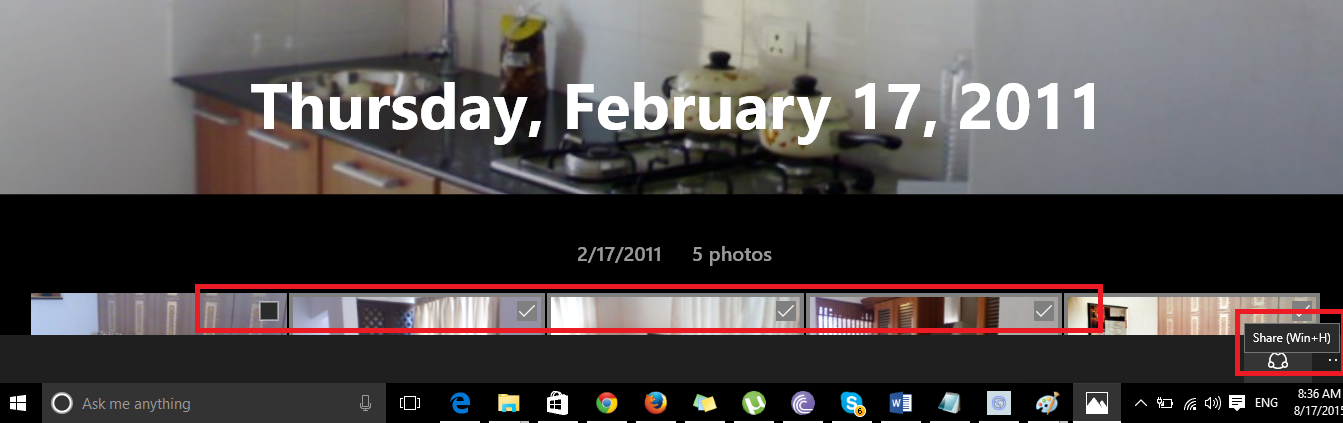
We can also select multiple pics and share them via mail,twitter, facebook , dropbox which is very nice.

9873

Still to explore more on this new version of operating system. It appears to have more features enhanced from the previous version.

Still require more help now we can always ask the Cortona application which will be able to help us further.

Thanks

Sathish Veerapandian


Checking Exchange 2016 Office 365 best practice Analyzer

Like the same in Exchange 2013 SP1 and later versions we have the same Office 365 best practice analyzer tool available in Exchange 2016 as well.

Because prior to Exchange 2013 SP1 we used to login to the office 365 admin tenant ID and download this from the Tools tab which wasn’t that much easier

O365


Now they made it easier for admins to be available from the tools tab at the bottom of the EAC. Its the same in Exchange 2016 as well.

In-order to access the tool just navigate to the tools option and you can see the prerequisites as well which you can go through

E168


But you can see it says exchange 2013 but still it works fine with collecting the required details and checking the readiness. This one will show as Exchange 2016 once the RTM is out.

32


Also its not mandatory to have all these ready since this system will navigate through and install all the missing components as and when required.

When you select the best practice analyzer it takes us to the below option and downloads the tool at the first time only.

213


Just accept the license agreement.All steps are the same as it was in Exchange 2013 SP1 and later


E162


You get the welcome page as below

E163


Click to start the scan


E164


You will be prompted to enter your office 365 Admin Tenant ID,.

In this you have 2 options

If you want to run the prerequisite check to be done only on the  on-premise then click cancel

If you want to run the prerequisite check to be done on both on-premise and Office365 then click ok


E165


Once the scan is completed you will be getting the summary results as below.


E166


This makes the jobs of many admins easier by having this option in the EAC in on premise when doing a hybrid integration with Office 365.

Make sure that you have internet connectivity from the server where you are running this tool in-order to authenticate with Office 365 credentials if you want to check the hybrid readiness on your office 365 as well as on-premise.

The Office 365 Best Practices Analyzer Tool can be used for organizations with:

Exchange Server 2013 SP1 and later on-premises only.

Exchange Server 2013 SP1 and later hybrid configuration.
Thanks

Sathish Veerapandian

Configure SSL certificate in Exchange server 2016

In this article we will have a look at the steps to configure SSL certificates in Exchange 2016 post installation.

If you have exchange 2016 in exchange 2013 coexistence you wouldn’t need to worry about this part. Because the already configured Exchange 2013 CAS server will have the capability to up proxy the requests to Exchange 2016 servers and you can stay relaxed for a while until the you decide to remove the exchange 2013 .

But if you have them in Exchange 2010 coexistence then you will need to move all of your external URL’s and place your SSL certificates into the Exchange 2016 servers.

Now we will have a look at how to place an  SSL certificate request in Exchange 2016 and complete them using a third party CA.

The configuration is the same as exchange 2013 and the only change  is the for internet facing CAS server will be now  internet facing mailbox server.

In-order to perform this action open EAC – click servers – and select certificates

C1

Give it a friendly name as below

Tets

Enter the domain name

If you are going to use wild card you can select the wild card certificate option.

Using wild card will cover your root domain and additional it covers one subdomain .

In my case i’m using wild card since its a lab and i’m using a complimentary subscription provided by digicert through MVP program.so in my case it would cover mail.exchangequery.com, Autodiscover.exchangequery.com, owa.exchangequery.com etc.,

C3

After this completes just click on next and choose one internet facing mailbox server in Exchange 2016

C4

Fill the required information as below

C5

place a location to save the private key as below

33

You can see the cert request generated as below in the location you mentioned

C6

After the above task is completed  you can see the certificate request in pending state in the certificates tab as below

Now we can submit this request to a third party CA and get a new SSL certificate for your domain.

There are so many good providers but i recommend digicert as i have seen their support to be very prompt and all together provide a competitive pricing

C7

Now copy paste the CSR request we generated in Exchange 2016 as below .Now you can select the server software as exchange 2013 and with that it would be working until they add exchange 2016.

s3

Once you get the SSL certificate from the certificate provider now we need to complete this request by importing them into the Exchange 2016 internet facing  server.

You can see the certificate that we requested in pending state as below

Final

So click on complete and you will get a pop up window to import the SSL certificate.

Just import the certificate that you got from the certificate provider and then complete the request.

Now we have successfully completed the SSL certificate request in Exchange 2016

Thanks 

Sathish Veerapandian 

MVP – Exchange Server