
Monthly Archives: February 2020

Microsoft Teams – Deploy Information barrier policies for your organization.

Information barrier policies is an another security enhancement feature in Microsoft Teams. With this new component it helps the organization to enforce policies which prevents the communication between specific group of people. This is primarily helpful and beneficial for the organizations who are into manufacturing and production units where they would need to adhere certain industry standards and guidelines usually to avoid conflicts of interest.

Before we actually move into deploying the information barrier policies segmentation of the users needs to be done.Ideally the business requirement which falls into compliance category to prevent communications between groups of users in Microsoft Teams. For example a person from Marketing Team cannot make a call,send instant messages or share his desktop to Research department. It can be vice versa or its is only one direction. All the sets of users needs to be identified because this contributes to the number of the segments that we are going to create for this policy to prevent the communication between them.

Continue reading

Microsoft Teams – Utilize the AzureADMSGroupLifecyclePolicy command to manage the teams group life cycle

With the Azure active directory powershell commandlets, we could control the lifecycle of office365 groups.Ideally when any office365 group is created for an action of creating a team in the backend it creates the azure ad group.With the Azure commandlets we have options to control the lifecycle of the office365 groups automatically.

Let’s say we ‘ve created Team for a partner project which completes in 1 year time period, we have got an option to expire this team in 1 year time during the team creation.This keeps the access reviews of the Microsoft Teams intact and ensures that only required persons have access to the company corporate data.

The default setting is unlimited days as it should be for most of the scenarios.

Firstly we need to connect to azuread module from the powershell. Since we do not have any group life cycle policy the value remains empty.

Continue reading

Microsoft Teams – Notify security administrator when a new team is created by the end users

Microsoft Teams is being used as a most preferred method of communication platform by many organizations. By default in office 365 the group creation is enabled for end users which will allow them to create public and private groups. Few organizations are having the group creation disabled on the organization level for larger scale companies and have users request for creating the teams using a request form which will run through a automation process in the background with help of azure automation accounts ,Microsoft flow or few other mechanisms.

But few organizations are really interested in allowing the users to create the Office 365 groups once their workloads are migrated to office 365. This is primarily to increase the adoption rate of Office 365 workloads Microsoft Teams and SharePoint online.

We have more options available in Office 365 cloud app security. By leveraging these options we can better secure the Office 365 suite of products which in turn controls the Data loss prevention, security compliance, information governance and threat management for the entire organization.

Through Cloud App Security –

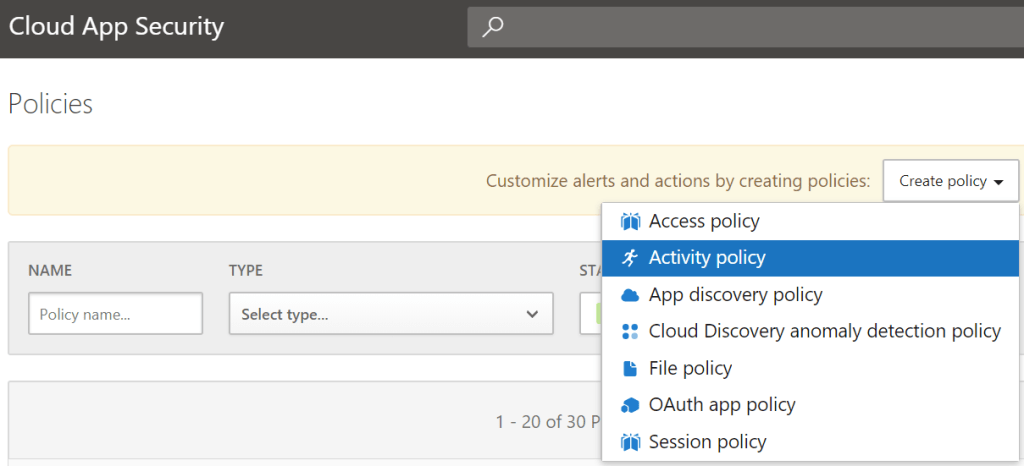
Navigate to Cloud App Security – https://portal.cloudappsecurity.com

Select and create Activity Policy

Do not choose any policy templates – select policy severity – category as per classification – Have selected compliance in below example.

Continue reading