Category Archives: AI

Creating Specialized AI Agent with RAG(Retrieval Augmented Generation) in Copilot Studio: A Motorcycle Expert Demo

Building industry specific AI agents is now easier than ever with Microsoft 365 Copilot Studio especially when combined with Retrieval Augmented Generation (RAG). In this blog, we’ll walk through how to create a RAG powered Motorcycle Expert AI Agent designed for motorcycle store owners who manage large inventories and need to support both customers and sales representatives.

In this example there is a dealership with 200+ motorcycles and this agent helps streamline customer inquiries, improve product comparisons, and empower your sales team with accurate, data‑driven responses.

This step‑by‑step guide shows you how to:

  • Design and prepare your motorcycle dataset
  • Connect SharePoint/OneDrive as your knowledge source
  • Configure RAG settings inside Copilot Studio
  • Shape the agent’s persona and behavior
  • Add comparison logic for models and categories
  • Enable advanced features like deep reasoning and generative orchestration
  • Test and publish the agent with proper security and moderation settings

By the end of this tutorial, you’ll have a fully operational Motorcycle Expert AI Agent running inside Microsoft 365 Copilot Chat, Teams, or web capable of answering questions, comparing models, and delivering expert insights using your actual business data.

The agent will:

  • Answer questions about motorcycles (models, categories, specs, use cases)
  • Compare models (e.g., “MT07 vs SV650 for commuting?”)
  • Use your own data (spreadsheets, docs, or SharePoint lists) as its primary knowledge source
  • Run inside Microsoft 365 Copilot Chat / Teams / web
Continue reading

Exploring Microsoft Entra Agent ID (Preview): Identity, Governance & Zero‑Trust for AI Agents

Note: Features are in Preview and may change.

As organizations lean into AI assistants and autonomous workflows, one challenge keeps coming up in every SOC and IAM conversation: agent sprawl. Agents show up in multiple teams and builder platforms, and before you know it, you’ve got non‑human actors touching sensitive data without a clear inventory, lifecycle, or policy boundary.

Microsoft Entra Agent ID and the Agent Registry (Preview) are designed to solve exactly that bringing identities, governance, and Zero Trust controls to AI agents, so you can securely discover, organize, and manage them easily in your directory.


What Agent Registry Adds (and Why You’ll Care)

Agent Registry is an Microsoft Entra integrated metadata repository that gives you a unified view of agents built on Microsoft platforms (e.g., Copilot Studio, Azure AI Foundry) and those from other ecosystems. It separates operational records (Agent Instances) from discoverability metadata (Agent Card Manifests) and introduces Collections to govern which agents can discover and collaborate with each other. Think discovery before access a crucial shift for reducing exposure.


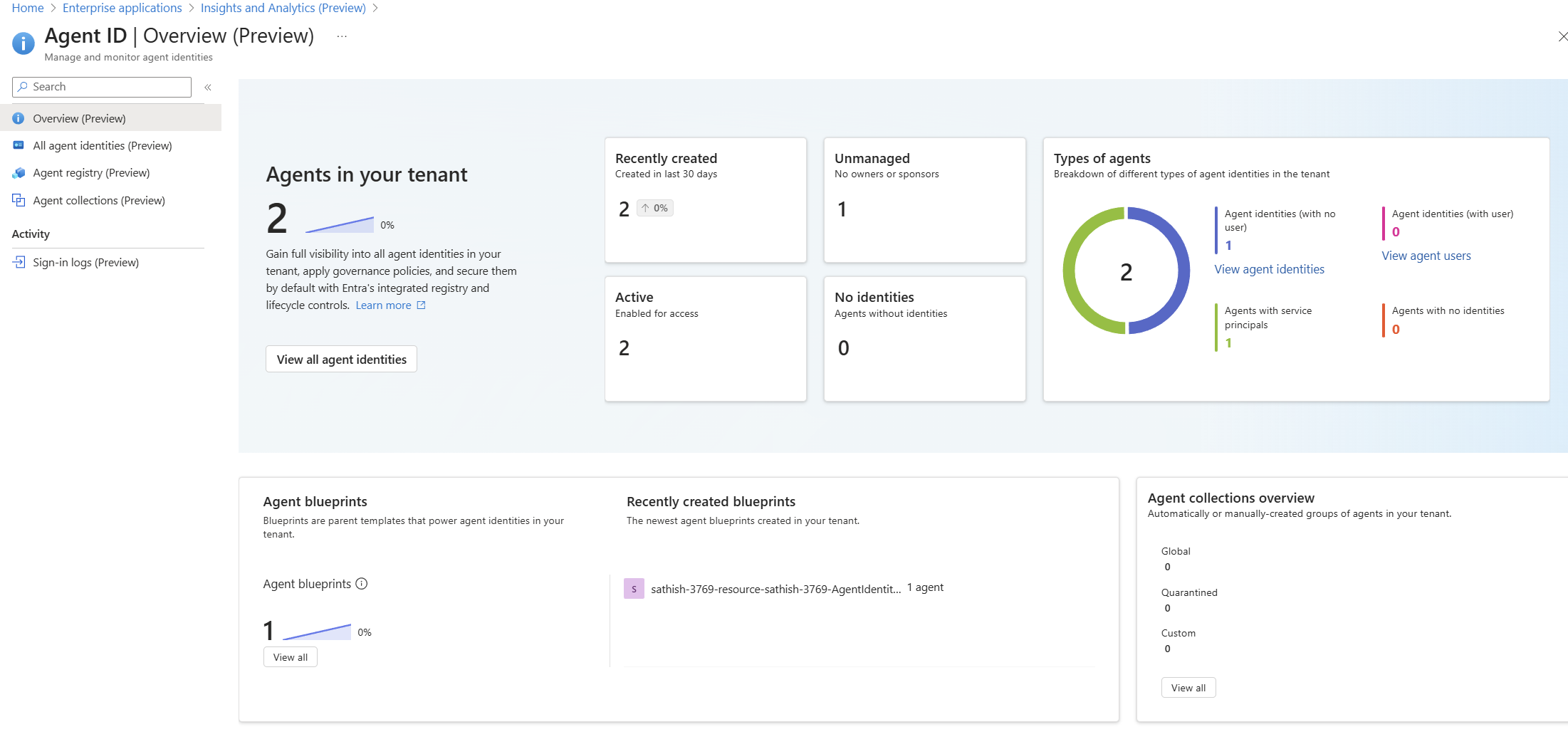
A Quick Look at the Tenant Experience

Agent ID Overview (Preview) dashboard showing agent counts, status, types, and blueprints: high-level posture of agents, identities, blueprints, and collections

Continue reading

Understanding Azure AI Foundry Hub

This powerful tool helps streamline governance and management activities of your AI Projects. Take a look at this video to know more information on the Azure AI foundry Hub.

Regards
Sathish Veerapandian

Creating Your First AI Agent with Azure AI Agent Service

Introduction

Azure AI Agent Service allows you to create, deploy, and manage AI agents that can perform various tasks. This service leverages powerful AI models to enable agents to perform a wide range of tasks, from answering queries to automating complex workflows. With its user-friendly interface and robust infrastructure, Azure AI Agent Service makes it easy for developers to build intelligent agents that can enhance applications and improve productivity.

This guide will walk you through the steps to set up and run your first agent with the help of Azure AI agent service.

Prerequisites:

  • An Azure subscription.
  • You need a GitHub Account.
  • Basic knowledge of PowerShell and Python.

So first step is to setup your workspace in the GitHUb

GitHub Codespaces: A Convenient Cloud-Based Development Environment

GitHub Codespaces offers a virtual machine in the cloud, providing a clean environment with all necessary prerequisites pre-installed. This makes it incredibly easy to set up and run your code, even on a standard laptop without high-end specifications.

Key Features:

  • Cloud-Based Computation: All computations are performed in the cloud, allowing you to work efficiently on a standard laptop.
  • Easy Setup: Setting up Codespaces is straightforward and quick, making it accessible for developers of all levels.
Continue reading

First Look at Microsoft AI Hub: What You Need to Know

Prioritize comprehensive security and compliance measures before integrating AI into your IT ecosystem. This video showcases what the Microsoft AI Hub (preview) brings to the table in this context.

Regards
Sathish Veerapandian

Understanding the fundamentals of AI

Building a strong foundation in AI is crucial for anyone venturing into this field.
This will be the fundamentals to know and learn more about the AI models and how to utilize them.

Thanks
Sathish Veerapandian