Category: Lync

  • Install and Configure Lync 2013 server standard edition

    In this article we will look at steps to install Lync 2013 server standard edition.

    Before we deploy Lync server in environment it’s always mandatory to do a proper planning for the enterprise voice features as there are more factors involved in connecting to the mediation server and need to be designed and planned accordingly.

    To install Standard edition front end server we need to plan the below things mandatory

    Readiness for Enterprise voice

    If we are planning for enterprise voice it’s better to check few things before we install front end server.

    By default the mediation server is collocated with the front end server in standard edition. But this needs to be considered and deployed separately or collocated according to our enterprise voice plan.

    In Lync 2013 standard edition we can choose to deploy mediation servers separately based on our requirements.

    Below are the types of enterprise plan that are available and we need to plan accordingly


    SIP trunking – For SIP trunk there is separate Standalone mediation servers required because the mediation servers acts as a proxy for all the Lync 2013 clients and transcodes media whenever required. So a dedicated server is required to handle this traffic as we do not have a dedicated pstn or a pbx.

    Direct SIP trunk with PSTN – If you have Direct SIP trunk with PSTN gateway then separate mediation servers is not required since they are capable of receiving traffic from any pool and capable of DNS load balancing across the pools.


    Ip-PBX or SBC – We don’t need to have a separate mediation server as long as the below conditions are met for IP-PBX or SBC

    If IP-PBX or SBC is intelligent and can receive traffic from mediation server and route the traffic to the mediation server.

    IP-PBX should not support media bypass and it should be able to do the media processing by its own by relieving the mediation server from media processing.

    Also it’s always better to run the Microsoft Lync server 2013 planning tool to see if the front end server along with the mediation server can handle the load. If it does not then it is best recommended deploying a separate pool and separate mediation server.

    Readiness for SQL

    By default, the SQL Server Express back-end database is collocated on the Standard Edition server. You cannot move it to a separate computer.

    SQL Standard/Enterprise is not supported with Lync 2013 Standard Edition pools. If you use a separate SQL Standard/Enterprise instance, you can deploy only Lync Enterprise edition.


    Readiness for Active Directory Services

    Domain Functional Level – Minimum should be at least Windows server 2003.

    Forest Functional level – Minimum should be at least windows server 2003.


    Install prerequisites on the front end server

    In this article we will look at how to install Lync 2013 on Windows server 2008 R2 server.

    Following prerequisites must be installed on the FE server


    Microsoft .NET Framework 4.5

    Remote Server Administration Tools (RSAT)

    Microsoft Visual C++ 11 Redistributable

    Windows powershell 3.0

    HTTP Activation

    WCF Activation

    Windows Installler 4.5

    Microsoft Silver light 5

    Run the below commands for installing the below features

    Import-Module ServerManager

    Add-WindowsFeature Web-Server, Web-Static-Content, Web-Default-Doc, Web-Scripting-Tools, Web-Windows-Auth, Web-Asp-Net, Web-Log-Libraries, Web-Http-Tracing, Web-Stat-Compression, Web-Default-Doc, Web-ISAPI-Ext, Web-ISAPI-Filter, Web-Http-Errors, Web-Http-Logging, Web-Net-Ext, Web-Client-Auth, Web-Filtering, Web-Mgmt-Console, Web-Asp-Net45, Web-Net-Ext45, Web-Dyn-Compression, Web-Mgmt-Console, Desktop-Experience

    Once the above installation is done ensure that you have joined this server in the domain and  logged in as domain admin.

    Note : Admin User account must be a member of domain, enterprise and schema admins for the installation.

    Run the setup from the CD

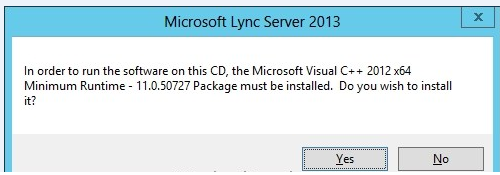
    You will be prompted to install the Microsoft visual C++ as sql is installed on front end standard  server by default
     

    Lync11


    Choose the installation location and click install.

    lync1


    Click accept on the license agreement to proceed with the installation.

    lync2


    Once the installation is completed we will have 2 new programs installed in the task bar.

    • Lync server management shell.
    • Lync server deployment wizard.


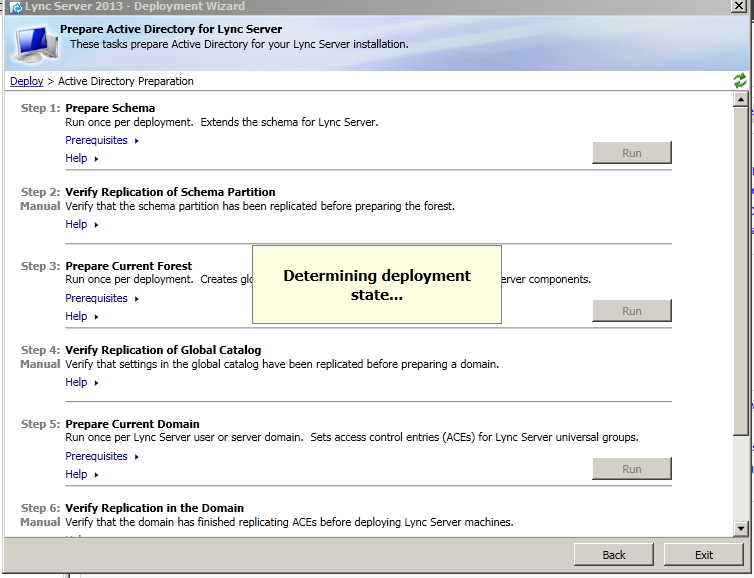
    Now open Lync deployment wizard. It determines the deployment state once we open.
     

    lync3


    Click on prepare schema

    lync4


    Click on finish once completed.

    Click on Prepare forest and click on finish once done

    lync5


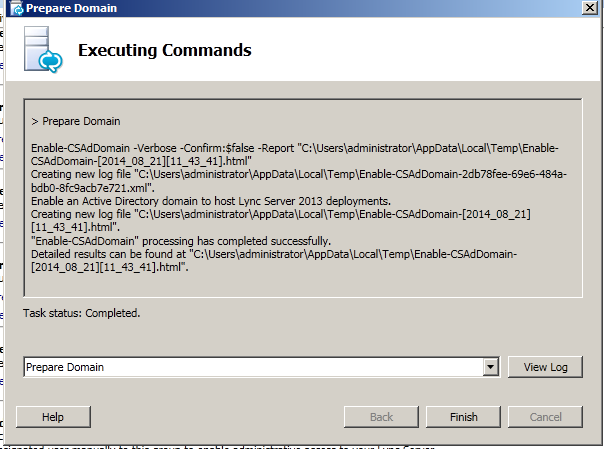
    Click on Prepare domain and click on finish once done
    lync6


    Once prepare domain done open lync deployment wizard again and click on prepare standard edition server.

    Once we have done the above things we can see the below groups created
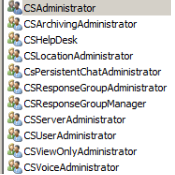
    lync7


    Now we need to add users to provide administrative access to the Lync Server Control Panel.

    Add users in CS Administrator group who requires access to Lync Server Control Panel.

    lync8


    Now create SRV record for automatic sign on for the Lync clients.

    Create Record: (screenshot below)

    • Service should be :  _sipinternaltls
    • Protocol should be :  _tcp
    • Port number:  5061
    • Host: point to your FQDN to your Front-End Server or Pool
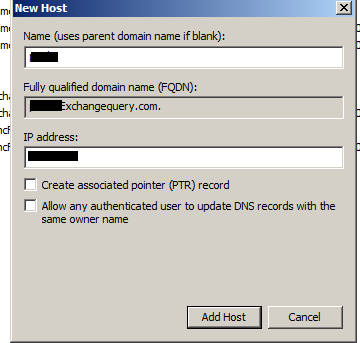
    lync9


    Now go back to the deployment wizard and install Lync administrative tools. Once after you install  you will see a new option called Lync server topology builder.

    Open Lync   Server topology builder and select new topology.

    lync10


    Now define the SIP domain for the users to log in

    lync14


    Every Lync server front end pool must be deployed in a site. So specify the site and you can also mention multiple sites later..

    lync16


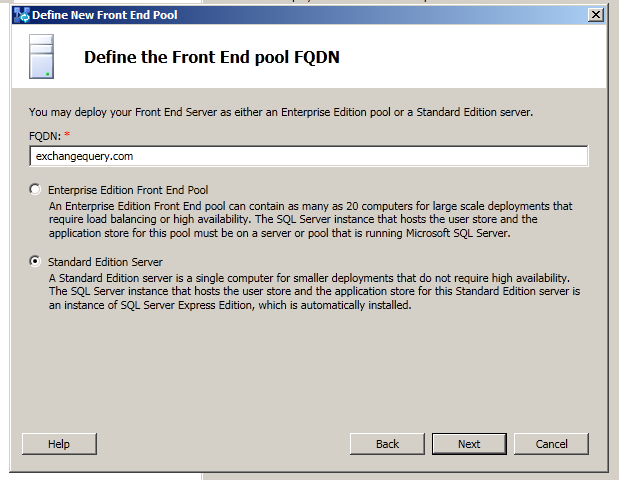
    Now define the front end pool fqdn

    lync14


    Now select the features that we need to enable. IM and presence is enabled by default. Select the additional features according to your design. Select collocate mediation server if you need to install mediation server along with FE pool.
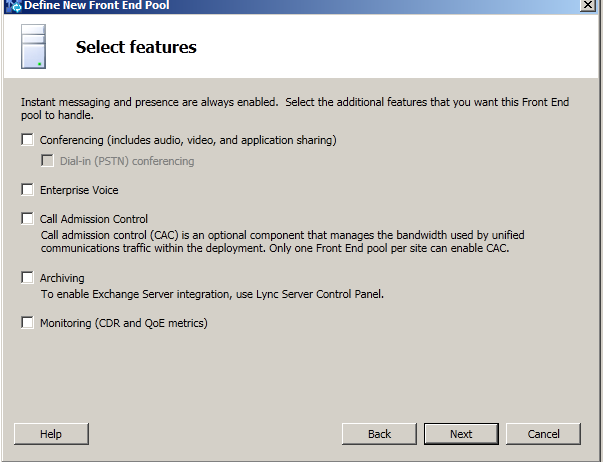
    lync15


    Just click default settings on the sql server store as we are installing standard edition.

    For define file store alone we need to manually specify the installation path as it wont create the path automatically. We need to create a share folder and grant access to users

    RTCHS Universal Services

    RTC Component Universal Services

    RTC Universal Server Admins

    RTC Universal Config Replicato

    Now click on Finish

    Now open Topology builder and click on publish to publish the topology


    lync17


    Once the publishing wizard is completed click install or update lync server system to complete the installation successfully.

    We are done with installing the Front end server collocated along with mediation server.

    You can later install monitoring and archiving server separately.

    Cheers

    Sathish Veerapandian

  • Overview and Readiness for configuring SIP trunk in Lync 2010/2013

    What is SIP trunk?

    SIP trunk is  a virtual  connection between Lync server(mediation server) in any organization  and the ITSP.SIP trunk is used to make a direct connection from your organization to ITSP(Internet Telephony Service Provider).

    It helps us to extend any organization VOIP (voice over internet protocol) functionality beyond the firewall without the need of ip-PSTN or even a PBX.

    In a simple term SIP trunk can be utilized to carry VOIP calls in following scenarios

    1)  PC to phone Communications.

    2)  Phone to PC Communications.

    3)  PC to PC    Communications.

    In addition to VOIP calls  SIP trunk can carry instant messages, multimedia conferences, user presence information, Enhanced 9-1-1 (E9-1-1) emergency calls, and other SIP-based, real-time communications services.

    In some scenarios we can choose the SIP trunk to connect to the branch site through ITSP.


    Advantages of SIP trunk

    By using SIP trunk we can typically reduce the cost in making a long distance calls.

    We do not need to have a PSTN or even a PBX.

    We can consolidate our organization connections and PSTN in a single central site.

    An enterprise user can make local calls i.e., within the organization and a long distance call to a  E.164-compliant number.


    What is  E.164-compliant number ?

    International public telecommunications numbering plan. The E.164 plan was originally developed by the International Telecommunication Union (ITU).

    E.164 is an international numbering plan for public telephone systems in which each assigned number contains a country code (CC), a national destination code (NDC), and a subscriber number (SN). There can be up to 15 digits in an E.164 number. With E.164, each address is unique worldwide and it has its own number. With this 15 digits combination for each user there can be 100 trillion numbers generated all around the world. So there is no possibility in future that  we might run out of option in assigning E.164-compliant number for any user.

    SIP trunk can be established in 2 ways

    Centralised SIP trunk

    Is a method in which all the branch site  connections come to a central site and then the connections are routed to the ITSP. This type of connection is Cost effective.

    Distributed SIP trunk

    Is a method where all the sip trunk are established of its own in each and every site to their own ITSP.

    Reason for having Distributed SIP Trunk

    Company sites can be in different countries

    In order to provide Site resilience


    How  do we implement SIP trunk ?

    1) Order a SIP trunk subscription connection from any one of SIP trunk service providers.

    2) Configure the external firewall to allow communication between SIP Trunk provider and your Lync Server with the Mediation Server role.

    3) Make the necessary changes and publish the Lync Topology.

    4) Create a dial plan and configure users for using enterprise voice.


    SIP trunk service providers can give 2 types of connections

    1) TCP connection

    For this type of connection we need to have port 5060 open in the firewall for SIP trunk provider. For this connection there is no certificate required. This type of connection uses NTLM type of authentication since no certificate is required.

    2) TLS  Connection

    For this type of connection we need to have port 5067 open in the firewall for SIP trunk provider and then we need to get a certificate from the SIP trunk provider. This type of connection uses TLS-DSK since it uses a certificate for the connection.

    We need to exchange few information between the SIP trunk service provider and our organization to configure the endpoints on both side for this type of connection.This configuration basically depends on what type of connection we are using for this SIP trunk and varies according to  different scenarios.

    For MPLS and dedicated type of connection ,give the router public IP address to  ITSP . Ensure that ITSP’s SBC or gateway is able to resolve this address.

    Also give the FQDN of the Mediation server.

    For VPN connection, give the VPN server IP address to the ITSP

    Note :

    We need to get the ITSP gateway.i.e, their IP address and the FQDN .We need to specify these values in the mediation pool of the mediation server.


    We need to have a Mediation server with 2 interfaces Basically 2 NIC’s.

    Internal interface connects to the front end server for internal connection.

    External interface – connects to ITSP edge component.(the external edge component of ITSP can be a router,SBC or an gateway)

    The mediation server can either be collocated along with the front end server or it can be a standalone server according to the requirement. It’s always better to use the Lync server  planning tool to evaluate the front end server pool that whether it can handle the load. Else we can deploy the mediation server separately.

    Exception:

    If you are connecting to a SBC(session Border Controller) of a ITSP a dedicated Mediation server is required.

    We need a connection to establish a SIP trunk from mediation server external interface to the ITSP external edge for any organization. Below are the supported connection types

    1) Least fibre  Optic connection or T1 line

    This one has the highest call carrying capacity, most secure and reliable one. Most expensive. Suitable for organization who prefer good quality of call and security. No VPN is required.

    2) MPLS connection

    Multi Protocol Label Switch is a dedicated line shared with other IP traffic and the bandwidth network is shared with other subscribers. No VPN is required. Drawback is that it can have excess of IP traffic,can interfere with VOIP unless VOIP is given as highest

    3) Internet connection

    Least expensive. VPN connection is required but less secure and low  quality.


    Bandwidth requirements

    Bandwidth planning is very important before making SIP trunk connection. We need to calculate according to the number of calls. That can be calculated with the below formulae

    SIP Trunk Peak Bandwidth = Max Simultaneous Calls x (64 kbps + header size)


    Codec Support

    Lync Server 2013 supports only the following codec’s:

    G.711 a-law (used primarily outside North America)

    G.711 µ-law (used in North America)


    Internet Telephony Service Provider

    For ITSP you need to use only Microsoft certified ITSP.

    How you implement the service provider side of a SIP trunk connection varies from one ITSP to another. For deployment information, contact your service provider. For a list of certified SIP trunk service providers, see Microsoft Unified Communications Open Interoperability Program website. For details about Microsoft certified SIP trunk providers, contact your Microsoft representative.

    References :-

    http://technet.microsoft.com/en-us/library/gg398755.aspx

    http://blogs.technet.com/b/nexthop/archive/2013/04/10/configuring-lync-2010-server-to-work-with-level-3-sip-trunking-services.aspx

    http://blogs.technet.com/b/drrez/archive/2011/04/21/configuring-an-intelepeer-sip-trunk-solution-in-lync-server-2010.aspx

    Cheers 🙂

    Sathish Veerapandian

    Technology Evangelist