
Note: Features are in Preview and may change.
As organizations lean into AI assistants and autonomous workflows, one challenge keeps coming up in every SOC and IAM conversation: agent sprawl. Agents show up in multiple teams and builder platforms, and before you know it, you’ve got non‑human actors touching sensitive data without a clear inventory, lifecycle, or policy boundary.
Microsoft Entra Agent ID and the Agent Registry (Preview) are designed to solve exactly that bringing identities, governance, and Zero Trust controls to AI agents, so you can securely discover, organize, and manage them easily in your directory.
What Agent Registry Adds (and Why You’ll Care)
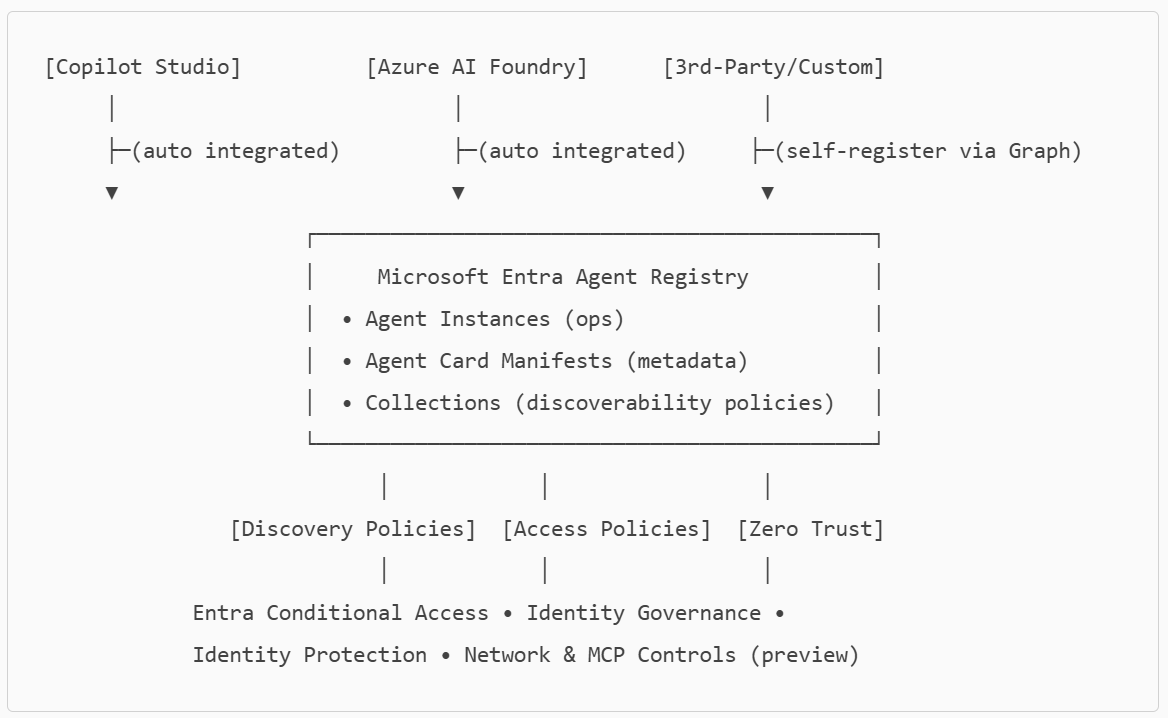
Agent Registry is an Microsoft Entra integrated metadata repository that gives you a unified view of agents built on Microsoft platforms (e.g., Copilot Studio, Azure AI Foundry) and those from other ecosystems. It separates operational records (Agent Instances) from discoverability metadata (Agent Card Manifests) and introduces Collections to govern which agents can discover and collaborate with each other. Think discovery before access a crucial shift for reducing exposure.
A Quick Look at the Tenant Experience
Agent ID Overview (Preview) dashboard showing agent counts, status, types, and blueprints: high-level posture of agents, identities, blueprints, and collections
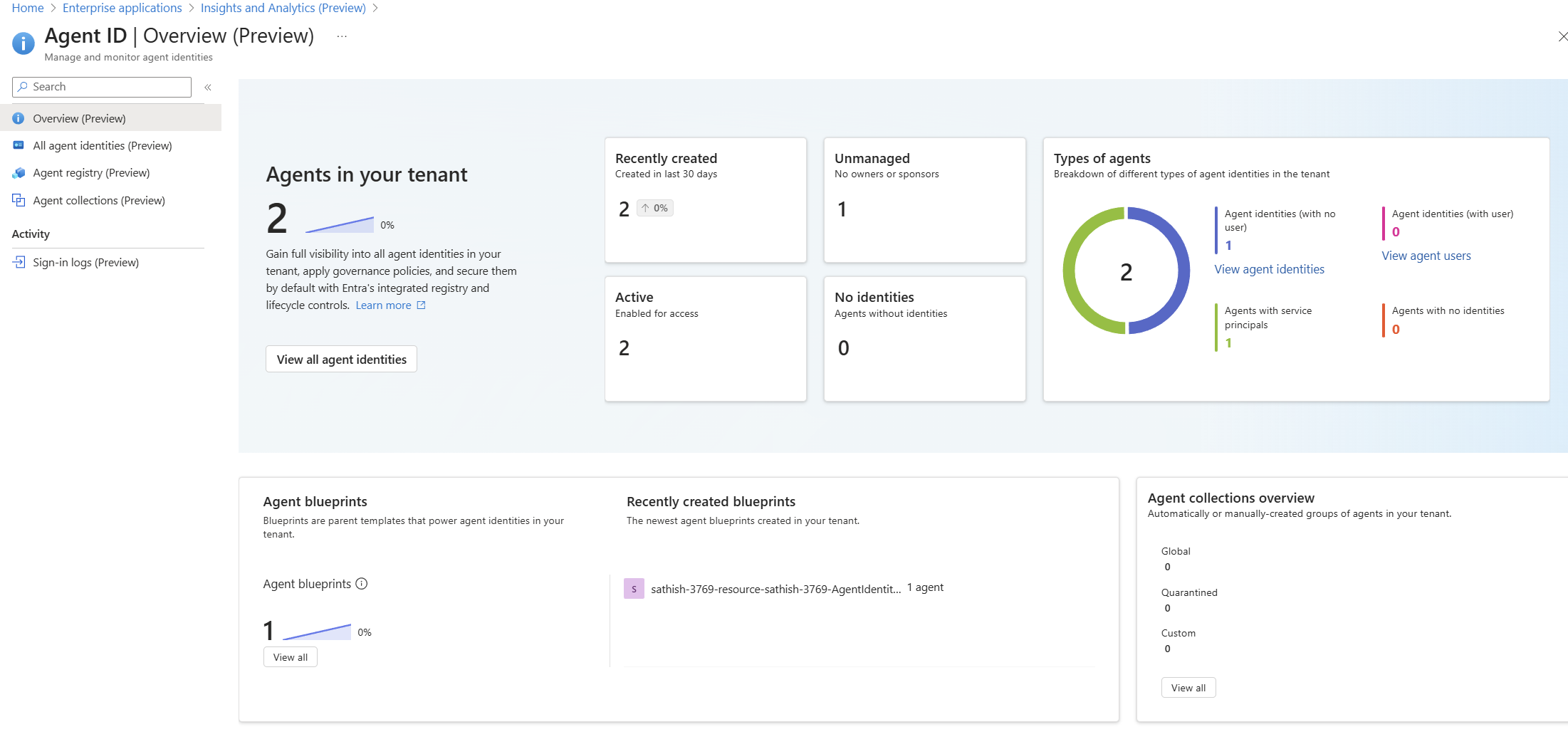
The Overview (Preview) pane provides instant visibility into newly created, unmanaged, and active agent identities, plus blueprint and collection summaries.
From the Agent ID (Preview) blade, you’ll see how many agents exist, which are unmanaged (no owners/sponsors), and which have no identities useful signals for SOC teams triaging risk and governance gaps.
Inventory: All Agent Identities
All agent identities list with status and object IDs
All agent identities (Preview) lists each agent identity with creation date, status, and object ID for programmatic queries.
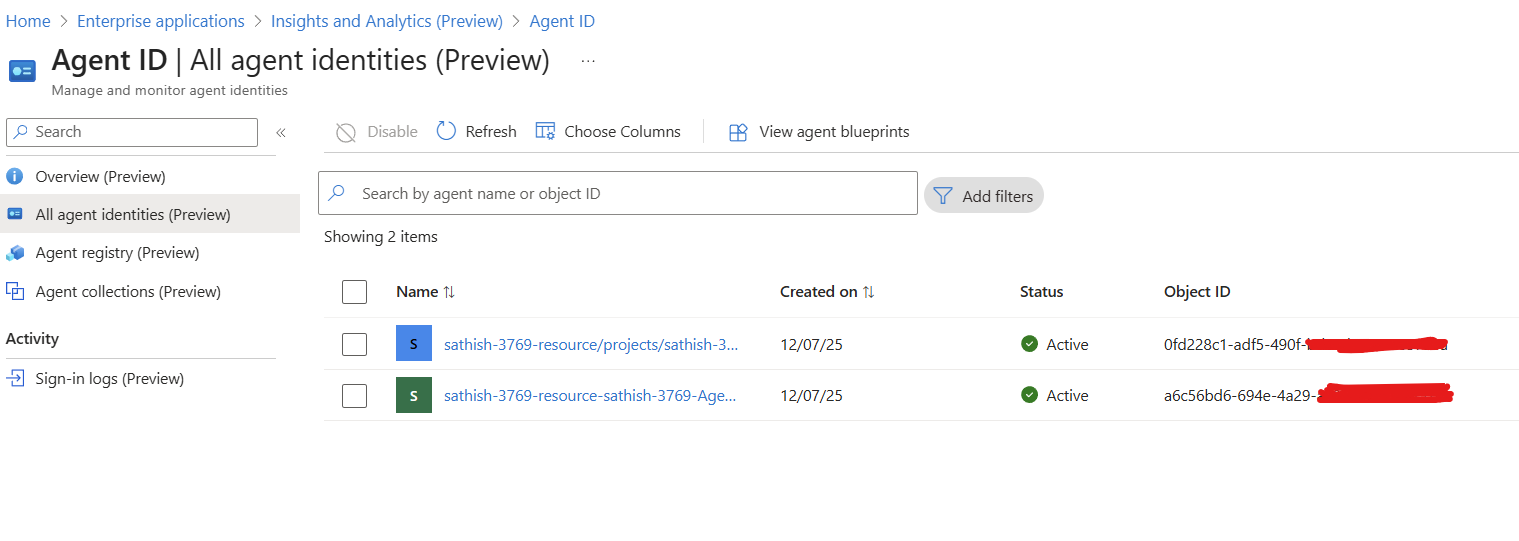
This is your starting point for who/what operates in the tenant. Agents created in Copilot Studio and Azure AI Foundry are auto‑integrated and appear here without manual registration. For non‑Microsoft agents, you can self‑register via Microsoft Graph (beta) by creating an Agent Instance (operational record) and then an Agent Card Manifest (discoverability metadata).
Collections: Govern Discoverability and Collaboration
Agent collections (Preview) showing Global and Quarantined predefined options and Quarantined (not discoverable)”)
Agent collections (Preview) provide built‑in and custom boundaries. Use Global for shared utilities; use Quarantined or custom collections to fence interactions.
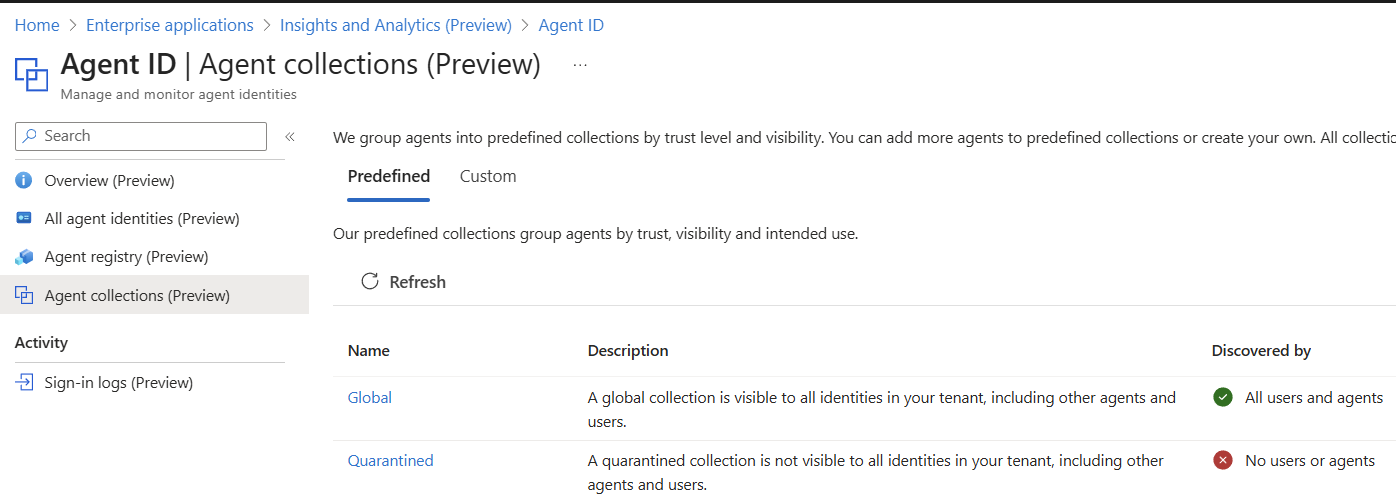
Collections decide which agents can find other agents during collaboration.
- Global → discoverable across the org.
- Custom → build department or sensitivity boundaries (e.g., HR ↔ Payroll only).
Agents without an Agent ID can be discovered (target role) but can’t query the Registry themselves; client agents need an Agent ID to perform discovery.
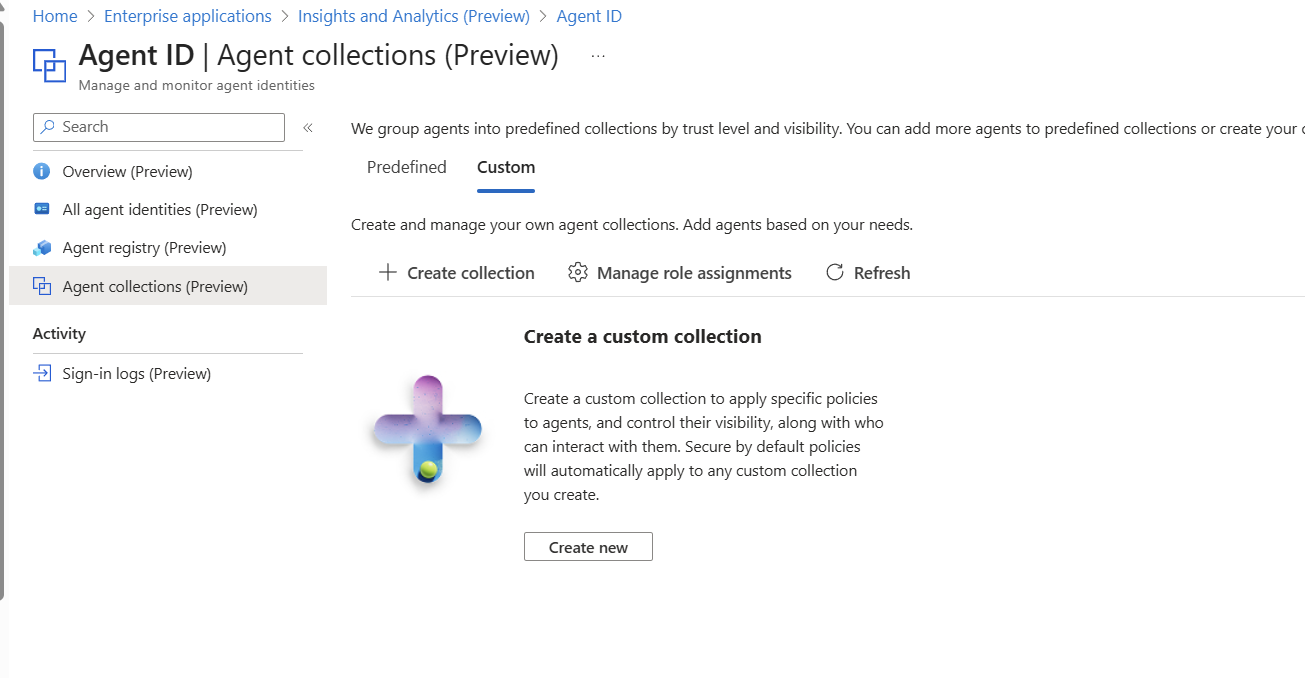
Admin note: Microsoft’s docs have a dedicated guide for creating/managing collections that’s being updated during preview. [github.com]
Conditional Access for Agents: Zero Trust in Practice
Conditional Access policies applied to an agent identity
Conditional Access surfaces show user-created and Microsoft-managed policy baselines. Protects your data lets say from high risk agent identities
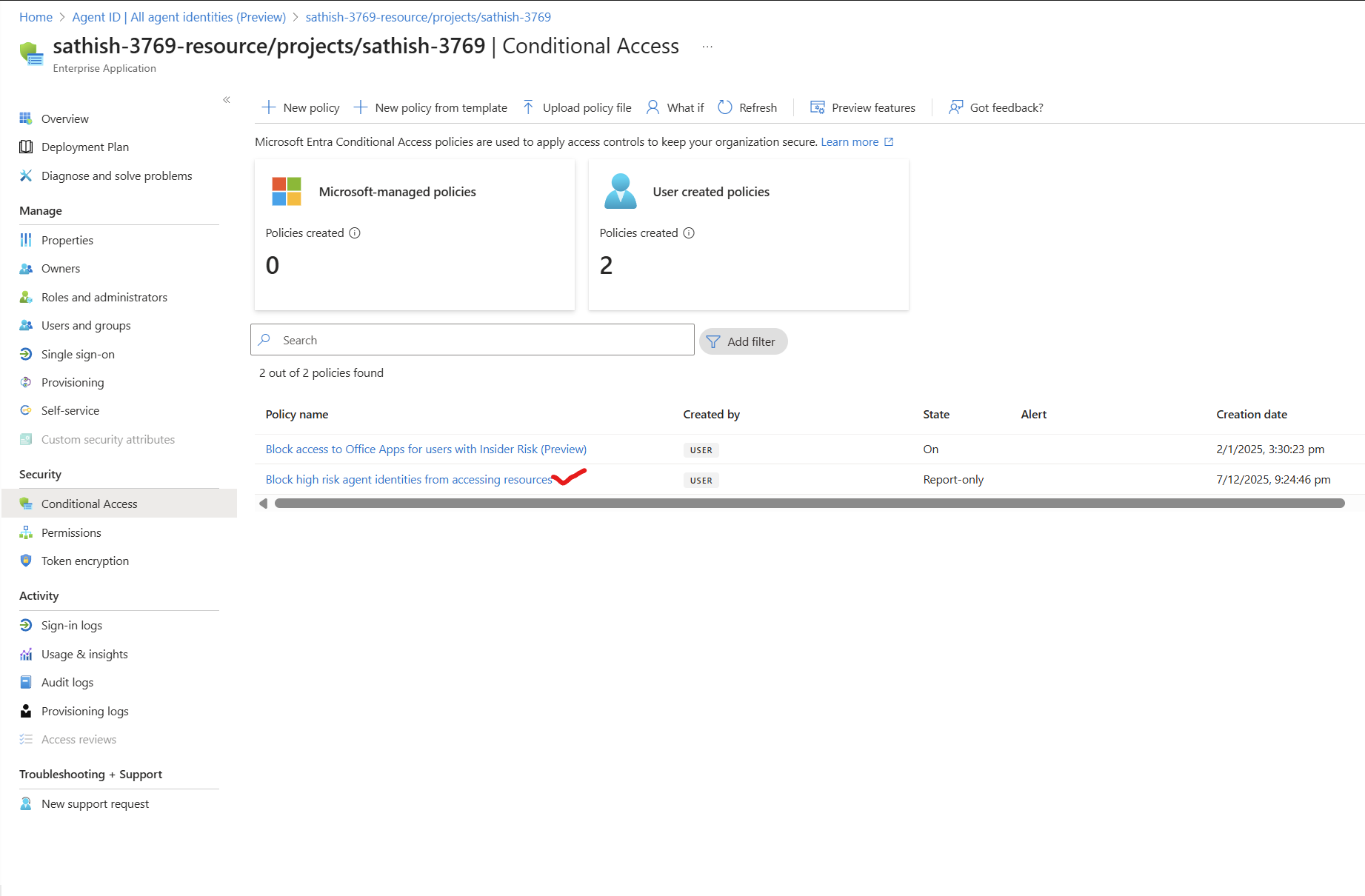
With Conditional Access for agents, applicable for all agent identities and currently it is in preview
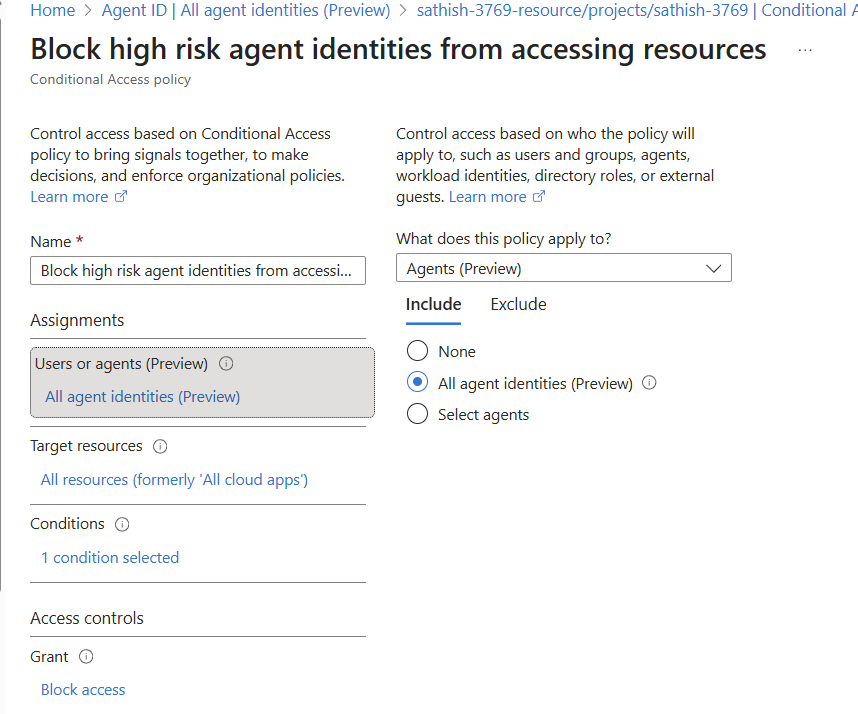
Baselines and custom policies extend familiar user/app patterns to non‑human identities—blocking high‑risk agents and ensuring compliant conditions.
And you can see that the agent risk level is that they have been compromised.
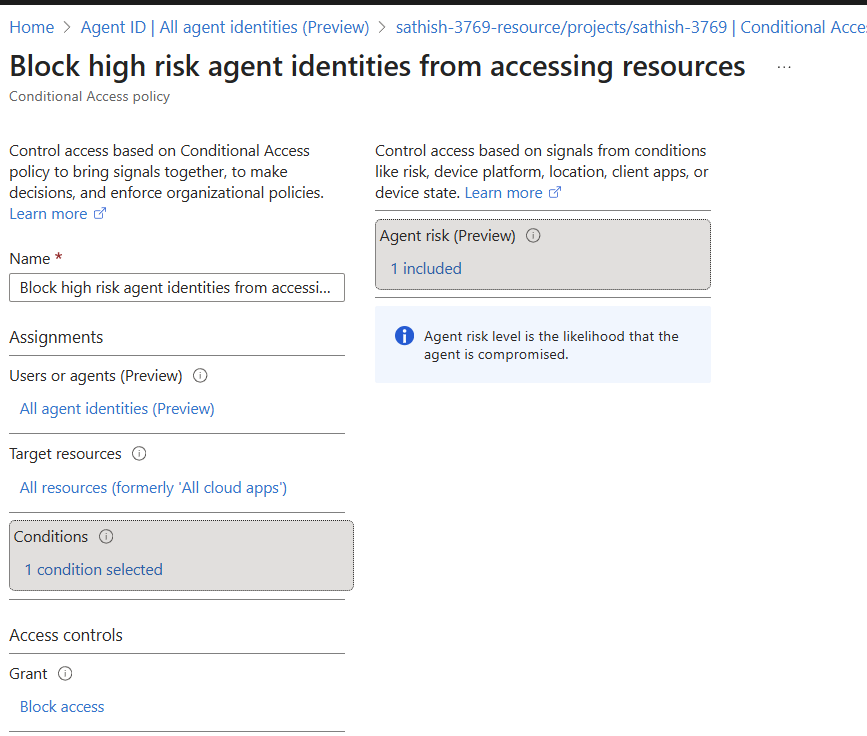
Preview protections expand to emerging threats (e.g., prompt‑injection, MCP restrictions, network filtering) and shadow AI visibility helpful when unsanctioned tools creep into workflows.
Agent Blueprints: Standardize Identity Foundations
Agent blueprint page with linked agent identities, access, and owners/sponsors tabs
Agent blueprints give you reusable identity templates with governance surfaces (access, owners/sponsors, logs). Great for scaling patterns consistently.
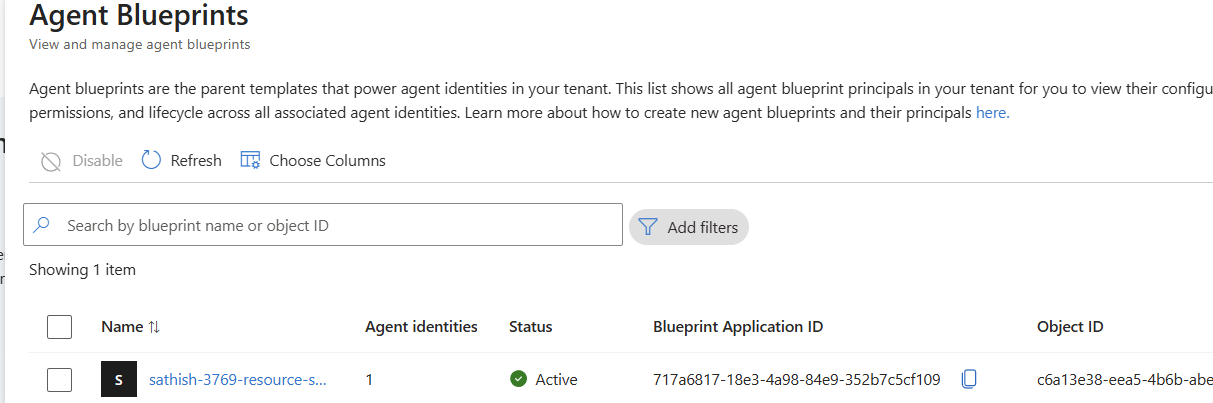
Blueprints help standardize how an agent identity should look and operate owners/sponsors, access envelopes, audit, and lifecycle controls so teams can spin up agents consistently rather than ad‑hoc. (Blueprints are referenced in the Learn content as part of the broader identity platform.)
Step‑by‑Step: Rolling Out Agent Registry in a Real Tenant
1) Baseline Visibility
- Inventory agents via Agent ID (Preview) → All agent identities.
- Tag each with owners/sponsors and business purpose; track unmanaged entities from the Overview pane.
2) Structure Discoverability with Collections
- Put cross‑cutting utilities into Global.
- Create Custom collections for sensitive domains; ensure only in‑scope agents can discover each other.
3) Enforce Access Controls
- Add Conditional Access baselines for agent identities (block high‑risk, require compliant network/device signals for sensitive APIs).
4) Govern Lifecycle
- Use Identity Governance (access packages, approvals, expirations) to avoid orphaned agent IDs and maintain least privilege through time.
5) Integrate with SOC Tooling
- Correlate agent identities with Purview DLP/Adaptive Protection signals and Defender alerts; watch for shadow AI patterns and policy violations.
6) Extend Beyond Microsoft Builders
- For third‑party/custom agents, self‑register via Graph (beta). Create the Agent Instance first, then the Agent Card; cards can be shared across instances (1:N).
How Agent‑to‑Agent Collaboration Works (Preview)
The Registry defines a standard agent communication approach:
- The Agent Manifest acts like a business card identity, capabilities, endpoint, and authentication requirements.
- A Client Agent queries the Registry, selects candidates, and orchestrates requests.
- The Remote Agent exposes an HTTP endpoint and processes tasks without revealing inner workings.
This consistent model makes cross‑team and cross‑platform collaboration interoperable and policy‑aware.
The Platform Trajectory
Microsoft is aligning endpoint and cloud experiences around agentic workflows (e.g., MCP support, Agent Workspace on Windows) while preserving strict identity boundaries agents separate from user accounts and governed by enterprise policies. Expect more cohesion across Entra, Windows, and the Copilot ecosystem as preview features mature.
Limitations & Preview Guidance
- Preview features, schemas, and UI can change. Always check the Learn docs for updates and known issues. [learn.microsoft.com]
- Strongest auto‑integration today is with Copilot Studio and Azure AI Foundry; broader product and third‑party support continues to roll out.
Final Thoughts
The Agent Registry plus Agent ID finally gives security and identity teams the inventory, policy boundaries, and lifecycle controls needed for AI agents. If you’ve already adopted Purview Adaptive Protection and Defender in your SOC, fold agents into that pipeline now, so you know exactly which digital teammate is acting, and you can control its blast radius before anything goes wrong.
Overall the architecture at a glance if your organization thinks of utilizing Microsoft Entra Agent ID looks like below
References & Further Reading
- What is the Microsoft Entra Agent Registry? (Learn): architecture, components, and benefits. [learn.microsoft.com]
- Register agents to the Agent Registry (Learn): auto‑integration and Graph self‑serve steps. [learn.microsoft.com]
- Agent Registry collections (Learn): discovery boundaries and collaboration controls.
Sathish Veerapandian
Tagged: AI, artificial-intelligence, chatgpt, Microsoft, technology

 Tej Pratap
 Ewald Hollestelle
 rsujiraja
 Sathish Veerapandian
 EzCloudInfo
Leave a comment