Tag Archives: cybersecurity

Zero Trust at the Device Level: Securing Endpoints, Internet Access, and Sensitive Data with Microsoft 365

Cybersecurity has shifted dramatically. Traditional perimeter defenses such as firewalls and VPNs are no longer enough to protect a workforce that operates across devices, networks, and locations. Today, the endpoint the laptop, mobile device, or workstation has become the primary battleground. Attackers target users directly through phishing, malicious scripts, identity compromise, and lateral movement techniques that bypass legacy controls.

This shift is why Endpoint Security is now the foundation of Zero Trust.

Microsoft’s modern security ecosystem Defender for Endpoint, Intune, Entra Conditional Access, Network Protection, Web Content Filtering, Purview DLP, and Entra Internet Access provides a unified, real time defense that protects devices, identities, networks, and data wherever work happens.

In this blog, we explore how these capabilities work together to deliver a layered, Zero Trust aligned endpoint and network security strategy that:

  • Reduces attack surface through hardened configurations
  • Detects and blocks malicious behavior directly on the device
  • Ensures only healthy, compliant devices can access corporate resources
  • Controls internet and private app access using identity‑aware network filtering
  • Prevents sensitive data from being copied, shared, or uploaded in unsafe ways
  • Provides unified visibility across endpoint, network, and data activity
Continue reading

Windows Hello Enhanced Sign in Security: The Hidden Layer That Makes Passwordless Truly Secure

Passwordless authentication is becoming the new standard for modern identity security.

Windows Hello for Business already replaces passwords with biometrics and PINs  but convenience alone doesn’t guarantee strong protection against credential theft.

This is where Windows Hello Enhanced Sign in Security (ESS) comes in.

ESS is a hardened, hardware backed mode of Windows Hello that ensures your authentication keys are protected inside the device’s secure enclave.

Even if malware is running, even if attackers gain local access, ESS prevents credential extraction and replay attacks.

What ESS Actually Does ?

ESS enforces:

  • TPM backed asymmetric keys
  • Hardware based isolation
  • Secure key release
  • Anti spoofing protections
  • Replay and credential theft resistance
Continue reading

Top 10 Browser Security Controls that can be Enforced with Microsoft Intune

In today’s enterprise landscape, most applications are accessed through modern browsers like Microsoft Edge and Google Chrome, especially on Windows devices. While these browsers come with built-in security features, organizations must go a step further to enforce consistent and robust browser security policies across all endpoints.

If your organization uses Microsoft Intune, you have powerful tools at your disposal to configure and enforce browser security settings. In this blog, we’ll walk through 10 essential browser security controls you can implement using Intune’s Settings Catalog to enhance protection against web-based threats.

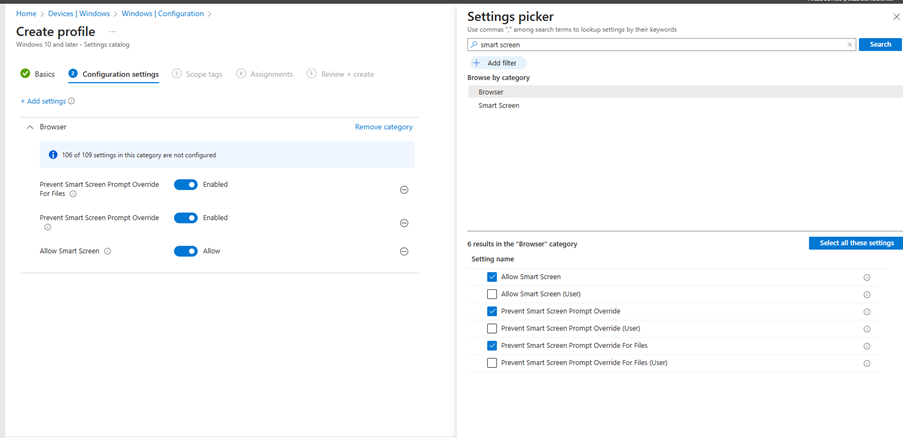
1. Enable Windows Defender SmartScreen

SmartScreen helps protect users from phishing attacks and malicious websites or downloads.

Recommended Settings:

  • Enable Windows Defender SmartScreen
  • Don’t allow SmartScreen warning overrides for unverified files
  • Don’t allow SmartScreen warning overrides
Continue reading

Deep Dive into Microsoft Purview Adaptive Protection: A SOC Team’s Guide to Investigating Insider Risk Alerts in Adaptive Protection

In today’s hybrid work environment, insider threats are becoming increasingly complex. Microsoft Purview’s Adaptive Protection and Insider Risk Management (IRM) offer a dynamic, risk-based approach to protecting sensitive data while enabling SOC teams to investigate and respond to alerts with precision.

This blog provides a step by step walkthrough of how SOC teams can leverage these tools to investigate alerts, assess user behavior, and take appropriate action.

Step 1: Understanding the Adaptive Protection Dashboard

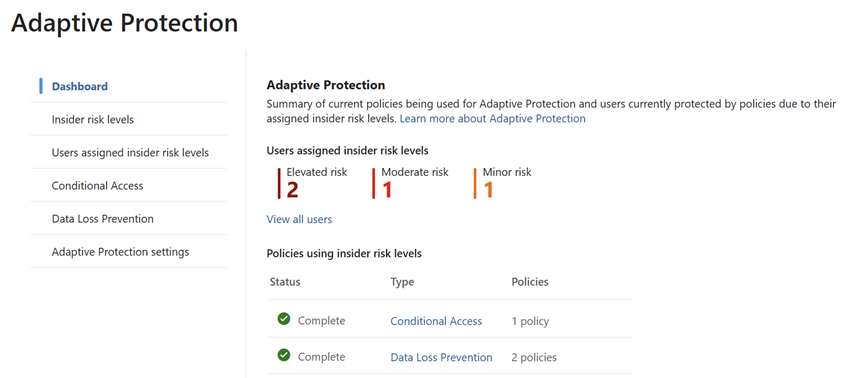
The Adaptive Protection dashboard is the SOC team’s starting point. It provides a bird’s-eye view of user risk levels across the organization, helping analysts prioritize investigations.

Key Elements of the Dashboard:

  • User Risk Levels:
    • Elevated Risk: Users exhibiting high-risk behavior that may indicate potential data exfiltration or policy violations.
    • Moderate Risk: Users with concerning patterns but not yet critical.
    • Minor Risk: Users with low level anomalies or early warning signs.
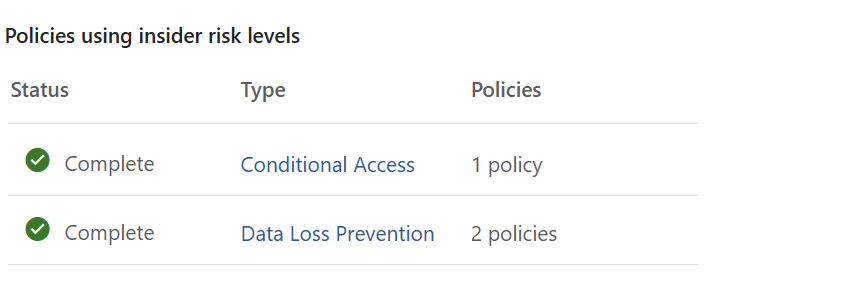
  • Policy Integration:
    • Shows which Insider Risk policies are actively using these risk levels.
    • Helps correlate user behavior with policy triggers, such as data leakage,
    • Security violations, or unusual access patterns.
Continue reading

SOC Analyst Guide: Investigating Insider Risk Alerts in Microsoft Purview

This blog post provides a comprehensive guide for SOC analysts to investigate and respond to alerts generated by Microsoft Purview’s Insider Risk Management and Adaptive Protection. It outlines step-by-step workflows for accessing alerts, triaging incidents, analyzing user behavior, managing cases, and leveraging Microsoft Defender integration.

The guide also includes best practices and suggested screenshots to help SOC teams effectively mitigate insider threats and maintain organizational security.

Introduction

Microsoft Purview’s Insider Risk Management (IRM) and Adaptive Protection empower SOC teams to detect and respond to insider threats dynamically. This guide walks through how SOC analysts can triage, investigate, and respond to alerts generated by these systems.

Part 1: Investigating Insider Risk Management Alerts

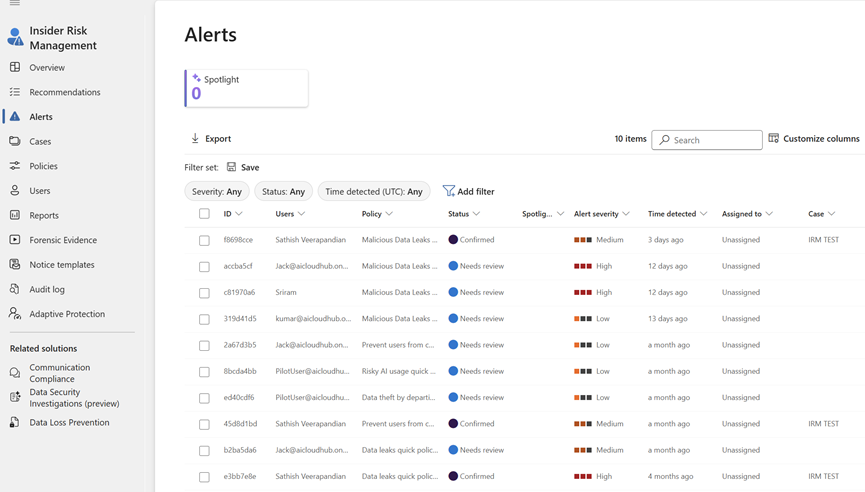
1. Access the Alerts Dashboard

Go to: Microsoft Purview Portal > Insider Risk Management > Alerts

Continue reading