Tag: Exchange Servers

  • Steps to run Experfwiz remotely on all Exchange Servers

    I have created a simple script to run experfwiz remotely on all the exchange servers. Below steps can be done to accomplish this task.

    First get all the servers  and store them in a text file. Ensure that are no spaces between them.

    Note: We need to download the experfwiz and have them  on the remote machine from where we are executing this script.

    Lets say if we are running this script on all the exchange servers remotely  from one machine we  will be prompted to answer yes or no after it enables the counters on each servers. So each and every time it would ask us an input before it starts collecting the data for all the counters.

    In-order to avoid this input each and every-time for all the servers probably we can bypass this confirm switch  parameter to yes so that no manual confirmation of (YES or NO)  is not  required from the admin side. We need to do small modification in the experfwiz script to avoid this input.

    Follow the below steps to avoid this manual confirmation.

    First download the experfwiz from the below technet link

    https://experfwiz.codeplex.com/releases/view/135743

    Open the ps1 file in notepad

    Look for the value $answer = confirmAnswer
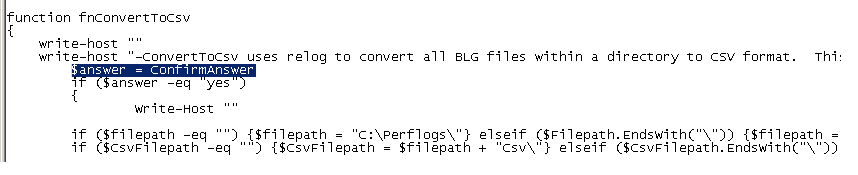
    experfwiz

    Change the above value from

    $answer = confirmAnswer

    to

    $answer = “yes” as shown below
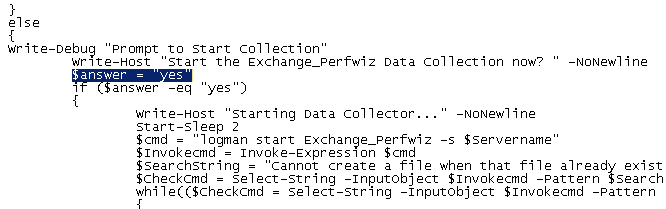
    experfwiz2

    save the PS1 file in the computer where we are going to run experfwiz

    Now copy the below script in notepad  , save them in a ps1 file on the computer where we are going to run the experfwiz

    *********************************************************************************

    $server = Get-Content c:\servers.txt

    foreach ($s in $server)

    {.\experfwiz.ps1 -Server $s -duration 08:00:00 -interval 5 -filepath \\$s\c$\Logs}

    **********************************************************************************

    In my example i’m storing it as experfwiz.ps1

    Then navigate to the drive and run this command and it will start to run experfwiz  on all exchange servers
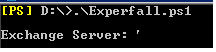
    experf222

    The above script will query all the servers we have in text file and will run experfwiz . After that it will store these perfmon logs in  respective servers in the path c$ in a folder called logs.

    To directly download the file as PS1 go to  – https://gallery.technet.microsoft.com/Steps-to-run-Experfwiz-73f3d662

    Thanks 

    Sathish Veerapandian

    MVP – Exchange Server

  • Steps to configure cross-forest availability between two exchange forests in Exchange 2013

    In this article lets have a look at steps to configure cross-forest availability between two exchange forests

    By using the Add-AvailabilityAddressSpace commandlet which has been introduced from Exchange 2013 we would be able to share the exchange free busy data between 2 forests.

    We need to have a trust relationship between the source forest and target forest to execute this command. Only then the below command will be successful.

    If a trust relationship exists between the two forests, run the following commands.

    In our example lets think of sharing the freebusy information between domain Exchangequery.com and toybox.com.

    In Order to share the free busy info between these 2 forests we need to perform the below steps

    In the source forest perform the following tasks : (ExchangeQuery.com)

    Add-AvailabilityAddressSpace -ForestName toybox.com -AccessMethod PerUserFB -UseServiceAccount $true

    The above command adds the target domain’s address space  in source domain to share the free busy information in a secured way.

    Below types of access methods can be used.

    PerUserFB – used to access the FB data in All Exchange Servers group.
    OrgWideFB – used to access the FB data in specific group in the target forest.
    InternalProxy – used to proxy the request in the latest version of exchange in the site.

    The type of access method  can be selected according to our requirement.

    Now we need to run the below command in the target domain ( Toybox.com)

    Get-Exchangeserver | Add-AdPermission -AccessRights ExtendedRight -ExtendedRights “ms-exch-epi-token-serialization” -User “ExchangeQuery.com\Exchange Servers”

    The above command will add required permission for source domain on the target domain Exchange Servers to  access the free busy information.

    In a trust relationship scenario, run this command in the target forest toybox to export the SCP from the target forest to the source forest :

     
    Export-AutodiscoverConfig –DomainController “LocalForestDomainController” -TargetForestDomainController “(toybox.com)” -TargetForestCredential (Get-Credential) -MultipleExchangeDeployments $true

    Type (Toybox\Administrator) password  when prompted.

    Now we need to perform the same tasks in the target forest  toybox.com  to share the exchangequery.com address space for sharing the freebusy data.

    In the target forest perform the following tasks : (Toybox.com)

    Add-AvailabilityAddressSpace -ForestName exchangequery.com – AccessMethod PerUserFB -UseServiceAccount $true

    Run the below command in the Source domain ( ExchangeQuery.com)

    Get-ClientAccessServer | Add-AdPermission -AccessRights ExtendedRight -ExtendedRights “ms-exch-epi-token-serialization” -User “Toybox.com\Exchange Servers”


    Now  run this command in the forest Exchangequery.com to export the SCP from the target forest to the source forest:

     
    Export-AutodiscoverConfig –DomainController “LocalForestDomainController” -TargetForestDomainController “exchangequery.com” -TargetForestCredential (Get-Credential) -MultipleExchangeDeployments $true

    Type Exchangequery.com\Administrator password when prompted.

    Imp Note : This command Add-AvailabilityAddressSpace is available and applicable only for Exchange 2013 servers and Office 365.

    The required trust relationship, contacts and address space  between the 2 different organizations must be already created and replicated between them.Only then free busy information will be working.

    Reference – http://technet.microsoft.com/en-us/library/bb124122(v=exchg.150).aspx

    http://social.technet.microsoft.com/wiki/contents/articles/28332.steps-to-configure-cross-forest-availability-between-two-exchange-forests-in-exchange-2013.aspx

    Thanks 

    Sathish Veerapandian

    MVP – Exchange Server